NHTSA ID Number: 10216988
Manufacturer Communication Number: Subaru TechTips
Summary
TechShare QMR of the Month
Articles Contained in this Issue
Click on a title below to jump to the article.
Click the date located in the footer to return to page 1.
CODE ARTICLE………………………………………………………….PAGE
(00) STIS New Releases………………………………… 8
(01) QMR of the Month………………………………..1-2
(01) QMR of the Month Award
Presentations………………………………………… 2
Tech Tips Greatest Tips
(08) 2015MY Legacy and Outback: Journey time .
Alert on Combination Meter
Telltale Display………………………………………. 3
(02) Diagnosing P0128 on Thermo Control Valve .
Equipped Vehicles………………………………..3-4
(03) Transmission Oil Residue,
New Vehicles……………………………………….5-6
(15) Keyless Access Output Volume……………….. 7
(15) Service Provider Software Information, .
Infotainment Portal………………………………… 8
1 Affected Product
Vehicle
1 Associated Document
Manufacturer Communications
TIPS0622 – June 2022 TechTIPS Newsletter
MC-10216988-0001.pdf 6767.975KB
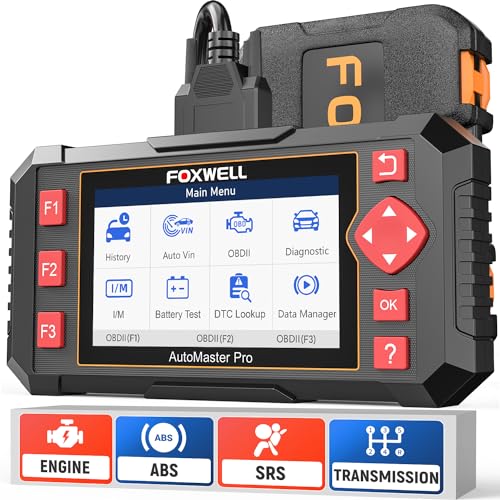
- [Easy to Use—Work Out of the Box] + [FOXWELL 2026 New Version] FOXWELL NT604 Elite scan tool is the 2026 new version from FOXWELL, designed for car owners who want to figure out the cause of issues before fixing car problems by scanning common systems like ABS, SRS, engine, and transmission. The NT604 Elite obd2 scanner diagnostic tool comes with the latest software—no need to waste time downloading software first. Plug the scanner into the OBDII port with OBDII cable to start the diagnosis.
- [Affordable] + [Reliable Car Health Monitor] Will you be confused what happens when the warning light of ABS/SRS/transmission/check engine flashes? Instead of taking your cars to dealership, this FOXWELL scanner will help you do a thorough scanning and detection for your cars and pinpoint the root cause. Note:The device is a diagnostic tool, not a repair tool. To turn off a warning light, you must first physically repair the issue causing it. Only then can the scanner be used to clear the corresponding fault code.
- [5 in 1 Car Diagnostic Scanner] Compared with obd scanners (50-100), NT604 Elite code scanner not only includes their OBDII diagnosis but also serves as ABS/SRS scanner, transmission and check engine code reader. When it’s an odb2 scanner, you can use it to check if your car is ready for annual test through I/M readiness menu. In addition, live data stream, built-in DTC library, data play back and print, all these features are a big plus for it. Note: doesn't support maintenance functions like reset or relearn. For the SRS system, NT604 Elite can read and clear common fault codes not caused by a crash, but crash/collision data cannot be cleared.
- [Fantastic AUTOVIN] + [No extra software fee] Through the AUTOVIN menu, this NT604 Elite car scanner allows you to get your V-IN and vehicle info rapidly, no need to take time to find your V-IN and input one by one. What's more, the NT604 Elite ABS SRS scanner supports 60+ car brands from worldwide (America/Asia/Europe). You don’t need to pay extra software fee. AUTOVIN may not work on some older vehicles or certain vehicle brands. If AUTOVIN fails, please input the vin code manually or go to the Diagnostic Menu to select your vehicle model.
- [Solid protective case KO plastic carrying bag] + [Lifetime update] Almost all same price-level car scanner diagnostic tool only offers plastic bag to hold the scanner.However, NT604 Elite automotive scanner is equipped with solid protective case, preventing your obd2 scanner from damage. Then you don’t need to pay extra money to buy a solid toolbox.
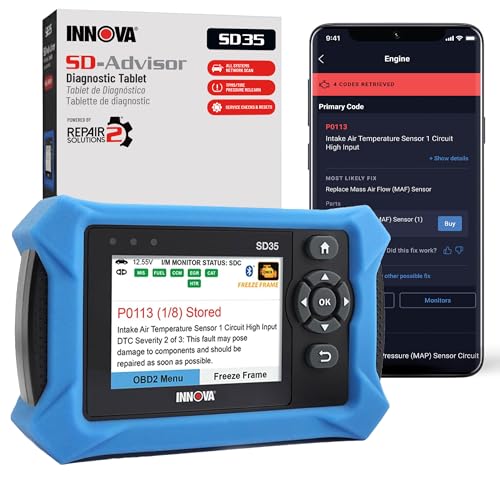
- OBD2 SCANNER FOR ALL SYSTEMS – The INNOVA SD35 is a tablet-based OBD2 scanner designed for advanced diagnostics. Read and clear check engine light, ABS, SRS, and TPMS codes, plus test your car battery and alternator to prevent unexpected failures. Vehicle coverage may vary. Please use Innova’s Coverage Checker to verify compatibility.
- ALL-SYSTEM DIAGNOSTICS & LIVE DATA – Unlike basic code readers, this OBD2 scanner for all vehicles scans engine, transmission, ABS, SRS, and more. Get real-time live data, including RPM, fuel trims, temperature readings, and oxygen sensor performance.
- OBD2 TABLET WITH USER-FRIENDLY INTERFACE – This automotive scan tool features a high-resolution display, making vehicle diagnostics faster and easier.
- ADVANCED TPMS, OIL RESET & SERVICE FUNCTIONS – Perform TPMS sensor checks, oil light reset, and other service resets with ease This professional diagnostic tool provides comprehensive vehicle maintenance capabilities in one device.
- WIDE VEHICLE COVERAGE (1996 & NEWER CARS & TRUCKS) – This OBD2 scanner Bluetooth tablet is compatible with Toyota, Ford, Honda, Chevrolet, Nissan, Dodge, and more. However, feature coverage may vary. Please use Innova's Coverage Checker to verify coverage.
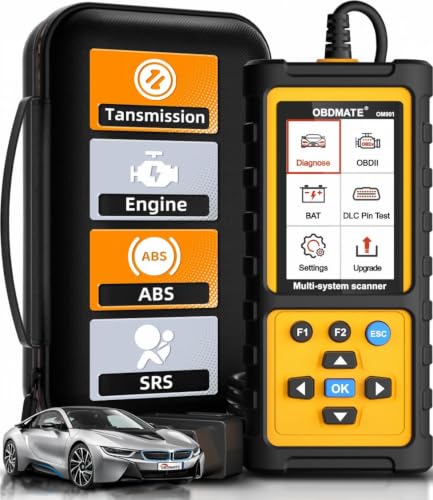
- 【Reset ABS/SRS/Transmission/Engine Lights】 More than an check engine code reader, OBDMATE OM901 obd2 scanner performs comprehensive diagnostics for the 4 most-used systems (ABS/SRS/Engine/Transmission). It quickly clears fault codes, turns off warning lights, read data stream and auto VIN.
- 【3.5" Handheld Scanner with 4 System Diagnose】 3.5" Super large TFT screen equipped displays an intuitive menu and clear readings of various sensors from ABS, SRS, ECM and TCM
 systems. It arrived with a silicone protective case and hard-shell carrying case, ensuring long-lived durability and drop resistance. The car diagnostic tool is plug-to-play designed, plug it and get diagnosis started without any batteries or updates required.
 - 【One-Click I/M Readines&Full OBD2 Functions】 Press F1 to get an intuitive corloured form about whether various emissions-related systems on the vehicle are operating properly. Help you get smog-check ready quickly. OM901 car scanner supports all essential OBD2 functions you need: read & clear codes, view freeze frame, read I/M readiness, retrieve VIN, live data stream (with graphing display), O2 sensor test, onboard monitoring mode, and EVAP leak test.
- 【Battery Voltage Check&DLC Pin Test】 It allows you to monitor battery health by testing current battery voltage. Plus, this obd2 diagnostic tool features DLC 16-PIN test to check current voltage of every pin.
- 【Automotive Scanner Diagnostic Kit】 The package comes with 1 car scanner, 1 USB-type c cable, 1 hard storage bag and 1 user manual(en). Free to update without any hidden fees. 5 languanges available in setting including English, French, Italian, German and Espanish. Valuable and Portable, making it a great tool kit for car owners, DIY enthusiasts, and professional mechanics.
 systems. It arrived with a silicone protective case and hard-shell carrying case, ensuring long-lived durability and drop resistance. The car diagnostic tool is plug-to-play designed, plug it and get diagnosis started without any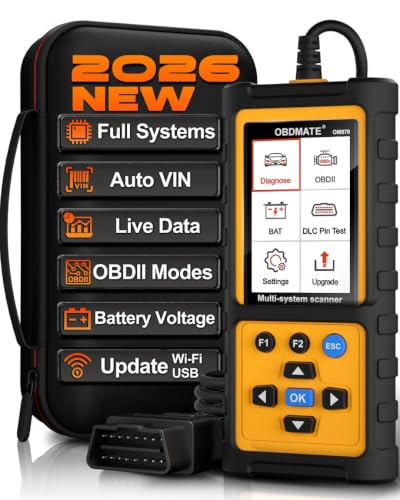
- 【Full Systems Automotive Diagnostic】 More than checking engine, ABS and SRS, OBDMATE OM970 obd2 scanner performs comprehensive diagnostics on all electric modules. It quickly scans and clears fault codes, turns off warning lights, reads live data, and features Auto-VIN technology.
- 【Live Datastream&4-in-1 Graph】 Easily view live sensor data such as RPM, fuel trims, ATF temperature, wheel speed sensor, battery voltage and so on. OM970 scan tool also supports 4-in-1 trend graphing. Spend just 3 minutes to check – and you'll know exactly what's going wrong, helping you avoid hundreds in dealership diagnostic fees.
- 【One-Click I/M Readiness&Full OBD2 Functions】 Press F1 to get an intuitive corloured form about whether your vehicle's emissions-related systems are operating properly. Help you get smog-check ready quickly. OM970 obd2 diagnostic tool supports all essential OBD2 functions you need. Plus, it features battery voltage test and DLC 16-PIN test.
- 【Straightforward Menus with Easy Navigation】 All functions are easy to understand without obscure decriptions. 3.5" Large screen delivers clear readings while keeping one-hand operation. The car diagnostic tool comes with a silicone protective case and a hard-shell carrying case, ensuring long-lived durability and drop resistance.
- 【Budget-Friendly, No Subscriptions, Free Software Updates】 Plug and play: no bluetooth pairing, monthly fees, Wi-Fi connection, or any other troublesome initial settings. OM970 obd2 scanner works out of the box with the latest software. Lifetime free upgrade.
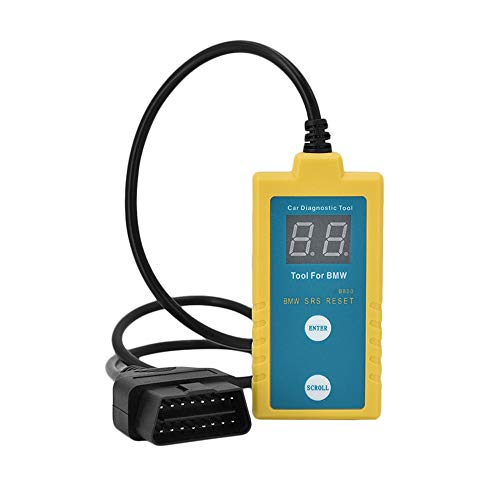
- ✔️【Professional SRS Reset for 1994-2003 BMW】 Designed specifically for classic BMW models (1994-2003). This B800 scanner reads & clears SRS airbag fault codes, turns off the warning light, and saves you a costly dealer visit. Confirmed compatible with: E36, E46 (EXCEPT 2001 330i), E34, E38, E39, Z3, and X5 (E53). NOT compatible with any BMW built before 1994 or after 2003.
- ✔️【Important: Two Different Connection Ports – Read Before Use】 To avoid “not working” issues, please note: For 1994–2000 BMWs (most E36, E34, Z3, early E39), the SRS diagnostic port is a round 20-pin connector under the hood. You MUST use the included 16-pin to 20-pin adapter cable. For 2000–2003 models (late E46, E39, X5), use the standard OBD-II port inside the cabin. Incorrect connection is the #1 reason for “incompatibility” reports.
- ✔️【Read & Clear Fault Codes in Minutes】 Quickly diagnose why your SRS light is on. The scanner accurately reads fault codes from airbag and seatbelt pretensioner systems. With one button press, clear the codes and reset the SRS warning light in seconds. No expensive dealer tools needed.
- ✔️【User-Friendly for DIYers – No Mechanic Required】 Easy operation with an intuitive button layout: ‘Enter’ to confirm, ‘Scroll’ to navigate. The clear LCD screen shows results instantly. Includes a step-by-step manual (revised for clarity) to guide you through the entire reset process.
- ✔️【Reliable Support with 1-Year Warranty】 We stand behind the quality of our B800 scanner. It comes with a 1-Year Hassle-Free Warranty. If you have any questions or need support, please contact us with your Order ID, and our dedicated team will assist you promptly.
SEOCONTENT-START
June 2022 TechTIPS Page 1 of 10 Subaru Service and Technical Support Line Newsletter ©2022 Subaru of America, Inc. All rights reserved. 01 TechShare QMR of the Month We are pleased to announce this month’s TechShare QMR of the Month Winner: Pete Silan from Farrish Subaru in Fairfax,VA Pete created a high quality QMR using TechShare reporting the driver side main switch will not operate the passenger side window. In addition, the passenger side window switch only lowers the window. Pete’s report included detailed diagnostic steps, high-quality photos, and videos. Please refer to the following link to review the TechShare QMR in detail. https://subarutechshare.com/qmrs/TS-196154 In appreciation for going the extra mile and sharing his experience with us, Pete will be receiving the following from his Field Service Engineer: $500.00 Snap-On gift card SUBARU TECHLINE HOLIDAYS & HOURS OF OPERATION Mon. – Thurs. 8:30AM – 7:30PM EST Friday 10:30AM – 5:00PM EST Saturday 9:00AM – 3:00PM EST Articles Contained in this Issue Click on a title below to jump to the article. Click the date located in the footer to return to page 1. CODE ARTICLE………………………………………………………….PAGE (00) STIS New Releases………………………………… 8 (01) QMR of the Month………………………………..1-2 (01) QMR of the Month Award Presentations………………………………………… 2 Tech Tips Greatest Tips (08) 2015MY Legacy and Outback: Journey time . Alert on Combination Meter Telltale Display………………………………………. 3 (02) Diagnosing P0128 on Thermo Control Valve . Equipped Vehicles………………………………..3-4 (03) Transmission Oil Residue, New Vehicles……………………………………….5-6 (15) Keyless Access Output Volume……………….. 7 (15) Service Provider Software Information, . Infotainment Portal………………………………… 8 The Subaru TechTIPS newsletter is intended for use by professional Technicians ONLY. Articles are written to inform those Technicians of conditions that may occur in some vehicles, or to provide information that could assist in the proper servicing of the vehicle. Properly trained Technicians have the equipment, tools, safety instructions, and know-how to do the job correctly and safely. If a condition is described, DO NOT assume that your vehicle has or will have that condition. Impreza, Legacy, Justy, Loyale, Outback, Forester, Subaru SVX, WRX, WRX STI, Baja, Tribeca, BRZ, XV Crosstrek, Ascent, Crosstrek Hybrid and “Quality Driven” are Registered Trademarks. ISO 14001 is the international standard for excellence in Environmental Management Systems. Please recycle or dispose of automotive products in a manner that is friendly to our environment and in accordance with all local, state and federal laws and regulations. CAUTION: VEHICLE SERVICING PERFORMED BY UNTRAINED PERSONS COULD RESULT IN SERIOUS INJURY TO THOSE PERSONS OR TO OTHERS. SUBARU OF AMERICA, INC. IS ISO 14001 COMPLIANT Continued on the next page June 2022 Continued on the next page June 2022 TechTIPS Page 2 of 10 01 QMR of the Month (CONTINUED) The other regional winners selected from TechShare QMRs submitted during April 2022 were: • Darren Beck from Ganley Subaru of Wickliffe • Brian Hillock from Cascade Subaru – Wenatchee • Russell Witt from Profile Subaru • Marco Yanes-Pena from Bill Kolb Jr. Subaru Any Subaru Technician can participate in the TechShare QMR of the Month program. See the February 2013 and January 2016 issues of TechTIPS for full details. You just might see your name and photo in a future issue of TechTIPS! 01 QMR of the Month Award Presentations As part of our “enhanced” QMR of the Month recognition program, we will include a photo (whenever available) of the recipient’s award presentation in TIPS. The winner selected from QMR of the Month submissions received during April 2022 was Pete Silan, Shop Foreman and Senior Master Technician at Farrish Subaru, Fairfax, VA. Pictured from left to right is Farrish Subaru’s Dealer Principal Kevin Farrish, Subaru of America Inc. Field Service Engineer Dan Rockholt, Farrish Subaru’s Service Manager Gary Mellett, Farrish Subaru’s Shop Foreman/Senior Master Technician Pete Silan after being presented with his $500.00 Snap-On Gift Card, Farrish Subaru’s Operations Director Daniel Farley, Farrish Subaru’s General Manager Fawad Osmani, Subaru of America Inc. District Sales Manager Andrew Raszewski and District Parts/Service Manager Cory Hiken. Congratulations and THANK YOU to our April 2022 QMR of the Month Award recipient! Continued on the next page June 2022 TechTIPS Page 3 of 10 This series features TechTIPS articles frequently referred to by Techline. This month’s feature is from September 2015. 2015MY LEGACY AND OUTBACK: JOURNEY TIME ALERT ON COMBINATION METER 08 TELLTALE DISPLAY An added feature of the Combination Meter is an alert message (accompanied by a single “beep” sound) which will be displayed in the Telltale section above the odometer after 2 hours of driving have elapsed from ignition ON. The “beep” is the same sound heard when the low fuel lamp is first illuminated. This message is provided simply as a notification to make the driver aware they have been driving for 2 hours and it may be a good time to consider taking a break, checking fuel level, etc. Like other alerts shown on the Telltale display, it cannot be turned off or adjusted. This feature has been included on Subaru vehicles for several years, but unless the vehicle is driven for approximately 2 hours or more, many customers may have never experienced it. Until the Owner’s Manual is revised, information will be limited regarding this message. 02 Diagnosing P0128 on Thermo Control Valve Equipped Vehicles Forester 2019MY – current Crosstrek Sport 2.5L – All Legacy/Outback 2.5L 2020MY – current When diagnosing a DTC P0128 on a vehicle equipped with a Thermo Control Valve (TCV), Technicians may want to look somewhere unexpected: the CVT transmission fluid level. It was recently discovered that if the CVT fluid is mistakenly overfilled, it can cause the coolant temperature to rise abruptly. This will be outside of the normal logic seen by the ECM during engine warm up. This causes the TCV to switch to Rapid Cooling mode. In turn the ECM will interpret this as the engine not cooling/warming correctly, eventually leading to a P0128 DTC. The current Trouble Tree for P0128 does not mention a CVT fluid check. Be sure to refer to the applicable service manual to check that CVT fluid level!! Continued on the next page June 2022 TechTIPS Page 4 of 10 02 Diagnosing P0128 on Thermo Control Valve Equipped Vehicles (CONTINUED) To check for this concern, inspect the FFD data for P0128. Check to see if the “Coolant Valve Circulation” PID is on RAPID. Also, look for the “Coolant Temperature 1” PID to be reading around 120° F. If you find both of those conditions in the FFD, check the CVT fluid to see if it is overfilled. If you do not find both in the FFD, continue with the normal P0128 Trouble Tree. A special note; when following the Trouble Tree for P0128 on a 19-21MY Thermo Control Valve equipped vehicle, it may lead to replacement of the thermostat. This is incorrect. Vehicles with a TCV should not be equipped with a traditional coolant thermostat. The TCV takes on the job of a thermostat. Please review the updated Trouble Tree below. The Service Manual has been updated for 2022MY and up and has the correct information. Continued on the next page June 2022 TechTIPS Page 5 of 10 03 Transmission Oil Residue, New Vehicles During inspection of a new vehicle equipped with a manual or CVT transmission, there may be oil residue found in the following areas. • The CV shaft, bottom of the transmission or on the drain plug • The propeller shaft and the thermal barrier. This is due to a small amount of oil spillage during the assembly process. If this symptom is found it is recommended to: 1) Clean the area so it is free of any residue. 2) Drive the vehicle for several miles (recommendation: 10 miles). 3) Re-check whether oil residue is duplicated. If no new oil is found, no action is needed. Note: If further action is needed, refer to Tech TIPS 3/21 for Leak Trace Powder Revisited. Fig.1 Junction of Transmission and CV drive shaft Continued on the next page June 2022 TechTIPS Page 6 of 10 03 Transmission Oil Residue, New Vehicles (CONTINUED) Fig.2 Transmission oil drain plug Fig.3 Junction of Transmission extension part and Propeller shaft. Thermal barrier cover under the extension section. Continued on the next page June 2022 TechTIPS Page 7 of 10 15 Keyless Access Output Volume Vehicles equipped with Keyless Access have two BIU settings that can be adjusted at customer request for Keyless Buzzer sound. These settings can be accessed through BIU customization in SSM4. The following example is from a MY20 Outback Touring with push button start. The first setting will turn off the audible noise made when the lock and unlock buttons are pressed on the key fob. This setting is called Buzzer sounding setting. When switched to OFF, there will be no audible noise emitted when locking or unlocking the car. This setting can be changed at any time. The next setting, Keyless Buzzer Volume, will adjust the volume of the Keyless entry chirp. The default setting is 5. Lowering the number value will make the vehicle quieter as the lock/unlock buttons are pushed. The volume can be made slightly louder by raising the volume to 7. It is recommended that this setting be changed only at customer request. Continued on the next page June 2022 TechTIPS Page 8 of 10 15 Service Provider Software Information, Infotainment Portal With the anticipated release of the enhanced Infotainment Portal Questionnaire, pilot groups provided feedback on a question about the Carrier Version number; mainly what it is and what is it for. The Carrier Version number allows a phone carrier to control which versions of applications are allowed to ‘run’ on the phone. This is different from the Operating System Version number. This information can be beneficial in helping Technicians understand how two seemingly similar phones are different. Techline has been working with colleagues at Harman and United Radio to assist retailer Technicians in identifying when a customer concern is related to operating software, rather than hardware failure. Therefore, the Carrier Version number is a valuable piece of information to collect. This information can be found in both Apple and Android phones. For Apple phones: Navigate to Settings > General > About. Locate “Carrier,” this is the carrier version information. For Android phones: Navigate to Settings > About phone > Software information. Locate “Service provider software version.” This information can be useful in making sure that the phone being tested is as identical a match as possible to the customers’ phone. As always, being able to test with the customers’ actual equipment is recommended. Continued on the next page June 2022 TechTIPS Page 9 of 10 00 STIS New Releases ITEM CODE ITEM TYPE TITLE CREATED DATE 15-283-21R Technical Service Bulletin 2022 Audio/Navigation & Power … 13-Jul-22 01-185-22 Technical Service Bulletin Lifting Requirements & Procedu… 13-Jul-22 WRK-21R Subaru Product/Campaign Bulletin CVT Chain Guide Breakage 13-Jul-22 16-132-20R Technical Service Bulletin Diagnostic Information for All… 12-Jul-22 S1165BE Other/Miscellaneous 2023MY Solterra Registration M… 11-Jul-22 15-298-22 Technical Service Bulletin Repair Process for Vehicles Wh… 11-Jul-22 TECH_SRVY_22 Other/Miscellaneous 2022 Subaru Technician Survey 11-Jul-22 02-131-12R Technical Service Bulletin Oil Seepage Diagnosis and Repa… 11-Jul-22 02-136-12R Technical Service Bulletin Oil Seepage Diagnosis and Repa… 11-Jul-22 PT97442231 Accessory Installation Guide PORT INSTALLATION: 2023MY Solt… 8-Jul-22 16-139-22 Technical Service Bulletin CVT Assembly (WRK-21) Warranty… 8-Jul-22 15-294-22 Technical Service Bulletin Original Equipment Key Fob Una… 8-Jul-22 09-91-22 Technical Service Bulletin Engine Not Cranking/Starting 8-Jul-22 SOA3881320 Accessory Installation Guide OIL CAP 5W-30 8-Jul-22 SOA3881310 Accessory Installation Guide OIL CAP 0W-20 8-Jul-22 SOA3881300 Accessory Installation Guide SUBARU BATTERY TIE DOWN 8-Jul-22 SS_OTA_Navi_3.1 Owner Manual Over the Air Software Updates … 6-Jul-22 SS_OTA_Mid_3.1 Owner Manual Over the Air Software Updates 6-Jul-22 SS_OTA_Navi_3.0 Owner Manual Over the Air Software Updates … 6-Jul-22 WRC-22 Subaru Product/Campaign Bulletin Safety Recall – Engine Harness… 6-Jul-22 WRC-20R Subaru Product/Campaign Bulletin Rear Seat Belt Webbing Locking 6-Jul-22 WUV-07R Subaru Product/Campaign Bulletin CVT Chain Slip 5-Jul-22 05-88-21R Technical Service Bulletin Front Stabilizer Bushing- Desi… 5-Jul-22 All revised publications are highlighted in yellow. Continued on the next page June 2022 TechTIPS Page 10 of 10 *** Now you can e-mail your TechTIPS input and suggestions to: tech@subaru.com *** SUBARU TECHLINE Monday – Thursday 8:30 am to 7:30 pm Hours of Operation Friday 10:30 am to 5 pm and Saturday 9 am to 3 pm This is your chance to offer suggestions for use in future issues of TechTIPS! Make sure that if you e-mail us, you place in the subject line of your e-mail “For TechTIPS Newsletter”. Thank you! Model: Year: VIN: Description of situation encountered: Your suggestion for repair procedure, product improvements, etc.: Please attach separate sheets, if necessary. You may also want to include Service Manual diagrams or references, or your own drawings to assist in describing your suggestion. All information submitted becomes the property of Subaru of America, Inc. Permission is granted to Subaru of America, Inc. to print your name and suggestions in TechTIPS and other Subaru of America, Inc. publications. Mail items to: PO Box 9103; Camden, NJ 08101-9877. Your Name: Signature: Dealer’s Name: City: Date: Dealer Code:
**************************************************************************************************************
SEOCONTENT-END
This product presentation was made with AAWP plugin.