NHTSA ID Number: 10164388
Manufacturer Communication Number: Subaru TECHTIPS
Summary
Subaru Service and Technical support line newsletter.
1 Affected Product
Vehicle
CODE ARTICLE………………………….PAGE
(00) STIS New Releases……………….. 7-8
(01) QMR of the Month…………………. 1-2
(01) QMR of the Month Award
Presentations ……………………….. 2
Tech Tips Greatest Tips
(01) Helpline Diagnostic Information……. 3
(15) Updated Infotainment “Conditions”
Information…………………………4-6
SEOCONTENT-START
Subaru Service and Technical Support Line Newsletter
August 2019
01 QMR OF THE MONTH
We are pleased to announce this month’s Winner of QMR of the Month:
Toby Costa from
Maita Subaru in Sacramento, CA.
Our selection for this month’s winner involved a 2019MY Ascent with a
recurring concern of the Brake, EyeSight and RAB warning lights coming
on. The customer reported the same warning indicators came back on
again a short time after another retailer had previously replaced the
brake light switch. After Toby confirmed the condition, he noticed the
clearance lights would come on when pressing the brake pedal. A DTC
check revealed DTC P0724 was stored for a high input in the brake light
circuit. Toby suspected a short and / or feedback through the related
wiring and began by disconnecting the trailer light wiring harness to see if
there was any change. With the trailer wiring ruled out, he disconnected
the rear combination lights and high mounted stop light, one at a
time, still with no change. After unplugging body harness connector
R466 for the left rear, the condition stopped. Leaving connector R466
disconnected, Toby used his DVOM between R466 and the R79 trailer
wiring connector to check the integrity of the harness. While “wiggle
testing” sections of the suspect harness and checking continuity, his
DVOM indicated an open circuit which he was able to make come and
go in grid area C4 near connector R28. Toby carefully opened the
harness sheath and found the clearance light wiring wrapped around a
brake circuit wire. Closer inspection revealed a pinched area where the
wire insulation had been compromised causing a short. The affected
wiring was repaired which restored normal brake and clearance light
operation. Toby’s QMR included quality photos of the wiring along with
snips of the related Service Manual wiring diagrams and location grid
for the identified source of the issue.
In appreciation for going the extra mile and sharing his experience with
us, Toby will receive the following from his Field Service Engineer:
A $500.00 Snap-On gift card.
©2019 Subaru of America, Inc. All rights reserved.
SUBARU TECHLINE HOLIDAYS
& HOURS OF OPERATION
Labor Day: (Closed)
Monday, September 2, 2019
Thanksgiving: (Closed)
Thursday, November 28, 2019
Day After Thanksgiving (10:30am-3:30pm)
Friday, November 29, 2019
Mon. – Thurs. 8:30AM – 7:30PM EST
Friday 10:30AM – 5:00PM EST
Saturday 9:00AM – 3:00PM EST
CONTINUED ON THE NEXT PAGE
home
ARTICLES CONTAINED
IN THIS ISSUE
CODE ARTICLE………………………….PAGE
(00) STIS New Releases……………….. 7-8
(01) QMR of the Month…………………. 1-2
(01) QMR of the Month Award
Presentations ……………………….. 2
Tech Tips Greatest Tips
(01) Helpline Diagnostic Information……. 3
(15) Updated Infotainment “Conditions”
Information…………………………4-6
The Subaru TechTIPS newsletter is intended for use by professional Technicians ONLY. Articles are
written to inform those Technicians of conditions that may occur in some vehicles, or to provide
information that could assist in the proper servicing of the vehicle. Properly trained Technicians
have the equipment, tools, safety instructions, and know-how to do the job correctly and safely.
If a condition is described, DO NOT assume that your vehicle has or will have that condition.
Impreza, Legacy, Justy, Loyale, Outback, Forester, Subaru SVX, WRX, WRX STI, Baja, Tribeca,
BRZ, XV Crosstrek, Ascent, Crosstrek Hybrid and “Quality Driven” are Registered Trademarks.
ISO 14001 is the international standard for
excellence in Environmental Management
Systems. Please recycle or dispose of
automotive products in a manner that is
friendly to our environment and in accordance
with all local, state and federal laws and
regulations.
CAUTION: VEHICLE SERVICING PERFORMED BY UNTRAINED PERSONS
COULD RESULT IN SERIOUS INJURY TO THOSE PERSONS OR TO OTHERS.
SUBARU OF AMERICA, INC. IS
ISO 14001 COMPLIANT
Click on a title below to jump to the article.
Click the date located in the footer to return to page 1.
August 2019 TechTIPS Page 1 of 9
01 QMR OF THE MONTH (CONTINUED)
The other Regional winners selected from QMRs submitted during June 2019 were:
• Joseph Frye from Auto Nation Subaru Hunt Valley in Cockeysville, MD
• James Harmes from International Subaru in Sheboygan, WI
• Bill Duaime from Flemington Subaru in Flemington, NJ
• Robert Wittig from Mitchell Subaru in Canton, CT
Any Subaru Technician can participate in the QMR of the Month program. See the February 2013 and
January 2016 issues of Tech TIPS for full details. You just might see your name and photo in a future issue
of Tech TIPS!
01 QMR OF THE MONTH AWARD PRESENTATIONS
As part of our “enhanced” QMR of the Month recognition program, we will be including a photo (whenever
available) of the recipient’s award presentation in TIPS. The winner selected from QMR of the Month
submissions received during June 2019 was Toby Costa, a Technician from Maita Subaru in Sacramento, CA.
Toby is shown above being presented with his $500.00 Snap-On Gift Card by SOA Field Service Engineer
Tom Blamey. Congratulations and THANK YOU to our June 2019 QMR of the Month Award recipient!
CONTINUED ON THE NEXT PAGE
August 2019 TechTIPS Page 2 of 9
This series features TechTIPS articles frequently referred to by Techline. This month’s feature is for
helpline diagnostic information from May 1995
01 HELPLINE DIAGNOSTIC INFORMATION
CONTINUED ON THE NEXT PAGE
August 2019 TechTIPS Page 3 of 9
15 UPDATED INFOTAINMENT “CONDITIONS” INFORMATION
WRX STI Popping Sound from Speakers:
There have been reports received regarding a single “pop” sound coming from the speakers when the head
unit (radio, H/U) is first turned on after being powered off. If the concern has been duplicated following an
installation of the KICKER® Powered Subwoofer accessory, the sound is a characteristic of the amplifier
energizing. This condition has NO negative impact on speaker performance or sound quality. In other
instances, the sound was attributed to the installation of the accessory subwoofer harness on vehicles
equipped with the mid-grade H/U. NOTE: If a Harman Kardon logo badge is displayed on the door speaker
grilles, accessory audio kits are not applicable. Always confirm accessory applicability using the charts on
Subarunet prior to installation.
CarPlay Operation:
Recently, the number of reports concerning iPhone X intermittently failing to reliably operate in Handsfree
Call Mode (through the CarPlay app) has increased. Investigation is ongoing to determine the root cause.
It is unclear at this time if the condition is related to the phone, the H/U or the Dual USB Hub’s AUX
terminal performance. In the meantime, PRIOR TO replacing the USB Hub or H/U, confirm the vehicle
is free of concerns using an iPhone model other than iPhone X. Always verify operation while using a
Genuine Apple® USB cable as only these cables are confirmed by Apple for both charging and data
transfer rates. Aftermarket cables may charge the phone perfectly fine, but most do not meet Apple’s
requirements for data transfer rates. If the condition is consistently duplicated with different iPhones, refer to
TSB 15-226-18R “USB Functionality Concerns and Troubleshooting” and TSB 15-220-18R “Apple CarPlay/
Android Auto Connectivity Concerns” for further diagnostics. It should also be noted, a H/U unit reboot (10
second press and hold of the volume/ power knob) followed by reconnecting the phone will restore normal
operation should a CarPlay operational concern occur.
Smart Phone (Accessories) Operation Affected by High Temperatures:
Leaving the phone sitting outside in the sun or in the car on a hot day can easily cause it to overheat.
Overheating can prevent the touch screen from working properly and cause the battery to drain faster. Smart
phone operation changes from normal to conservative when battery capacity becomes “marginal” to what
the phone manufacturers consider safe. In addition to sun and heat exposure, water damage can also be
a possible cause of phone overheating. When it occurs, the customer might experience a noticeable delay
(slowdown) when using Android Auto and CarPlay applications, audio streaming or Hands-Free calling
features. Cooling smart phones while charging generally restores normal operation.
SXM Subscription Loss:
As vehicles age, SXM subscription-related concerns reported by customers are many times attributed to
changes in the contract terms or, temporary battery power loss to the H/U. Always obtain the Radio ID
(RID) information and verify the terms of the customer’s contract prior to performing any repairs. Sending
a refresh signal using the current RID to re-connect may solve the concern. This can be done by entering
the RID into the URL below and following the instructions: www.siriusxm.com/refresh. NOTE: If SXM
services only work after a refresh for a single ignition cycle then revert to Preview channels only, this may
indicate either an expired service agreement or, other possible contract errors such as expired credit card
associated with the customer’s account. Always confirm the customer’s contract is active and up to date
before performing other diagnostics. If the condition involves specific channels not working, the customer
should review their account with SXM confirm if their current service agreement includes those channels.
CONTINUED ON THE NEXT PAGE
August 2019 TechTIPS Page 4 of 9
15 UPDATED INFOTAINMENT “CONDITIONS” INFORMATION (CONTINUED)
Gen 2: Denso 10 Head Unit- “Clock Shifts by One Hour when Daylight Saving Is Set
to Auto.”:
Reports have been received with customers stating their clock unexpectedly shifted by one hour when the
Daylight-Saving setting was set to Auto. Most customers reported this condition occurred in early April of this
year during the same time as GPS week rollover events reported on the internet were occurring. This is a
known condition and only affects Gen 2.0 NAVI H/U found in: 2015MY Outback/Legacy, 2015MY Crosstrek
and Impreza, 2016MY Forester and 2016MY WRX/WRX STI models. This condition was addressed in
the software update released for these Denso 10 navigation head units at the end of 2018. After verifying
the currently installed software version, perform the applicable update following the procedure supplied in
TSB 15-205-16R.
Audio (Volume) Level Adjustment When Using the Android Auto Application:
Reports have been received by Android
Auto application users regarding
the audio level failing to operate
correctly following notifications alerts.
NOTE: This is a known concern with
Google software and not with Android
Auto or vehicle H/Us. Updating Google
Play services should alleviate the
concern. A “How To” guide from the
Google Help Center page online, on
how to make sure your Google Play
Services are up to date is shown to
the right. Always confirm the customer
has the latest version installed prior to
initiating additional diagnosis or head
unit replacement
CONTINUED ON THE NEXT PAGE
August 2019 TechTIPS Page 5 of 9
15 UPDATED INFOTAINMENT “CONDITIONS” INFORMATION (CONTINUED)
Phonebook Downloading:
There have been reports received regarding phonebook downloading failure during Bluetooth pairing.
Customers report after repeated pairing attempts, the condition continues.
We would like to refresh the steps involved in the process to prevent issue occurrence due to the setup. If the
phonebook or messages are not appearing as expected following Bluetooth Pairing, verify the Phonebook
Download feature has been enabled in the head unit settings. Select the “Phone” button then press
“Overview” on the head unit touch screen. Then select “Change Device” and ensure “Phonebook
Download” is enabled.
If the customer still cannot access the phonebook or messages, check the phone’s Bluetooth settings to
ensure all related sharing settings are enabled.
• Android Device
Select the gear icon next to your vehicle device name. Ensure
all settings are enabled.
• Apple Device
There are no additional settings to check on Apple devices
following successful pairing with the head unit. However, it is
strongly recommended to restart the vehicle to finalize the pairing
process and ensure all devices are in sync.
CONTINUED ON THE NEXT PAGE
August 2019 TechTIPS Page 6 of 9
00 STIS NEW RELEASES
ITEM
CODE
ITEM TYPE TITLE
CREATED
DATE
15-236-18R Technical Service Bulletin Reprogramming File Availabilit… 21-Aug-19
B321SFL020 Accessory Installation Guide Black Lug Nuts & Wheel Locks 21-Aug-19
06-72-19 Technical Service Bulletin ABS Wheel Speed Sensor- Design… 20-Aug-19
F411SFL010 Accessory Installation Guide Crosstrek-Impreza Seat Cover-R… 20-Aug-19
F411SFL000 Accessory Installation Guide Crosstrek-Impreza Seat Cover-R… 20-Aug-19
04-17-17R Technical Service Bulletin Rattling Sound from Steering R… 20-Aug-19
10-92-19R Technical Service Bulletin A/C System Inoperative 19-Aug-19
J601SCA000 Accessory Installation Guide 2020 Impreza Battery Warmer Ki… 16-Aug-19
15-246-19 Technical Service Bulletin New Immobilizer Registration P… 15-Aug-19
07-158-19 Technical Service Bulletin DTC B280B- EyeSight Camera Rep… 15-Aug-19
07-159-19 Technical Service Bulletin Battery Ground Cable Disconnec… 14-Aug-19
10-92-19R Technical Service Bulletin A/C System Inoperative 9-Aug-19
07-151-19R Technical Service Bulletin DTC B112C or B112E -Driver Mon… 8-Aug-19
15-205-16R Technical Service Bulletin Reprogramming File Availabilit… 8-Aug-19
E515SAN000 Accessory Installation Guide 2020MY Outback Engine Under Gu… 8-Aug-19
E515SAN010 Accessory Installation Guide 2020MY Outback Engine Under Gu… 8-Aug-19
06-51-15R Technical Service Bulletin New Front Disc Brake Pad Kit A… 8-Aug-19
16-114-18R Technical Service Bulletin DTC P0C79- Revised Diagnostics 8-Aug-19
S1090BE Other/Miscellaneous 2020MY Registration Manual For… 6-Aug-19
11-191-19R Technical Service Bulletin DTC P2610- New ECM Availabilit… 5-Aug-19
J201SAN000 Accessory Installation Guide 2020MY Legacy/Outback Exterior… 2-Aug-19
H671SAN200 Accessory Installation Guide 2020MY Legacy/Outback Wireless… 2-Aug-19
H621SAN000 Accessory Installation Guide 2020MY Legacy/Outback CD Playe… 2-Aug-19
H461SAN000 Accessory Installation Guide 2020MY Legacy/Outback Interior… 2-Aug-19
H451SAN100 Accessory Installation Guide 2020MY Outback Fog Lamp Kit 2-Aug-19
H451SAN000 Accessory Installation Guide 2020MY Legacy Fog Lamp Kit 2-Aug-19
U3210BE Service Manual 2020MY Ascent New Car Informat… 2-Aug-19
MSA5B2013A Owner Manual 2020MY Legacy/Outback & Forest… 1-Aug-19
MSA5B2004A Owner Manual 2020MY Outback Getting Started… 1-Aug-19
MSA5B2003A Owner Manual 2020MY Legacy Getting Started … 1-Aug-19
MSA5M2014A Owner Manual 2020MY Legacy/Outback Eyesight… 1-Aug-19
MSA5M2011A Owner Manual 2020MY Legacy/Outback Subaru S… 1-Aug-19
MSA5M2004A Owner Manual 2020MY Outback Owner’s Manual 1-Aug-19
MSA5M2003A Owner Manual 2020MY Legacy Owner’s Manual 1-Aug-19
U2570BE Service Manual 2020MY Legacy/Outback New Car … 1-Aug-19
L2570BE Service Manual 2020MY Legacy/Outback Body Rep… 1-Aug-19
Service Diagnostics 2020 Legacy/Outback Service Ma… 1-Aug-19
All revised publications are highlighted in yellow. CONTINUED ON THE NEXT PAGE
August 2019 TechTIPS Page 7 of 9
ITEM
CODE
ITEM TYPE TITLE
CREATED
DATE
SOA367031 Accessory Installation Guide 2017-20MY WRX/STI Crossbars 31-Jul-19
16-123-19 Technical Service Bulletin DTC P173B- Auto Start-Stop Sys… 30-Jul-19
12-269-19 Technical Service Bulletin Rattle Sound from EyeSight Cam… 29-Jul-19
WTN-74R Subaru Product/Campaign Bulletin Reprogramming File Availabilit… 29-Jul-19
WUA-86R Subaru Product/Campaign Bulletin Harman Kardon Head Unit Reprog… 29-Jul-19
WTZ-85R Subaru Product/Campaign Bulletin Harman Kardon Head Unit FMVSS … 29-Jul-19
15-211-17R Technical Service Bulletin Reprogramming File Availabilit… 26-Jul-19
15-177-14R Technical Service Bulletin “Gen 2” & “Gen 2.1” Operating … 26-Jul-19
All revised publications are highlighted in yellow. CONTINUED ON THE NEXT PAGE
August 2019 TechTIPS Page 8 of 9
*** NOW YOU CAN E-MAIL YOUR TECHTIPS INPUT AND SUGGESTIONS TO: TECH@SUBARU.COM ***
SUBARU TECHLINE Monday – Thursday 8:30 am to 7:30 pm
Hours of Operation Friday 10:30 am to 5 pm and Saturday 9 am to 3 pm
This is your chance to offer suggestions for use in future issues of TechTIPS! Make sure
that if you e-mail us, you place in the subject line of your e-mail “For TechTIPS Newsletter”.
Thank you!
MODEL:
YEAR:
VIN:
Description of situation encountered:
Your suggestion for repair procedure, product improvements, etc.:
Please attach separate sheets, if necessary. You may also want to include Service Manual
diagrams or references, or your own drawings to assist in describing your suggestion. All
information submitted becomes the property of Subaru of America, Inc. Permission is granted to
Subaru of America, Inc. to print your name and suggestions in TechTIPS and other Subaru of
America, Inc. publications. Mail items to: PO Box 9103; Camden, NJ 08101-9877.
Your Name:
Signature:
Dealer’s Name:
City:
Date:
Dealer Code:
August 2019 TechTIPS Page 9 of 9
SEOCONTENT-END
TIPS0819
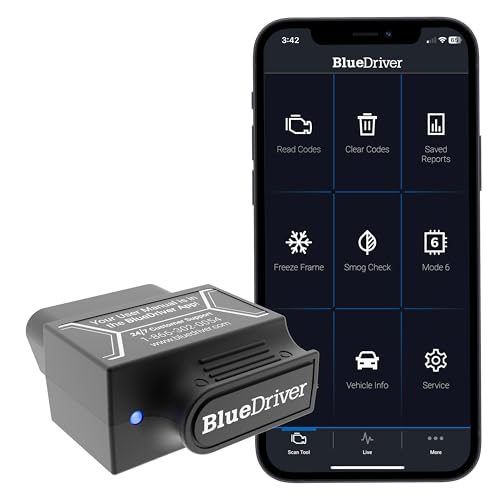
- [Diagnose Like a Pro] BlueDriver Pro is a professional OBD2 scanner and diagnostic tool that helps you scan, understand, and clear vehicle trouble codes with confidence. Turn your phone into a powerful car diagnostic scanner—no guesswork, no unnecessary repairs.
- [Read and Clear More Codes Than Ever] Read and clear more codes than basic car code readers. Access enhanced diagnostics for Check Engine, ABS, SRS, Airbag, TPMS, Transmission.
- [Verified Fixes and Real-Time Data] Get unlimited, technician-verified repair reports matched to your VIN, with definitions, causes, and confirmed fixes. Monitor live vehicle data as you drive, view freeze frames, check smog readiness, and analyze Mode 6 test results.
- [Wireless & Bluetooth Enabled] - Say goodbye to wires. BlueDriver connects with Bluetooth via your phone/tablet to a sensor that plugs into your car's OBDII port. Get all of the capabilities of an expensive code reader & scan tool without any annoying wires.
- [Broad Make & Model Coverage] Strong support for GM, Ford, Stellantis (RAM, Jeep, Chrysler), Toyota, Honda, Nissan, Mazda, Subaru, Hyundai, Mercedes-Benz, BMW, and VW.

- 2026 Advanced ECU Coding Scan Tool: Maximize the capabilities of your vehicles with the ArtiDiag Pro. This scan tool, seamlessly compatible with renowned models such as VW, A-U-D-I, SKODA, SEAT, BENZ, and more, empowers you to uncover hidden features, deactivate annoying functions, and code retrofitted components for peak performance. Ensure a backup before coding and steer clear of problems on low battery levels.
- Efficient Diagnostics with Bidirectional Control: Say goodbye to uncertainty, streamline diagnostics, and reclaim valuable time with ArtiDiag Pro scan tool. This bidirectional scan tool exceeds expectations, enabling targeted tests on individual actuators to swiftly identify and resolve issues. Covering lights, door locks, fuel and coolant systems, windows, wipers, EVAP, and more in vehicle components.
- 35+ Services Resolve 90% of Repair Challenges: Unleash maximum productivity with the ArtiDiag Pro, a scan tool that tackles 90% of maintenance issues through its 35 special functions. Effortlessly clear oil maintenance indicators with oil reset. Engage the EPB Reset for brake system management and establish precise alignment with the Steering Angle Reset to define the straight-line reference position for your vehicle.
- FCA Autoauth : This diagnostic tool supports Autoauth for FCA SGW/Renault, Chrysler, Jeep, Dodge, Fiat etc. 2017 and later. NOTE: Due to Product Upgrade, there is no Chrysler 12+8 adapter, the BMW-20 Adapter in the package any more. We are sincerely sorry for the inconvenience. NOTE: Please confirm compatibility before purchase.(Topdon Website>Support>Vehicle Coverage)
- Professional Customer Support: At TOPDON, your satisfaction is our unwavering commitment. Experience hassle-free support and a lifetime of expert assistance. Should you encounter any challenges, reach out to us at 833-629-4832. For returns, please damage the packaging to prevent Amazon from reselling it. Please be advised that after two years, a subscription fee of 249 Bucks will apply.
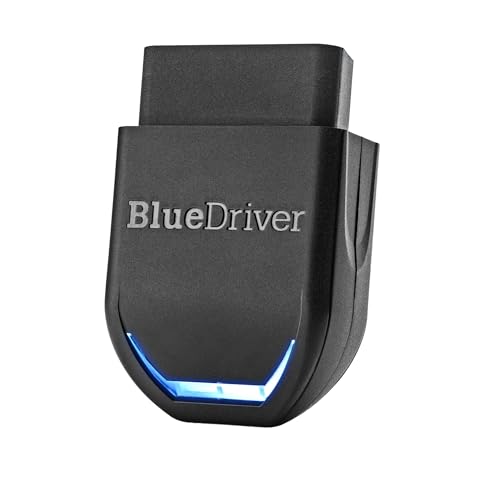
- [Diagnose Like a Pro] BlueDriver Pro Next-Gen is a professional OBD2 scanner and diagnostic tool that helps you scan, understand, and clear vehicle trouble codes with confidence. Turn your phone into a powerful car diagnostic scanner—no guesswork, no unnecessary repairs.
- [Read and Clear More Codes Than Ever] Read and clear more codes than basic car code readers. Access enhanced diagnostics for Check Engine, ABS, SRS, Airbag, TPMS, Transmission, and more on supported vehicles, including expanded coverage on newer model years.
- [Verified Fixes and Real-Time Data] Get unlimited, technician-verified repair reports matched to your VIN, with definitions, causes, and confirmed fixes. Monitor live vehicle data as you drive, view freeze frames, check smog readiness, and analyze Mode 6 test results.
- [Expanded Make & Model Coverage] Optimized for today’s vehicles with strong support for GM, Ford, Stellantis (RAM, Jeep, Chrysler), Toyota, Honda, Nissan, Mazda, Subaru, Hyundai, Mercedes-Benz, BMW, and VW. Enhanced communication on select 2024+ Nissan and Mazda models (see compatibility chart).
- [Gas Vehicles 1996+ & Select Light-Duty Trucks] Works with all gas-powered vehicles made in 1996 or newer, plus select light-duty trucks and diesels, including F-250, RAM 2500, Silverado, and Sierra. Built for daily drivers, family vehicles, and real-world truck use.

- OE-Level diagnostics on your smart device
- FREE Software updates - No subscriptions, no fees – EVER
- Full bi-directional control, live actuation test
- Supports 23 vehicle reset/relearn functions, including throttle matching, ABS bleeding, TPMS reset, etc.
- Live data mapping and freeze frame capturing

- MAINTAIN PEAK PERFORMANCE AND SAFETY ON THE ROAD - Easily find and fix the problem with your vehicle using the INNOVA 5610 bidirectional scan tool. This OBD2 scanner diagnostic tool provides real-time solutions to troubleshoot issues. Access OBD2 and OEM live data with ease, making it an essential car scanner diagnostic tool. Perfect for those seeking reliable car diagnostic scanner and code readers & scan tools for vehicles.
- PRO-LEVEL FUNCTIONALITIES - Use the INNOVA 5610’s Enhanced Data Stream to view live data for advanced systems like ABS, SRS, transmission, and engine. The Special Reset Function lets you use dealership-level re-learn procedures. This car diagnostic scanner is ideal for those needing a bidirectional scan tool or mechanic tools automotive for professional repairs. Compatible with select vehicle makes and models; not universal.
- COMMAND WITH BIDIRECTIONAL CONTROLS - The INNOVA 5610 bidirectional scan tool sends commands to test functions such as fuel pump on/off or retracting the electronic parking brake. With this car scanner diagnostic for all cars, you can operate like a pro. Ideal for those seeking a car code reader and reset tool or advanced fixd car diagnostic tool capabilities. Compatible with select vehicle makes and models; not universal.
- EASY TO USE - The INNOVA 5610 OBD2 scanner diagnostic tool supports English, Spanish, and French. Easily use this scanner for car on most 1996 - 2023 (2024 coming soon) OBD2 vehicles to verify repairs. Designed for ease of operation, it’s a dependable code reader for cars and trucks and check engine code reader. To confirm vehicle coverage, please utilize Innova's Coverage Checker.
- BUY AND DRIVE WITH CONFIDENCE - Backed by ASE-Certified support, this car scanner pairs with the RepairSolutions2 app, trusted by 4M users, for wireless OBD scanner functionality. With free updates and no subscription fees, this durable car computer diagnostic reader ensures you’re prepared for any repair. A must-have diagnostic scanner for vehicles.
This product presentation was made with AAWP plugin.