NUMBER: 10-82-15
DATE: 03-24-15
| APPLICABILITY: | 2015MY Legacy and Outback |
| SUBJECT: | Break-In Procedure after Variable A/C Compressor Replacement |
INTRODUCTION
This bulletin provides the required break-in procedures to follow after replacing the variable A/C compressor. The applicable procedure described below MUST be performed to prevent damaging the new compressor.
SERVICE PROCEDURE / INFORMATION
IMPORTANT: Before the applicable compressor break-in procedure can be determined, the HVAC control unit’s ROM ID must be identified. Follow the sequence of SSMIII screen shots below. Once the current ROM ID is determined, choose the applicable break-in procedure (SSMIII or “MANUAL”) as described below.
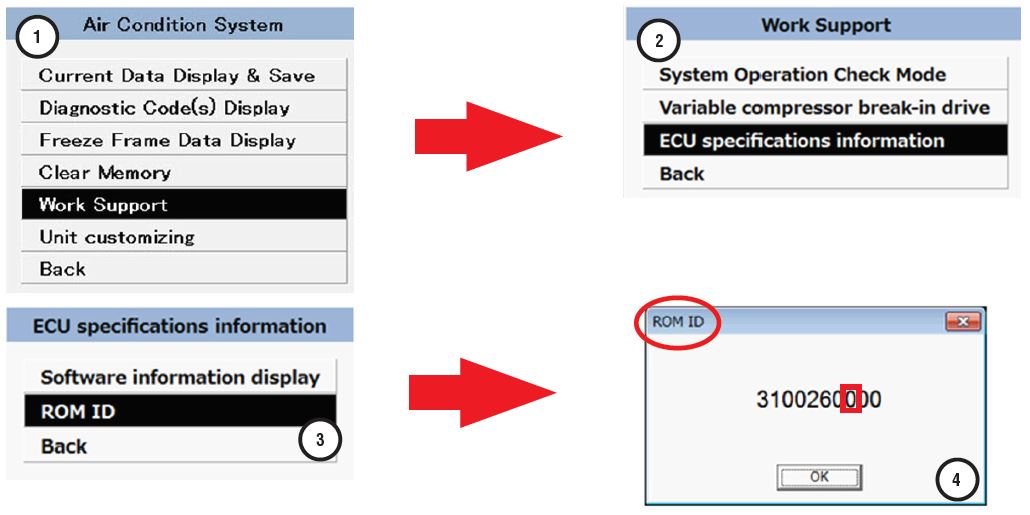
NOTE: This ROM ID information / procedure is applicable to 2015MY Legacy and Outback models only.
- In the example above, if the third digit from the right (end) of the ROM ID is a “0” (zero), the “MANUAL” compressor break-in procedure must be performed.
- If the third digit from the right (end) of the ROM ID is a “1” (one) or higher number, the “SSMIII” compressor break-in procedure must be performed.
“MANUAL” Compressor Break-In Procedure:
VERY IMPORTANT: After replacing the compressor assembly, do not let the engine speed reach or exceed 4000 rpm until the break-in procedure has been completed.
- Verify all related sensor wiring harness connectors are fully locked in place.
- Turn the ignition ON but do not start the engine.
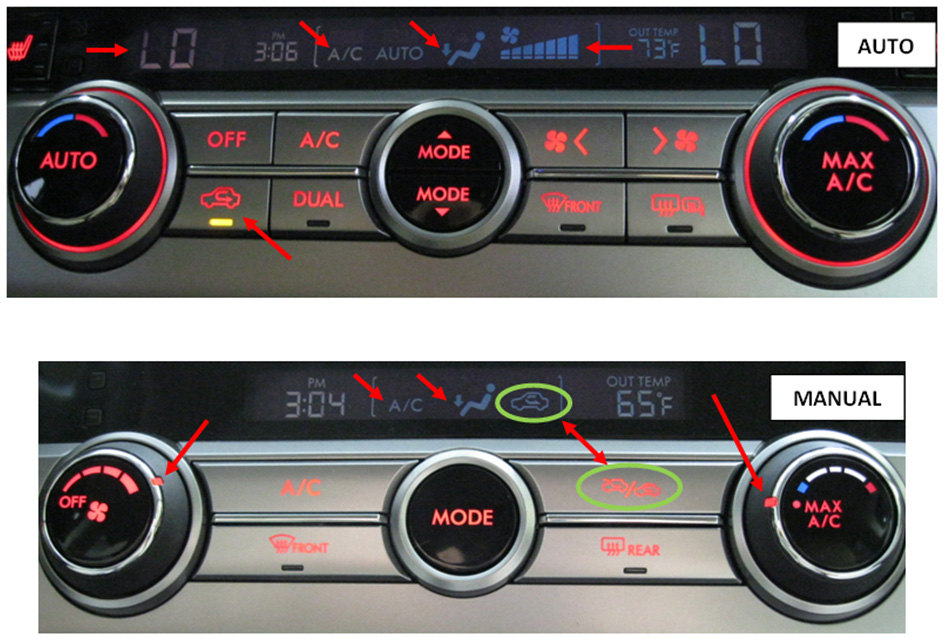
- Arrange the HVAC system settings as shown below:
AUTO System: Temp: LO, Blower Fan Speed: HIGH, Ventilation Mode: FLOOR, Recirculation: ON.
MANUAL System: Temp: MAX A/C, Blower Fan Speed: HIGH (4th position), Ventilation Mode: FLOOR, Recirculation: ON.
- Start the engine but do not let it reach or exceed 4000 RPM.
- Idle the engine at or below 1800 RPM for at least 1 minute.
- Shut the engine off to complete the “MANUAL” A/C compressor break-in procedure.
“SSMIII” Compressor Break-In Procedure:
VERY IMPORTANT: After replacing the compressor assembly, do not let the engine speed reach or exceed 4000 rpm until the break-in procedure has been completed.
- Connect the SSMIII and select Air Condition System from the Each Systems Check menu.
- Follow the screen shot sequence / steps below.
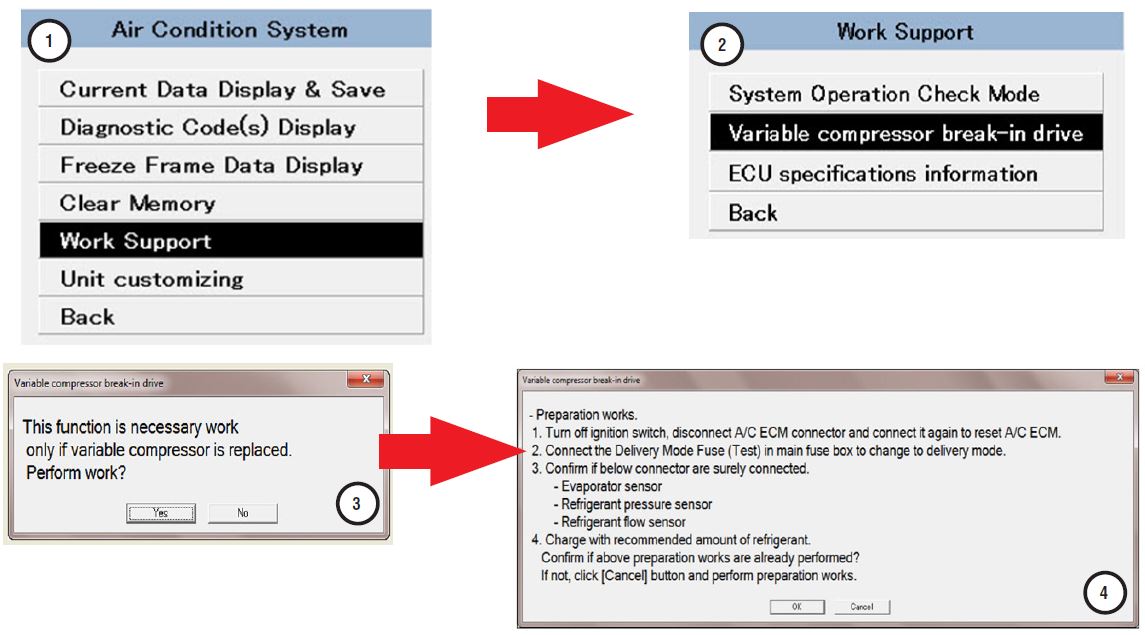
Additional Information for above:
- Turn off the Ignition switch.
- Using your finger or plastic trim tool, release the 3 claws securing the front edge of the lower glove box / blower motor cover to access the 2 HVAC control module wiring harness connectors.
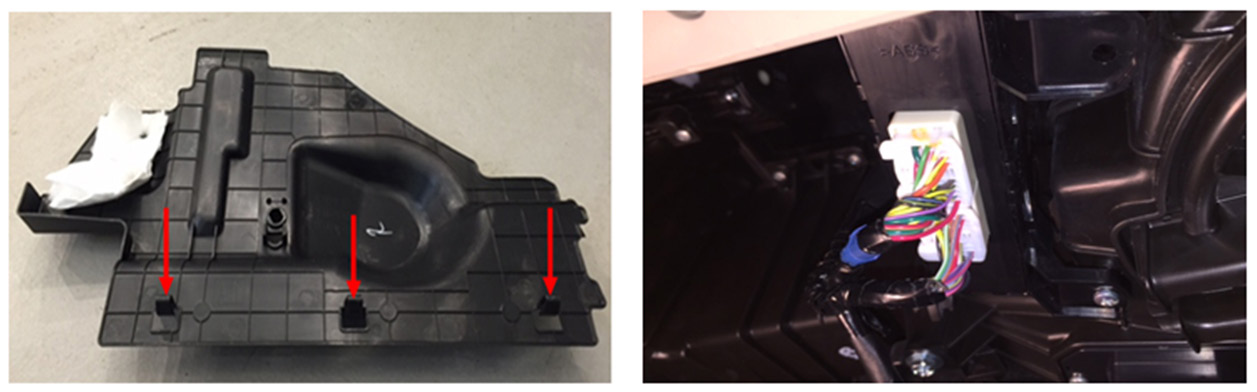
- Unplug both of the HVAC control module harness connectors then re-connect them to “reset” it.
- Install a spare 15A fuse in the transit mode fuse slot of the Main Fuse Box (M/B) shown below to enter test mode.
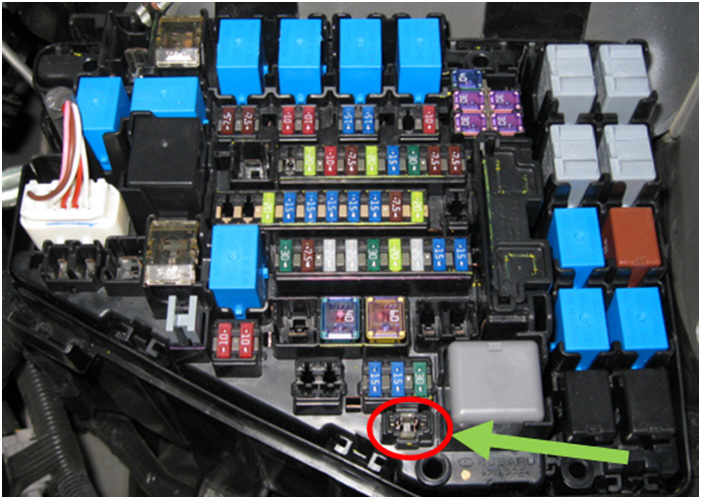
- Verify all related A/C system sensor wiring harness connectors are fully locked in place.
- If not already done, charge the system with the recommended amount of refrigerant following the procedure in the applicable Service Manual.

- Once the compressor break-in is complete, the SSMIII display will change from “Variable compressor break-in drive finish status incomplete” to “Variable compressor break-in drive finish status Finished” as shown in
- Shut the engine off and remove the fuse from the transit slot in the M/B to complete the “SSMIII” A/C compressor break-in procedure.
WARRANTY / CLAIM INFORMATION
As per the Subaru Labor Time Guide, completion of the applicable break-in procedure is included in the compressor R&R time allowance.
REMINDER: SOA strongly discourages the printing and/or local storage of service information as previously released information and electronic publications may be updated at any time.
Always refer to STIS for the latest service information before performing any repairs.
No products found.
No products found.
No products found.
This product presentation was made with AAWP plugin.