
NHTSA ID Number: 10233917
Manufacturer Communication Number: 15-273-20
Summary
This Service Information Bulletin addresses isolated customer concerns regarding the pictured CP1 BASE Model Center Information Display (CID) LOWER 7-inch display screen flashing, not responding to touch inputs and / or shutting off intermittently.
NUMBER: 15-273-20
DATE: 09/09/20
REVISED: 03/15/23
| APPLICABILITY: | 2020MY-2023MY Legacy & Outback 2022MY-2023MY WRX |
| SUBJECT: | Denso CP1 BASE (Dual 7” Display Screen) Erratic Operation |
INTRODUCTION:
This Service Information Bulletin addresses isolated customer concerns regarding the pictured CP1 BASE Model Center Information Display (CID) LOWER 7-inch display screen flashing, not responding to touch inputs and / or shutting off intermittently.
SERVICE PROCEDURE / INFORMATION:
REMINDER: Customer satisfaction and retention starts with performing quality repairs.
Use the reference table below for the procedure to help isolate the root cause and repair as applicable.
| STEP | Check Items: | Yes | No | |
| 1 | Inspect for any deformation of the lower touch screen surface.
Look closely at the lower touch screen from various angles. Are there any wavy surface areas visible as shown in Fig. 1 below on the touch screen? | Replace the CID | Go to Step 2 | |
| 2a / 2b | Inspect for deformation of the touch screen, surrounding trim panel and for any foreign material trapped in between them.
Can a folded dollar bill (2 thicknesses) be inserted 2mm into the gap between the top and bottom edges and 4mm into the gap on both sides of the surrounding trim panel and the lower touch screen? Perform these measurement tests TWICE. | Go to Step 3 | Replace the CID | |
| 3 | After removing the screws from the instrument panel, is the touch screen still switching on its own (without any user input), flashing or shutting off intermittently? | Replace the CID | Test over time | |
| 4 | Reassemble the IP. After reassembly, is the lower touch screen still switching on its own (without any user input), flashing or shutting off intermittently? | Replace the CID | Test over time | |
INSPECTION PROCEDURE:
Step 1: Check for deformation of the LOWER touch screen surface:
Check for any deformation or waviness of the touch screen surface. Inspect the surface condition diagonally with light reflecting on it at various angles. Is any waviness visible as shown in Fig. 1 below?
- If YES: Replace the CID display component because the surface of the touch screen is deformed.
- If NO: Proceed to Step 2.
NOTE: In the event the CID requires replacement, the new unit INCLUDES a new surrounding trim panel and new control buttons as a ready to install assembly.
Steps 2a & 2b: Inspect for deformation of the lower touch screen, the surrounding trim panel and for any foreign material trapped in between them. Use the illustrations below as a guide.
- 2a: Insert a (preferably a crisp, new) dollar bill into the gaps between the touch screen and the surrounding trim panel along the top (A) and bottom (B) as shown in the 2 example below. The dollar bill should be able to be inserted 2mm into the full width of both the top and bottom gaps.
- 2b: Insert a dollar bill folded in half (to provide 2 thicknesses) into the gaps between the touch screen and the surrounding trim panel along the sides (C) & (D). The folded dollar bill should be able to be inserted 4mm into the side gaps from top to bottom.
IMPORTANT: All 4 of these measurement checks must be done TWICE.
- If the dollar bill can be inserted into the gap 2mm on the Top and Bottom and 4mm on BOTH sides, there is no deformation of the touch screen or surrounding trim panel. Proceed to Step 4.
- If the dollar bill cannot be inserted, replace the CID because the surrounding trim panel and / or touch screen are likely deformed.
Step 3: Can any of the conditions “Display flashes, does not respond to touch inputs, or shuts off intermittently” be duplicated:
- If YES: The condition persists, proceed to Step 4.
- If NO: The condition no longer persists. Operate the unit for an extended period to confirm a successful repair.
Step 4: Check condition of the retaining screw holes and contact surfaces between the instrument panel (IP) and CID after removing the screws.
- Inspect the screw holes of the IP and the bracket following the illustrations below. If the screw hole(s) are overlapped, CAREFULLY re-align to Acceptable or “OK” as shown below.
- Inspect the gap between contact surfaces of the IP and the bracket following the illustration below. If a gap exists between the two contact surfaces, CAREFULLY adjust the seating / alignment by changing the tightening order of the retaining screws.
TIP: If there is too much mis-alignment, CAREFULLY loosen the other three screws, let things settle, then try tightening them again in a different order to see if the alignment improves before installing the final screw or, loosen them all, let things settle then tighten again but in stages so any one hole is not too far offset (beyond OK).
Can the conditions “Display flashes, exhibit “ghost touch” operation as per 15-295-22, does not respond to touch inputs or shut off intermittently” still be duplicated?
- If YES: The condition persists, replace the CID.
- If NO: The condition no longer persists. Operate the unit for an extended period to confirm a successful repair.
10 Affected Products
Vehicles
1 Associated Document
Manufacturer Communications
NUMBER: 15-273-20
DATE: 09/09/20
REVISED: 03/15/23
MC-10233917-0001.pdf 1177.924KB
NHTSA ID Number: 10213181
Manufacturer Communication Number: 15-273-20
Summary
This bulletin addresses isolated customer concerns regarding the pictured CP1 BASE Model Center Information Display (CID) LOWER 7-inchdisplay screen flashing, not responding to touch inputs and / or shutting off intermittently.
1 Associated Document
Manufacturer Communications
NUMBER: 15-273-20
DATE: 09/09/20
REVISED: 05/13/22
MC-10213181-0001.pdf 2464.928KB
NHTSA ID Number: 10201794
Manufacturer Communication Number: 15-273-20
Summary
This bulletin addresses isolated customer concerns regarding the pictured CP1 BASE Model Center Information Display (CID) LOWER 7-inch display screen flashing, not responding to touch inputs and / or shutting off intermittently.
1 Associated Document
Manufacturer Communications
NUMBER: 15-273-20
DATE: 09/09/20
REVISED: 09/08/21
MC-10201794-0001.pdf 1613.947KB
NHTSA ID Number: 10183709
Manufacturer Communication Number: 15-273-20
Summary
This Service Information Bulletin addresses isolated customer concerns regarding the CP1 Base Model Center Information Display (CID) lower 7-inch display screen flashing, not responding to touch inputs, and / or shutting off intermittently.
1 Associated Document
Manufacturer Communications
NUMBER: 15-273-20
DATE: 09/09/20
REVISED: 11/24/20
MC-10183709-0001.pdf 1612.343KB
NHTSA ID Number: 10180685
Manufacturer Communication Number: 15-273-20
Summary
This service information bulletin addresses isolated customer concerns regarding the pictured CP1 BASE Model Center Information Display (CID) lower 7-inch display screen flashing, not responding to touch inputs, and/or shutting off intermittently.
1 Associated Document
Manufacturer Communications
NUMBER: 15-273-20
DATE: 09/09/20
MC-10180685-0001.pdf 1612.674KB

- 【Android 13 System Car Radio】Car Radio Compatible with Subaru Forester WRX Impreza 2013 2014 2015. With 2GB RAM and 64GB ROM, ensures smooth operation and multitasking capabilities. Built-in Bluetooth for answering, making phone calls, streaming music by hands-free. The 1280x720 high-resolution display video clear and vivid pictures and videos. You can enjoy your favourite music, movies and short videos from the car stereo.
- 【Car Stereo with Wireless Carplay & Android Auto】This car radio supports wireless Carplay/Android auto /Mirrorlink. Wirelessly connect your phone to the car's stereo infotainment system, providing a seamless experience. You can make phone calls, send messages, listen to music, and get directions using voice control, allowing you to focus on driving without worrying about using your phone, making your driving safely.
- 【Car Radio with GPS Navigation & WIFI】The built-in GPS module and external GPS antenna supports both online and offline map navigation. With Wi-Fi or hotspot connectivity, you can easily download and access to online navigation app and other video or music apps on Play Store. With the split-screen function, you can view two apps on the same screen simultaneously. For example, you can display navigation and music apps side by side, ensuring a more pleasant journey.
- 【FM/Steering Wheel Control】 With built-in FM radio that allows you to listen to radio programs and stay up-to-date with the latest news and weather information during driving. The car head unit also supports steering wheel controls, allowing you to effortlessly switch songs, change channels, and adjust the volume without taking your hands off the wheel, helping you stay focused on the road while enjoying a smooth and convenient driving experience
- 【SWC &AHD Rear Camera】The car head unit supports original car steering wheel control, such as switching songs, adjusting volume, answering calls, etc. The waterproof night vision camera offers 1080P resolution, reversing image is clearer no matter the weather conditions. Automatically switch the reversing image when reversing. Note: Professional installation is required. Incorrect wiring may cause a short circuit.

- Replaces the original part number: Compatible with Subaru Legacy Outback 8-inch touchscreen radio screen. The TsuperU uses upgraded materials, offering superior sensitivity, high definition, high temperature resistance, and is non-bubbling and non-whitening. With this part, you won't need to go to the dealer for a replacement, as they often recommend replacing the entire radio, which could cost thousands of dollars, but is completely unnecessary. Please watch the replacement video on YT's
- EASY PROBLEM SOLVED: If your display touch screen is cracked, delaminating, bubbles, White, fogging, air holes, unresponsive, has garbled, phantom, ghosted, ghosting, dead pixels, unresponsive, or looks bad, simply replace the TsuperU 8-inch screen navigation touchscreen and it will return to its original functionality without the need for a trip to the dealership for costly repairs. One replacement is all it takes to fix the problem
- COMPATIBLE WITH SUBARU MODELS: Navigation screen fits Subaru Outback 2.5i Limited Premium Sport Touring Premier 3.6R Limited Premier Touring radio digitizer screen 2019 2018. please check the OEM number and size carefully before purchasing, There are two versions of MAP & PHONE, compare with your original parts to make sure that this touch screen fits your car. The digitizer screen for the 8-inch touchscreen radio works with both GPS-equipped radios and non-GPS radios
- EASY TO INSTALL: The product comes with adhesive, you only need to tear off the protective film to use it, easy to install. for Subaru radio screen is an exact fit for the original vehicle. For display only 86471-AL65A 86471-AL65B 86471-AL66A 86471-AL68A 86431-AL66A 86431-AL62A 86431-AL65A 86471 AL65A 86471 AL65B 86471 AL66A 86471 AL68A 86431 AL66A 86431 AL62A 86431 AL65A 86471AL65A 86471AL65B 86471AL66A 86471AL68A 86431AL66A 86431AL62A 86431AL65A, 864734-AL66A, 86471AL76A, 86471-AL76A
- TOUCH RESPONSIVE: Touch screen meets OEM navigation system, high light transmission, high visibility, responsive, high touch accuracy. touch screen monitor is made of new upgraded material with high resolution, high clarity, more stable performance, faster response time, and has been rigorously tested to ensure a long service life, touch screen replacement

- 8 Core 64GB Android Radio:Our Android car radio is equipped with the latest version of Android and an 8-core CPU processor, delivering exceptional performance and a perfect user experience. With 4G RAM and 64G ROM, our radio ensures smooth operation and provides ample storage for downloading popular apps like YouTube. It is designed to be compatible with Subaru Forester Impreza WRX 2008-2012 models. If you’re unsure whether it’s a good fit for your vehicle, please ask us first
- Wireless and Wired Carplay Android Auto:The Subaru Forester Impreza WRX car stereo offers seamless connectivity with your smartphone’s apps and features like WhatsApp, Google Maps, and Telegram, whether through Bluetooth or a USB data cable. It also supports voice control through Siri or Google Assistant, allowing you to keep your hands free while operating the stereo
- GPS Navigation and WiFi and Split Screen:With WiFi or hotspot connectivity, you can browse the internet, watch videos, and download apps on the 9 inch Subaru Forester Impreza WRX car radio. It also supports online and offline maps, providing real-time road conditions to help you avoid traffic jams. The split-screen feature enables you to simultaneously enjoy GPS navigation and watch videos on the 9 -inch screen with a resolution of 1280x720
- 32EQ DSP/BLUETOOTH 5.0/ FM/RDS:The car stereo comes pre-installed with DSP tuning software, allowing you to adjust the frequency, audio effects, and 32 EQ equalization settings, resulting in crystal-clear sound. Bluetooth 5.0 ensures a faster transmission speed and enables hands-free calling, phonebook downloads, and music streaming. The FM/RDS radio with 30 preset stations allows you to stay updated with new broadcasts, real-time traffic information, weather forecasts, and more
- Multi Function:The Android car stereo supports mirror link functionality, allowing you to mirror your smartphone’s content onto the large screen. It also supports steering wheel controls, provides 59 UI themes to suit your preferences, and allows you to move frequently used software to the home screen for easy access. As a gift, the car stereo comes with an external microphone and an AHD rearview camera with night vision and a 170 degree viewing angle
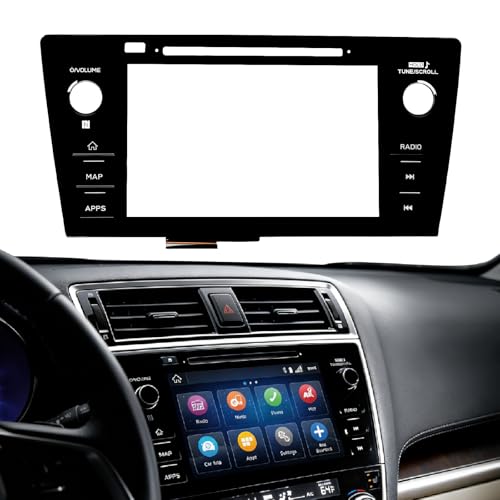
- Fitment:Our Touch Screen Digitizer(MAP) Compatible with 2018 2019 Subaru Outback,2018 2019 Subaru Legacy
- Replace Part Number:86471-AL62A,86471-AL65A,86471-AL65B,86471-AL66A,86471-AL67A,86471-AL68A,86431-AL62A,86431-AL65A,86431-AL66A
- Direct-Fit Replacement:Our 8-inch touchscreen is designed to address common display issues, such as physical cracks, unresponsiveness, or dead pixels, to help return your system to working condition.
- Function:This universal-style LCD touchscreen features integrated MAP functions.
- Support: For any questions or concerns regarding the product, please inform us so we can resolve the issue
SEOCONTENT-START
Bulletin Number: 15-273-20R; Revised: 03/15/23 Page 1 of 4 Continued… CAUTION: VEHICLE SERVICING PERFORMED BY UNTRAINED PERSONS COULD RESULT IN SERIOUS INJURY TO THOSE PERSONS OR TO OTHERS. Subaru Service Bulletins are intended for use by professional technicians ONLY. They are written to inform those technicians of conditions that may occur in some vehicles, or to provide information that could assist in the proper servicing of the vehicle. Properly trained technicians have the equipment, tools, safety instructions, and know-how to do the job correctly and safely. If a condition is described, DO NOT assume that this Service Bulletin applies to your vehicle, or that your vehicle will have that condition. Subaru of America, Inc. is ISO 14001 Compliant ISO 14001 is the international standard for excellence in Environmental Management Systems. Please recycle or dispose of automotive products in a manner that is friendly to our environment and in accordance with all local, state and federal laws and regulations. NUMBER: 15-273-20 DATE: 09/09/20 REVISED: 03/15/23 APPLICABILITY: 2020MY-2023MY Legacy & Outback 2022MY-2023MY WRX SUBJECT: Denso CP1 BASE (Dual 7” Display Screen) Erratic Operation INTRODUCTION: This Service Information Bulletin addresses isolated customer concerns regarding the pictured CP1 BASE Model Center Information Display (CID) LOWER 7-inch display screen flashing, not responding to touch inputs and / or shutting off intermittently. SERVICE PROCEDURE / INFORMATION: REMINDER: Customer satisfaction and retention starts with performing quality repairs. Use the reference table below for the procedure to help isolate the root cause and repair as applicable. STEP Check Items: Yes No 1 Inspect for any deformation of the lower touch screen surface. Look closely at the lower touch screen from various angles. Are there any wavy surface areas visible as shown in Fig. 1 below on the touch screen? Replace the CID Go to Step 2 2a / 2b Inspect for deformation of the touch screen, surrounding trim panel and for any foreign material trapped in between them. Can a folded dollar bill (2 thicknesses) be inserted 2mm into the gap between the top and bottom edges and 4mm into the gap on both sides of the surrounding trim panel and the lower touch screen? Perform these measurement tests TWICE. Go to Step 3 Replace the CID 3 After removing the screws from the instrument panel, is the touch screen still switching on its own (without any user input), flashing or shutting off intermittently? Replace the CID Test over time 4 Reassemble the IP. After reassembly, is the lower touch screen still switching on its own (without any user input), flashing or shutting off intermittently? Replace the CID Test over time SERVICE INFORMATION BULLETIN ATTENTION: GENERAL MANAGER q PARTS MANAGER q CLAIMS PERSONNEL q SERVICE MANAGER q IMPORTANT – All Service Personnel Should Read and Initial in the boxes provided, right. ©2020 Subaru of America, Inc. All rights reserved. Bulletin Number: 15-273-20R; Revised: 03/15/23 Page 2 of 4 Continued… INSPECTION PROCEDURE: Step 1: Check for deformation of the LOWER touch screen surface: Check for any deformation or waviness of the touch screen surface. Inspect the surface condition diagonally with light reflecting on it at various angles. Is any waviness visible as shown in Fig. 1 below? • If YES: Replace the CID display component because the surface of the touch screen is deformed. • If NO: Proceed to Step 2. NOTE: In the event the CID requires replacement, the new unit INCLUDES a new surrounding trim panel and new control buttons as a ready to install assembly. Steps 2a & 2b: Inspect for deformation of the lower touch screen, the surrounding trim panel and for any foreign material trapped in between them. Use the illustrations below as a guide. • 2a: Insert a (preferably a crisp, new) dollar bill into the gaps between the touch screen and the surrounding trim panel along the top (A) and bottom (B) as shown in the Fig. 2 example below. The dollar bill should be able to be inserted 2mm into the full width of both the top and bottom gaps. • 2b: Insert a dollar bill folded in half (to provide 2 thicknesses) into the gaps between the touch screen and the surrounding trim panel along the sides (C) & (D). The folded dollar bill should be able to be inserted 4mm into the side gaps from top to bottom. IMPORTANT: All 4 of these measurement checks must be done TWICE. Bulletin Number: 15-273-20R; Revised: 03/15/23 Page 3 of 4 Continued… • If the dollar bill can be inserted into the gap 2mm on the Top and Bottom and 4mm on BOTH sides, there is no deformation of the touch screen or surrounding trim panel. Proceed to Step 4. • If the dollar bill cannot be inserted, replace the CID because the surrounding trim panel and / or touch screen are likely deformed. Step 3: Can any of the conditions “Display flashes, does not respond to touch inputs, or shuts off intermittently” be duplicated: • If YES: The condition persists, proceed to Step 4. • If NO: The condition no longer persists. Operate the unit for an extended period to confirm a successful repair. Step 4: Check condition of the retaining screw holes and contact surfaces between the instrument panel (IP) and CID after removing the screws. a. Inspect the screw holes of the IP and the bracket following the illustrations below. If the screw hole(s) are overlapped, CAREFULLY re-align to Acceptable or “OK” as shown below. b. Inspect the gap between contact surfaces of the IP and the bracket following the illustration below. If a gap exists between the two contact surfaces, CAREFULLY adjust the seating / alignment by changing the tightening order of the retaining screws. Bulletin Number: 15-273-20R; Revised: 03/15/23 Page 4 of 4 TIP: If there is too much mis-alignment, CAREFULLY loosen the other three screws, let things settle, then try tightening them again in a different order to see if the alignment improves before installing the final screw or, loosen them all, let things settle then tighten again but in stages so any one hole is not too far offset (beyond OK). Can the conditions “Display flashes, exhibit “ghost touch” operation as per 15-295-22, does not respond to touch inputs or shut off intermittently” still be duplicated? • If YES: The condition persists, replace the CID. • If NO: The condition no longer persists. Operate the unit for an extended period to confirm a successful repair. IMPORTANT REMINDERS: • SOA strongly discourages the printing and/or local storage of service information as previously released information and electronic publications may be updated at any time. • Always check for any open recalls or campaigns anytime a vehicle is in for servicing. • Always refer to STIS for the latest service information before performing any repairs.
**************************************************************************************************************
SEOCONTENT-END
This product presentation was made with AAWP plugin.