
NHTSA ID Number: 10183700
Manufacturer Communication Number: 15-275-20
Summary
This Service Information Bulletin provides a testing procedure for the microphone used in Denso CP1 infotainment systems.
NUMBER: 15-275-20
DATE: 11/10/2020
| APPLICABILITY: | 2020-21MY Legacy and Outback |
| SUBJECT: | Microphone Testing Procedure for Denso CP1 Infotainment Systems |
INTRODUCTION:
This Service Information Bulletin provides a testing procedure for the microphone used in Denso CP1 infotainment systems. The procedure is to be used as a diagnostic tool for customer concerns related to microphone operation. This testing is performed after accessing Dealership Mode and is applicable to units installed with Version 1 or Version 2 software. This procedure will be used temporarily until Version 3 has been released and installed.
Because of an inadequate gain setting, the microphone indicator level currently shows either just one or no “bars” at all when 2 or 3 bars should be displayed, especially when the input sound is brief (short).
SERVICE PROCEDURE / INFORMATION:
REMINDER: Customer satisfaction and retention starts with performing quality repairs.
Step 1) Access Dealership Mode by pushing and holding down both passenger (right) side A/C Up/ Down Temperature buttons while pressing the Tune button 6 times.
Step 2) From the Dealership Mode menu, select System Information then, from the System Information menu, select Version Information.
Step 3) The Version Information list will display the MSOC / Version Number.
- If the Version Number is OTHER THAN a Version Number shown in the table below, proceed to Step 4.
- If the Version Number is included in the table, diagnose the microphone per the applicable Service Manual procedure as the following test procedure is not compatible with these MSOC / Version Numbers.
| MY | High | MID | Base |
| 2020 | F11GHM022-504 | F11GMM022-504 | F11GBM022-504 |
| 2021 | F31BHM008-500 | F31BMM008-500 | F31BBM008-500 |
Step 4) Press BACK 2 times to return to the Dealership Mode menu.
Step 5) From the Dealership Mode menu, select Function Check.
Step 6) From the Function Check menu, select Microphone. The Microphone indicator screen (bars) will be displayed.
Step 7) Using the alarm sound (or ringer) of a smartphone, test the microphone operation and monitor the bars on the display:
- Make sure the silent mode of the smartphone is turned OFF.
- Set the alarm volume level to maximum.
- Activate the alarm sound.
- Hold the smartphone within half an inch of the microphone for at least 10 seconds.
TEST: Does the Microphone display show 2 or more bars? The number of blue bars represent signal level.
- YES– The microphone is operating normally.
- NO– Diagnose the microphone system per the applicable Service Manual procedure.
4 Affected Products
Vehicles
1 Associated Document
Manufacturer Communications
NUMBER: 15-275-20
DATE: 11/10/2020
MC-10183700-0001.pdf 1934.149KB
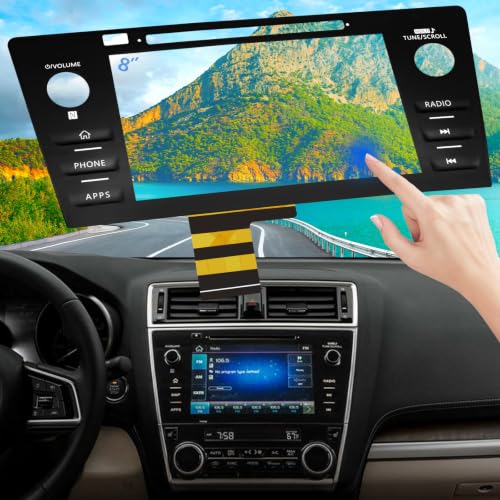
- Replaces the original part number: Compatible with Subaru
 Legacy Outback 8-inch touchscreen radio screen. The TsuperU uses upgraded materials, offering superior sensitivity, high definition, high temperature resistance, and is non-bubbling and non-whitening. With this part, you won't need to go to the dealer for a replacement, as they often recommend replacing the entire radio, which could cost thousands of dollars, but is completely unnecessary. Please watch the replacement video on YT's
 - EASY PROBLEM SOLVED: If your display touch screen is cracked, delaminating, bubbles, White, fogging, air holes, unresponsive, has garbled, phantom, ghosted, ghosting, dead pixels, unresponsive, or looks bad, simply replace the TsuperU 8-inch screen navigation touchscreen and it will return to its original functionality without the need for a trip to the dealership for costly repairs. One replacement is all it takes to fix the problem
- COMPATIBLE WITH SUBARU MODELS: Navigation screen fits Subaru Outback 2.5i Limited Premium Sport Touring Premier 3.6R Limited Premier Touring radio digitizer screen 2019 2018. please check the OEM number and size carefully before purchasing, There are two versions of MAP & PHONE, compare with your original parts to make sure that this touch screen fits your car. The digitizer screen for the 8-inch touchscreen radio works with both GPS-equipped radios and non-GPS radios
- EASY TO INSTALL: The product comes with adhesive, you only need to tear off the protective film to use it, easy to install. for Subaru radio screen is an exact fit for the original vehicle. For display only 86471-AL65A 86471-AL65B 86471-AL66A 86471-AL68A 86431-AL66A 86431-AL62A 86431-AL65A 86471 AL65A 86471 AL65B 86471 AL66A 86471 AL68A 86431 AL66A 86431 AL62A 86431 AL65A 86471AL65A 86471AL65B 86471AL66A 86471AL68A 86431AL66A 86431AL62A 86431AL65A, 864734-AL66A, 86471AL76A, 86471-AL76A
- TOUCH RESPONSIVE: Touch screen meets OEM navigation system, high light transmission, high visibility, responsive, high touch accuracy. touch screen monitor is made of new upgraded material with high resolution, high clarity, more stable performance, faster response time, and has been rigorously tested to ensure a long service life, touch screen replacement

- 【Android 13 System Car Radio】Car Radio Compatible with Subaru Forester WRX Impreza 2013 2014 2015. With 2GB RAM and 64GB ROM, ensures smooth operation and multitasking capabilities. Built-in Bluetooth for answering, making phone calls, streaming music by hands-free. The 1280x720 high-resolution display video clear and vivid pictures and videos. You can enjoy your favourite music, movies and short videos from the car stereo.
- 【Car Stereo with Wireless Carplay & Android Auto】This car radio supports wireless Carplay/Android auto /Mirrorlink. Wirelessly connect your phone to the car's stereo infotainment system, providing a seamless experience. You can make phone calls, send messages, listen to music, and get directions using voice control, allowing you to focus on driving without worrying about using your phone, making your driving safely.
- 【Car Radio with GPS Navigation & WIFI】The built-in GPS module and external GPS antenna supports both online and offline map navigation. With Wi-Fi or hotspot connectivity, you can easily download and access to online navigation app and other video or music apps on Play Store. With the split-screen function, you can view two apps on the same screen simultaneously. For example, you can display navigation and music apps side by side, ensuring a more pleasant journey.
- 【FM/Steering Wheel Control】 With built-in FM radio that allows you to listen to radio programs and stay up-to-date with the latest news and weather information during driving. The car head unit also supports steering wheel controls, allowing you to effortlessly switch songs, change channels, and adjust the volume without taking your hands off the wheel, helping you stay focused on the road while enjoying a smooth and convenient driving experience
- 【SWC &AHD Rear Camera】The car head unit supports original car steering wheel control, such as switching songs, adjusting volume, answering calls, etc. The waterproof night vision camera offers 1080P resolution, reversing image is clearer no matter the weather conditions. Automatically switch the reversing image when reversing. Note: Professional installation is required. Incorrect wiring may cause a short circuit.
- 【Vehicle Compatibility】 The car stereo is compatible with Subaru Forester WRX Impreza 2016 2017 2018(With Silver Air Vent). Please check the car console and the year before buying. If you are not clear, please provide the following details: 1. Your car's model and year, 2. A picture of your car console
- 【 Android 13 Car Radio】The head unit runs on Android 13 as its main operating system, turning your car radio into a large tablet. Featuring 2GB + 64GB of storage, it ensures smooth performance for navigation, music, and more. The 9-inch touch screen with 1280x720 resolution provides a sharp and clear display. With the Play Store preinstalled, you can install many apps after connecting to Wi-Fi,
- 【Wireless CarPlay & Android Auto】 Wireless CarPlay and Android Auto work seamlessly, allowing for hands-free calls, navigation, music, and app use without cables. Simply connect to your smartphone via Bluetooth/Wi-Fi/USB to access the GPS navigation system, make phone calls, enjoy music while focusing on the road through the car's CarPlay screen, having a more convenient and safer driving experience
- 【GPS Navigation & WIFI &Bluetooth】Built-in GPS module supports both offline and online navigation. When connected to WiFi, you can get real - time traffic information. You can answer/make hands-free Bluetooth phone calls, listen to Bluetooth music without distractions
- 【Bluetooth & FM/RDS Radio】This car radio replacement features built-in Bluetooth, enabling hands-free calls, phone book syncing, and wireless music streaming for a convenient and safe driving experience. The FM/RDS radio offers stable reception and allows you to preset your favorite stations, keeping you informed with real-time news, sports updates, and weather forecasts while you're on the road
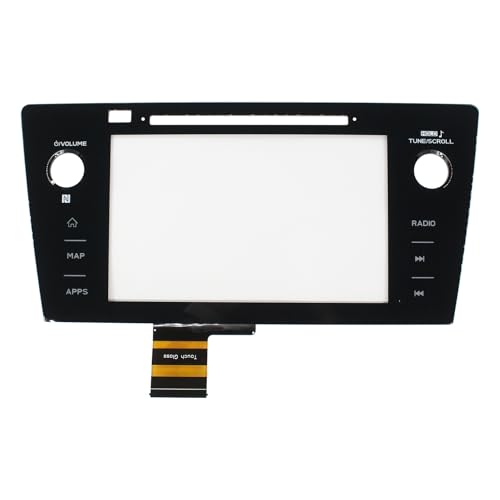
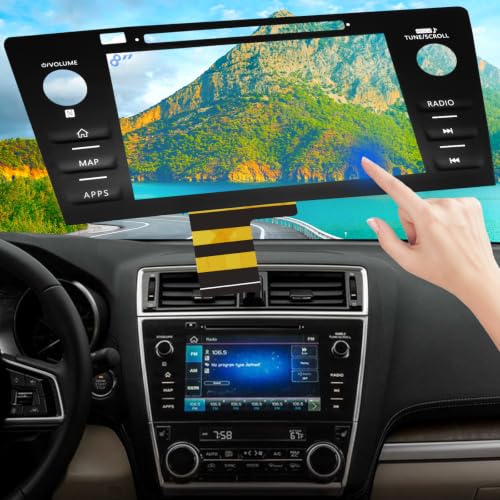
- Replaces the original part number: Compatible with Subaru Legacy Outback 8-inch touchscreen radio screen. The TsuperU uses upgraded materials, offering superior sensitivity, high definition, high temperature resistance, and is non-bubbling and non-whitening. With this part, you won't need to go to the dealer for a replacement, as they often recommend replacing the entire radio, which could cost thousands of dollars, but is completely unnecessary. Please watch the replacement video on YT's
- EASY PROBLEM SOLVED: If your display touch screen is cracked, delaminating, bubbles, White, fogging, air holes, unresponsive, has garbled, phantom, ghosted, ghosting, dead pixels, unresponsive, or looks bad, simply replace the TsuperU 8-inch screen navigation touchscreen and it will return to its original functionality without the need for a trip to the dealership for costly repairs. One replacement is all it takes to fix the problem
- COMPATIBLE WITH SUBARU MODELS: Navigation screen fits Subaru Outback 2.5i Limited Premium Sport Touring Premier 3.6R Limited Premier Touring radio digitizer screen 2019 2018. please check the OEM number and size carefully before purchasing, There are two versions of MAP & PHONE, compare with your original parts to make sure that this touch screen fits your car. The digitizer screen for the 8-inch touchscreen radio works with both GPS-equipped radios and non-GPS radios
- EASY TO INSTALL: The product comes with adhesive, you only need to tear off the protective film to use it, easy to install. for Subaru radio screen is an exact fit for the original vehicle. For display only 86471-AL65A 86471-AL65B 86471-AL66A 86471-AL68A 86431-AL66A 86431-AL62A 86431-AL65A 86471 AL65A 86471 AL65B 86471 AL66A 86471 AL68A 86431 AL66A 86431 AL62A 86431 AL65A 86471AL65A 86471AL65B 86471AL66A 86471AL68A 86431AL66A 86431AL62A 86431AL65A, 864734-AL66A, 86471AL76A, 86471-AL76A
- TOUCH RESPONSIVE: Touch screen meets OEM navigation system, high light transmission, high visibility, responsive, high touch accuracy. touch screen monitor is made of new upgraded material with high resolution, high clarity, more stable performance, faster response time, and has been rigorously tested to ensure a long service life, touch screen replacement
SEOCONTENT-START
Bulletin Number: 15-275-20; Date: 11/10/20 Page 1 of 5 Continued… CAUTION: VEHICLE SERVICING PERFORMED BY UNTRAINED PERSONS COULD RESULT IN SERIOUS INJURY TO THOSE PERSONS OR TO OTHERS. Subaru Service Bulletins are intended for use by professional technicians ONLY. They are written to inform those technicians of conditions that may occur in some vehicles, or to provide information that could assist in the proper servicing of the vehicle. Properly trained technicians have the equipment, tools, safety instructions, and know-how to do the job correctly and safely. If a condition is described, DO NOT assume that this Service Bulletin applies to your vehicle, or that your vehicle will have that condition. Subaru of America, Inc. is ISO 14001 Compliant ISO 14001 is the international standard for excellence in Environmental Management Systems. Please recycle or dispose of automotive products in a manner that is friendly to our environment and in accordance with all local, state and federal laws and regulations. NUMBER: 15-275-20 DATE: 11/10/2020 APPLICABILITY: 2020-21MY Legacy and Outback SUBJECT: Microphone Testing Procedure for Denso CP1 Infotainment Systems INTRODUCTION: This Service Information Bulletin provides a testing procedure for the microphone used in Denso CP1 infotainment systems. The procedure is to be used as a diagnostic tool for customer concerns related to microphone operation. This testing is performed after accessing Dealership Mode and is applicable to units installed with Version 1 or Version 2 software. This procedure will be used temporarily until Version 3 has been released and installed. Because of an inadequate gain setting, the microphone indicator level currently shows either just one or no “bars” at all when 2 or 3 bars should be displayed, especially when the input sound is brief (short). SERVICE PROCEDURE / INFORMATION: REMINDER: Customer satisfaction and retention starts with performing quality repairs. Step 1) Access Dealership Mode by pushing and holding down both passenger (right) side A/C Up/ Down Temperature buttons while pressing the Tune button 6 times. SERVICE INFORMATION BULLETIN ATTENTION: GENERAL MANAGER q PARTS MANAGER q CLAIMS PERSONNEL q SERVICE MANAGER q IMPORTANT – All Service Personnel Should Read and Initial in the boxes provided, right. © 2020 Subaru of America, Inc. All rights reserved. Bulletin Number: 15-275-20; Date: 11/10/20 Page 2 of 5 Step 2) From the Dealership Mode menu, select System Information then, from the System Information menu, select Version Information. Step 3) The Version Information list will display the MSOC / Version Number. Continued… Bulletin Number: 15-275-20; Date: 11/10/20 Page 3 of 5 Continued… • If the Version Number is OTHER THAN a Version Number shown in the table below, proceed to Step 4. • If the Version Number is included in the table, diagnose the microphone per the applicable Service Manual procedure as the following test procedure is not compatible with these MSOC / Version Numbers. Step 4) Press BACK 2 times to return to the Dealership Mode menu. Bulletin Number: 15-275-20; Date: 11/10/20 Page 4 of 5 Continued… Step 5) From the Dealership Mode menu, select Function Check. Step 6) From the Function Check menu, select Microphone. The Microphone indicator screen (bars) will be displayed. Step 7) Using the alarm sound (or ringer) of a smartphone, test the microphone operation and monitor the bars on the display: a) Make sure the silent mode of the smartphone is turned OFF. b) Set the alarm volume level to maximum. c) Activate the alarm sound. d) Hold the smartphone within half an inch of the microphone for at least 10 seconds. Bulletin Number: 15-275-20; Date: 11/10/20 Page 5 of 5 TEST: Does the Microphone display show 2 or more bars? The number of blue bars represent signal level. • YES- The microphone is operating normally. • NO- Diagnose the microphone system per the applicable Service Manual procedure. IMPORTANT REMINDERS: • SOA strongly discourages the printing and/or local storage of service information as previously released information and electronic publications may be updated at any time. • Always check for any open recalls or campaigns anytime a vehicle is in for servicing. • Always refer to STIS for the latest service information before performing any repairs.
**************************************************************************************************************
SEOCONTENT-END
This product presentation was made with AAWP plugin.