Resetting the Lifetime Fuel Consumption Function of the Multi-Function Display (MFD)
INTRODUCTION
This Service Information bulletin provides a procedure for resetting the Lifetime Fuel Consumption function of the MFD. Whenever replacing the MFD and / or Combination Meter, the Lifetime Fuel Consumption function of the MFD must be reset for accurate information to display going forward. If not reset, erroneous values (either extremely high in the case of a MFD replacement or extremely low for a Combination Meter replacement) for Lifetime Fuel Consumption will be displayed. There is no way to transfer the old / existing Lifetime Fuel Consumption results to the new MFD or Combination Meter allowing it to continue uninterrupted. As a result, after replacement of the MFD and / or Combination Meter, all calculations will start fresh following performance of the following procedures.
SERVICE PROCEDURE / INFORMATION
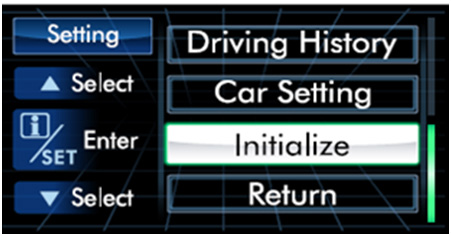
Access the Settings menu of the MFD by pulling the iSet button on the steering wheel toward you and holding it until the “Setting” menu screen is displayed. The iSet button is also used to select (or enter) the desired function of the screen being displayed.
Pull the up ⇑ or down ⇓ button on the steering wheel to scroll through the Settings menu.
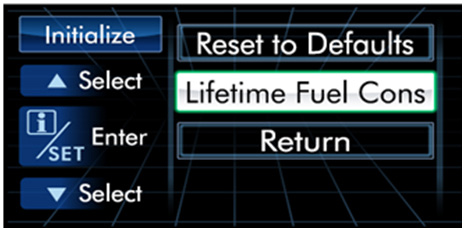
Once “Initialize” is illuminated, pull the iSet button to select it.
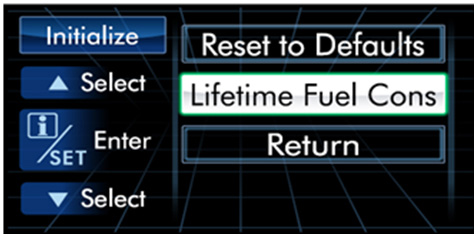
The next screen will have “Lifetime Fuel Cons” listed. Pull the up or down button to scroll until illuminated then the iSet button to select it.
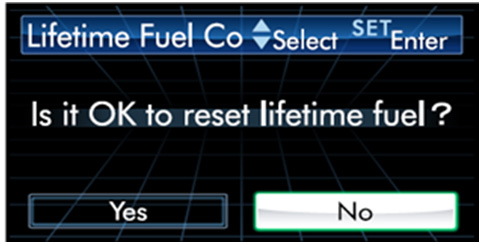
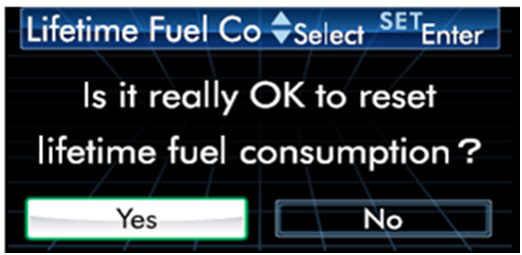
The next screen asks “Is it OK to reset.…” but No is illuminated. Pull the up or down button to toggle between Yes and No. Pull the iSet button to select Yes when illuminated.
The next screen asks if it is OK to reset again and as before, No will be illuminated. Pull the up or down button to toggle between YES and NO then the iSet button to select Yes.
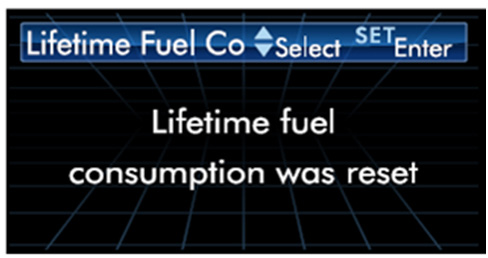
A reset confirmation screen will be displayed for about 3 seconds.
The Settings / Reset to Defaults screen will automatically be displayed again with an option to “Return” or “Go Back”. Use the up or down button to scroll until “Return” or “Go Back” is illuminated then pull the iSet button to select it.
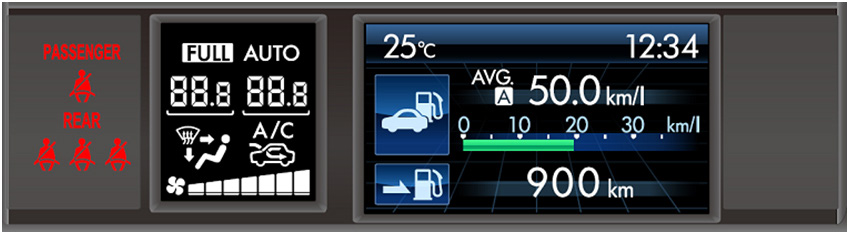
Repeat the “Return” or “Go Back” selections until the customer’s previously selected “home screen” (clock, average mileage, miles to empty, etc.) is displayed on the MFD to complete the reset procedure.
REMINDER: SOA strongly discourages the printing and/or local storage of service information as previously released information and electronic publications may be updated at any time.
Always refer to STIS for the latest service information before performing any repairs.
DEEP FUEL SYSTEM CLEANING - Cleans the entire fuel system (injectors, carburetor passageways, intake valves, and chamber areas) to help restore power, MPG, and throttle response.
FUEL ADDITIVE FOR GASOLINE AND DIESEL ENGINES - Breaks down fuel residues and varnish for smoother idling and cleaner combustion in gasoline and diesel engines.
OIL TREATMENT FOR ENGINE CLEANING - Cleans sludge and deposits that can restrict oil flow and lubrication in motor oil crankcases, helping support longer engine life in car and truck engines.
FUEL STABILIZER - Keeps gas or diesel fresh for up to 2 years. Ideal as a fuel stabilizer and gas stabilizer for stored cars, motorcycles, and generators.
SAFE FOR ALL ENGINES & FUELS - Compatible with all gasoline and diesel fuels and blends, including E10 and E85. Trusted for use as a gasoline and diesel fuel additive.