NUMBER: 15-200-16
DATE: 05/24/16
| APPLICABILITY: | 2015MY Legacy, Outback, Impreza and XV Crosstrek 2016MY Forester, WRX and STI Models with Fujitsu-TEN / FTEN / (F10) Gen2 Navigation System |
| SUBJECT: | Fujitsu-TEN / FTEN / (F10) Navigation: Voice Recognition Concerns with Finding Addresses in Some Metro Areas |
Introduction:
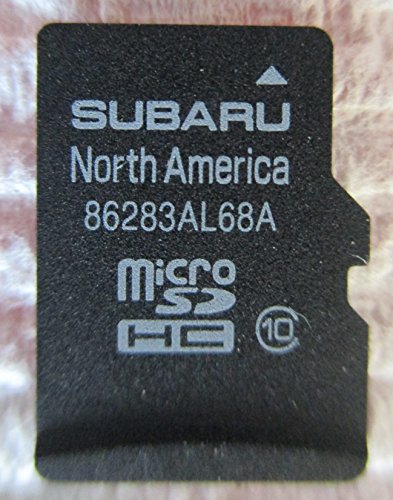
This bulletin announces availability of new MicroSD cards which contain a revision to the cities data. The revision will address customer concerns of some addresses in select metropolitan areas not being recognized when inputted using the Navigation system’s voice recognition (VR) feature. For example: when using voice recognition and speaking the address “123 Main St. Denver Colorado”, the address does not appear in the option list shown on the head unit display.
Production Change Information:
The new MicroSD cards were incorporated into production as follows:
- Legacy, Outback, Impreza and XV Crosstrek Models: Start of 2016MY Production
- Forester: G*464091
- WRX and STI: G*818112
Part Information:
| PART NUMBER | DESCRIPTION | APPLICABILITY |
|---|---|---|
| 86283AL68A | MicroSD Card | Legacy and Outback |
| 86283FJ650
No products found. | Forester, Impreza, WRX and STI |
Service Procedure / Information:
Should a vehicle present with the condition described above, first confirm the address which the customer states does not appear when using voice recognition actually appears in the map database. To confirm this, enter the address manually using the navigation touch screen. Once the address has been confirmed this way, using voice recognition, say the same address (all at once with no pauses) but include the words “metro area” after the city name and before the state name. For example: “123 Main Street Denver Metro Area Colorado”. If both these processes result in the navigation system providing direction to the specified address, the MicroSD card must be replaced. Order the applicable replacement MicroSD using the table above through normal parts channels. To summarize the diagnosis:
STEP 1: Confirm the address the customer reports does not work using VR.
STEP 2: Enter the address using the touch screen to confirm it exists in the database.
STEP 3: Enter the same address using VR and including “metro area” to see if it appears on the screen.
STEP 4: If results of 2 and 3 are YES and YES, the replacement MicroSD card will resolve this issue.
STEP 5: If results of 2, or 3 are NO, another condition exists and Card replacement will not resolve it.
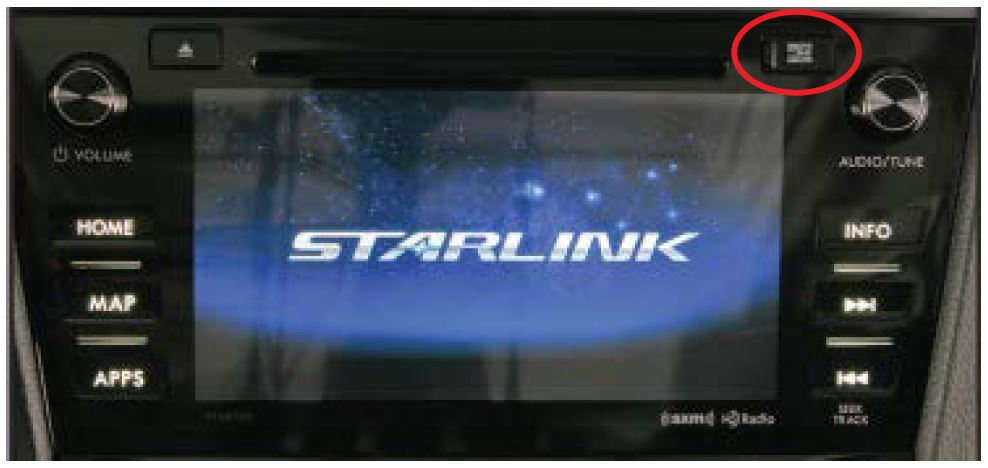
After receiving the replacement MicroSD card, open the small access cover on the face of the unit circled in the photo below. Push the original card in slightly to release it then pull it out of the unit. Use care to press the card straight in to release it. Do not apply any upward or downward pressure on the card while pressing it in otherwise, it may crack or break. CAREFULLY install the new card into the slot. Push the card all the way in while using care to avoid any upward or downward pressure to avoid cracking or breaking it. Release the card to lock it in place and close the access cover to complete the procedure.
Warranty / Claim Information:
For vehicles within the Basic New Car Limited Warranty period, this repair may be submitted using the following claim information:
| Labor Description | Labor Operation # | Failure Code | Labor Time |
|---|---|---|---|
| F10 GEN2 MicroSD CARD REPLACEMENT FOR VOICE RECOGNITION ISSUE | A031-125 | ZRB-43 | 0.3 |
IMPORTANT REMINDERS:
- SOA strongly discourages the printing and/or local storage of service information as previously released information and electronic publications may be updated at any time.
- Always check for any open recalls or campaigns anytime a vehicle is in for servicing.
- Always refer to STIS for the latest service information before performing any repairs.
No products found.

- Foursquare - Search millions of additional new and popular restaurants, shops and more with Foursquare
- Garmin Real Directions - Garmin Real Directions guides like a friend using landmarks and traffic lights
- Direct Access - Simplifies navigating to select complex destinations, like malls and airports
- Backup Camera Compatible - Take the worry out of reversing with the BC 30 Wireless Backup Camera (purchased separately)3
- Free lifetime Map updates

- Vehicle dash mount for use on any stable surface
- Securely holds your GPS in vehicle.Keep your device in easy sight with this portable friction mount, and then remove it from your vehicle when you arrive at your destination
- Does not slide or detach while vehicle is in motion
- Adjustable to position GPS in a variety of angles
- Ships in Certified Frustration-Free Packaging

This product presentation was made with AAWP plugin.