
NHTSA ID Number: 10241828
Manufacturer Communication Number: Subaru TechTips
Summary
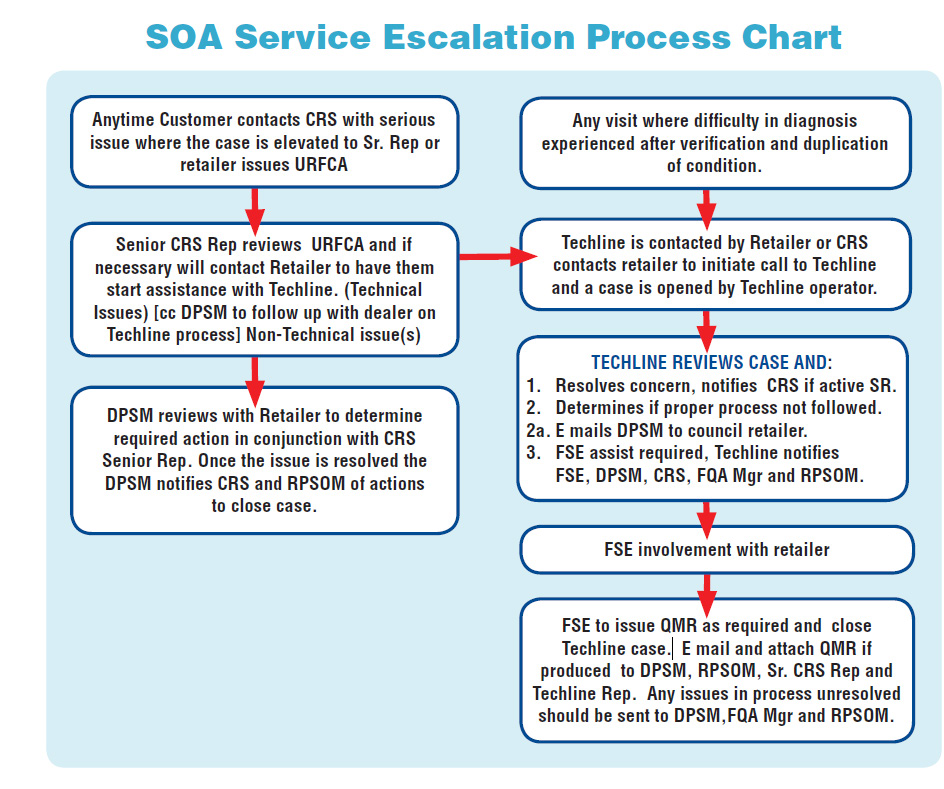
Subaru Service and Technical Support Line Newsletter. ( Escalation Process)
ARTICLES CONTAIN IN THIS ISSUE
Click on a title below to jump to the article.
Click the date located in the footer to return to page 1.
CODE ARTICLE – PAGE
(01) Escalation Process What, Why, and How – 1-5
SPECIAL EDITION
We last published information to you regarding the Escalation Process in January 2015. We feel with the New Year upon us, it is an opportune time to revisit this process and bring it to your attention once again.
Escalation is a process for retailers and all of us within SOA to follow when there is a vehicle with a difficult to diagnose concern. This can include parts delays also. Retailers should know within a few hours to a couple of days, if they are struggling for resolution of a duplicated concern on a customer’s vehicles and as such, should not hesitate to seek assistance through established channels.
Our number one priority is our customer and the resolution of whatever concerns(s) they are experiencing with our product(s). We also have regulatory reporting requirements which must be followed. We have the need for information across our ranks to make us more effective and to provide vital feedback to SBR for continuing product improvements and customer satisfaction. This gives us all a unified process to provide consistent resolution to field issues and support staff in our objective to continually satisfy our customers and improve product quality.
This process is not designed to cover every situation. We appreciate honest feedback to know what may need adjusting in this escalation process, so we can work together for the benefit of our customers and the Love Promise.
Below, is a reprint of the June 2006 TIPS article which has been slightly modified for today’s use.
VEHICLE REPAIR ESCALATION PROCESS
(UPDATED REPRINT FROM JUNE 2006)
Before we get started, did you even know there was an Escalation Process? The Escalation Process is a procedure designed to help ensure the timely resolution of vehicle concerns/repairs that you may be having difficulty with. Before you throw your arms up in disbelief at another process, understand that it has been around for nearly 15 years and you probably already follow it to some extent.
For this article, we will only cover the first 2 (the two most important) levels. The first 2 are the levels the Technician and Service Manager have the most control over. As you probably expected, each level has several steps. These steps are outlined below:
Level 1: “Contacting the Techline”
Step 1 – Confirm the customer’s concern under the same or similar conditions as they describe it occurs. Are you sure the concern you are diagnosing is the same one the customer is thinking of? If needed, interview the customer to gather additional details. If you are not 100% certain, have the customer demonstrate. If they cannot demonstrate, do not attempt any repair and return the car to the customer. Submit a QMR indicating what the customer’s concern was and what you did in attempting to duplicate it.
Step 2 – Is the customer’s concern a defect or normal operation? Verify with another car. If it is not a defect, stop here. Do not attempt any repairs. Demonstrate to the customer if necessary and return the car to the customer. Submit a QMR at this point to make SOA and SBR aware of a customer concern with a vehicle characteristic. Submitting a QMR on a vehicle characteristic serves only as notification to SOA and SBR so that this area may be investigated. It does not guarantee any improvement action will occur.
Step 3 – If it is a defect, repair it and confirm the repair. If this is a new, unusual, or recurring concern that you are seeing, enter a QMR.
Step 4 – Follow standard repair procedures. If applicable, check all control modules for codes and freeze frame data (FFD). Save all codes and FFD electronically so they may be shared later if necessary (faxed FFD will not be accepted). Check for relevant service bulletins or TechTIPS. Complete the appropriate service manual step by step troubleshooting, either DTC based, diagnostics by phenomenon, or general troubleshooting. Collect relevant data with the Subaru Select Monitor (SSM) while duplicating the customer’s concern (be sure to mark where it occurs). Finally diagnose the condition using technician know-how. In other words, diagnose the vehicle using your knowledge and understanding of vehicle system operations. As an overly simple example, if you are presented with a crank-no start condition you should check for the presence or lack-of fuel, air, and spark and then diagnose the related system and controls to determine why that element is missing. Record all results found, exact measurements and/or readings should be recorded. Review all your findings with your Service Manager or Shop Foreman to confirm the results and determine if there may be other internal avenues to pursue.
IMPORTANT: Retailer internal resources should be utilized before contacting Techline.
Step 5 – If you still have been unable to resolve the concern, now is the time to contact the Techline. When contacting the Techline make sure you have all diagnostic results (actual values, not “it was ok” or “it was in spec.”), complete service history, and freeze frame data. It is highly recommended that you complete the appropriate Pre-Call Worksheet for the condition as found on Subarunet > Service Operations & Technical > Techline Pre-Call Worksheets or related questionnaire found on Subarunet > Service Operations & Technical > Forms/Downloads and fax it in before you call. These sheets have all recently been revised by SBR Engineers to provide needed information.
IMPORTANT: If this vehicle has been in for this concern before or has been at your retailer for more than a few days, make sure to advise your Techline representative! At the same time notify your Service Manager to file an Urgent Request for Customer Assistance (URFCA) with SOA’s Customer Advocacy Department (CAD).
Step 6 – The car MUST actually be there at the retailer before you call for assistance. The Techline can’t make hypothetical diagnosis on a vehicle that isn’t there and/or on a vehicle the technician hasn’t actually confirmed whether there is or isn’t in fact a problem with it. Call only after attempting to duplicate and diagnose the customer’s concern.
Level 2: “Techline Notified”
Step 1 – The Techline will help you to determine if the complaint is an actual defect or normal operation.
Step 2 – If it is a defect, is it a known issue? Whether it is a known issue or not, follow the recommendation of the Techline and follow up with results. It may be a known issue and Subaru is working on a fix or countermeasure. If this is the case, usually all we can do is wait for further information. If we are waiting, make sure you document the repair order with the Techline case number and have the service advisor explains the situation to the customer.
Step 3 – After following the recommendations of the Techline, if the car is fixed, contact the Techline and close the case. Techline cannot build a database of confirmed repairs if cases are not closed. It is the Technician’s responsibility to call and close any case they open. If after following the recommendations of the Techline the car still is not repaired, contact the Techline for additional assistance. Be sure Techline knows how long the vehicle has been at your facility for this issue. This step will alert the appropriate personnel that there is a potential customer issue.
Step 4 – If you become stuck and with the assistance of Techline need further assistance, Techline will alert your local Field Service Engineer (FSE) to contact you concerning the vehicle. At this point, it is up to the FSE to continue to work with the retailer and Techline to repair the vehicle. This does not mean the Technician should stop and wait for the FSE to arrive. The Technician should continue to diagnose the vehicle.
Important notes:
It is the Technician’s responsibility to follow-up at all steps and ensure that this process is being followed.
You need to continue to diagnose and repair the vehicle at all steps of the process unless directed otherwise. DO NOT tell the customer “We are waiting to hear from Subaru and until we do, there is nothing more we can do.” Just because you are waiting to hear back from someone doesn’t mean that you should stop working on the car and go on to other things. Instead reassure the customer “We have contacted Subaru Techline and we are working with them to reach a resolution as quickly as possible”. Provide the customer with a date/ time convenient to them, when you will be in touch to provide an update on the progress of the diagnosis. Be sure to follow up with them at the agreed upon time.
If a Technician is awaiting a call back from Techline and it is not received within twenty-four (24) hours, then the Technician should call in for an update.
If the vehicle has been in more than once for this concern and the concern has been verified or has been down for any length of time with no end in sight, make sure to advise Techline how long this vehicle has been down based on the repair order date. Notify your Service Manager to submit an URFCA to CAD.
1 Affected Product
Vehicle
1 Associated Document
Manufacturer Communications
TIPS0121-SE – Escalation Process Special Edition TechTIPS
NHTSA ID Number: 10186429
Manufacturer Communication Number: Techtips
Summary
Subaru service and technical support line newsletter. (Special Edition)
1 Associated Document
Manufacturer Communications
TIPS0121-SE Escalation Process Special Edition TechTIPS
MC-10186429-0001.pdf 513.228KB

- [Easy to Use—Work Out of the Box] + [FOXWELL 2026 New Version] FOXWELL NT604 Elite scan tool is the 2026 new version from FOXWELL, designed for car owners who want to figure out the cause of issues before fixing car problems by scanning common systems like ABS, SRS, engine, and transmission. The NT604 Elite obd2 scanner diagnostic tool comes with the latest software—no need to waste time downloading software first. Plug the scanner into the OBDII port with OBDII cable to start the diagnosis.
- [Affordable] + [Reliable Car Health Monitor] Will you be confused what happens when the warning light of ABS/SRS/transmission/check engine flashes? Instead of taking your cars to dealership, this FOXWELL scanner will help you do a thorough scanning and detection for your cars and pinpoint the root cause. Note:The device is a diagnostic tool, not a repair tool. To turn off a warning light, you must first physically repair the issue causing it. Only then can the scanner be used to clear the corresponding fault code.
- [5 in 1 Car Diagnostic Scanner] Compared with obd scanners (50-100), NT604 Elite code scanner not only includes their OBDII diagnosis but also serves as ABS/SRS scanner, transmission and check engine code reader. When it’s an odb2 scanner, you can use it to check if your car is ready for annual test through I/M readiness menu. In addition, live data stream, built-in DTC library, data play back and print, all these features are a big plus for it. Note: doesn't support maintenance functions like reset or relearn. For the SRS system, NT604 Elite can read and clear common fault codes not caused by a crash, but crash/collision data cannot be cleared.
- [Fantastic AUTOVIN] + [No extra software fee] Through the AUTOVIN menu, this NT604 Elite car scanner allows you to get your V-IN and vehicle info rapidly, no need to take time to find your V-IN and input one by one. What's more, the NT604 Elite ABS SRS scanner supports 60+ car brands from worldwide (America/Asia/Europe). You don’t need to pay extra software fee. AUTOVIN may not work on some older vehicles or certain vehicle brands. If AUTOVIN fails, please input the vin code manually or go to the Diagnostic Menu to select your vehicle model.
- [Solid protective case KO plastic carrying bag] + [Lifetime update] Almost all same price-level car scanner diagnostic tool only offers plastic bag to hold the scanner.However, NT604 Elite automotive scanner is equipped with solid protective case, preventing your obd2 scanner from damage. Then you don’t need to pay extra money to buy a solid toolbox.

- 【Reset ABS/SRS/Transmission/Engine Lights】 More than an check engine code reader, OBDMATE OM901 obd2 scanner performs comprehensive diagnostics for the 4 most-used systems (ABS/SRS/Engine/Transmission). It quickly clears fault codes, turns off warning lights, read data stream and auto VIN.
- 【3.5" Handheld Scanner with 4 System Diagnose】 3.5" Super large TFT screen equipped displays an intuitive menu and clear readings of various sensors from ABS, SRS, ECM and TCM
 systems. It arrived with a silicone protective case and hard-shell carrying case, ensuring long-lived durability and drop resistance. The car diagnostic tool is plug-to-play designed, plug it and get diagnosis started without any batteries or updates required.
 - 【One-Click I/M Readines&Full OBD2 Functions】 Press F1 to get an intuitive corloured form about whether various emissions-related systems on the vehicle are operating properly. Help you get smog-check ready quickly. OM901 car scanner supports all essential OBD2 functions you need: read & clear codes, view freeze frame, read I/M readiness, retrieve VIN, live data stream (with graphing display), O2 sensor test, onboard monitoring mode, and EVAP leak test.
- 【Battery Voltage Check&DLC Pin Test】 It allows you to monitor battery health by testing current battery voltage. Plus, this obd2 diagnostic tool features DLC 16-PIN test to check current voltage of every pin.
- 【Automotive Scanner Diagnostic Kit】 The package comes with 1 car scanner, 1 USB-type c cable, 1 hard storage bag and 1 user manual(en). Free to update without any hidden fees. 5 languanges available in setting including English, French, Italian, German and Espanish. Valuable and Portable, making it a great tool kit for car owners, DIY enthusiasts, and professional mechanics.
 systems. It arrived with a silicone protective case and hard-shell carrying case, ensuring long-lived durability and drop resistance. The car diagnostic tool is plug-to-play designed, plug it and get diagnosis started without any
- [Diagnose Like a Pro] BlueDriver Pro is a professional OBD2 scanner and diagnostic tool that helps you scan, understand, and clear vehicle trouble codes with confidence. Turn your phone into a powerful car diagnostic scanner—no guesswork, no unnecessary repairs.
- [Read and Clear More Codes Than Ever] Read and clear more codes than basic car code readers. Access enhanced diagnostics for Check Engine, ABS, SRS, Airbag, TPMS, Transmission.
- [Verified Fixes and Real-Time Data] Get unlimited, technician-verified repair reports matched to your VIN, with definitions, causes, and confirmed fixes. Monitor live vehicle data as you drive, view freeze frames, check smog readiness, and analyze Mode 6 test results.
- [Wireless & Bluetooth Enabled] - Say goodbye to wires. BlueDriver connects with Bluetooth via your phone/tablet to a sensor that plugs into your car's OBDII port. Get all of the capabilities of an expensive code reader & scan tool without any annoying wires.
- [Broad Make & Model Coverage] Strong support for GM, Ford, Stellantis (RAM, Jeep, Chrysler), Toyota, Honda, Nissan, Mazda, Subaru, Hyundai, Mercedes-Benz, BMW, and VW.

- ✔️【Professional SRS Reset for 1994-2003 BMW】 Designed specifically for classic BMW models (1994-2003). This B800 scanner reads & clears SRS airbag fault codes, turns off the warning light, and saves you a costly dealer visit. Confirmed compatible with: E36, E46 (EXCEPT 2001 330i), E34, E38, E39, Z3, and X5 (E53). NOT compatible with any BMW built before 1994 or after 2003.
- ✔️【Important: Two Different Connection Ports – Read Before Use】 To avoid “not working” issues, please note: For 1994–2000 BMWs (most E36, E34, Z3, early E39), the SRS diagnostic port is a round 20-pin connector under the hood. You MUST use the included 16-pin to 20-pin adapter cable. For 2000–2003 models (late E46, E39, X5), use the standard OBD-II port inside the cabin. Incorrect connection is the #1 reason for “incompatibility” reports.
- ✔️【Read & Clear Fault Codes in Minutes】 Quickly diagnose why your SRS light is on. The scanner accurately reads fault codes from airbag and seatbelt pretensioner systems. With one button press, clear the codes and reset the SRS warning light in seconds. No expensive dealer tools needed.
- ✔️【User-Friendly for DIYers – No Mechanic Required】 Easy operation with an intuitive button layout: ‘Enter’ to confirm, ‘Scroll’ to navigate. The clear LCD screen shows results instantly. Includes a step-by-step manual (revised for clarity) to guide you through the entire reset process.
- ✔️【Reliable Support with 1-Year Warranty】 We stand behind the quality of our B800 scanner. It comes with a 1-Year Hassle-Free Warranty. If you have any questions or need support, please contact us with your Order ID, and our dedicated team will assist you promptly.

- OBD2 SCANNER FOR ALL SYSTEMS – The INNOVA SD35 is a tablet-based OBD2 scanner designed for advanced diagnostics. Read and clear check engine light, ABS, SRS, and TPMS codes, plus test your car battery and alternator to prevent unexpected failures. Vehicle coverage may vary. Please use Innova’s Coverage Checker to verify compatibility.
- ALL-SYSTEM DIAGNOSTICS & LIVE DATA – Unlike basic code readers, this OBD2 scanner for all vehicles scans engine, transmission, ABS, SRS, and more. Get real-time live data, including RPM, fuel trims, temperature readings, and oxygen sensor performance.
- OBD2 TABLET WITH USER-FRIENDLY INTERFACE – This automotive scan tool features a high-resolution display, making vehicle diagnostics faster and easier.
- ADVANCED TPMS, OIL RESET & SERVICE FUNCTIONS – Perform TPMS sensor checks, oil light reset, and other service resets with ease This professional diagnostic tool provides comprehensive vehicle maintenance capabilities in one device.
- WIDE VEHICLE COVERAGE (1996 & NEWER CARS & TRUCKS) – This OBD2 scanner Bluetooth tablet is compatible with Toyota, Ford, Honda, Chevrolet, Nissan, Dodge, and more. However, feature coverage may vary. Please use Innova's Coverage Checker to verify coverage.
SEOCONTENT-START
Anytime Customer contacts with serious Any visit where difficulty in diagnosis issue where the case is elevated to Sr. Rep or experienced after verification and duplication retailer issues URFCA of condition. \.. \.. ,J ‘ i , R ‘ . ‘I r ‘ “I Senior ep rev,1ews URFCA and if . Techline is contacted by Retailer or necessary will contact Retailer to have them . contacts retailer to initiate call to Techline start assistance with Techline. (Technical and a case is opened by Techline operator. ,J Issues) [cc DPSM to follow up with dealer on \,. .L Techline process] Non-Technical issue(s) \,. ~ r TECHLINE REVi EWS CASE AND: ” r -H- “I 1. Resolves concern, notifies CRS if active SR. DPSM reviews with Retailer to determine 2. Determines if proper process not followed. required action in conjunction with 2a. E mails DPSM to council retailer. Senior Rep. Once the issue is resolved the 3. FSE assist required , Techline notifies DPSM notifies and of actions FSE , DPSM, ‘ Mgr and \. ~ to close case. ~ \.. ~ FSE involvem’ ent with retailer ) .1. r FSE to issue QMR ! s required and close ., Techline case.I E mail and attach QMR if produced to DPSM, RPSOM, Sr. Rep and Techline Rep. Any issues in process unresolved should be sent to DPSM, Mgr and \.. ~
SEOCONTENT-END
This product presentation was made with AAWP plugin.