
NHTSA ID Number: 10201796
Manufacturer Communication Number: WRH-21
Summary
In the interest of customer satisfaction, Subaru of America, Inc. (Subaru) is initiating a service program to reprogram the Engine Control Module (ECM) on certain 2021 model year Crosstrek vehicles equipped with a 2.0L engine and a continuously variable transmission (CVT).
NUMBER: WRH-21
DATE: 09/10/21
INTRODUCTION
In the interest of customer satisfaction, Subaru of America, Inc. (Subaru) is initiating a service program to reprogram the Engine Control Module (ECM) on certain 2021 model year Crosstrek vehicles equipped with a 2.0L engine and a continuously variable transmission (CVT).
AFFECTED VEHICLES
The number of U.S. vehicles included in this service program is 40,612.
| Model Year | Carline | Production Date Range |
| 2021 | Crosstrek 2.0L w/CVT | June 22, 2020 – February 11, 2021 |
Not all vehicles within the production date range listed above are included in this service program. Coverage for all affected vehicles must be confirmed by using the Vehicle Coverage Inquiry function on subarunet.com. This information is now available.
REASON FOR THIS SERVICE PROGRAM
Subaru has determined that the ECM programming in the affected vehicles erroneously includes certain logic applicable to manual transmission vehicles. As a result, under certain driving conditions, the ECM may detect DTC P0606 (Control Module Processor), the MIL will illuminate, and the vehicle may go into failsafe mode. If the vehicle goes into failsafe mode, the driver will experience a reduced amount of power.
DESCRIPTION OF THE REPAIR
Subaru retailers will reprogram the ECM.
RETAILER RESPONSIBILITY
Any vehicles listed in any recall or campaign that are in retailer stock must be:
- Immediately identified
- Tagged or otherwise marked to prevent their delivery or use prior to repair
- Repaired in accordance with the repair procedures outlined in this bulletin
Retailers are to promptly perform the applicable service procedures, to correct all affected vehicles in their inventory (new, used, demo & SSLP). Additionally, whenever a vehicle subject to this campaign is taken into inventory or in for service, necessary steps should be taken to ensure the repair has been made before selling or releasing the vehicle.
OWNER NOTIFICATION
Owner notification letters will be mailed on September 16, 2021.
PAK FILE INFORMATION:
| MY | Model | PAK File Description | New ECM
Part # | Old ECM Part # | Decryption Keyword | New ECM CID # |
| 2021 | Crosstrek | 22765AP931.pak | 22765AP931 | 22765AP930 | 27C0EA89 | XE1P101F00G |
This reprogramming file is currently available in SSM4 software.
SERVICE PROCEDURE / INFORMATION:
REMINDER: Customer satisfaction and retention starts with performing quality repairs.
Subaru of America, Inc. (SOA) highly recommends connecting either the Subaru Midtronics DCA8000 Dynamic Diagnostic Charging System or the Subaru Midtronics GR8-1100 Diagnostic Battery Charger to the vehicle and utilizing the Power Supply Mode feature anytime a vehicle control module is being reprogrammed. Once the Midtronics charger is connected to the vehicle, if the battery is fully charged, it takes less than three (3) minutes to boot-up the charger, select the Power Supply Mode, and have the battery voltage stabilized and ready for reprogramming.
NOTES:
- For instructions on using the power supply mode, reference the applicable User Manual for the Midtronics DCA-8000 Dynamic Diagnostic Charging System and the Midtronics GR8-1100 Diagnostic Battery Charger on STIS.
- Confirm all electrical loads such as lights, audio, HVAC, seat heaters, and rear defroster are all switched OFF before setting up the charger for Power Supply Mode.
- Select the correct battery type (Flooded, EFB, Gel, AGM or AGM Spiral).
- Input the CCA which matches the vehicle’s battery. NOTE: OE and replacement batteries have different CCA ratings. Always confirm the battery’s CCA rating before proceeding.
- If using a DCA-8000 Dynamic Diagnostic Charging System, set the power supply voltage to 13.5 volts.
- DO NOT connect the DST-i or SDI until the Power Supply mode function has completed its battery test mode and the Charging Voltage has dropped to and shows a steady 13.5 Volts on the display.
- Once Power Supply Mode reaches a steady 13.5 volts, connect the DST-i or SDI to the OBD connector and proceed with initiating the normal FlashWrite reprogramming process.
- Amperage will fluctuate based upon the vehicle’s demand for power. NOTE: If the voltage rises beyond 14V while programming is in process, the procedure will abort. This can indicate a need to test or charge the vehicle battery before any further attempt at programming is made.
REMINDER: If the DCA-8000 or GR8-1100 indicates the vehicle’s battery must be charged, charge the battery fully before proceeding to reprogram the vehicle while using the Power Supply Mode.
NOTE: Control module failures resulting from battery discharge during reprogramming are not a matter for warranty. Should any DTCs reset after the reprogramming update is performed, diagnose per the procedure outlined in the applicable Service Manual.
VERY IMPORTANT:
This information is applicable to the Subaru Midtronics DCA-8000 Dynamic Diagnostic Charging
System and the Subaru Midtronics GR8-1100 Diagnostic Battery Charger ONLY. It does not apply to any other brand / type of “generic” battery charger whatsoever. ONLY the DCA-8000 and the GR81100 and their Power Supply Mode feature have been tested and approved by SOA.
SERVICE PROGRAM IDENTIFICATION LABEL:
Type or print the necessary information on a Campaign Identification Label. The completed label should be attached to the vehicle’s upper radiator support. Additional labels are available through normal parts ordering channels. The part number is MSA6P1302, which comes as one sheet of 20 labels.
IMPORTANT: Always note the original Calibration Identification number (CID) the vehicle came in with on the repair order before reprogramming and, make sure to list the NEW CID for any newlyinstalled programming (as confirmed from the actual control module AFTER installation). The NEW CID MUST also be noted on the repair order as this information is required for entry in the Miscellaneous Detail field during claim submission.
NOTE: The pak file listings provided in this bulletin are the latest available at the time of publishing. Updates are often released thereafter without revision to the original bulletin. For this reason, it is critical to always have the latest version of Select Monitor software installed on your system. You can confirm if a later version is available by entering the CID listed in this bulletin into FlashWrite.
If a newer CID is shown as available in FlashWrite, reprogram using that file.
This notice applies to the VIN identified in the address section printed below
Subaru Service Program WRH-21
September 2021
Dear Subaru Owner:
We would like to thank you for your selection of a Subaru vehicle. We take pride in our products and are committed to your continued satisfaction.
Subaru of America, Inc. (Subaru) is initiating a service program for certain 2021 model year Crosstrek vehicles equipped with a 2.0L engine and a continuously variable transmission (CVT). You have received this notice because our records indicate that you currently own one of these vehicles.
REASON FOR THIS SERVICE PROGRAM
Subaru has determined that the electronic control module (ECM) programming in the vehicles covered by this service program erroneously includes certain logic applicable to manual transmission vehicles.
As a result, under certain driving conditions, the ECM may detect a certain diagnostic trouble code for the control module processor, the check engine warning light will illuminate, and the vehicle may go into failsafe mode. If the vehicle goes into failsafe mode, the driver will experience a reduced amount of power.
REPAIR
Your Subaru retailer (dealer) will reprogram the electronic control module in your vehicle with the correct logic, at no cost to you.
WHAT YOU SHOULD DO
You should immediately contact your Subaru retailer for an appointment to have repair performed.
HOW LONG WILL THE REPAIR TAKE?
The actual time to perform this repair is less than 30 minutes. Your retailer can provide you with a better estimate of the overall time for this service visit, as it may be necessary to make your vehicle available for a longer period of time for scheduling purposes.
CHANGED YOUR ADDRESS OR SOLD YOUR SUBARU?
If you have moved or sold your vehicle, please update this information online at www.subaru. com, select ‘Customer Support,’ then select ‘Address Update’ or ‘Ownership Update’ from the ‘Quick Links’ menu.
IF YOU NEED FURTHER ASSISTANCE:
To locate the nearest Subaru retailer, you can access our website at www.subaru.com and select ‘Find a Retailer.’
For additional information, please go to: http://www.wrh21.service-campaign.com.
If you need additional assistance, please contact us directly:
- By e-mail: Go to www.subaru.com, Customer Support and select ‘Contact Us’
- By telephone: 1-844-373-6614
Monday through Friday between 8:00 a.m. and 7:00 p.m. ET
- By U.S. Postal mail: Write us at Subaru of America, Inc.,
Attn: Customer Advocacy Department,
P.O. Box 9103, Camden, NJ 08101-9877
Please contact us immediately if the Subaru retailer fails or is unable to make the necessary repairs free of charge.
Your continued satisfaction with your Subaru is important to us. Please understand that we have taken this action in the interest of your vehicle’s proper operation. We sincerely apologize for any inconvenience this matter may cause and urge you to schedule an appointment as soon as possible to have this repair performed.
Sincerely,
Subaru of America, Inc.
A subsidiary of SUBARU CORPORATION
1 Affected Product
Vehicle
| MAKE | MODEL | YEAR |
| SUBARU | CROSSTREK | 2021 |
1 Associated Document
Manufacturer Communications
NUMBER: WRH-21
DATE: 09/10/21
MC-10201796-0001.pdf 1210.822KB
NHTSA ID Number: 10201795
Manufacturer Communication Number: Subarunet Announ
Summary
In the interest of customer satisfaction, Subaru of America, Inc. (Subaru) is initiating a service program to reprogram the Engine Control Module (ECM) on certain 2021 model year Crosstrek vehicles equipped with a 2.0L engine and a continuously variable transmission (CVT).
1 Associated Document
Manufacturer Communications
Date: September 10, 2021
New Subaru Service Program:
WRH21 – ECM Reprogramming for DTC P0606
MC-10201795-0001.pdf 161.964KB
Reprogramming
What J2534 reprogramming capabilities are available?
(4a) J2534 Reprogramming
Subaru reprogramming files using a generic (non-OEM) SAEJ2534 pass-thru vehicle programming device are available by contacting Service Technical Information Company toll free at 1-866-428-2278. The cost for the CD-ROM with all reprogramming files is $75.00 plus S/H and applicable state tax. Files will be updated four (4) times per year, in CD-ROM format, with all available reprogramming service information at the same above offered cost. Authorized Subaru Dealers are provided the same reprogramming information.
Before purchasing, the reprogramming details can be found in the following Reprogramming J-2534 Files chart. Click the link to view the PDF chart.
Subaru J2534 Reprogramming software meets the latest available J2534-1 specification. Our Reprogramming J2534 Files chart does not specify the Calibration Identification Number (CID); however, this information is included in our offered CD-Rom.
Note: The ECM or TCM being reprogrammed may already contain some or all of the reprogramming files listed in the Reprogramming J2534 Files chart shown by release date. It is possible to damage the vehicles ECM/TCMduring the reprogramming event. Once the reprogramming process has started, it is recommended not to interrupt the process until the event is completed. If you experience any problems, please contact your scan tool maker for further instructions.
(4b) Are all pre-2004MY Subaru vehicles compatible with J2534?
No. Subaru has no reprogramming capability for model years 1996-1998. Starting with our 1999 model year, please see our Reprogramming Pre-J2534 Files chart for affected model reprogramming information.
Both pre-J2534 reprogramming and J2534 pass thru reprogramming files are included in the offered HDS kit software for aftermarket service provider application.

- J2534 Pass-Thru Programmer: TOPDON RLink J2534 is an advanced diagnostic and reprogramming tool that support all J2534 protocols, as well as D-PDU, CAN-FD and DoIP, ensuring compatibility with a wide range of modern vehicles. It offers extensive versatility with support for over 18 major automotive brands, including Chrysler, Ford, GM, Nissan, Toyota, Honda, Subaru, Land Rover/Jaguar, Volvo, Wuling, Volkswagen/Audi, Mercedes-Benz, and BMW. NOTE: Not compatible with Ford IDS diagnostic software
- All-in-One OEM Diagnostics: This J2534 ECU programming tool elevates your automotive repair capabilities to new heights by delivering complete OEM diagnosis. Boasting comprehensive full-system diagnostics, intuitive repair guides, advanced ECU programming and coding, common reset services, a vast library of repair information and more, this all-in-one solution empowers technicians to effortlessly tackle complex vehicle issues with ease. *Not compatible with 24V vehicles
- Proven Performance You Can Trust: Backed by over 10000 real vehicle tests and benefit from a wealth of practical experience, this OEM reprogramming tool guarantees stable and exceptional performance. Supported by TOPDON's dedicated technical experts with in-depth knowledge of both auto repair and J2534 Pass-Thru programming, the RLink J2534 provides prompt and professional assistance, ensuring a smooth setup and reliable compatibility
- Integrated Excellence, Always Up-to-Date: Featuring the exclusive RLink Platform to provide a streamlined experience with one-click driver installation and management, ensuring flawless integration with your OE software, maintaining the original performance quality. The built-in operation guide makes mastering OE software quick and easy, so you can get started right away. Plus, with lifetime free updates, your diagnostics will stay current with the latest drivers and innovations
- Efficiency Meets Versatility: Engineered to support three CAN channels simultaneously - CAN FD and CAN-CC included, giving you the edge in fast troubleshooting. To perfectly synchronized with the OE software, please diagnose with active subscriptions and make sure your computer system is running a compatible 64-bit Windows version (7, 8, 10 or later) to fully leverage the power of RLink J2534. *We don't provide extra OE software

- Advanced VCI Box, Industry-leading J2534 Pass-Thru Technology: This J2534 Pass-Thru Programmer is designed espically for technicians, independent shop owners, and DIY enthusiasts, enables fast, reliable computer-based programming. It supports all J2534 protocols—including the latest DoIP and CAN FD—ensuring full compatibility with both legacy and next-generation vehicles.
- High-Speed OEM-Level Diagnostics & Programming: Unlock true OEM functionality with comprehensive system diagnostics, guided troubleshooting, coding, adaptations, resets, and programming—all designed to slash repair time. This all-in-one tool eliminates the need for multiple OEM devices, boosting efficiency and cutting costs. Equipped with High-Speed USB, it delivers 10x more data per second than competing solutions
- Coverage for 17 Car Brands & Ultra Reliability: Works seamlessly for Chrysler, for Ford(Forscan), for GM, for Nissan, for Toyota, for Honda, for Subaru(SSM4), for Land Rover/Jaguar, for Volvo, for Wuling, for Volkswagen, for Mercedes-Benz, and for BMW. Backed by over 10000 real vehicle tests and benefit from a wealth of practical experience, this OEM reprogramming tool guarantees stable and exceptional performance
- User-Friendly RLink Platform & Expert Support: TOPDON’s proprietary driver management platform offers a clean interface and lifetime free updates. Access a rich library of real-world case studies to stay ahead of the curve. Backed by a support team with 10+ years of J2534 and automotive repair experience, we provide one-on-one assistance to resolve any technical issue.
- 6.6 ft USB-C Cable & Portable Storage Case: The RLink J2534 diagnostic tool features a 6.6ft USB 2.0 Cable and a 1.2 ft OBDII Extension Cable, allows to connection your computer easily outside the vehicle. The included handled carry case offers easy portability, storage, and hanging options—keeping your gear clean and ready to go, anywhere.

- Dual WiFi & 10.1" Touchscreen: Provides a stable, high-speed wireless link 3x faster than bluetooth, and a responsive, professional interface. Topdon ONE obd2 scanner diagnostic tool ensures smooth, non-lagging diagnostic scan, boosting mechanic efficiency
- J2534 Pass-Thru Support: The included ONE VCI supports the J2534 standard, allowing it to function as a pass-thru device when paired with OEM diagnostic software.Through TOPDON’s RLink platform, technicians can perform dealer-level coding, expanding in-house capabilities without investing in multiple factory automotive scan tools
- OE Topology Mapping: Visualize the vehicle’s ECU network exactly as it’s built.Zoom, pan, and highlight specific modules to pinpoint component issues with precision.Topology mapping displays real-time communication between modules
- 50+ Service Functions: Covers high-demand services like ADAS calibration, DPF regen, TPMS reset, ABS bleed, and throttle adaptation.Expands your service menu, allows you to charge premium rates, and turns away zero jobs due to lack of tooling. Vehicle-specific functionality may vary
- Advaned ECU Coding: 10 of the most serviced brands in North America, including full ECU coding and flash hidden support for BMW, VW, Au-di, Benz, Porsche, Toyota, Ni ssan and more. Enables module replacement, feature customization, and personal settings with automatic backup or restore.Lets your shop safely offer high-margin customization services, attracting more customers and boosting profit

- [J2534 Pass-Thru Programmer] - TOPDON RLink J2534 is engineered for professional technicians, delivering OEM diagnostic and reprogramming capabilities. It supports all J2534 protocols, CAN-FD, DoIP, D-PDU. Compatible with 17 vehicle brands—such as Chrysler, Ford, GM, KIA, Hyundai, Nissan, Toyota, Honda, Subaru, Mitsubishi, MAZDA, Land Rover/Jaguar, Volvo, Volkswagen/Audi, Mercedes-Benz, and BMW. RLink J2534 can help reduce the cost of purchasing equipment from different brands.
- [All-in-One OEM Reprogramming and Diagnostics] - When seamlessly integrated with OEM diagnostic software, this dongle enables you to perform a wide range of functions, including ECU programming and coding, DTC reading and clearing, active tests, component matching, adaptations, rewriting, guided troubleshooting, and more. This all-in-one tool eliminates the need for multiple OEM devices, significantly boosting work efficiency.
- [Tested, Trusted, and Proven for Accuracy] - TOPDON RLink J2534 is renowned for its reliability, having successfully completed over 10,000 real-vehicle tests. The wealth of data and hands-on experience behind it ensures consistent performance and accurate results. You can trust this tool to deliver optimal performance.
- [One-Click Installation, Continuous Updates] - The exclusive TOPDON RLink platform streamlines installation with a one-click driver setup, allowing you to quickly access OEM software for diagnostic and reprogramming tasks. With lifetime free updates, your RLink J2534 stays current without any additional cost, ensuring reliable performance for the long term. *We don't provide extra OE software.
- [Works with Windows Compatibility and OEM Software Subscription] - The RLink J2534 supports three CAN channels - including CAN FD and CAN-CC, providing advantages in the process of rapid troubleshooting. Compatible with Windows 7, 8 and 10 (64-bit) and higher versions of the system. For full functionality, an active OEM software subscription is required for each supported vehicle brand. Please note that the dongle does not include OEM software, which must be purchased separately to access brand-specific diagnostic and reprogramming features.
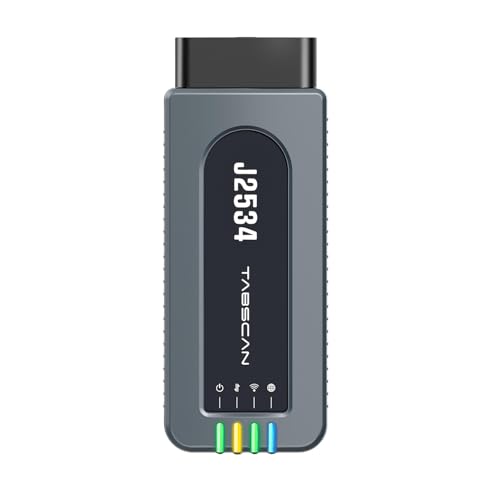
- 【J2534 Pass-Thru Device】 This budget-friendly J2534 pass-thru device delivers OEM diagnostics and reprogramming capabilities for dealerships, repair shops and automotive DIY enthuisasts, enables you diagnose, program and repair the vehicles more efficiently and precisely. Supporting J2534, D-PDU, CAN-FD and DoIP, this J2534 passthru tool ensures wide vehicle coverage. It's compatible with OE software application, ensuring seamless integration and original performance quality
- 【All-in-One Diagnostic Tool】 Simplify your workflow and tackle the complex diagnostics and repairs with confidence! This J2534 passthrough tool provides full system diagnosis, bi-directional control, maintenance reset services, ECU programming and ECU coding to run advanced diagnostics and programming. Equipped with the specialized platform, this J2534 pass-thru tool is fully compatible with OE software that helps technicians confidently handle complicated vehicle repair issues
- 【J2534 Diagnostic Tool】 The Tabscan J2534 pass-thru device is built with a dedicated platform, making it ideal for both professional and personal use. Simply download the driver for your ford vehicle within the platform—ensuring only one driver is installed at a time. Then connect the device to your vehicle’s OBD2 port and link it to your computer using the included USB A to USB C cable. Finally launch your OE software, select Tabscan J2534 VCI as interface, and begin diagnose and program
- 【Universal Compatibility】 Tabscan J2534 reprogramming tool is designed to be compatible with Ford vehicles for advanced diagnostics and programming. It supports J2534 protocols, along with D-PDU, CAN-FD and DoIP, ensuring seamless connectivity with older or modern vehicles. This J2534 diagnostic tool only works with computer running on windows 7/10/11. Vehicle compatibility varies by model or year, please confirm with us before purchase. Note: It's not compatible with 24V vehicles
- 【Professional Technical Support】 Tabscan J2534 pass-thru device provides a stable and seamless connection between your vehicle and computer for diagnostics, programming, and coding. But that's not all—we go beyond hardware. Our dedicated technical support team brings deep expertise in automotive diagnostics and programming. Whether you need help with setup, troubleshooting or latest diagnostic resources and upgrades, we provide fast, professional and reliable support every step of the way
- 💯【Conta.ct us for Support Directly】For any issues experienced after purchase, please reach out to: 📞autelsupply@ outlook. com🛣️. Our team will provide perfect solution for you. For tech support or [explore additional accessory], please cont.act our team: 📞autelsupply@ outlook. com🛣️.
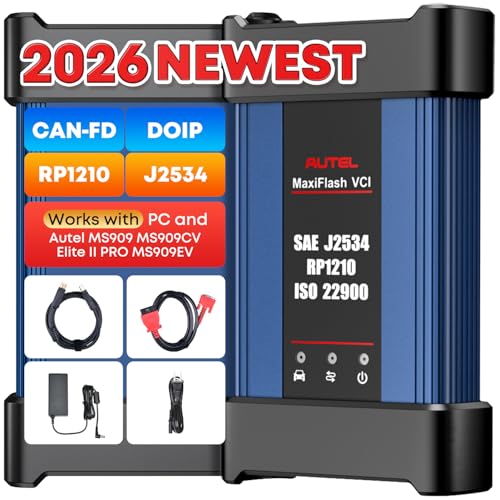
- 🌎【Autel J2534 Pass-Thru Progra.mmer】As an OEM Pass-Thru Progra.mmer Vehicle interface for multiple makes, Autel MaxiFlash J2534 support all J2534 protocols, D-PDU, CAN-FD and DoIP protocols. 2026 newer Autel MaxiFlash J2534 VCI can works with P-C and download OEM vehicle software, seamlessly conduct OE-level diagnostic-progra.mming-c0ding. Also, Work with Elite II Pro/ Ultra Lite/ MS909/ MS909CV/ MS909EV to directly pro.gram on Merce.des-Be.nz & BM.W. Autel J2534 Progr.ammer is a multi-functional device and supports 10+ major brands, including for Hond.a, G.M, LandRo.ver, BM.W, Chrysl.er, For.d, Hyun.dai, Ki.a, Merc.edes B.enz, Toyot.a, Volksw.agen etc.
- 🌎【Enhanced Protocol: J2534/D-PDU/RP1210/CAN FD/DoIP】Autel MaxiFlash JVCI is a blueto.oth communicate device, it supports latest CAN FD DoIP CAN protocols, compliant with automotive D-PDU/ J2534/ RP1210 standards. It can perform standard PassThru J2534 functions: compatible with Toyota Techstream, Volvo VIDA, Honda HDS, Jaguar Land Rover IDS and BM.W 3G for OEM diagnostics. CAN FD protocol is mainly for GM 2019+, DoIP protocol is mainly for Volvo 2018+, for L-and Rover/for Jaguar 2017+, for BM.W F chassis and G chassis.
- 🌎【Compatible with P-C/ WIND.OWS 】The Autel J2534 VCI can be connected to a compu.ter via a data cable; once the corresponding OEM software is installed, it enables do advanced progr.amming and c0ding on your vehicles. Easy Steps: 1) Connect to P-C via a USB cable 2) download OEM vehicle software 3) Start Diagnose. Take For.d for example, you can download OEM software on mot.orcraft.erservi.ce website, such as: For.d Diagnostic Software downloads, As B.uilt Data, Updated Cali.bration information, then use different software do relevant features.
- 🌎【Work with Autel Elite II Pro/ Ultra Lite/ MS909/ MS909CV/ MS909EV】This 2026 latest Autel J2534 Pass-Thru VCI is 100% compatible with Autel Elite II Pro Ultra Lite MS909 MS909CV MS909EV to perform advanced functions from diagnose to progra.mming.
SEOCONTENT-START
Bulletin Number: WRH-21; Date: 09/10/21 Page 1 of 6 SERVICE PROGRAM BULLETIN Continued… CAUTION: VEHICLE SERVICING PERFORMED BY UNTRAINED PERSONS COULD RESULT IN SERIOUS INJURY TO THOSE PERSONS OR TO OTHERS. Subaru Service Bulletins are intended for use by professional technicians ONLY. They are written to inform those technicians of conditions that may occur in some vehicles, or to provide information that could assist in the proper servicing of the vehicle. Properly trained technicians have the equipment, tools, safety instructions, and know-how to do the job correctly and safely. If a condition is described, DO NOT assume that this Service Bulletin applies to your vehicle, or that your vehicle will have that condition. Subaru of America, Inc. is ISO 14001 Compliant ISO 14001 is the international standard for excellence in Environmental Management Systems. Please recycle or dispose of automotive products in a manner that is friendly to our environment and in accordance with all local, state and federal laws and regulations. NUMBER: WRH-21 DATE: 09/10/21 APPLICABILITY: 2021 MY Crosstrek 2.0L SUBJECT: ECM Reprogramming for DTC P0606 INTRODUCTION In the interest of customer satisfaction, Subaru of America, Inc. (Subaru) is initiating a service program to reprogram the Engine Control Module (ECM) on certain 2021 model year Crosstrek vehicles equipped with a 2.0L engine and a continuously variable transmission (CVT). AFFECTED VEHICLES The number of U.S. vehicles included in this service program is 40,612. Model Year Carline Production Date Range 2021 Crosstrek 2.0L w/CVT June 22, 2020 – February 11, 2021 Not all vehicles within the production date range listed above are included in this service program. Coverage for all affected vehicles must be confirmed by using the Vehicle Coverage Inquiry function on subarunet.com. This information is now available. REASON FOR THIS SERVICE PROGRAM Subaru has determined that the ECM programming in the affected vehicles erroneously includes certain logic applicable to manual transmission vehicles. As a result, under certain driving conditions, the ECM may detect DTC P0606 (Control Module Processor), the MIL will illuminate, and the vehicle may go into failsafe mode. If the vehicle goes into failsafe mode, the driver will experience a reduced amount of power. DESCRIPTION OF THE REPAIR Subaru retailers will reprogram the ECM. ATTENTION: GENERAL MANAGER q PARTS MANAGER q CLAIMS PERSONNEL q SERVICE MANAGER q IMPORTANT – All Service Personnel Should Read and Initial in the boxes provided, right. ©2021 Subaru of America, Inc. All rights reserved. Bulletin Number: WRH-21; Date: 09/10/21 Page 2 of 6 Continued… RETAILER RESPONSIBILITY Any vehicles listed in any recall or campaign that are in retailer stock must be: • Immediately identified • Tagged or otherwise marked to prevent their delivery or use prior to repair • Repaired in accordance with the repair procedures outlined in this bulletin Retailers are to promptly perform the applicable service procedures, to correct all affected vehicles in their inventory (new, used, demo & SSLP). Additionally, whenever a vehicle subject to this campaign is taken into inventory or in for service, necessary steps should be taken to ensure the repair has been made before selling or releasing the vehicle. OWNER NOTIFICATION Owner notification letters will be mailed on September 16, 2021. PAK FILE INFORMATION: MY Model PAK File Description New ECM Part # Old ECM Part # Decryption Keyword New ECM CID # 2021 Crosstrek 22765AP931.pak 22765AP931 22765AP930 27C0EA89 XE1P101F00G This reprogramming file is currently available in SSM4 software. SERVICE PROCEDURE / INFORMATION: REMINDER: Customer satisfaction and retention starts with performing quality repairs. • Reprogram the ECM following the normal FlashWrite procedure. Subaru of America, Inc. (SOA) highly recommends connecting either the Subaru Midtronics DCA8000 Dynamic Diagnostic Charging System or the Subaru Midtronics GR8-1100 Diagnostic Battery Charger to the vehicle and utilizing the Power Supply Mode feature anytime a vehicle control module is being reprogrammed. Once the Midtronics charger is connected to the vehicle, if the battery is fully charged, it takes less than three (3) minutes to boot-up the charger, select the Power Supply Mode, and have the battery voltage stabilized and ready for reprogramming. Bulletin Number: WRH-21; Date: 09/10/21 Page 3 of 6 Continued… NOTES: • For instructions on using the power supply mode, reference the applicable User Manual for the Midtronics DCA-8000 Dynamic Diagnostic Charging System and the Midtronics GR8-1100 Diagnostic Battery Charger on STIS. • Confirm all electrical loads such as lights, audio, HVAC, seat heaters, and rear defroster are all switched OFF before setting up the charger for Power Supply Mode. • Select the correct battery type (Flooded, EFB, Gel, AGM or AGM Spiral). • Input the CCA which matches the vehicle’s battery. NOTE: OE and replacement batteries have different CCA ratings. Always confirm the battery’s CCA rating before proceeding. • If using a DCA-8000 Dynamic Diagnostic Charging System, set the power supply voltage to 13.5 volts. • DO NOT connect the DST-i or SDI until the Power Supply mode function has completed its battery test mode and the Charging Voltage has dropped to and shows a steady 13.5 Volts on the display. • Once Power Supply Mode reaches a steady 13.5 volts, connect the DST-i or SDI to the OBD connector and proceed with initiating the normal FlashWrite reprogramming process. • Amperage will fluctuate based upon the vehicle’s demand for power. NOTE: If the voltage rises beyond 14V while programming is in process, the procedure will abort. This can indicate a need to test or charge the vehicle battery before any further attempt at programming is made. REMINDER: If the DCA-8000 or GR8-1100 indicates the vehicle’s battery must be charged, charge the battery fully before proceeding to reprogram the vehicle while using the Power Supply Mode. NOTE: Control module failures resulting from battery discharge during reprogramming are not a matter for warranty. Should any DTCs reset after the reprogramming update is performed, diagnose per the procedure outlined in the applicable Service Manual. VERY IMPORTANT: This information is applicable to the Subaru Midtronics DCA-8000 Dynamic Diagnostic Charging System and the Subaru Midtronics GR8-1100 Diagnostic Battery Charger ONLY. It does not apply to any other brand / type of “generic” battery charger whatsoever. ONLY the DCA-8000 and the GR8- 1100 and their Power Supply Mode feature have been tested and approved by SOA. Bulletin Number: WRH-21; Date: 09/10/21 Page 4 of 6 SERVICE PROGRAM IDENTIFICATION LABEL: Type or print the necessary information on a Campaign Identification Label. The completed label should be attached to the vehicle’s upper radiator support. Additional labels are available through normal parts ordering channels. The part number is MSA6P1302, which comes as one sheet of 20 labels. WRH-21 CLAIM REIMBURSEMENT AND ENTRY PROCEDURES: Credit to perform this service program will be based on properly completed repair order information. Retailers may submit claims through subarunet.com. Labor Description Labor Operation # Fail Code Labor Time ECM Reprogramming A155-288 WRH-21 0.4 IMPORTANT: Always note the original Calibration Identification number (CID) the vehicle came in with on the repair order before reprogramming and, make sure to list the NEW CID for any newlyinstalled programming (as confirmed from the actual control module AFTER installation). The NEW CID MUST also be noted on the repair order as this information is required for entry in the Miscellaneous Detail field during claim submission. NOTE: The pak file listings provided in this bulletin are the latest available at the time of publishing. Updates are often released thereafter without revision to the original bulletin. For this reason, it is critical to always have the latest version of Select Monitor software installed on your system. You can confirm if a later version is available by entering the CID listed in this bulletin into FlashWrite. If a newer CID is shown as available in FlashWrite, reprogram using that file. IMPORTANT REMINDERS: • SOA strongly discourages the printing and/or local storage of service information as previously released information and electronic publications may be updated at any time. • Always check for any open recalls or campaigns anytime a vehicle is in for servicing. • Always refer to STIS for the latest service information before performing any repairs. Subaru of America, Inc PO Box 9103 Camden, NJ 08101-9877 844-373-6614 www.subaru.com Subaru Service Program WRH-21 September 2021 This notice applies to the VIN identified in the address section printed below Dear Subaru Owner: We would like to thank you for your selection of a Subaru vehicle. We take pride in our products and are committed to your continued satisfaction. Subaru of America, Inc. (Subaru) is initiating a service program for certain 2021 model year Crosstrek vehicles equipped with a 2.0L engine and a continuously variable transmission (CVT). You have received this notice because our records indicate that you currently own one of these vehicles. REASON FOR THIS SERVICE PROGRAM Subaru has determined that the electronic control module (ECM) programming in the vehicles covered by this service program erroneously includes certain logic applicable to manual transmission vehicles. As a result, under certain driving conditions, the ECM may detect a certain diagnostic trouble code for the control module processor, the check engine warning light will illuminate, and the vehicle may go into failsafe mode. If the vehicle goes into failsafe mode, the driver will experience a reduced amount of power. REPAIR Your Subaru retailer (dealer) will reprogram the electronic control module in your vehicle with the correct logic, at no cost to you. WHAT YOU SHOULD DO You should immediately contact your Subaru retailer for an appointment to have repair performed. HOW LONG WILL THE REPAIR TAKE? The actual time to perform this repair is less than 30 minutes. Your retailer can provide you with a better estimate of the overall time for this service visit, as it may be necessary to make your vehicle available for a longer period of time for scheduling purposes. A subsidiary of SUBARU CORPORATION CHANGED YOUR ADDRESS OR SOLD YOUR SUBARU? If you have moved or sold your vehicle, please update this information online at www.subaru. com, select ‘Customer Support,’ then select ‘Address Update’ or ‘Ownership Update’ from the ‘Quick Links’ menu. IF YOU NEED FURTHER ASSISTANCE: To locate the nearest Subaru retailer, you can access our website at www.subaru.com and select ‘Find a Retailer.’ For additional information, please go to: http://www.wrh21.service-campaign.com. If you need additional assistance, please contact us directly: • By e-mail: Go to www.subaru.com, Customer Support and select ‘Contact Us’ • By telephone: 1-844-373-6614 Monday through Friday between 8:00 a.m. and 7:00 p.m. ET • By U.S. Postal mail: Write us at Subaru of America, Inc., Attn: Customer Advocacy Department, P.O. Box 9103, Camden, NJ 08101-9877 Please contact us immediately if the Subaru retailer fails or is unable to make the necessary repairs free of charge. Your continued satisfaction with your Subaru is important to us. Please understand that we have taken this action in the interest of your vehicle’s proper operation. We sincerely apologize for any inconvenience this matter may cause and urge you to schedule an appointment as soon as possible to have this repair performed. Sincerely, Subaru of America, Inc.
**************************************************************************************************************
Subarunet Announcement To: All Subaru Retailers From: Subaru of America, Inc. Date: September 10, 2021 New Subaru Service Program: WRH21 – ECM Reprogramming for DTC P0606 In the interest of customer satisfaction, Subaru of America, Inc. (Subaru) is initiating a service program to reprogram the Engine Control Module (ECM) on certain 2021 model year Crosstrek vehicles equipped with a 2.0L engine and a continuously variable transmission (CVT). Affected Vehicles The number of U.S. vehicles included in this service program is 40,612. Model Year Carline Production date range 2021 Crosstrek 2.0L w/CVT June 22, 2020 – February 11, 2021 Not all vehicles within the production date range listed above are included in this service program. Coverage for all affected vehicles must be confirmed by using the Vehicle Coverage Inquiry function on subarunet.com. This information is now available. Reason for this Service Program Subaru has determined that the ECM programming in the affected vehicles erroneously includes certain logic applicable to manual transmission vehicles. As a result, under certain driving conditions, the ECM may detect DTC P0606 (Control Module Processor), the MIL will illuminate, and the vehicle may go into failsafe mode. If the vehicle goes into failsafe mode, the driver will experience a reduced amount of power. Description of the Repair Subaru retailers will reprogram the ECM. Retailer Responsibility Any vehicles listed in any recall or campaign that are in retailer stock must be: • Immediately identified • Tagged or otherwise marked to prevent their delivery or use prior to repair • Repaired in accordance with the repair procedures outlined in the Bulletin Retailers are to promptly perform the applicable service procedures, to correct all affected vehicles in their inventory (new, used, demo & SSLP). Additionally, whenever a vehicle subject to this service program is taken into inventory or in for service, necessary steps should be taken to ensure the repair has been made before selling or releasing the vehicle. Owner Notification Owner notification letters will be mailed on September 16, 2021. Service and Claim Instructions Please refer to the WRH-21 Service Program Bulletin which is now available on STIS.
SEOCONTENT-END
This product presentation was made with AAWP plugin.