NHTSA ID Number: 10233074
Manufacturer Communication Number: 1516613R
Summary
Customer Satisfaction – Navigation SD Card Update Program
NUMBER: 15-166-13R
DATE: 11/13/13
REVISED: 12/11/13
| APPLICABILITY: | 2014 Foresters Produced Prior to June 20, 2013 and equipped with Fujitsu-Ten (F10) Audio / Navigation System that include Subaru STARLINK / Aha |
|---|---|
| SUBJECT: | Customer Satisfaction – Navigation SD Card Update Program |
INTRODUCTION
This Bulletin provides the procedure for reprogramming the F10 SD Card Navigation System with the latest software version.
PART INFORMATION
The “Update Kit” which must be ordered from your facing RDC through normal parts channels consists of:
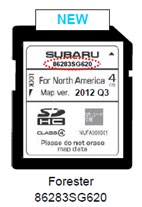
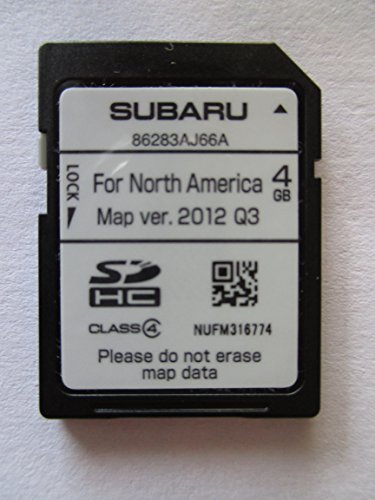
- SD card containing the updated software
- Updated Navigation system Owner’s Manual Supplement
- Installation instructions document
| PART NUMBER ON SD CARD | “UPDATE KIT” PART NUMBER |
|---|---|
| 86283SG620 | MSA5M1422K |
SERVICE PROCEDURE / INFORMATION
BEFORE YOU BEGIN:
- Confirm the audio / navigation unit is equipped with STARLINK and Aha and the current software version has not already been updated. See Steps 11-13 below for how to determine which software version is currently installed.
- If applicable confirm the customer has installed the Aha Radio application on their Smartphone, the device is paired to the audio / navigation unit and the Aha Radio application is fully operational.
- Make sure the vehicle’s battery is fully charged.
- DO NOT connect any battery chargers or auxiliary power supply as part of this procedure.
- Record the customer’s navigation guidance volume, handsfree ringtone and ringtone volume settings.
Once you have obtained the proper Update Kit for your application, proceed with the software
installation procedure outlined below.
- Confirm the Push Start Switch (or ignition key) is in the “OFF” position.
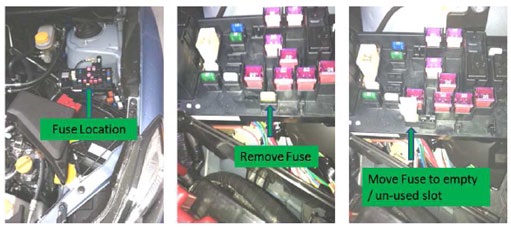
- Remove the Back-Up fuse from the Main Box (M/B, under-hood fuse box).
NOTE: the Back-Up fuse locations may vary by model. See pg. 12-12 in the Owner Manual.
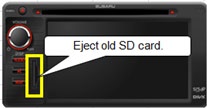
- Once the fuse is removed, eject the current (old) SD card from the audio / navigation unit.
- To distinguish between the old and the new SD cards, slide the lock tab downward on the old card as shown in the illustration below, right.
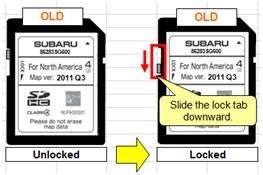
IMPORTANT: The old SD card must be the one shown in the illustration below. If it is not, do not proceed further until it can be confirmed the audio / navigation unit is applicable for the reprogram.
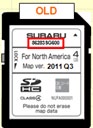
The part number on the old SD card must be 86283SG600.
- After verifying you have the proper new SD card, insert it into the audio / navigation unit.
- Re-install the Back-Up fuse into its proper location in the M/B (Main fuse box).
- Push the Push Start button once (or turn key) to “ACC” position.
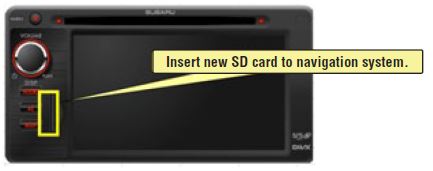
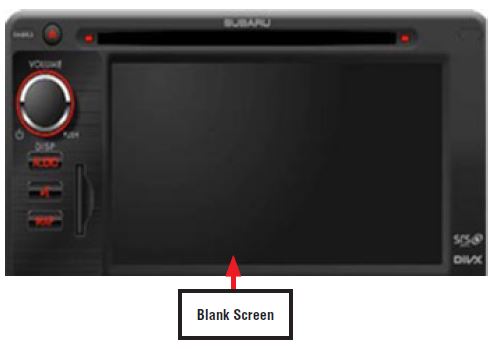
- After the Push Start Button (or key) has been switched to “ACC”, reprogramming will start automatically and continue for approximately one minute. During this time, the display screen will be blank.
IMPORTANT NOTES:
- Until the reprogramming process has completed, do not turn the ignition switch off or crank the engine as damage to the audio / navigation unit’s internal memory may result. If the internal memory becomes damaged, the audio / navigation unit will need to be replaced.
- DO NOT touch the brake pedal.
- NO activity (status bar) will be shown on the BLANK screen while reprogramming takes place.
- CAUTION: While screen is BLANK, do not touch the screen, knob or any of the unit’s buttons.
- Screen will remain BLANK for at least 60 seconds once the programming starts (BE PATIENT).
- Wait for the programming to complete (Step 9) before touching anything.
- When the reprogramming is completed, the start-up screen will be displayed as shown below.
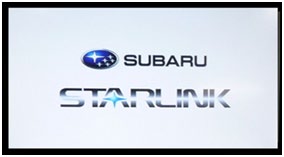
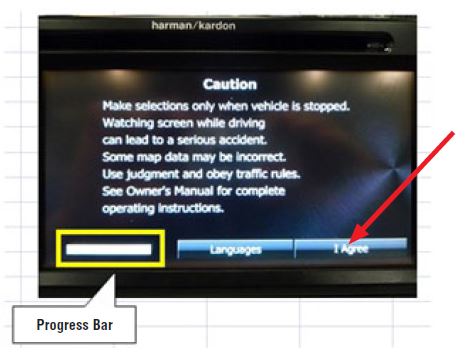
- Next, press the “I Agree” button on the screen and confirm the progress bar proceeds to full as shown below..
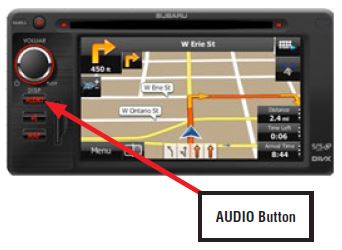
- Press the “AUDIO” button once.
- Next, press the “V” (down arrow) button then press the “Setup” button.
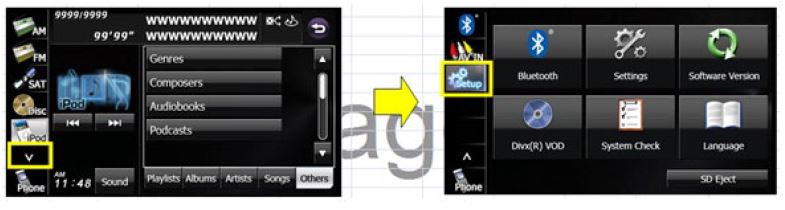
- Press “Software Version” and verify the proper version has been installed.
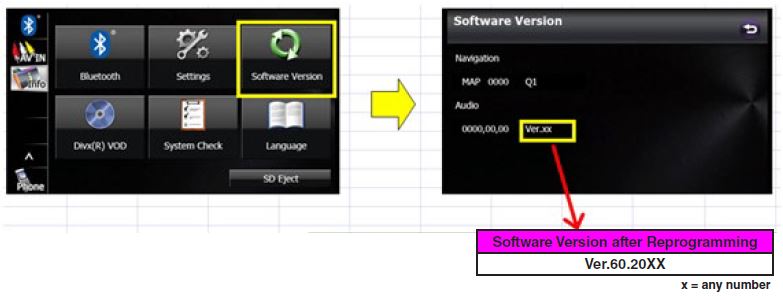
If the software version number differs from what is shown above, repeat the reprogramming procedure.
- The customer must register (provide an e-mail address and establish a password) and log into the Aha Radio application before the Aha button is selected from the system’s menu. They will also need to log onto Twitter, Facebook, Slacker, etc. (if applicable) to have access through the Aha application.
- Although phone pairing, phonebook, and radio station presets will not be lost during this procedure, it is advisable to reset the previously recorded navigation guidance volume, handsfree ringtone and ringtone volume to their pre-update levels as a customer satisfaction measure.
1 Affected Product
Vehicle
| MAKE | MODEL | YEAR |
| SUBARU | FORESTER | 2014 |
1 Associated Document
Manufacturer Communications
NUMBER: 15-166-13R
DATE: 11/13/13
REVISED: 12/11/13
NHTSA ID Number: 10067060
Manufacturer Communication Number: 15-166-13R
Summary
SUMMARY TO BE PROVIDED ON A FUTURE DATE.
1 Associated Document
Service Bulletin Document
NUMBER: 15-166-13R
DATE: 11/13/13
REVISED: 12/11/13
NHTSA ID Number: 10235931
Manufacturer Communication Number: 1516613R
Summary
Customer Satisfaction – Navigation SD Card Update Program
1 Associated Document
Manufacturer Communications
NUMBER: 15-166-13R
DATE: 11/13/13
REVISED: 11/19/13
MC-10235931-9999.pdf 696.997KB

- 【Android 13 System Car Radio】Car Radio Compatible with Subaru Forester WRX Impreza 2013 2014 2015. With 2GB RAM and 64GB ROM, ensures smooth operation and multitasking capabilities. Built-in Bluetooth for answering, making phone calls, streaming music by hands-free. The 1280x720 high-resolution display video clear and vivid pictures and videos. You can enjoy your favourite music, movies and short videos from the car stereo.
- 【Car Stereo with Wireless Carplay & Android Auto】This car radio supports wireless Carplay/Android auto /Mirrorlink. Wirelessly connect your phone to the car's stereo infotainment system, providing a seamless experience. You can make phone calls, send messages, listen to music, and get directions using voice control, allowing you to focus on driving without worrying about using your phone, making your driving safely.
- 【Car Radio with GPS Navigation & WIFI】The built-in GPS module and external GPS antenna supports both online and offline map navigation. With Wi-Fi or hotspot connectivity, you can easily download and access to online navigation app and other video or music apps on Play Store. With the split-screen function, you can view two apps on the same screen simultaneously. For example, you can display navigation and music apps side by side, ensuring a more pleasant journey.
- 【FM/Steering Wheel Control】 With built-in FM radio that allows you to listen to radio programs and stay up-to-date with the latest news and weather information during driving. The car head unit also supports steering wheel controls, allowing you to effortlessly switch songs, change channels, and adjust the volume without taking your hands off the wheel, helping you stay focused on the road while enjoying a smooth and convenient driving experience
- 【SWC &AHD Rear Camera】The car head unit supports original car steering wheel control, such as switching songs, adjusting volume, answering calls, etc. The waterproof night vision camera offers 1080P resolution, reversing image is clearer no matter the weather conditions. Automatically switch the reversing image when reversing. Note: Professional installation is required. Incorrect wiring may cause a short circuit.

- Replaces the original part number: Compatible with Subaru Legacy Outback 8-inch touchscreen radio screen. The TsuperU uses upgraded materials, offering superior sensitivity, high definition, high temperature resistance, and is non-bubbling and non-whitening. With this part, you won't need to go to the dealer for a replacement, as they often recommend replacing the entire radio, which could cost thousands of dollars, but is completely unnecessary. Please watch the replacement video on YT's
- EASY PROBLEM SOLVED: If your display touch screen is cracked, delaminating, bubbles, White, fogging, air holes, unresponsive, has garbled, phantom, ghosted, ghosting, dead pixels, unresponsive, or looks bad, simply replace the TsuperU 8-inch screen navigation touchscreen and it will return to its original functionality without the need for a trip to the dealership for costly repairs. One replacement is all it takes to fix the problem
- COMPATIBLE WITH SUBARU MODELS: Navigation screen fits Subaru Outback 2.5i Limited Premium Sport Touring Premier 3.6R Limited Premier Touring radio digitizer screen 2019 2018. please check the OEM number and size carefully before purchasing, There are two versions of MAP & PHONE, compare with your original parts to make sure that this touch screen fits your car. The digitizer screen for the 8-inch touchscreen radio works with both GPS-equipped radios and non-GPS radios
- EASY TO INSTALL: The product comes with adhesive, you only need to tear off the protective film to use it, easy to install. for Subaru radio screen is an exact fit for the original vehicle. For display only 86471-AL65A 86471-AL65B 86471-AL66A 86471-AL68A 86431-AL66A 86431-AL62A 86431-AL65A 86471 AL65A 86471 AL65B 86471 AL66A 86471 AL68A 86431 AL66A 86431 AL62A 86431 AL65A 86471AL65A 86471AL65B 86471AL66A 86471AL68A 86431AL66A 86431AL62A 86431AL65A, 864734-AL66A, 86471AL76A, 86471-AL76A
- TOUCH RESPONSIVE: Touch screen meets OEM navigation system, high light transmission, high visibility, responsive, high touch accuracy. touch screen monitor is made of new upgraded material with high resolution, high clarity, more stable performance, faster response time, and has been rigorously tested to ensure a long service life, touch screen replacement

- 8 Core 64GB Android Radio:Our Android car radio is equipped with the latest version of Android and an 8-core CPU processor, delivering exceptional performance and a perfect user experience. With 4G RAM and 64G ROM, our radio ensures smooth operation and provides ample storage for downloading popular apps like YouTube. It is designed to be compatible with Subaru Forester Impreza WRX 2008-2012 models. If you’re unsure whether it’s a good fit for your vehicle, please ask us first
- Wireless and Wired Carplay Android Auto:The Subaru Forester Impreza WRX car stereo offers seamless connectivity with your smartphone’s apps and features like WhatsApp, Google Maps, and Telegram, whether through Bluetooth or a USB data cable. It also supports voice control through Siri or Google Assistant, allowing you to keep your hands free while operating the stereo
- GPS Navigation and WiFi and Split Screen:With WiFi or hotspot connectivity, you can browse the internet, watch videos, and download apps on the 9 inch Subaru Forester Impreza WRX car radio. It also supports online and offline maps, providing real-time road conditions to help you avoid traffic jams. The split-screen feature enables you to simultaneously enjoy GPS navigation and watch videos on the 9 -inch screen with a resolution of 1280x720
- 32EQ DSP/BLUETOOTH 5.0/ FM/RDS:The car stereo comes pre-installed with DSP tuning software, allowing you to adjust the frequency, audio effects, and 32 EQ equalization settings, resulting in crystal-clear sound. Bluetooth 5.0 ensures a faster transmission speed and enables hands-free calling, phonebook downloads, and music streaming. The FM/RDS radio with 30 preset stations allows you to stay updated with new broadcasts, real-time traffic information, weather forecasts, and more
- Multi Function:The Android car stereo supports mirror link functionality, allowing you to mirror your smartphone’s content onto the large screen. It also supports steering wheel controls, provides 59 UI themes to suit your preferences, and allows you to move frequently used software to the home screen for easy access. As a gift, the car stereo comes with an external microphone and an AHD rearview camera with night vision and a 170 degree viewing angle
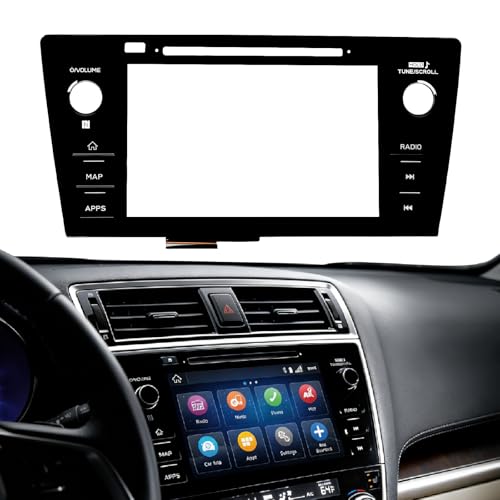
- Fitment:Our Touch Screen Digitizer(MAP) Compatible with 2018 2019 Subaru Outback,2018 2019 Subaru Legacy
- Replace Part Number:86471-AL62A,86471-AL65A,86471-AL65B,86471-AL66A,86471-AL67A,86471-AL68A,86431-AL62A,86431-AL65A,86431-AL66A
- Direct-Fit Replacement:Our 8-inch touchscreen is designed to address common display issues, such as physical cracks, unresponsiveness, or dead pixels, to help return your system to working condition.
- Function:This universal-style LCD touchscreen features integrated MAP functions.
- Support: For any questions or concerns regarding the product, please inform us so we can resolve the issue
SEOCONTENT-START
Bulletin Number: 15-166-13R; Date: 12/11/13 Page 1 INTRODUCTION This Bulletin provides the procedure for reprogramming the F10 SD Card Navigation System with the latest software version. PART INFORMATION The “Update Kit” which must be ordered from your facing RDC through normal parts channels consists of: • SD card containing the updated software • Updated Navigation system Owner’s Manual Supplement • Installation instructions document PART NUMBER ON SD CARD “UPDATE KIT” PART NUMBER 86283SG620 MSA5M1422K SERVICE PROCEDURE / INFORMATION BEFORE YOU BEGIN: • Confirm the audio / navigation unit is equipped with STARLINK and Aha and the current software version has not already been updated. See Steps 11-13 below for how to determine which software version is currently installed. • If applicable confirm the customer has installed the Aha Radio application on their Smartphone, the device is paired to the audio / navigation unit and the Aha Radio application is fully operational. • Make sure the vehicle’s battery is fully charged. • DO NOT connect any battery chargers or auxiliary power supply as part of this procedure. • Record the customer’s navigation guidance volume, handsfree ringtone and ringtone volume settings. NUMBER: 15-166-13R DATE: 11/13/13 REVISED: 12/11/13 APPLICABILITY: 2014 Foresters Produced Prior to June 20, 2013 and equipped with Fujitsu-Ten (F10) Audio / Navigation System that include Subaru STARLINK™ / Aha™ SUBJECT: Customer Satisfaction – Navigation SD Card Update Program Continued… CAUTION: VEHICLE SERVICING PERFORMED BY UNTRAINED PERSONS COULD RESULT IN SERIOUS INJURY TO THOSE PERSONS OR TO OTHERS. Subaru Service Information bulletins are intended for use by professional technicians ONLY. They are written to inform those technicians of conditions that may occur in some vehicles, or to provide information that could assist in the proper servicing of the vehicle. Properly trained technicians have the equipment, tools, safety instructions, and knowhow to do the job correctly and safely. If a condition is described, DO NOT assume that this Service Bulletin applies to your vehicle, or that your vehicle will have that condition. SUBARU OF AMERICA, INC. IS “ISO 14001 COMPLIANT” The international standard for excellence in Environmental Management Systems. Please recycle or dispose of automotive products in a manner that is friendly to our environment and in accordance with all local, state and federal laws and regulations. SERVICE BULLETIN ATTENTION: GENERAL MANAGER q PARTS MANAGER q CLAIMS PERSONNEL q SERVICE MANAGER q IMPORTANT – All Service Personnel Should Read and Initial in the boxes provided, right. Bulletin Number: 15-166-13R; Date: 12/11/13 Page 2 Once you have obtained the proper Update Kit for your application, proceed with the software installation procedure outlined below. 1. Confirm the Push Start Switch (or ignition key) is in the “OFF” position. 2. Remove the Back-Up fuse from the Main Box (M/B, under-hood fuse box). NOTE: the Back-Up fuse locations may vary by model. See pg. 12-12 in the Owner Manual. 3. Once the fuse is removed, eject the current (old) SD card from the audio / navigation unit. Continued… 86283SG620 Fuse Location Remove Fuse Move Fuse to empty/un-used slot Eject old SD Card Bulletin Number: 15-166-13R; Date: 12/11/13 Page 3 4. To distinguish between the old and the new SD cards, slide the lock tab downward on the old card as shown in the illustration below, right. IMPORTANT: The old SD card must be the one shown in the illustration below. If it is not, do not proceed further until it can be confirmed the audio / navigation unit is applicable for the reprogram. The part number on the old SD card must be 86283SG600. 5. After verifying you have the proper new SD card, insert it into the audio / navigation unit. 6. Re-install the Back-Up fuse into its proper location in the M/B (Main fuse box). 7. Push the Push Start button once (or turn key) to “ACC” position. Continued… Insert new SD card to navigation system. Unlocked Locked Slide the lock tab downward. Bulletin Number: 15-166-13R; Date: 12/11/13 Page 4 8. After the Push Start Button (or key) has been switched to “ACC”, reprogramming will start automatically and continue for approximately one minute. During this time, the display screen will be blank. IMPORTANT NOTES: • Until the reprogramming process has completed, do not turn the ignition switch off or crank the engine as damage to the audio / navigation unit’s internal memory may result. If the internal memory becomes damaged, the audio / navigation unit will need to be replaced. • DO NOT touch the brake pedal. • NO activity (status bar) will be shown on the BLANK screen while reprogramming takes place. • CAUTION: While screen is BLANK, do not touch the screen, knob or any of the unit’s buttons. • Screen will remain BLANK for at least 60 seconds once the programming starts (BE PATIENT). • Wait for the programming to complete (Step 9) before touching anything. 9. When the reprogramming is completed, the start-up screen will be displayed as shown below. Continued… Blank Screen Bulletin Number: 15-166-13R; Date: 12/11/13 Page 5 10. Next, press the “I Agree” button on the screen and confirm the progress bar proceeds to full as shown below.. 11. Press the “AUDIO” button once. 12. Next, press the “V” (down arrow) button then press the “Setup” button. Progress Bar AUDIO Button Continued… Bulletin Number: 15-166-13R; Date: 12/11/13 Page 6 13. Press “Software Version” and verify the proper version has been installed. If the software version number differs from what is shown above, repeat the reprogramming procedure. 14. The customer must register (provide an e-mail address and establish a password) and log into the Aha Radio application before the Aha button is selected from the system’s menu. They will also need to log onto Twitter, Facebook, Slacker, etc. (if applicable) to have access through the Aha application. 15. Although phone pairing, phonebook, and radio station presets will not be lost during this procedure, it is advisable to reset the previously recorded navigation guidance volume, handsfree ringtone and ringtone volume to their pre-update levels as a customer satisfaction measure. CLAIM INFORMATION NOTE: This repair must be submitted for payment using PAR claim type ONLY. LABOR DESCRIPTION LABOR OPERATION # FAIL CODE LABOR TIME AUDIO/NAVIGATION REPROGRAMMING FOR AHA SYSTEM A067-339 ZPP-48 0.3 x = any number Software Version after Reprogramming Ver.60.20XX
SEOCONTENT-END
This product presentation was made with AAWP plugin.