
NHTSA ID Number: 10233429
Manufacturer Communication Number: 078013R
Summary
Power Rear Gate (PRG) Inoperative, Incomplete Initialization Procedure
NUMBER: 07-80-13R
DATE: 10/31/13
REVISED: 03/13/14
| APPLICABILITY: | 2014 Forester Models |
|---|---|
| SUBJECT: | Power Rear Gate (PRG) Inoperative, Incomplete Initialization Procedure |
INTRODUCTION
This bulletin provides additional information (see TSB 07-76-13R dated 7/8/2013) regarding the PRG system operation and initialization procedure. If you receive a customer concern of a “beepbeep-beep” sound when trying to operate the PRG, a likely cause is an incomplete initialization procedure. Initialization occurs any time the auto closer function operates. It must complete every time the PRG is operated (closed) in order for the PRG to work properly the next time one of the activation switches is operated. If a voltage drop occurs (e.g. cranking the engine) during the exact time this initialization procedure is in process, there is a possibility the procedure will not complete properly and (although securely closed and latched) the PRG system will be rendered inoperative. During this time, the gate will operate manually however the PRG functions will be disabled. If the customer’s normal usage pattern creates this condition regularly, a countermeasure PRG control unit has been developed to remedy it.
COUNTERMEASURE IN PRODUCTION
The countermeasure PRG control module was incorporated into production during January, 2014 beginning with E*556875.
PART INFORMATION
The part number for the countermeasure PRG control unit is 63350SG004.
SERVICE PROCEDURE / INFORMATION
If the condition has been verified and can be duplicated, begin by explaining and demonstrating to the customer the operating characteristics of the PRG system (e.g. wait to start the car until the PRG is fully closed). Starting the car with the rear gate open is NOT recommended. This is to prevent exhaust gases from entering the vehicle’s passenger cabin. If the customer understands how the system operates and is able to adjust their habits accordingly, no further repair is necessary. Complete steps 1-3 of the initialization procedure outlined below. If normal PRG operation cannot be restored or this condition occurs frequently for the customer, perform the complete procedure, steps 1-7 to re-initialize the system.
- With the ignition “OFF”, open the PRG manually using a fluid motion (no light flash or beep should occur).
- Carefully (slowly) close the rear gate until the first audible “click” of the rear gate latch mechanism is heard then immediately let go of the rear gate. The auto closer function will then operate to complete the rear gate closing / latching function. This will also complete the initialization process. If the auto closer function is inoperative, diagnose per the applicable Service Manual.
- After the PRG is fully closed, operate either the Gate Opener switch, the Gate Inner (close) switch, remote keyless access switch or the Interior PRG Open/Close switch to verify the automatic opening and closing operation.
- If the PRG inoperative condition persists, record the radio station presets (and navigation system favorites, if applicable).
- IMPORTANT: Record any codes currently in PRG memory as the next step will clear them.
- Disconnect the positive and negative cables from the vehicle’s battery, touch the 2 cable ends together creating a capacitive discharge which will clear the memory.
- Reconnect the cables to the battery, reset all radio presets (and navigation favorites, if applicable) then confirm normal PRG operation.
- If the customer’s PRG usage pattern precludes the ability of the system to initialize upon closing, and control unit replacement is determined to be necessary to assure customer satisfaction, order and replace the PRG control unit following the service procedure outlined in the applicable Service Manual.
- If the PRG still does not operate properly, utilize any codes pulled from the system and follow the rest of the diagnostic procedures beginning on page PRG(diag)-2 of the 2014 Forester Service Manual.
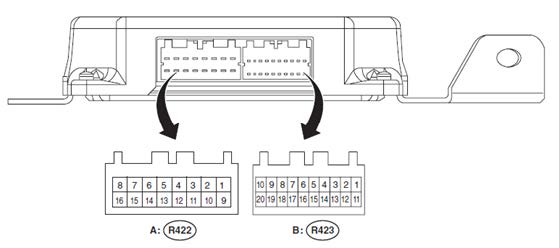
- IMPORTANT: In the event the PRG control module harness connectors are disconnected
(e.g. diagnosis, control module replacement, etc.), ALWAYS reconnect (B:) R423 BEFORE reconnecting (A:) R422 as illustrated below. If this reconnection order is not followed, other PRG DTCs may set. In addition, the ignition switch must ALWAYS be OFF before disconnecting or reconnecting the PRG control module.
1 Affected Product
Vehicle
| MAKE | MODEL | YEAR |
| SUBARU | FORESTER | 2014 |
1 Associated Document
Manufacturer Communications
NUMBER: 07-80-13R
DATE: 10/31/13
REVISED: 03/13/14
NHTSA ID Number: 10067884
Manufacturer Communication Number: 07-80-13R
Summary
SUMMARY TO BE PROVIDED ON A FUTURE DATE.
1 Associated Document
Service Bulletin Document
NUMBER: 07-80-13R
DATE: 10/31/13
REVISED: 03/13/14
NHTSA ID Number: 10232878
Manufacturer Communication Number: 078013R
Summary
PRG inoperative, incomplete initalization procedure
1 Associated Document
Manufacturer Communications
NUMBER: 07-80-13R
DATE: 10/31/13
REVISED: 02/25/14
MC-10232878-9999.pdf 272.636KB
NHTSA ID Number: 10235898
Manufacturer Communication Number: 078013
Summary
This bulletin provides additional information (see TSB 07-76-13R dated 7/8/2013) regarding the PRG system operation and initialization procedure.
1 Associated Document
Manufacturer Communications
NUMBER: 07-80-13
DATE: 10/31/13
MC-10235898-9999.pdf 439.896KB

- OE-Level diagnostics on your smart device
- FREE Software updates - No subscriptions, no fees – EVER
- Full bi-directional control, live actuation test
- Supports 23 vehicle reset/relearn functions, including throttle matching, ABS bleeding, TPMS reset, etc.
- Live data mapping and freeze frame capturing


- CEL Doctor: The ANCEL AD310 is one of the best-selling OBD II scanners on the market and is recommended by Scotty Kilmer, a YouTuber and auto mechanic. It can easily determine the cause of the check engine light coming on. After repairing the vehicle's problems, it can quickly read and clear diagnostic trouble codes of emission system, read live data & hard memory data, view freeze frame, I/M monitor readiness and collect vehicle information
- Sturdy and Compact: Equipped with a 2.5 foot cable made of very thick, flexible insulation. It is important to have a sturdy scanner as it can easily fall to the ground when working in a car. The AD310 OBD2 scanner is a well-constructed mechanic tool with a sleek design. It weighs 12 ounces and measures 8.9 x 6.9 x 1.4 inches. Thanks to its compact design and light weight, transporting the device is not a problem. The buttons are clearly labelled and the screen is large and displays results clearly
- Accurate Fast and Easy to Use: The AD310 scanner can help you or your mechanic understand if your car is in good condition, provides exceptionally accurate and fast results, reads and clears engine trouble emission codes in seconds after you fixed the problem. This device will let you know immediately and fix the problem right away without any car knowledge. No need for batteries or a charger, get power directly from the OBDII Data Link Connector in your vehicle
- OBDII Protocols and Car Compatibility: Many cheap scan tools do not really support all OBD2 protocols. AD310 scanner as it can support all OBDII protocols such as KWP2000, J1850 VPW, ISO9141, J1850 PWM and CAN. This device also has extensive vehicle compatibility with 1996 US-based, 2000 EU-based and Asian cars, light trucks, SUVs, as well as newer OBD2 and CAN vehicles both domestic and foreign. Pls confirm with our customer service whether it is compatible with your vehicle before purchasing
- Home Necessity and Worthy to Own: This is an excellent code reader to travel or home with as it weighs less and it is compact in design. You can easily slide it in your backpack as you head to the garage, or put it on the dashboard, this will be a great fit for you. The AD310 is not only portable, but also accurate and fast in performance. Moreover, it covers various car brands and is suitable for people who just need a code reader to check their car

- MAINTAIN PEAK PERFORMANCE AND SAFETY ON THE ROAD - Easily find and fix the problem with your vehicle using the INNOVA 5610 bidirectional scan tool. This OBD2 scanner diagnostic tool provides real-time solutions to troubleshoot issues. Access OBD2 and OEM live data with ease, making it an essential car scanner diagnostic tool. Perfect for those seeking reliable car diagnostic scanner and code readers & scan tools for vehicles.
- PRO-LEVEL FUNCTIONALITIES - Use the INNOVA 5610’s Enhanced Data Stream to view live data for advanced systems like ABS, SRS, transmission, and engine. The Special Reset Function lets you use dealership-level re-learn procedures. This car diagnostic scanner is ideal for those needing a bidirectional scan tool or mechanic tools automotive for professional repairs. Compatible with select vehicle makes and models; not universal.
- COMMAND WITH BIDIRECTIONAL CONTROLS - The INNOVA 5610 bidirectional scan tool sends commands to test functions such as fuel pump on/off or retracting the electronic parking brake. With this car scanner diagnostic for all cars, you can operate like a pro. Ideal for those seeking a car code reader and reset tool or advanced fixd car diagnostic tool capabilities. Compatible with select vehicle makes and models; not universal.
- EASY TO USE - The INNOVA 5610 OBD2 scanner diagnostic tool supports English, Spanish, and French. Easily use this scanner for car on most 1996 - 2023 (2024 coming soon) OBD2 vehicles to verify repairs. Designed for ease of operation, it’s a dependable code reader for cars and trucks and check engine code reader. To confirm vehicle coverage, please utilize Innova's Coverage Checker.
- BUY AND DRIVE WITH CONFIDENCE - Backed by ASE-Certified support, this car scanner pairs with the RepairSolutions2 app, trusted by 4M users, for wireless OBD scanner functionality. With free updates and no subscription fees, this durable car computer diagnostic reader ensures you’re prepared for any repair. A must-have diagnostic scanner for vehicles.

- 2026 Advanced ECU Coding Scan Tool: Maximize the capabilities of your vehicles with the ArtiDiag Pro. This scan tool, seamlessly compatible with renowned models such as VW, A-U-D-I, SKODA, SEAT, BENZ, and more, empowers you to uncover hidden features, deactivate annoying functions, and code retrofitted components for peak performance. Ensure a backup before coding and steer clear of problems on low battery levels.
- Efficient Diagnostics with Bidirectional Control: Say goodbye to uncertainty, streamline diagnostics, and reclaim valuable time with ArtiDiag Pro scan tool. This bidirectional scan tool exceeds expectations, enabling targeted tests on individual actuators to swiftly identify and resolve issues. Covering lights, door locks, fuel and coolant systems, windows, wipers, EVAP, and more in vehicle components.
- 35+ Services Resolve 90% of Repair Challenges: Unleash maximum productivity with the ArtiDiag Pro, a scan tool that tackles 90% of maintenance issues through its 35 special functions. Effortlessly clear oil maintenance indicators with oil reset. Engage the EPB Reset for brake system management and establish precise alignment with the Steering Angle Reset to define the straight-line reference position for your vehicle.
- FCA Autoauth : This diagnostic tool supports Autoauth for FCA SGW/Renault, Chrysler, Jeep, Dodge, Fiat etc. 2017 and later. NOTE: Due to Product Upgrade, there is no Chrysler 12+8 adapter, the BMW-20 Adapter in the package any more. We are sincerely sorry for the inconvenience. NOTE: Please confirm compatibility before purchase.(Topdon Website>Support>Vehicle Coverage)
- Professional Customer Support: At TOPDON, your satisfaction is our unwavering commitment. Experience hassle-free support and a lifetime of expert assistance. Should you encounter any challenges, reach out to us at 833-629-4832. For returns, please damage the packaging to prevent Amazon from reselling it. Please be advised that after two years, a subscription fee of 249 Bucks will apply.
- [Diagnose Like a Pro] BlueDriver Pro Next-Gen is a professional OBD2 scanner and diagnostic tool that helps you scan, understand, and clear vehicle trouble codes with confidence. Turn your phone into a powerful car diagnostic scanner—no guesswork, no unnecessary repairs.
- [Read and Clear More Codes Than Ever] Read and clear more codes than basic car code readers. Access enhanced diagnostics for Check Engine, ABS, SRS, Airbag, TPMS, Transmission, and more on supported vehicles, including expanded coverage on newer model years.
- [Verified Fixes and Real-Time Data] Get unlimited, technician-verified repair reports matched to your VIN, with definitions, causes, and confirmed fixes. Monitor live vehicle data as you drive, view freeze frames, check smog readiness, and analyze Mode 6 test results.
- [Expanded Make & Model Coverage] Optimized for today’s vehicles with strong support for GM, Ford, Stellantis (RAM, Jeep, Chrysler), Toyota, Honda, Nissan, Mazda, Subaru, Hyundai, Mercedes-Benz, BMW, and VW. Enhanced communication on select 2024+ Nissan and Mazda models (see compatibility chart).
- [Gas Vehicles 1996+ & Select Light-Duty Trucks] Works with all gas-powered vehicles made in 1996 or newer, plus select light-duty trucks and diesels, including F-250, RAM 2500, Silverado, and Sierra. Built for daily drivers, family vehicles, and real-world truck use.
SEOCONTENT-START
Bulletin Number: 07-80-13R; Date: 03/13/14 Page 1 INTRODUCTION This bulletin provides additional information (see TSB 07-76-13R dated 7/8/2013) regarding the PRG system operation and initialization procedure. If you receive a customer concern of a “beep-beep- beep” sound when trying to operate the PRG, a likely cause is an incomplete initialization procedure. Initialization occurs any time the auto closer function operates. It must complete every time the PRG is operated (closed) in order for the PRG to work properly the next time one of the activation switches is operated. If a voltage drop occurs (e.g. cranking the engine) during the exact time this initialization procedure is in process, there is a possibility the procedure will not complete properly and (although securely closed and latched) the PRG system will be rendered inoperative. During this time, the gate will operate manually however the PRG functions will be disabled. If the customer’s normal usage pattern creates this condition regularly, a countermeasure PRG control unit has been developed to remedy it. COUNTERMEASURE IN PRODUCTION The countermeasure PRG control module was incorporated into production during January, 2014 beginning with E*556875. PART INFORMATION The part number for the countermeasure PRG control unit is 63350SG004. SERVICE PROCEDURE / INFORMATION If the condition has been verified and can be duplicated, begin by explaining and demonstrating to the customer the operating characteristics of the PRG system (e.g. wait to start the car until the PRG is fully closed). Starting the car with the rear gate open is NOT recommended. This is to prevent exhaust gases from entering the vehicle’s passenger cabin. If the customer understands how the system operates and is able to adjust their habits accordingly, no further repair is necessary. Complete steps 1-3 of the initialization procedure outlined below. If normal PRG operation cannot be restored or this condition occurs frequently for the customer, perform the complete procedure, steps 1-7 to re-initialize the system. 1. With the ignition “OFF”, open the PRG manually using a fluid motion (no light flash or beep should occur). NUMBER: 07-80-13R DATE: 10/31/13 REVISED: 03/13/14 APPLICABILITY: 2014 Forester Models SUBJECT: Power Rear Gate (PRG) Inoperative, Incomplete Initialization Procedure SERVICE BULLETIN ATTENTION: GENERAL MANAGER q PARTS MANAGER q CLAIMS PERSONNEL q SERVICE MANAGER q IMPORTANT – All Service Personnel Should Read and Initial in the boxes provided, right. Continued… CAUTION: VEHICLE SERVICING PERFORMED BY UNTRAINED PERSONS COULD RESULT IN SERIOUS INJURY TO THOSE PERSONS OR TO OTHERS. Subaru Service Bulletins are intended for use by professional technicians ONLY. They are written to inform those technicians of conditions that may occur in some vehicles, or to provide information that could assist in the proper servicing of the vehicle. Properly trained technicians have the equipment, tools, safety instructions, and know-how to do the job correctly and safely. If a condition is described, DO NOT assume that this Service Bulletin applies to your vehicle, or that your vehicle will have that condition. SUBARU OF AMERICA, INC. IS “ISO 14001 COMPLIANT” The international standard for excellence in Environmental Management Systems. Please recycle or dispose of automotive products in a manner that is friendly to our environment and in accordance with all local, state and federal laws and regulations. Bulletin Number: 07-80-13R; Date: 03/13/14 Page 2 2. Carefully (slowly) close the rear gate until the first audible “click” of the rear gate latch mechanism is heard then immediately let go of the rear gate. The auto closer function will then operate to complete the rear gate closing / latching function. This will also complete the initialization process. If the auto closer function is inoperative, diagnose per the applicable Service Manual. 3. After the PRG is fully closed, operate either the Gate Opener switch, the Gate Inner (close) switch, remote keyless access switch or the Interior PRG Open/Close switch to verify the automatic opening and closing operation. 4. If the PRG inoperative condition persists, record the radio station presets (and navigation system favorites, if applicable). 5. IMPORTANT: Record any codes currently in PRG memory as the next step will clear them. 6. Disconnect the positive and negative cables from the vehicle’s battery, touch the 2 cable ends together creating a capacitive discharge which will clear the memory. 7. Reconnect the cables to the battery, reset all radio presets (and navigation favorites, if applicable) then confirm normal PRG operation. • If the customer’s PRG usage pattern precludes the ability of the system to initialize upon closing, and control unit replacement is determined to be necessary to assure customer satisfaction, order and replace the PRG control unit following the service procedure outlined in the applicable Service Manual. • If the PRG still does not operate properly, utilize any codes pulled from the system and follow the rest of the diagnostic procedures beginning on page PRG(diag)-2 of the 2014 Forester Service Manual. • IMPORTANT: In the event the PRG control module harness connectors are disconnected (e.g. diagnosis, control module replacement, etc.), ALWAYS reconnect (B:) R423 BEFORE reconnecting (A:) R422 as illustrated below. If this reconnection order is not followed, other PRG DTCs may set. In addition, the ignition switch must ALWAYS be OFF before disconnecting or reconnecting the PRG control module. Continued… Bulletin Number: 07-80-13R; Date: 03/13/14 Page 3 WARRANTY / CLAIM INFORMATION For vehicles within the Basic New Car Limited Warranty period, this repair may be claimed using the following information: LABOR DESCRIPTION LABOR OPERATION # FAIL CODE LABOR TIME PRG Re-Initialization Procedure (Steps 1-3) A850-971 UPY-43 0.2 PRG Re-Initialization Procedure (Steps 1-7) A850-972 UPZ-43 0.4 PRG Control Module R&R B850-965 UPW-43 0.5 PRG Testing & Diagnosis C850-950 – 0.4
SEOCONTENT-END
This product presentation was made with AAWP plugin.