
NHTSA ID Number: 10232545
Manufacturer Communication Number: TechTIPS-3
Summary
Subaru Service and Technical Support Line Newsletter
ARTICLES CONTAINED IN THIS ISSUE
CODE ARTICLE…………………………….PAGE
(00) June STIS New Releases……..05
(01) QMR of the Month……………..01
(01) 2015 Legacy and Outback Launch Team Activity- Your Help is Needed…………………………02
(01) New Subaru Oil Change Reference Cards………………03
(01) 2015 Legacy and Outback Fujitsu 10 Audio and Audio/ Navigation Systems……………………… 04
1 Affected Product
Vehicle
1 Associated Document
Manufacturer Communications
TIPS0714 – 2014 July TechTIPS Newsletter
MC-10232545-9999.pdf 221.533KB

- [Easy to Use—Work Out of the Box] + [FOXWELL 2026 New Version] FOXWELL NT604 Elite scan tool is the 2026 new version from FOXWELL, designed for car owners who want to figure out the cause of issues before fixing car problems by scanning common systems like ABS, SRS, engine, and transmission. The NT604 Elite obd2 scanner diagnostic tool comes with the latest software—no need to waste time downloading software first. Plug the scanner into the OBDII port with OBDII cable to start the diagnosis.
- [Affordable] + [Reliable Car Health Monitor] Will you be confused what happens when the warning light of ABS/SRS/transmission/check engine flashes? Instead of taking your cars to dealership, this FOXWELL scanner will help you do a thorough scanning and detection for your cars and pinpoint the root cause. Note:The device is a diagnostic tool, not a repair tool. To turn off a warning light, you must first physically repair the issue causing it. Only then can the scanner be used to clear the corresponding fault code.
- [5 in 1 Car Diagnostic Scanner] Compared with obd scanners (50-100), NT604 Elite code scanner not only includes their OBDII diagnosis but also serves as ABS/SRS scanner, transmission and check engine code reader. When it’s an odb2 scanner, you can use it to check if your car is ready for annual test through I/M readiness menu. In addition, live data stream, built-in DTC library, data play back and print, all these features are a big plus for it. Note: doesn't support maintenance functions like reset or relearn. For the SRS system, NT604 Elite can read and clear common fault codes not caused by a crash, but crash/collision data cannot be cleared.
- [Fantastic AUTOVIN] + [No extra software fee] Through the AUTOVIN menu, this NT604 Elite car scanner allows you to get your V-IN and vehicle info rapidly, no need to take time to find your V-IN and input one by one. What's more, the NT604 Elite ABS SRS scanner supports 60+ car brands from worldwide (America/Asia/Europe). You don’t need to pay extra software fee. AUTOVIN may not work on some older vehicles or certain vehicle brands. If AUTOVIN fails, please input the vin code manually or go to the Diagnostic Menu to select your vehicle model.
- [Solid protective case KO plastic carrying bag] + [Lifetime update] Almost all same price-level car scanner diagnostic tool only offers plastic bag to hold the scanner.However, NT604 Elite automotive scanner is equipped with solid protective case, preventing your obd2 scanner from damage. Then you don’t need to pay extra money to buy a solid toolbox.

- OBD2 SCANNER FOR ALL SYSTEMS – The INNOVA SD35 is a tablet-based OBD2 scanner designed for advanced diagnostics. Read and clear check engine light, ABS, SRS, and TPMS codes, plus test your car battery and alternator to prevent unexpected failures. Vehicle coverage may vary. Please use Innova’s Coverage Checker to verify compatibility.
- ALL-SYSTEM DIAGNOSTICS & LIVE DATA – Unlike basic code readers, this OBD2 scanner for all vehicles scans engine, transmission, ABS, SRS, and more. Get real-time live data, including RPM, fuel trims, temperature readings, and oxygen sensor performance.
- OBD2 TABLET WITH USER-FRIENDLY INTERFACE – This automotive scan tool features a high-resolution display, making vehicle diagnostics faster and easier.
- ADVANCED TPMS, OIL RESET & SERVICE FUNCTIONS – Perform TPMS sensor checks, oil light reset, and other service resets with ease This professional diagnostic tool provides comprehensive vehicle maintenance capabilities in one device.
- WIDE VEHICLE COVERAGE (1996 & NEWER CARS & TRUCKS) – This OBD2 scanner Bluetooth tablet is compatible with Toyota, Ford, Honda, Chevrolet, Nissan, Dodge, and more. However, feature coverage may vary. Please use Innova's Coverage Checker to verify coverage.
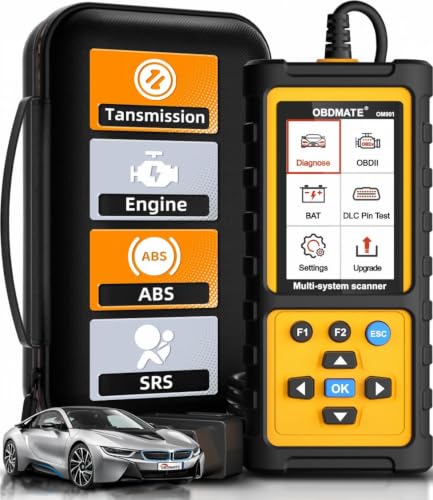
- 【Reset ABS/SRS/Transmission/Engine Lights】 More than an check engine code reader, OBDMATE OM901 obd2 scanner performs comprehensive diagnostics for the 4 most-used systems (ABS/SRS/Engine/Transmission). It quickly clears fault codes, turns off warning lights, read data stream and auto VIN.
- 【3.5" Handheld Scanner with 4 System Diagnose】 3.5" Super large TFT screen equipped displays an intuitive menu and clear readings of various sensors from ABS, SRS, ECM and TCM
 systems. It arrived with a silicone protective case and hard-shell carrying case, ensuring long-lived durability and drop resistance. The car diagnostic tool is plug-to-play designed, plug it and get diagnosis started without any batteries or updates required.
 - 【One-Click I/M Readines&Full OBD2 Functions】 Press F1 to get an intuitive corloured form about whether various emissions-related systems on the vehicle are operating properly. Help you get smog-check ready quickly. OM901 car scanner supports all essential OBD2 functions you need: read & clear codes, view freeze frame, read I/M readiness, retrieve VIN, live data stream (with graphing display), O2 sensor test, onboard monitoring mode, and EVAP leak test.
- 【Battery Voltage Check&DLC Pin Test】 It allows you to monitor battery health by testing current battery voltage. Plus, this obd2 diagnostic tool features DLC 16-PIN test to check current voltage of every pin.
- 【Automotive Scanner Diagnostic Kit】 The package comes with 1 car scanner, 1 USB-type c cable, 1 hard storage bag and 1 user manual(en). Free to update without any hidden fees. 5 languanges available in setting including English, French, Italian, German and Espanish. Valuable and Portable, making it a great tool kit for car owners, DIY enthusiasts, and professional mechanics.
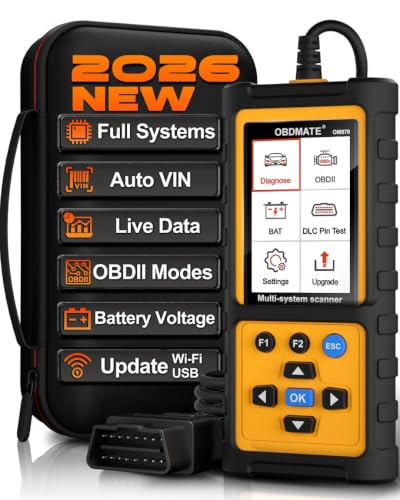
- 【Full Systems Automotive Diagnostic】 More than checking engine, ABS and SRS, OBDMATE OM970 obd2 scanner performs comprehensive diagnostics on all electric modules. It quickly scans and clears fault codes, turns off warning lights, reads live data, and features Auto-VIN technology.
- 【Live Datastream&4-in-1 Graph】 Easily view live sensor data such as RPM, fuel trims, ATF temperature, wheel speed sensor, battery voltage and so on. OM970 scan tool also supports 4-in-1 trend graphing. Spend just 3 minutes to check – and you'll know exactly what's going wrong, helping you avoid hundreds in dealership diagnostic fees.
- 【One-Click I/M Readiness&Full OBD2 Functions】 Press F1 to get an intuitive corloured form about whether your vehicle's emissions-related systems are operating properly. Help you get smog-check ready quickly. OM970 obd2 diagnostic tool supports all essential OBD2 functions you need. Plus, it features battery voltage test and DLC 16-PIN test.
- 【Straightforward Menus with Easy Navigation】 All functions are easy to understand without obscure decriptions. 3.5" Large screen delivers clear readings while keeping one-hand operation. The car diagnostic tool comes with a silicone protective case and a hard-shell carrying case, ensuring long-lived durability and drop resistance.
- 【Budget-Friendly, No Subscriptions, Free Software Updates】 Plug and play: no bluetooth pairing, monthly fees, Wi-Fi connection, or any other troublesome initial settings. OM970 obd2 scanner works out of the box with the latest software. Lifetime free upgrade.
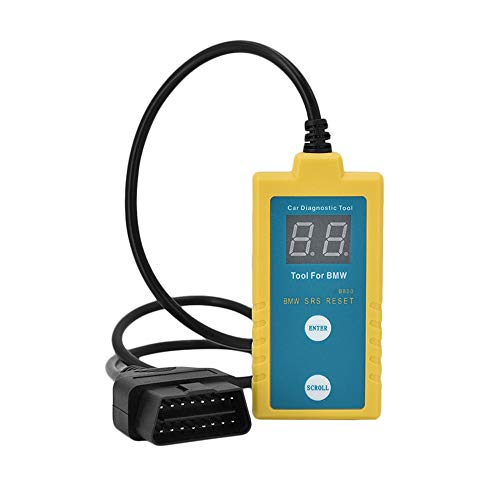
- ✔️【Professional SRS Reset for 1994-2003 BMW】 Designed specifically for classic BMW models (1994-2003). This B800 scanner reads & clears SRS airbag fault codes, turns off the warning light, and saves you a costly dealer visit. Confirmed compatible with: E36, E46 (EXCEPT 2001 330i), E34, E38, E39, Z3, and X5 (E53). NOT compatible with any BMW built before 1994 or after 2003.
- ✔️【Important: Two Different Connection Ports – Read Before Use】 To avoid “not working” issues, please note: For 1994–2000 BMWs (most E36, E34, Z3, early E39), the SRS diagnostic port is a round 20-pin connector under the hood. You MUST use the included 16-pin to 20-pin adapter cable. For 2000–2003 models (late E46, E39, X5), use the standard OBD-II port inside the cabin. Incorrect connection is the #1 reason for “incompatibility” reports.
- ✔️【Read & Clear Fault Codes in Minutes】 Quickly diagnose why your SRS light is on. The scanner accurately reads fault codes from airbag and seatbelt pretensioner systems. With one button press, clear the codes and reset the SRS warning light in seconds. No expensive dealer tools needed.
- ✔️【User-Friendly for DIYers – No Mechanic Required】 Easy operation with an intuitive button layout: ‘Enter’ to confirm, ‘Scroll’ to navigate. The clear LCD screen shows results instantly. Includes a step-by-step manual (revised for clarity) to guide you through the entire reset process.
- ✔️【Reliable Support with 1-Year Warranty】 We stand behind the quality of our B800 scanner. It comes with a 1-Year Hassle-Free Warranty. If you have any questions or need support, please contact us with your Order ID, and our dedicated team will assist you promptly.
SEOCONTENT-START
July 2014 TechTIPS Page 1 Subaru Service and Technical Support Line Newsletter July 2014 The Subaru TechTIPS newsletter is intended for use by professional technicians ONLY. Articles are written to inform those technicians of conditions that may occur in some vehicles, or to provide information that could assist in the proper servicing of the vehicle. Properly trained technicians have the equipment, tools, safety instructions, and know-how to do the job correctly and safely. If a condition is described, DO NOT assume that your vehicle has or will have that condition. Impreza, Legacy, Justy, Loyale, Outback, Forester, Subaru SVX, WRX, WRX STI, L.L. Bean, Baja, Tribeca, BRZ, XV Crosstrek and “Quality Driven” are Registered Trademarks. ISO 14001 is the international standard for excellence in Environmental Management Systems. Please recycle or dispose of automotive products in a manner that is friendly to our environment and in accordance with all local, state and federal laws and regulations. ARTICLES CONTAINED IN THIS ISSUE CAUTION: VEHICLE SERVICING PERFORMED BY UNTRAINED PERSONS COULD RESULT IN SERIOUS INJURY TO THOSE PERSONS OR TO OTHERS. SUBARU OF AMERICA, INC. IS ISO 14001 COMPLIANT CODE ARTICLE…………………………….PAGE (00) June STIS New Releases……..05 (01) QMR of the Month……………..01 (01) 2015 Legacy and Outback Launch Team Activity- Your Help is Needed…………………………02 (01) New Subaru Oil Change Reference Cards………………03 (01) 2015 Legacy and Outback Fujitsu 10 Audio and Audio/ Navigation Systems……………………… 04 01 QMR OF THE MONTH We are pleased to announce this month’s winner of the QMR of the Month. Kyle submitted a very detailed QMR reviewing his diagnosis of a 2014 XV Crosstrek with a failed ELCM pressure sensor. His step by step report confirmed how he determined the source of the concern and verified it by testing the ELCM pressure sensor off the car. He then took the additional step of confirming his results by testing a known good part for comparison. This belt and suspenders approach to diagnosis ensured a fixed right the first time result for Kyle’s customer and his report provided us with some detailed insights into this unusual failure. In appreciation for going the extra mile and sharing his experience with us, Kyle will be receiving the following from his FSE: Any Subaru Service Technician can participate in QMR of the Month. See the February 2013 Tech Tips for full details. You may see your name here in a future Tech Tips. A Subaru Confidence In Motion Jacket and a $100 Gift Card Kyle Sorensen Lancaster County Subaru in East Petersburg, PA 2014 CALENDAR OF SUBARU HOLIDAYS Labor Day Monday, September 1, 2014 Thanksgiving Thursday, November 27, 2014 Friday, November 28, 2014 Happy Holidays Thursday, December 25, 2014 Friday, December 26, 2014 ©2014 Subaru of America, Inc. All rights reserved. July 2014 TechTIPS Page 2 A Special FHI Quality Monitoring Team is currently in the USA monitoring the launch of these much anticipated new models. The Team is very interested in EVERYTHING related to these new vehicles. They are looking for specific and detailed information on EVERY condition identified. Naturally, this includes any and all repairs performed. It also includes cases when a customer comments on a condition that is deemed to be a normal or operational characteristic, or any improvement opportunity where some feature or function could be made even better. We are asking you to be our eyes and ears with this new model. E-QMRs are the best and preferred reporting method for reporting any new model feedback. For high priority, unusual, or serious issues, we ask that you call SOA’s Technical Helpline right away with all details. When you report something, include pictures and where practical videos of the condition prior to repair. Providing as much detail as possible on the customer complaint, the actual condition, and your findings are strongly requested and greatly appreciated. Be sure to save all DTCs and Freeze Frame Data electronically (printouts are incomplete) before performing any clear memory functions. Be sure to check all control units individually for codes. All System Check will only show current codes therefore, it does not represent the full scope of the failure mode. Checking the individual systems is the best choice. While there is no guarantee a change will occur based upon any individual report, we can guarantee that nothing will happen if we don’t know about it. Our request is that you report everything, even if it seems to be a small or straightforward to repair. E-QMRs, Techline or CDS Cases, and Warranty Claims are being reviewed daily. Team Members may contact you for additional details, photos, parts collections, or to arrange for an on-site inspection. We ask your cooperation in quickly responding to these requests for additional information. Please save any and all removed parts no matter how small including gaskets, clips, fasteners, any filtered sediments, or other small bits and pieces. The rule of thumb is, if you claim it, save it. The more specific information you can provide on each condition or repair the better. Otherwise, you may be contacted multiple times with follow-up questions. Please note: questions may come to you regardless if you report the condition in a QMR or not, so please keep detailed notes on all repairs. For example: If you perform a wiring repair, the team will be asking for the wire color, connector number, pin location, and the details of the condition. This would include your comments on if the wire was cut, pinched, corroded, or nicked. If there was a loose pin, bent pin, pin pushed out, wire pulled out of the pin, or simply a soft set connection (connectors not locked together fully). Was the harness strained or stretched? How? Was the circuit open or shorted? Was the operation of the circuit intermittent, or totally inoperative? What related systems were affected? Was the condition temperature or moisture related? They will also want to know the exact details of your repair. How exactly did you fix it? If possible, try to get a photo of the condition prior to the repair and after as they will most likely be requested. This is the kind of detail the team is looking for and is most helpful to them in making product or production improvements quickly. It also helps speed up the release of related service information. 01 2015 LEGACY AND OUTBACK LAUNCH TEAM ACTIVITY- YOUR HELP IS NEEDED CONTINUED ON THE NEXT PAGE July 2014 TechTIPS Page 3 As a reminder, E-QMRs must never be used to request escalation of a repair, request information, or for any other purpose than to notify SOA of a new or trending condition. Authorization or Repair Escalation Requests must always go through normal channels for the fastest, most efficient handling. Paint, Glass or Long block Authorization requests must go through the Techline Authorization System on Subarunet. All other authorizations must be reviewed in advance with your DPSM. We thank you all in advance for your continued support and assistance in making this launch successful. 01 2015 LEGACY AND OUTBACK LAUNCH TEAM ACTIVITY- YOUR HELP IS NEEDED (CONTINUED) During the second and third weeks of June, each Subaru Retailer was shipped new and improved oil change reference cards. They now have a card that you pull out from the bottom front and line it up with the vehicle you want to check on. The new card will show you Model, Model Year, number of Cylinders, Oil Viscosity, Oil Type and Oil Change Intervals. Also included are part numbers and quantities, CVT Fluid part numbers and quantities and Gear Oil part numbers and quantities. The back side of the card contains Transmission information including: transmission type, fluid required, gear oil required as well as the part numbers that you need. Please distribute these new reference cards among your retailer staff to assist customers that may ask questions about service intervals and various fluids used in their Subaru. 01 NEW SUBARU OIL CHANGE REFERENCE CARDS July 2014 TechTIPS Page 4 The 2015 Legacy and Outback are equipped with an all-new Fujitsu 10 audio system and an all-new Fujitsu 10 audio/ navigation system. There are three areas all retailer personnel involved in servicing these systems should be aware of. Two are permanent changes to the exchange program procedures while the third is a short term change resulting from the Special Launch Team Activity for quality monitoring. 01 2015 LEGACY AND OUTBACK FUJITSU 10 AUDIO AND AUDIO/ NAVIGATION SYSTEMS 1. As those who have been to NTT have seen, the all-new Fujitsu 10 Audio/ Navigation system utilizes a new micro SD Card which contains map data only. All boot and operating software is now housed inside the head unit itself. As a result of this, supplied exchange units will not come with a micro SD Card installed. Technicians will need to transfer the existing micro SD Card from the customer’s head unit to the supplied exchange. Note: the navigation system will not function without this card installed. Also, these cards must NEVER be removed from the unit while it is powered on. While there is not a scripted removal process like the existing unit, ALWAYS power the unit down completely before removing the micro SD Card or damage to the head unit may result. 3. As part of the Special Launch Team Activity, retailer personnel (Parts and Service) may notice a short-term change in the core return process. Some retailers may receive a special return UPS label along with the exchange unit shipment. If you receive one of these labels, please use it when returning the removed/ core unit. If you do not receive one of these special labels, please return the core unit following the already established procedures. This program is expected to be in place from now through October 2014. Again, not all units received will include this special UPS shipping label but if you receive one please use it when shipping the core return. 2. While not a change from the prior unit, we would like to take this opportunity to reinforce the need to deactivate the customer’s Sirius/ XM Satellite service from the unit in the vehicle before it is removed and then re-activate the service on the exchange unit when it is installed. This is a critical activity for both customer satisfaction and to avoid serious delays in the remanufacturing of the returned core. This second piece has lead to significant delays in exchange unit availability which must be avoided going forward if we are to provide the level of service our customers expect. July 2014 TechTIPS Page 5 00 JUNE STIS NEW RELEASES ITEM CODE ITEM TYPE TITLE CREATED DATE MSA5M1518A Owner Manual 2015MY Legacy and Outback EyeSight Owner’s Manual (Ver. B) 27-Jun-14 11-143-14 Technical Service Bulletin Reprogramming Files for DTC P0606 25-Jun-14 J101SAL100 Accessory Installation Guide 2015MY Legacy Splash Guard Kit 25-Jun-14 E201SAL000 Accessory Installation Guide 2015MY Outback Wheel Arch Molding 25-Jun-14 E771SAL300 Accessory Installation Guide 2015MY Legacy Rear Bumper Applique 23-Jun-14 E551SAL200 Accessory Installation Guide 2015MY Outback Rear Bumper Under Guard 19-Jun-14 L101SAL010 Accessory Installation Guide 2015MY Outback Trailer Hitch 18-Jun-14 12-147-13R Technical Service Bulletin Pop Sound from Right Rear Wheel Apron Area 18-Jun-14 MSA5T1512A Service Manual Full 2015MY Legacy and Outback Body Repair Manual 18-Jun-14 G2510BE Service Manual Full 2015MY Legacy and Outback Service Manual 17-Jun-14 02-132-12R Technical Service Bulletin Diagnosis and Repair for AVCS-Related DTCs P000A, P000B, P000C, P000D, P0011, P0014, P0021 and P0024 16-Jun-14 MSA5M1510A Owner Manual 2015MY Legacy and Outback Navigation Owner Manual 16-Jun-14 MSA5M1504A Owner Manual 2015MY Legacy and Outback Owner’s Manual 16-Jun-14 HTML Diagnostics 2015MY Legacy and Outback Service Manual 16-Jun-14 02-152-14R Technical Service Bulletin Revised Valve Train Parts to Reduce a Warm Engine Tapping Sound from the Left Cylinder Head (Forester Turbo) 12-Jun-14 02-151-14R Technical Service Bulletin Revised Valve Train Parts to Reduce a Warm Engine Tapping Sound from the Left Cylinder Head 12-Jun-14 09-57-14 Technical Service Bulletin Fuel (Gasoline) Filler Door (Flap) Does Not Open 11-Jun-14 CONTINUED ON THE NEXT PAGE July 2014 TechTIPS Page 6 00 JUNE STIS NEW RELEASES (CONTINUED) ITEM CODE ITEM TYPE TITLE CREATED DATE J101SAL000 Accessory Installation Guide 2015 Outback (splash guard) 10-Jun-14 J201SAL100 Accessory Installation Guide 2015 Outback and Legacy (exterior auto dimming mirror with approach light and blind spot detection module) 10-Jun-14 J201SAL000 Accessory Installation Guide 2015 Outback and Legacy (exterior auto dimming mirror with approach light) 10-Jun-14 H501SAL100 Accessory Installation Guide 2015 Outback and Legacy (interior auto dimming mirror with compass and HomeLink) 10-Jun-14 H501SAL000 Accessory Installation Guide 2015 Outback and Legacy (interior auto dimming mirror with compass) 10-Jun-14 15-168-13R Technical Service Bulletin 2014 Exchange Component Identification and Procedures 10-Jun-14 07-82-14R Technical Service Bulletin Reprogramming File Availability for DTCs P0CDD and P0A3F 9-Jun-14 07-85-14 Technical Service Bulletin Measurement of Dark Current (Parasitic Battery Draw) 9-Jun-14 TIPS0614 TechTIPS NewsLetter 2014 June TechTIPS Newsletter 6-Jun-14 Be sure to always check the “What’s New” section on STIS for any updated or recently released information that may not be listed here. July 2014 TechTIPS Page 7 *** NOW YOU CAN E-MAIL YOUR TECHTIPS INPUT AND SUGGESTIONS TO: TECH@SUBARU.COM *** SUBARU TECHLINE Monday – Thursday 8:30 am to 7:30 pm Hours of Operation Friday 10:30 am to 5 pm and Saturday 9 am to 3 pm This is your chance to offer suggestions for use in future issues of TechTIPS! Make sure that if you e-mail us, you place in the subject line of your e-mail “For TechTIPS Newsletter”. Thank you! MODEL: YEAR: VIN: Description of situation encountered: Your suggestion for repair procedure, product improvements, etc.: Please attach separate sheets, if necessary. You may also want to include Service Manual diagrams or references, or your own drawings to assist in describing your suggestion. All information submitted becomes the property of Subaru of America, Inc. Permission is granted to Subaru of America, Inc. to print your name and suggestions in TechTIPS and other Subaru of America, Inc. publications. Mail items to: PO Box 6000, Cherry Hill, NJ 08034-6000. Your Name: Signature: Dealer’s Name: City: Date: Dealer Code:
SEOCONTENT-END
This product presentation was made with AAWP plugin.