
NHTSA ID Number: 10238444
Manufacturer Communication Number: Subaru Tech Tips
Summary
Subaru Service and Technical Support Line Newsletter. (QMR of the Month)
Articles Contained in this Issue
Click on a title below to jump to the article.
Click the date located in the footer to return to page 1.
CODE ARTICLE – PAGE
(00) STIS New Releases – 8
(01) QMR of the Month – 1-2
(01) QMR of the Month Award Presentations – 2
Tech Tips Greatest Tips
(01) Lost Keys? Contact the Subaru Techline Updated Immobilizer Chart – 3
(01) SXM Traffic and Weather Now Discontinued – 4
(01) Opening an Infotainment Case & Attaching Files To Open Techline Cases – 5-7
(07) DTC’s, Crank No Start, Key “chip” falls out, BIU – 7-8
(11) A/F or O2 sensor contamination – 8-9
(15) Fuel consumption widget “missing” on Denso CP 1.0/1.5 equipped vehicles – 10-11
(16) DTC P1867 and P0867 – 11-12
1 Affected Product
Vehicle
1 Associated Document
Manufacturer Communications
TIPS0523 – 2023 May TechTIPS Newsletter
MC-10238444-0001.pdf 2824.94KB

- [Easy to Use—Work Out of the Box] + [FOXWELL 2026 New Version] FOXWELL NT604 Elite scan tool is the 2026 new version from FOXWELL, designed for car owners who want to figure out the cause of issues before fixing car problems by scanning common systems like ABS, SRS, engine, and transmission. The NT604 Elite obd2 scanner diagnostic tool comes with the latest software—no need to waste time downloading software first. Plug the scanner into the OBDII port with OBDII cable to start the diagnosis.
- [Affordable] + [Reliable Car Health Monitor] Will you be confused what happens when the warning light of ABS/SRS/transmission/check engine flashes? Instead of taking your cars to dealership, this FOXWELL scanner will help you do a thorough scanning and detection for your cars and pinpoint the root cause. Note:The device is a diagnostic tool, not a repair tool. To turn off a warning light, you must first physically repair the issue causing it. Only then can the scanner be used to clear the corresponding fault code.
- [5 in 1 Car Diagnostic Scanner] Compared with obd scanners (50-100), NT604 Elite code scanner not only includes their OBDII diagnosis but also serves as ABS/SRS scanner, transmission and check engine code reader. When it’s an odb2 scanner, you can use it to check if your car is ready for annual test through I/M readiness menu. In addition, live data stream, built-in DTC library, data play back and print, all these features are a big plus for it. Note: doesn't support maintenance functions like reset or relearn. For the SRS system, NT604 Elite can read and clear common fault codes not caused by a crash, but crash/collision data cannot be cleared.
- [Fantastic AUTOVIN] + [No extra software fee] Through the AUTOVIN menu, this NT604 Elite car scanner allows you to get your V-IN and vehicle info rapidly, no need to take time to find your V-IN and input one by one. What's more, the NT604 Elite ABS SRS scanner supports 60+ car brands from worldwide (America/Asia/Europe). You don’t need to pay extra software fee. AUTOVIN may not work on some older vehicles or certain vehicle brands. If AUTOVIN fails, please input the vin code manually or go to the Diagnostic Menu to select your vehicle model.
- [Solid protective case KO plastic carrying bag] + [Lifetime update] Almost all same price-level car scanner diagnostic tool only offers plastic bag to hold the scanner.However, NT604 Elite automotive scanner is equipped with solid protective case, preventing your obd2 scanner from damage. Then you don’t need to pay extra money to buy a solid toolbox.
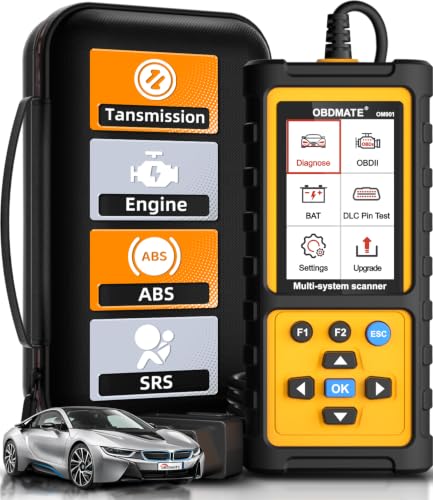
- 【Reset ABS/SRS/Transmission/Engine Lights】 More than an check engine code reader, OBDMATE OM901 obd2 scanner performs comprehensive diagnostics for the 4 most-used systems (ABS/SRS/Engine/Transmission). It quickly clears fault codes, turns off warning lights, read data stream and auto VIN.
- 【3.5" Handheld Scanner with 4 System Diagnose】 3.5" Super large TFT screen equipped displays an intuitive menu and clear readings of various sensors from ABS, SRS, ECM and TCM systems. It arrived with a silicone protective case and hard-shell carrying case, ensuring long-lived durability and drop resistance. The car diagnostic tool is plug-to-play designed, plug it and get diagnosis started without any batteries or updates required.
- 【One-Click I/M Readines&Full OBD2 Functions】 Press F1 to get an intuitive corloured form about whether various emissions-related systems on the vehicle are operating properly. Help you get smog-check ready quickly. OM901 car scanner supports all essential OBD2 functions you need: read & clear codes, view freeze frame, read I/M readiness, retrieve VIN, live data stream (with graphing display), O2 sensor test, onboard monitoring mode, and EVAP leak test.
- 【Battery Voltage Check&DLC Pin Test】 It allows you to monitor battery health by testing current battery voltage. Plus, this obd2 diagnostic tool features DLC 16-PIN test to check current voltage of every pin.
- 【Automotive Scanner Diagnostic Kit】 The package comes with 1 car scanner, 1 USB-type c cable, 1 hard storage bag and 1 user manual(en). Free to update without any hidden fees. 5 languanges available in setting including English, French, Italian, German and Espanish. Valuable and Portable, making it a great tool kit for car owners, DIY enthusiasts, and professional mechanics.

- [All System Diagnostics, Professional-Level Scanner] - BLCKTEC 460T is the ultimate OBD2 diagnostic tool for home mechanics and professionals. It supports all 10 OBD2 modes, reads and clears Engine/Transmission/ABS/SRS codes, performs All-System Diagnostics, offers workshop reset tools, and provides real-time live data. It helps you pinpoint issues, assess your car's condition, and prepare for SMOG checks with ease. NOTE: Function availability depends on your vehicle. Before you buy, be sure to use the Compatibility Checker on BLCKTEC website or contact our customer support to verify that the features you need are supported for your vehicle’s specific year, make, and model.
- [12+ Most Popular Reset Functions] - BLCKTEC 460T OBD2 scanner offers 12+ dealer-level service functions, including Oil Maintenance Reset, ABS Bleeding, EPB Reset, SAS(Steering Angle Sensor) Recalibration, DPF(Diesel Particulate Filter) Reset, Throttle Body Relearn, Battery Reset/Initialization, TPMS Relearn, Transmission Reset, Fluid Change Reset, Maintenance Reset and more, enabling you to perform workshop services like a pro. NOTE: Function availability depends on your vehicle. Be sure to use the Compatibility Checker on BLCKTEC website to verify that the features you need are supported for your vehicle.
- [Real-Time OBD2 and OEM Live Data, Freeze Frame Data] - BLCKTEC 460T helps diagnose vehicle issues when warning lights like Check Engine Light or ABS/SRS Light appear. It offers detailed DTC info, ECU Freeze Frame Data, and real-time OBD2 and advanced OEM live data, including Engine, Transmission, ABS, SRS, and more, making it easy to diagnose and resolve vehicle problems. You can view, graph, record, replay, and overlay up to four live data streams in a single graph for better analysis.
- [AutoVIN, AutoReLink, AutoScan, 3X Faster] - Equipped with AutoVIN technology, 460T automatically retrieves the VIN to save you time. Its AutoScan and AutoReLink features scan all of the vehicle's ECUs and detect any fault codes immediately after you plug the scanner into the vehicle's OBD2 port - no button presses required. Additionally, it regathers DTC and I/M readiness information every 30 seconds, simplifying monitor tests. 460T's advanced technology makes it 3X faster than other products.
- [Get RepairSolutions2, the #1 Auto Repair App for Free] - When paired with RepairSolutions2(RS2) App, 460T becomes even more powerful. RS2's Verified Fix Database built by master technicians, provides the parts needed for the repair. Additionally, RS2 gives you access to OEM warranty info, maintenance schedules, TSB, and dealership recall info, making car care easier than ever. RS2 is free with no subscription fees and it stores your car scan reports in the cloud, allowing you to access, share, or print them anytime and anywhere.
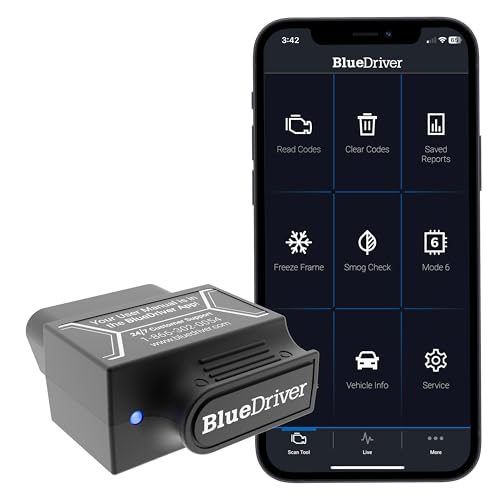
- [Diagnose Like a Pro] BlueDriver Pro is a professional OBD2 scanner and diagnostic tool that helps you scan, understand, and clear vehicle trouble codes with confidence. Turn your phone into a powerful car diagnostic scanner—no guesswork, no unnecessary repairs.
- [Read and Clear More Codes Than Ever] Read and clear more codes than basic car code readers. Access enhanced diagnostics for Check Engine, ABS, SRS, Airbag, TPMS, Transmission.
- [Verified Fixes and Real-Time Data] Get unlimited, technician-verified repair reports matched to your VIN, with definitions, causes, and confirmed fixes. Monitor live vehicle data as you drive, view freeze frames, check smog readiness, and analyze Mode 6 test results.
- [Wireless & Bluetooth Enabled] - Say goodbye to wires. BlueDriver connects with Bluetooth via your phone/tablet to a sensor that plugs into your car's OBDII port. Get all of the capabilities of an expensive code reader & scan tool without any annoying wires.
- [Broad Make & Model Coverage] Strong support for GM, Ford, Stellantis (RAM, Jeep, Chrysler), Toyota, Honda, Nissan, Mazda, Subaru, Hyundai, Mercedes-Benz, BMW, and VW.

- OBD2 SCANNER FOR ALL SYSTEMS – The INNOVA SD35 is a tablet-based OBD2 scanner designed for advanced diagnostics. Read and clear check engine light, ABS, SRS, and TPMS codes, plus test your car battery and alternator to prevent unexpected failures. Vehicle coverage may vary. Please use Innova’s Coverage Checker to verify compatibility.
- ALL-SYSTEM DIAGNOSTICS & LIVE DATA – Unlike basic code readers, this OBD2 scanner for all vehicles scans engine, transmission, ABS, SRS, and more. Get real-time live data, including RPM, fuel trims, temperature readings, and oxygen sensor performance.
- OBD2 TABLET WITH USER-FRIENDLY INTERFACE – This automotive scan tool features a high-resolution display, making vehicle diagnostics faster and easier.
- ADVANCED TPMS, OIL RESET & SERVICE FUNCTIONS – Perform TPMS sensor checks, oil light reset, and other service resets with ease This professional diagnostic tool provides comprehensive vehicle maintenance capabilities in one device.
- WIDE VEHICLE COVERAGE (1996 & NEWER CARS & TRUCKS) – This OBD2 scanner Bluetooth tablet is compatible with Toyota, Ford, Honda, Chevrolet, Nissan, Dodge, and more. However, feature coverage may vary. Please use Innova's Coverage Checker to verify coverage.
SEOCONTENT-START
May 2023 TechTIPS Page 1 of 15
Subaru Service and Technical Support Line Newsletter ©2023 Subaru of America, Inc. All rights reserved.
01 QMR of the Month
We are pleased to announce this month’s TechShare QMR of the Month
Winner:
Kristopher Orrok from
Evergreen Subaru in Auburn, ME
Kristopher created a high quality QMR using TechShare reporting on
customer’s concern of being unable to register a user to vehicle profile.
Kristopher’s report included detailed diagnostic steps, high-quality
photos, and a video.
Please refer to the following link to review the TechShare QMR in detail:
TS-230727
In appreciation for going the extra mile and sharing his experience with
us, Kristopher will be receiving the following from his District Service
Quality Manager:
$500.00 Snap-On gift card
SUBARU TECHLINE HOLIDAYS
& HOURS OF OPERATION
Mon. – Thurs. 8:30AM – 7:30PM EST
Friday 10:30AM – 5:00PM EST
Saturday 9:00AM – 3:00PM EST
Articles Contained
in this Issue
Click on a title below to jump to the article.
Click the date located in the footer to return to page 1.
CODE ARTICLE………………………………………………………….PAGE
(00) STIS New Releases………………………………… 8
(01) QMR of the Month………………………………..1-2
(01) QMR of the Month Award
Presentations………………………………………… 2
Tech Tips Greatest Tips
(01) Lost Keys? Contact the Subaru Techline .
Updated Immobilizer Chart……………………… 3
(01) SXM Traffic and Weather
Now Discontinued………………………………….. 4
(01) Opening an Infotainment Case & Attaching .
Files To Open Techline Cases………………..5-7
(07) DTC’s, Crank No Start, Key “chip” falls out, .
BIU……………………………………………………..7-8
(11) A/F or O2 sensor contamination…………….8-9
(15) Fuel consumption widget “missing” on .
Denso CP 1.0/1.5 equipped vehicles…..10-11
(16) DTC P1867 and P0867……………………….11-12
ISO 14001 is the international standard for excellence
in Environmental Management Systems.
Please recycle or dispose of automotive products
in a manner that is friendly to our environment
and in accordance with all local, state and federal
laws and regulations.
CAUTION: VEHICLE SERVICING PERFORMED BY UNTRAINED PERSONS
COULD RESULT IN SERIOUS INJURY TO THOSE PERSONS OR TO OTHERS.
SUBARU OF AMERICA, INC. IS
ISO 14001 COMPLIANT
Continued on the next page
May 2023
The Subaru TechTIPS newsletter is intended for use by professional Technicians ONLY. Articles are written
to inform those Technicians of conditions that may occur in some vehicles, or to provide information
that could assist in the proper servicing of the vehicle. Properly trained Technicians have the equipment,
tools, safety instructions, and know-how to do the job correctly and safely. If a condition is described,
DO NOT assume that your vehicle has or will have that condition. Impreza, Legacy, Justy, Loyale,
Outback, Forester, Subaru SVX, WRX, WRX STI, Baja, Tribeca, BRZ, XV Crosstrek, Ascent, Crosstrek
Hybrid, Solterra and “Quality Driven” are Registered Trademarks.
Continued on the next page
May 2023 TechTIPS Page 2 of 15
01 QMR of the Month (CONTINUED)
The other Regional winners selected from QMRs submitted during March 2023 were:
• Benjamin Gotcher from Subaru of Clear Lake
• Brian Lowe from Tindol Subaru
• Charlie Pham from Diablo Subaru of Walnut Creek
• Gregory Beach from Ramsey Subaru
Any Subaru Technician can participate in the TechShare QMR of the Month program. See the November
2022 issues of TechTIPS for full details. You just might see your name and photo in a future issue of
TechTIPS!
01 QMR of the Month Award Presentations
As part of our “enhanced” QMR of the Month recognition program, we will include a photo (whenever
available) of the recipient’s award presentation in TIPS. The winner selected from QMR of the Month
submissions received during March 2023 was Kris Orrok, Senior Master Technician at Evergreen
Subaru, Auburn, ME.
Kris is shown above (left/center) after being presented with his $500.00 Snap-On Gift Card. To his right is
Evergreen Subaru’s General Manager Chris Dunn. To his left are Subaru of America’s District Service and
Quality Manager David Dennis and Evergreen Subaru’s Service Manager Kevin Crowell.
Congratulations and THANK YOU to our March 2023 QMR of the Month Award recipient!
Continued on the next page
May 2023 TechTIPS Page 3 of 15
This series features TechTIPS articles frequently referred to by Techline. This month’s feature is from
March 2022.
01 Lost Keys? Contact the Subaru Techline. Updated Immobilizer Chart
If you receive a vehicle from the customer where all their originally registered keys have been lost,
contact the Subaru Techline for the necessary steps to program new keys. Depending on the
immobilizer type, you will be unable to just program one key without an original key. All immobilizer
types (except for A type) require an original key to make any changes to the immobilizer system.
Without an original key, a new one cannot be added. Unsure of which immobilizer type you have?
Refer to the reference chart below. Once you have confirmed the vehicles immobilizer type perform
the following:
• Verify the vehicle is onsite.
• Open a Repair Order with all necessary information.
Š VIN, RO number, RO date, Mileage (if it can be obtained), etc.
• Verify key type (push button, turn-key)
• Contact the Subaru Techline.
When calling the Subaru Techline, please ensure all necessary information is available at the time
of the call.
SOA will no longer clear immobilizer modules for POLK branded title vehicles (except
for lemon law buy-back.) All other POLK branding will require immobilizer component
replacement. Refer to the Title Alert when checking the Vehicle Inquiry on Subarunet.
Please refer to the Service Manual/Registration Manual for Immobilizer for repair of these
vehicles.
Anytime a retailer has a vehicle with lost keys a NEW Techline case must be opened for EACH
vehicle. The retailer will not be allowed to reuse the document sent for other vehicles.
When Techline has components to clear, it is vital a completed form is sent. Without this information
the entire process will be delayed. Specific components have different procedures for clearing and
without this information the components may not be cleared at all or additional down time may
occur to determine their origin.
May 2023 TechTIPS Page 4 of 15
Continued on the next page
01 SXM Traffic and Weather Now Discontinued
SXM Traffic and Weather Now services have been discontinued by SXM. Due to low usage, this is
no longer an available feature. Depending upon the head unit installed, and if the customer has ever
previously accessed these services, this change will appear in slightly different ways which may
result in questions to retailers. Please review the following examples carefully to better understand
the different scenarios for how this change will appear to be able to recognize and address each
should any customer questions arise.
On CP1.0 and CP1.5, the Traffic and Weather Now button will be grayed out. If the customer had not
previously selected an area, they will then be able to do so. Once selected, the button will gray out.
Gen 4 Denso CP1.0 & CP1.5:
On a Harman Kardon 3.1 and 3.1a unit, for customers who previously used the feature, the button will
then highlight and beep with no action. For users who have not selected a city, when pressing the
button, they will be prompted to select a city and then the button will become inoperative.
Gen 3 Harman 3.1 & 3.1a:
May 2023 TechTIPS Page 5 of 15
Continued on the next page
01 Opening an Infotainment Case & Attaching Files To Open Techline Cases
TechShare is continuing to grow and incorporate new features and capabilities. Techline is now on
TechShare. Understanding how to navigate these new tools will help save time and make working with
Techline easier. Included below are images of the Techline portion for TechShare on both desktop and
smartphone applications.
On the home screen of the desktop application
(see above), select “Techline” on the left side
of the screen. There will be two selections at
the top right. “View All Open Techline Cases”
and “Create Infotainment Case.” With these
features you will be able to add attachments
and update cases as well as create cases for
Infotainment concerns. To find these options on
the smartphone application, select “Techline”
at the bottom and the scroll to the bottom of
the page (see image). Techline will be adding
other options for Technician case creation in
the future. If using the smartphone application,
select “Techline” and scroll to the bottom to find
the same 2 options (see image to the left). When
using the phone app, all the same functions exist.
Continued on the next page
May 2023 TechTIPS Page 6 of 15
Opening an Infotainment Case & Attaching Files To Open Techline Cases
(CONTINUED) 01
When selecting “View All Open Techline Cases,” these
screens will appear. Select the “upload” symbol next to the
appropriate case to add an attachment on a case. There is no
limit on file size for attachments. Adding an attachment will
automatically update the case and alert Techline. There will
be times it will be beneficial to use the phone app instead of
the desktop version and vice versa. For instance, if a photo or
video stored on a phone needs to be attached to a case, the
phone app will be easier to use. When attaching a head unit
data log/SSM data file, the desktop site may be easier to use.
Continued on the next page
May 2023 TechTIPS Page 7 of 15
Opening an Infotainment Case & Attaching Files To Open Techline Cases
(CONTINUED) 01
When selecting “Create Infotainment Case,” the VIN entry screen will appear. TSB 15-304-22
includes information and directions for creating an Infotainment case. Input the VIN for the appropriate
vehicle. Once the VIN has been entered, the screen will populate with other fields that will need to be
filled out. Please include as much specific information as possible. Providing specific and detailed
information in the original submission will lead to a quicker resolution. Please fill out all the fields as
this information may be necessary in diagnosing the issue. As soon as the information is submitted,
an email will be sent to the Technician with a Techline case number. If immediate assistance is
required, a Technician can call in once the email with a case number has been received. After
submission, Techline will respond in a timely manner once the submission has been reviewed.
IMPORTANT NOTE: This is the only way that an Infotainment case should be opened. Calling in to
open an Infotainment case should only be done when access to TechShare is not possible.
07 DTC’s, Crank No Start, Key “chip” falls out, BIU
Techline is receiving calls about B1572 and other DTC’s, BIU replacements and a no start condition.
This issue only affects “turnkey” vehicles. If a vehicle is towed in as a no start, the customer may
describe the condtion coming out of nowhere, it was working fine and then stopped. Closely inspect
the key itself. The “chip” that communicates with the Immobilizer system may be missing from the key.
This may cause B1572 and other DTC’s to set. On a vehicle that does not have something else wrong
with it, following the Trouble Tree for the DTC may lead to replacing the BIU or other components as all
the wiring checks will pass. After the BIU or other component is replaced, the concern is still present.
Before replacing any parts, always make sure to closely inspect the key for the chip. Another
way to verify the concern would be to request all the keys for the vehicle from the customer. Will the
vehicle start with a different key?
Continued on the next page
May 2023 TechTIPS Page 8 of 15
07 DTC’s, Crank No Start, Key “chip” falls out, BIU (CONTINUED)
11 A/F or O2 sensor contamination
While servicing the front or rear A/F or O2 sensor or any component near it, caution must be taken.
There is a breather hole in the front A/F sensor. It is possible for oil or silicone to enter the hole and
cause the A/F sensor to fail. This may cause the erratic readings to the ECM or a DTC. Always
inspect the A/F and O2 sensors for oil contamination due to an oil leak. When performing service near
the front A/F, it should be protected if any chemicals are being sprayed nearby. This could include
oil penetrants (WD-40, PB Blaster etc.), brake clean or even silicone-based engine shine/dressing
(Armor-All) applied by detailers.
Continued on the next page
May 2023 TechTIPS Page 9 of 15
11 A/F or O2 sensor contamination (CONTINUED)
To avoid failure of A/F and O2 sensor and assembly contamination, use the cautions below.
1. When removing the A/F or O2 sensors:
Use caution to not let the breather hole of A/F Sensor or Rear O2 Sensor be sprayed with liquid
lubricant. In case of using spray lubricant to remove these sensors, the hole should be covered
with a rag* (as shown in the below photo) before applying the spray lubricant only to the threads
of the sensor.
2. When changing the engine oil:
Use caution to not spill engine oil onto the A/F and O2 sensors when removing the oil filter.
3. When applying any materials containing silicone to engine compartment and/or undercarriage:
When using polishing chemical materials or lubricant materials near the engine compartment or
undercarriage of the vehicle, always pay attention to not spray them on or near these sensors
without covering the sensors with a rag.
*CAUTION – NEVER cover the sensor with a rag while the exhaust system is hot!! If the sensor
is covered with a rag (after the exhaust system has cooled down), be sure to remove it before
driving the vehicle as it may cause a fire if left on the exhaust.
Continued on the next page
May 2023 TechTIPS Page 10 of 15
15 Fuel consumption widget “missing” on Denso CP 1.0/1.5 equipped vehicles
Techline has been receiving calls with a customer concern of fuel consumption no longer displaying
on the head unit. When the Driver Monitoring System (DMS) is turned on, the fuel consumption can be
viewed as a widget at the top of the head unit screen.
If the DMS is turned off, the fuel consumption widget cannot be viewed, this is a normal condition.
Once the DMS is turned back on, the fuel consumption widget can be viewed again. The fuel
consumption widget shows information for that driver’s DMS profile. This fuel consumption widget
is not the same as the fuel mileage displayed in the combination meter. Please refer to the Owner’s
Manual for the specific vehicle for more information on this system.
This photo shows the DMS turned off, note
the Fuel consumption is blank.
Continued on the next page
May 2023 TechTIPS Page 11 of 15
Fuel consumption widget “missing” on Denso CP 1.0/1.5 equipped vehicles
(CONTINUED) 15
16 DTC P1867 and P0867
When diagnosing a vehicle with DTC P1867 or a P0867 it is important to note if the issue is intermittent
or if the fault is occurring all the time. When performing the diagnostics in the trouble tree, be mindful
of the testing results of Steps 14-18. There has been an increase in CVT replacements where a valve
body may have repaired the fault due to incorrect diagnostics (see below for a list of serviceable parts).
When collecting the results of these steps, if the issue is not occurring, the results may indicate no
fault. It is important to note on Step 18, to not only record the actual secondary pressure at an engine
RPM of 3000, but to also compare that reading to the results collected in Step 17. This can often be
overlooked.
With the DMS turned on, the fuel consumption
will now be shown for the driver.
Continued on the next page
May 2023 TechTIPS Page 12 of 15
16 DTC P1867 and P0867 (CONTINUED)
Here the list of serviceable CVT parts. Take note that the Control Valve Body is serviceable:
Continued on the next page
May 2023 TechTIPS Page 13 of 15
00 STIS New Releases
ITEM CODE ITEM TYPE TITLE
CREATED
DATE
15-236-18R Technical Service Bulletin Reprogramming File Availabilit… 6-Jun-23
14-28-21R Technical Service Bulletin New Software Reprogramming Pro… 6-Jun-23
J101SFN960 Accessory Installation Guide 2024MY Crosstrek Wilderness – … 5-Jun-23
J101SFN600 Accessory Installation Guide 2024MY Crosstrek Wilderness – … 5-Jun-23
4/29/2023 Technical Service Bulletin Electronic Power Steering Repr… 5-Jun-23
07-211-23 Technical Service Bulletin EyeSight / Wide Angle Mono Cam… 5-Jun-23
16-136-22R Technical Service Bulletin Vibration & Possible Judder Co… 5-Jun-23
15-300-22R Technical Service Bulletin STARLINK® Telematics Remote En… 5-Jun-23
PT94242232 Accessory Installation Guide PORT INSTALLATION: 2023MY Solt… 5-Jun-23
15-299-22R Technical Service Bulletin Remote Engine Starter (RES) / … 5-Jun-23
15-310-23R Technical Service Bulletin Solterra Connect 5-Jun-23
WRJ-23R Subaru Product/Campaign Bulletin Lower Control Arm Castle Nut /… 5-Jun-23
J101SFN300 Accessory Installation Guide 2024MY Crosstrek Wilderness – … 1-Jun-23
15-309-23R Technical Service Bulletin Solterra Audio / Navigation He… 26-May-23
07-219-23R Technical Service Bulletin Genuine Alternative Battery Re… 24-May-23
07-218-23R Technical Service Bulletin Genuine Alternative Battery Re… 24-May-23
WRD-23R Subaru Product/Campaign Bulletin 12V Inverter Connector Corrosi… 24-May-23
12-249-23R Technical Service Bulletin Cleaning of Painted Surfaces A… 23-May-23
SUTTIPSLOC Other/Miscellaneous TechTIPS Article Locator Index… 23-May-23
05-62-18R Technical Service Bulletin Surface Rust Accumulation in F… 22-May-23
15-301-22R Technical Service Bulletin Reprogramming File Availabilit… 22-May-23
WRI-23R Subaru Product/Campaign Bulletin Safety Recall/STOP SALE – Stop… 19-May-23
J201SFN000 Accessory Installation Guide 2024MY Impreza/Crosstrek – Aut… 16-May-23
H501SFN000 Accessory Installation Guide 2024MY Impreza/Crosstrek – Aut… 16-May-23
H461SFN200 Accessory Installation Guide 2024MY Crosstrek – Side Sill P… 16-May-23
H461SFN200 Accessory Installation Guide 2024MY Crosstrek – Side Sill P… 16-May-23
H461SFN000 Accessory Installation Guide 2024MY Impreza/Crosstrek – Foo… 16-May-23
07-213-22R Technical Service Bulletin Genuine Battery Replacement 16-May-23
H4510FN010 Accessory Installation Guide 2024MY Crosstrek Fog Light Kit 16-May-23
H4510FN000 Accessory Installation Guide 2024MY Impreza Fog Light Kit 16-May-23
12-248-23 Technical Service Bulletin Rattle-Type Sound From B-Pilla… 16-May-23
09-80-21R Technical Service Bulletin DTC # P2682 & P26Ax** / Thermo… 16-May-23
07-220-23 Technical Service Bulletin Diagnostic Procedures / DTCs P… 16-May-23
16-141-23 Technical Service Bulletin DTC P0711 / TCM Reprograming F… 16-May-23
15-255-19R Technical Service Bulletin Map Data Update Procedure for … 15-May-23
12-230-21R Technical Service Bulletin Outer Door Weatherstrip Fitmen… 12-May-23
All revised publications are highlighted in yellow.
Continued on the next page
May 2023 TechTIPS Page 14 of 15
ITEM CODE ITEM TYPE TITLE
CREATED
DATE
15-302-22R Technical Service Bulletin 2023 Audio/Navigation & Power … 11-May-23
03-78-17R Technical Service Bulletin Clutch Release Bearing- Design… 11-May-23
06-88-23 Technical Service Bulletin Clicking Sound Heard When Usin… 11-May-23
09-105-23 Technical Service Bulletin Reprogramming Files / P0011 & … 9-May-23
09-104-23 Technical Service Bulletin Reprogramming Files / P0011 & … 9-May-23
All revised publications are highlighted in yellow.
Continued on the next page
May 2023 TechTIPS Page 15 of 15
*** Now you can e-mail your TechTIPS input and suggestions to: tech@subaru.com ***
SUBARU TECHLINE Monday – Thursday 8:30 am to 7:30 pm
Hours of Operation Friday 10:30 am to 5 pm and Saturday 9 am to 3 pm
This is your chance to offer suggestions for use in future issues of TechTIPS! Make
sure that if you e-mail us, you place in the subject line of your e-mail “For TechTIPS
Newsletter”. Thank you!
Model:
Year:
VIN:
Description of situation encountered:
Your suggestion for repair procedure, product improvements, etc.:
Please attach separate sheets, if necessary. You may also want to include Service Manual
diagrams or references, or your own drawings to assist in describing your suggestion. All
information submitted becomes the property of Subaru of America, Inc. Permission is granted
to Subaru of America, Inc. to print your name and suggestions in TechTIPS and other Subaru of
America, Inc. publications. Mail items to: PO Box 9103; Camden, NJ 08101-9877.
Your Name:
Signature:
Dealer’s Name:
City:
Date:
Dealer Code:
**************************************************************************************************************
**************************************************************************************************************
SEOCONTENT-END
This product presentation was made with AAWP plugin.