
NHTSA ID Number: 10233908
Manufacturer Communication Number: 15-226-18R
Summary
This bulletin provides troubleshooting steps to follow when diagnosing customer concerns regarding USB functionality. (All models equipped with Harmon Audio/Navigation head units).
NUMBER: 15-226-18R
DATE: 08/21/18
REVISED: 03/27/23
| APPLICABILITY: | All Models Equipped with Harman Audio / Navigation Head Units |
| SUBJECT: | Harman Audio / Infotainment: Troubleshooting USB Functionality Concerns |
INTRODUCTION:
This bulletin provides troubleshooting steps to follow when diagnosing customer concerns regarding USB functionality. Please start by completing the Harman Investigation Guide Questionnaire as it gathers important details which will help with diagnosis and will be required should the condition not be resolved by this troubleshooting. While completing the questionnaire, follow the question flow based on the customer concern. Answer each related question noting the results to each in detail while performing the diagnostics. Review the entire bulletin before beginning in order to understand the flow for the listed concern. If the concern you have is not listed, check the Service Manual “Infotainment (Diagnostics) – Diagnostics with Phenomena” section as a starting point.
SERVICE PROCEDURE / INFORMATION:
REMINDER: Customer satisfaction and retention starts with performing quality repairs.
1) Always confirm the condition as reported by the customer.
2) This section addresses USB detection symptoms.
a. Confirm the USB is recognized (USB icon appears) on the Media screen as shown in the figure below.
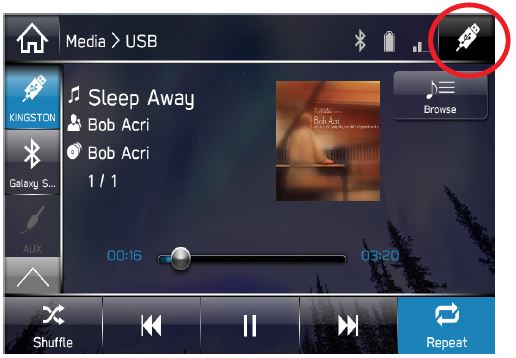
b. If the USB is not recognized, follow Service Diagnostic Mode from the Service Manual:
i. Turn the ignition switch to ACC.
ii. Press the “TUNE/SCROLL” button six times while pressing the “HOME” button.
1. SERVICE INSPECTION:
a. CONNECTION
i. On Service Menu, press “Connection” to display the list of items.
ii. OK: Each device is connected properly.
iii. NG: Connection is not established, or connection status (possibly including the related harness) is faulty.
NOTES:
- The USB connection showing “NG” when no USB device is connected to USB ports is normal.
- If the concern involves “CarPlay not working”, make sure a genuine Apple cable is used. In some cases, aftermarket cables may cause connection issues.
- If the concern involves “Android Auto not working”, try using another cable since Android phones do not require use of a genuine cable.
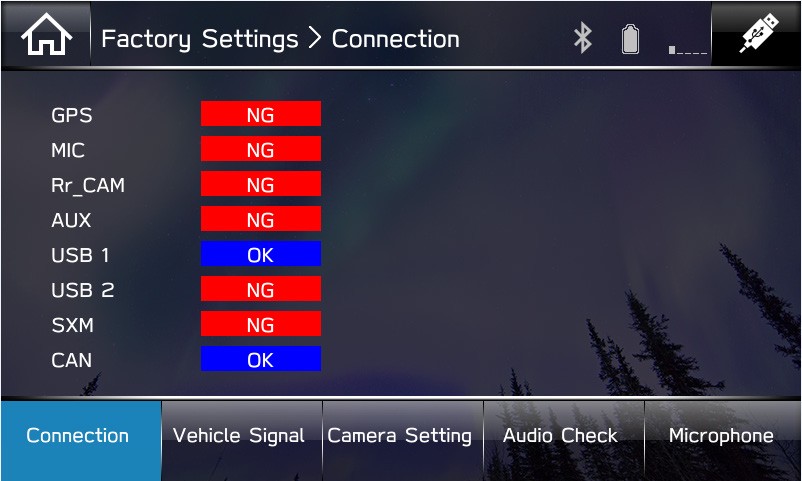
c. Do other USB devices work in the suspect vehicle? If yes, check the USB device’s operation in another like vehicle.
d. Please provide detailed information regarding the USB device (brand, device type, file system, types of files on device, etc.).
3) This section addresses issues related to Apple CarPlay and/or Android Auto not launching consistently due to poor connectivity to USB Media.
New firmware has been released to enhance connectivity for Auxiliary Terminal part numbers used with MID and HIGH level head units.
NOTE: The BASE model utilizes a different Auxilliary Terminal part number which is not affected.
How to determine if the Auxiliary Terminal is pre- or post-countermeasure (CM):
4) If the above steps do not resolve the customer’s concern with USB functionality, complete a fresh Harman Investigation Guide Questionnaire documenting the customer’s concern and the results of each diagnostic step in this bulletin. If possible, capture a video of the condition then contact the SOA Techline to review the next steps. Techline will request you send the completed questionnaire, step-by-step bulletin test results and any videos of the condition.
1 Affected Product
Vehicle
1 Associated Document
Manufacturer Communications
NUMBER: 15-226-18R
DATE: 08/21/18
REVISED: 03/27/23
NHTSA ID Number: 10168563
Manufacturer Communication Number: 15-226-18R
Summary
This bulletin provides troubleshooting steps to follow when diagnosing customer concerns regarding USB functionality. Please start by completing the Harman Investigation Guide Questionnaire as it gathers important details which will help with diagnosis and will be required should the condition not be resolved by this troubleshooting. While completing the questionnaire, follow the question flow based on the customer concern. Answer each related question noting the results to each in detail while performing the diagnostics. Review the entire bulletin before beginning in order to understand the flow for the listed concern.
1 Associated Document
Manufacturer Communications
NUMBER: 15-226-18R
DATE: 08/21/18
REVISED: 11/15/19
MC-10168563-0001.pdf 592.593KB
NHTSA ID Number: 10146468
Manufacturer Communication Number: 15-226-18R
Summary
This bulletin provides troubleshooting steps to follow when diagnosing customer concerns regarding USB functionality. Please start by completing the Harman Investigation Guide Questionnaire as it gathers important details which will help with diagnosis and will be required should the condition not be resolved by this troubleshooting. While completing the questionnaire, follow the question flow based on the customer concern. Answer each related question noting the results to each in detail while performing the diagnostics. Review the entire bulletin before beginning in order to understand the flow for the listed concern. If the concern you have is not listed, check the Service Manual ?Infotainment (Diagnostics) – Diagnostics with Phenomena? section as a starting point.
1 Associated Document
Manufacturer Communications
NUMBER: 15-226-18R
DATE: 08/21/18
REVISED: 09/05/18
MC-10146468-9999.pdf 552.232KB
NHTSA ID Number: 10144884
Manufacturer Communication Number: 15-226-18
Summary
This bulletin provides troubleshooting steps to follow when diagnosing customer concerns regarding USB functionality. Please start by completing the Harman Investigation Guide Questionnaire as it gathers important details which will help with diagnosis and will be required should the condition not be resolved by this troubleshooting. While completing the questionnaire, follow the question flow based on the customer concern. Answer each related question noting the results to each in detail while performing the diagnostics. Review the entire bulletin before beginning in order to understand the flow for the listed concern
1 Associated Document
Manufacturer Communications
NUMBER: 15-226-18
DATE: 08/21/08
MC-10144884-9999.pdf 551.695KB

- USB-C 2-in-1 storage OTG: The Lexar JumpDrive Dual Drive D40E features USB Type-A and Type-C connectors in a slim, portable form factor for easy device compatibility
- Transfer speeds up to 100MB/s: Based on internal testing, performance may vary depending upon the host device, interface, and usage conditions. 1MB=1,000,000 bytes
- Plug and Play: Widely compatible with USB Type-C smartphones, tablets, laptops, Macs, and traditional Type-A devices, no software installation required. The 360° swivel design allows for easy switching between connectors without the hassle of losing a cap
- Durable & Compact: The Lexar D40E USB memory stick features a metal enclosure, withstands temperatures from 0° to 50° C (32°F to 122°F), and is lightweight at 26g with dimensions of 70.4 x 16.9 x 11.7mm
- Security & Warranty: Securely protects files using an advanced security software solution with 256-bit AES encryption. Backed by a Lexar 3-year limited warranty
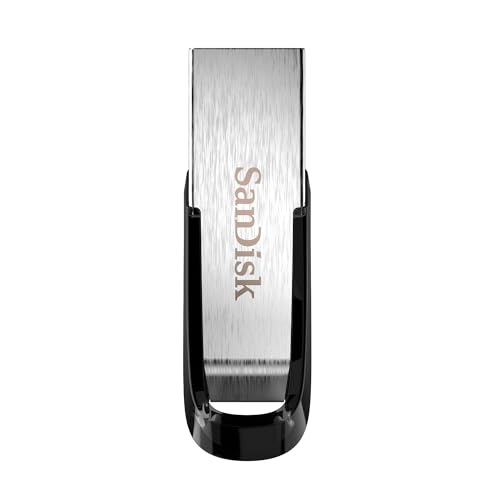
- High-speed USB 3.0 performance of up to 150MB/s(1) [(1) Write to drive up to 15x faster than standard USB 2.0 drives (4MB/s); varies by drive capacity. Up to 150MB/s read speed. USB 3.0 port required. Based on internal testing; performance may be lower depending on host device, usage conditions, and other factors; 1MB=1,000,000 bytes]
- Transfer a full-length movie in less than 30 seconds(2) [(2) Based on 1.2GB MPEG-4 video transfer with USB 3.0 host device. Results may vary based on host device, file attributes and other factors]
- Transfer to drive up to 15 times faster than standard USB 2.0 drives(1)
- Sleek, durable metal casing
- Easy-to-use password protection for your private files(3) [(3)Password protection uses 128-bit AES encryption and is supported by Windows 7, Windows 8, Windows 10, and Mac OS X v10.9 plus; Software download required for Mac, visit the SanDisk SecureAccess support page]

- GOOD VALUE PACKAGE - 1 Pack 32GB Memory Stick USB 2.0 Flash Drives with great cost performance and high quality.
- BIG CAPACITY - The available capacity: 29.10GB-29.8GB, You can save the data of movies, music, photos, designs, programs, manuals, handouts in a high speed.Good performance in digital data storing, transferring and sharing with families, friends, workmates, clients and machines.
- EASY TO USE & PLUG AND WORK - Support windows 7 / 8 / 10 / Vista / XP / 2000 / ME / NT Linux and Mac OS, Compatible with USB2.0 and below.
- TWISTTURN DESIGN & EASY CARRY - The metal clip rotates 360° round the ABS plastic body which with rubber oil skin feeling finish. The capless design can avoid lossing of cap, and providing efficient protection to the USB port.
- WARRANTY & SUPPORT - SIMMAX logo is laser printed on the USB connector surface, our products are of good quality and we promise that any problem about the product within one year since you buy.

- The durable, light-weight design of the Turbo Attaché 3 USB 3.0 Flash Drive is the essential mobile storage solution
- Perfect for transferring large files such as movies, videos, photos, music & documents
- Transfer speeds up to 10 times faster than standard USB 2.0 flash drives
- Convenient sliding collar, and cap-less design protects your content when not in use
- Compatible with most PC and Mac laptop and desktop computers with USB 3.0 ports

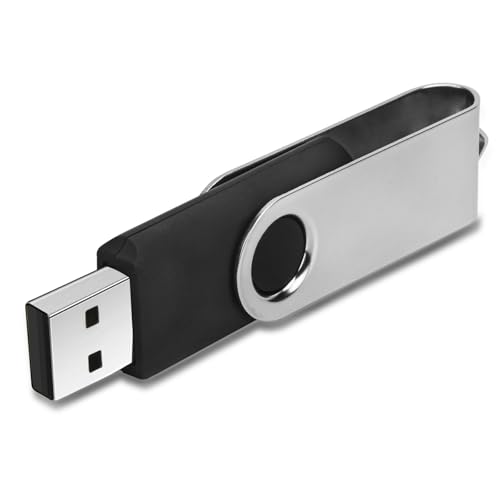
- 【16GB Flash Drive】USB flash drives with 16GB capacity, meet your needs of daily use on work, school, home and travelling for photos, music, videos, files storage and transfer. IMEASON thumb drives can be used to store different files, easy to data backup.
- 【Metal Swivel Cap Design】USB thumb drive is metal swivel cover provides extra protection for the usb thumbdrive connector, no usb drive cap to lose; keychain design makes it easier to carry without worrying lose it.
- 【Wide Compatibility】USB drive supports Windows 7/8/10/11 / Vista / XP / Unix / 2000 / ME / NT Linux and Mac OS, also Supports USB 2.0 and 1.1 ports. USB Stick support TV, desktop, notebook computer, car, audio and other device. The USB Memory Stick is your great data storage and transfer companion with traveling and working.
- 【Easy to use】usb memory stick is plug and play without any software installation. Just simply plug the Flashdrive into the port of your USB-compatible devices such as computer, laptop to start data storage or transmission.
- 【What You Get】16 GB USB Flash Drive Thumb Drive, The default format of the usb storage flash drive is FAT32.
SEOCONTENT-START
Bulletin Number: 15-226-18R; Revised: 03/27/23 Page 1 of 4 NUMBER: 15-226-18R DATE: 08/21/18 REVISED: 03/27/23 APPLICABILITY: All Models Equipped with Harman Audio / Navigation Head Units SUBJECT: Harman Audio / Infotainment: Troubleshooting USB Functionality Concerns CAUTION: VEHICLE SERVICING PERFORMED BY UNTRAINED PERSONS COULD RESULT IN SERIOUS INJURY TO THOSE PERSONS OR TO OTHERS. Subaru Service Bulletins are intended for use by professional technicians ONLY. They are written to inform those technicians of conditions that may occur in some vehicles, or to provide information that could assist in the proper servicing of the vehicle. Properly trained technicians have the equipment, tools, safety instructions, and know-how to do the job correctly and safely. If a condition is described, DO NOT assume that this Service Bulletin applies to your vehicle, or that your vehicle will have that condition. Subaru of America, Inc. is ISO 14001 Compliant ISO 14001 is the international standard for excellence in Environmental Management Systems. Please recycle or dispose of automotive products in a manner that is friendly to our environment and in accordance with all local, state and federal laws and regulations. Continued… SERVICE BULLETIN ATTENTION: GENERAL MANAGER q PARTS MANAGER q CLAIMS PERSONNEL q SERVICE MANAGER q IMPORTANT – All Service Personnel Should Read and Initial in the boxes provided, right. ©2018 Subaru of America, Inc. All rights reserved. INTRODUCTION: This bulletin provides troubleshooting steps to follow when diagnosing customer concerns regarding USB functionality. Please start by completing the Harman Investigation Guide Questionnaire as it gathers important details which will help with diagnosis and will be required should the condition not be resolved by this troubleshooting. While completing the questionnaire, follow the question flow based on the customer concern. Answer each related question noting the results to each in detail while performing the diagnostics. Review the entire bulletin before beginning in order to understand the flow for the listed concern. Please apply the information captured in the checklist to the Harman Investigation Guide Questionnaire. If the concern you have is not listed, check the Service Manual “Infotainment (Diagnostics) – Diagnostics with Phenomena” section as a starting point. SERVICE PROCEDURE / INFORMATION: Please complete checklist provided at the end of the document and keep it available for future reference. REMINDER: Customer satisfaction and retention starts with performing quality repairs. 1) Always confirm the condition as reported by the customer. 2) This section addresses USB detection symptoms. a. Confirm the USB is recognized (USB icon appears) on the Media screen as shown in the figure to the right. Bulletin Number: 15-226-18R; Revised: 03/27/23 Page 2 of 4 Continued… b. If the USB is not recognized, follow Service Diagnostic Mode from the Service Manual: i. Turn the ignition switch to ACC. ii. Press the “TUNE/SCROLL” button six times while pressing the “HOME” button. 1. SERVICE INSPECTION: a. CONNECTION i. On Service Menu, press “Connection” to display the list of items. ii. OK: Each device is connected properly. iii. NG: Connection is not established, or connection status (possibly including the related harness) is faulty. NOTES: • The USB connection showing “NG” when no USB device is connected to USB ports is normal. • If the concern involves “CarPlay not working”, make sure a genuine Apple cable is used. In some cases, aftermarket cables may cause connection issues. • If the concern involves “Android Auto not working”, try using another cable since Android phones do not require use of a genuine cable. c. Do other USB devices work in the suspect vehicle? If yes, check the USB device’s operation in another like vehicle. d. Please provide detailed information regarding the USB device (brand, device type, file system, types of files on device, etc.). 3) This section addresses issues related to Apple CarPlay and/or Android Auto not launching consistently due to poor connectivity to USB Media. New firmware has been released to enhance connectivity for Auxiliary Terminal part numbers used with MID and HIGH level head units. NOTE: The BASE model utilizes a different Auxilliary Terminal part number which is not affected. 4) If the above steps do not resolve the customer’s concern with USB functionality, complete a fresh Harman Investigation Guide Questionnaire documenting the customer’s concern and the results of each diagnostic step in this bulletin. If possible, capture a video of the condition then contact the SOA Techline to review the next steps. Techline will request you send the completed questionnaire, step-by-step bulletin test results and any videos of the condition. Bulletin Number: 15-226-18R; Revised: 03/27/23 Page 3 of 4 Continued… USB FUNCTIONALITY CONCERNS AND TROUBLESHOOTING CONCERN CHECKLIST Repair Order Date: Vehicle Identification Number (VIN): 1. Condition confirmed as reported by the customer? NO: YES: Concern details: 2. Is the cable used to connect the phone OEM? NO: YES: 3. Head Unit software version: 4. Is the USB recognized? NO: YES: 5. Does the USB connection show “NG”? NO: YES: 6. Are other USB devices recognized and work properly? NO: YES: 7. Has USB device been tested using a like vehicle? NO: YES: 8. USB device details: brand , type , file system ,USB hub 9. Part Number: Date Code: Bulletin Number: 15-226-18R; Revised: 03/27/23 Page 4 of 4 WARRANTY / CLAIM INFORMATION: For vehicles within the Basic New Car Limited Warranty period or covered by an active Subaru Added Security Gold plan, this repair may be submitted using the following claim information: Labor Description Labor Operation # Labor Time Fail Code H/U Type HARMAN USB TROUBLESHOOTING A850-873 0.5 ZLI-43 Base, Mid & High IMPORTANT REMINDERS: • SOA strongly discourages the printing and/or local storage of service information as previously released information and electronic publications may be updated at any time. • Always check for any open recalls or campaigns anytime a vehicle is in for servicing. • Always refer to STIS for the latest service information before performing any repairs.
**************************************************************************************************************
SEOCONTENT-END
This product presentation was made with AAWP plugin.