
NHTSA ID Number: 10232239
Manufacturer Communication Number: 15-242-19R
Summary
This Service Information bulletin has been developed for use as a quick reference tool to aid in diagnosing operational concerns of the Gen 2 Telematics system’s remote access features.
NUMBER: 15-242-19R
DATE: 05/21/19
REVISED: 02/28/23
| APPLICABILITY: | All 2019-23MY Vehicles with Gen 2 Telematics |
| SUBJECT: | Telematics System Diagnostic Quick-Reference Guide |
INTRODUCTION:
This Service Information bulletin has been developed for use as a quick reference tool to aid in diagnosing operational concerns of the Gen 2 Telematics system’s remote access features. It is STRONGLY suggested both Technicians and Service Advisors read through this material carefully and in its entirety as the intent of this tool is to help Service Department staff enhance Customer Satisfaction, save valuable time and in some cases, reduce unnecessary component replacements.
SERVICE PROCEDURE / INFORMATION:
VERY IMPORTANT: Any Technician or other retailer personnel who, despite service documentation and training to the contrary, performs a DCM swap on a subscribed vehicle should NEVER release that vehicle back to the customer until after confirming the proper operation of the Telematics system. If the issue is first discovered only after the vehicle has been released to the customer, then the retailer MUST contact the customer immediately to inform the customer the ACN/AACN feature may not be functioning properly, and that the vehicle must be returned for inspection as soon as possible.
REMINDER: Customer satisfaction and retention starts with performing quality repairs.
IMPORTANT NOTE: Before performing any diagnosis, ALWAYS confirm an active subscription and the level of that subscription includes the features in question.
WARRANTY / CLAIM INFORMATION:
For vehicles within the Basic New Car Limited Warranty period or covered by an active Subaru Added Security Gold plan, refer to the Labor Time Guide on Subarunet for the proper claim coding information.
| Remote System / Service Not Functioning | Inspection Points / Areas | Purpose of Inspection / Additional Details |
| Customer states the Remote Engine Start (RES) system requests are failing.
NOTE: This information applies to push-button start models only as Key Start models are not equipped with Telematics RES. | Using the Subaru Select Monitor (SSM) confirm operation of LF, RF, LR, RR, R Gate Switch inputs. | The RES system confirms all doors are closed and locked before starting. Intermittent door switch operation could make RES fail for not seeing the correct door position status. |
| Using SSM, confirm operation of Hood Switch input. NOTE: Hood switch is now a component of the hood latch assembly. | The RES system confirms the hood is securely latched prior to starting as a safety feature to ensure there is nobody working in the engine compartment. Intermittent hood switch operation could make RES fail for not seeing the correct hood position status. | |
| Confirm the fuel level using the fuel gauge. | The RES confirms there is a sufficient amount of fuel in the vehicle prior to starting. Although this varies by vehicle, generally the low fuel light will illuminate when approximately 2.5 gallons or less remain in the tank. A low fuel level, inaccurate fuel level sensor or fuel gauge could be the root cause of RES not completing. | |
| Confirm operation of shift lever and Inhibiter Switch.
Check Combination Meter, TCM | The RES will only start the engine when the vehicle is in Park. An improperly adjusted or malfunctioning Inhibiter Switch could possibly be the root cause of a RES concern. | |
| Verify operation of security system. Ask the customer if a RES was attempted immediately following an alarm system activation. | A malfunctioning security system could be one source. However, after a security system activation occurs, a manual push button start is required before the RES will resume normal operation. | |
| Verify operation of all door locks and the remote keyless entry system through a visual inspection and SSM data (if necessary). | The RES system locks all doors for safety before starting the vehicle. A malfunctioning door lock actuator, mechanical condition (lock / latch problem) and/or electrical fault may be the root cause of a RES concern. | |
| Using the SSM, check for any DTCs. Is B2A16 current or in history? | The DCM must be registered with the immobilizer for the RES system to work. Follow the 2019 Registration Manual for Immobilizer Other Than BRZ found on STIS to perform the DCM registration procedure. | |
| Using the SSM, check the following items in the [Data monitor] > [Telematics] | Confirm the DCM is capable of receiving an Engine Start request signal. Does the PID for Remote Engine Starter Active indicate TRUE? If TRUE, and engine does not start, refer to Telematics System (Diagnostics) > Diagnostics with Phenomenon > Inspection > Telematics Remote Engine Starter / RES Air Conditioner Does Not Function. If FALSE, and it is confirmed the STARLINK subscription includes this feature, there may be a provisioning problem. | |
| Using the SSM, check the following items with [Data monitor] > [Body Control] [Data monitor] > [Keyless Access with Push Button Start] | Verify the Immobilizer has not been triggered preventing a restart:
Body Control – Immobilizer Set Memory = SET Keyless Access with P/B Start – Immobilizer Set Memory = SET IF SET is displayed, have customer contact call the Subaru CRS Call Center to release the lock-out. | |
| Ask customer for details about the RES concern. For example: were any RES requests successful? How many times was RES requested and for what duration? | After RES start, total maximum runtime will not exceed 20 minutes. Example: 5 Minutes + 5 Minutes + 10 Minutes = 20 minutes total runtime for a total of 3 remote engine start requests. |
| Remote System / Service Not Functioning | Inspection Points / Areas | Purpose of Inspection / Additional Details |
| Customer reports inability to remotely perform an Engine Stop request after trying multiple times. | Ask customer detailed questions about the time the Remote Engine Start Request was made and how long after the successful RES was the Remote engine stop request made? The default configuration of these services sends an email and/or text message to confirm service activation. Use the time stamps from these if available to build a timeline. | A remote engine stop can only be performed within the first 10 min of a remote engine start request. If the request was for 15 min runtime and the remote engine stop request was performed during minute 11, the customer would receive a fail message which is normal operation of this feature. |
| Customer states only some remote system requests operate.
Examples: Remote Door Locks, Remote Horn and Lights, RES, Remote Climate control (Hybrid model only). | Ask for details about the concern. For example: was the vehicle parked in a garage? Was the key away from the vehicle and all the dash lamps not illuminated? Were any abnormal warning chimes heard? | Most of the remote services require the ignition to be in the “OFF” position to operate. Some customers who park in garages or driveways get in the habit of leaving the keys in the car and sometimes forget to verify the position of the ignition switch. |
| Ask for details about the concern. For example: was the vehicle in park and stationary at the time of the request? | Almost all remote services require the vehicle not be moving when the request is made. The vehicle confirms first it is in Park. Next, it confirms there is no vehicle speed detected before it will issue a remote services request. | |
| Using the SSM, check the following items in the [Data monitor] > [Telematics] | Verify the DCM is receiving a Door Lock request.
Does the PID for Remote Door Lock Active indicate TRUE? If TRUE and Door Locks are not active, refer to STIS for Security and Locks Inspection procedures. | |
| Using the SSM, check the following items in the [Data monitor] > [Telematics] | Verify the DCM is receiving a Horn and Lights request.
Does the PID for Remote Horn & Lights Active indicate TRUE? If TRUE and Horn & Lights are not active, refer to STIS for Security and Locks Inspection procedures. | |
| Customer states Hybrid Charge Now requests are failing. | Use SSM to verify Hybrid battery state of charge. Ask detailed questions about color and status of LED at the charging inlet. Ask detailed questions about color and status of Power Indicator, Charging Indicator and any Error warning lamps on the dash.
Check operation of charging inlet. | Hybrid batteries only charge when the state of charge is less than 70%. There are charging indicator lamps at the charging inlet and inside the cockpit to indicate many different circumstances which could affect charging. Refer to the Hybrid Owner’s Manual for specific information on charging, charging port operation and operation of charging indicators. A faulty charge cable, charging inlet or charging inlet lock assembly can all prevent normal charging. |
| Customer states no remote service requests were working previously but now, all are working to manufacturer specifications. | Make sure to ask detailed questions about the circumstances leading up to the remote services request. For example: When was the last time the vehicle was driven? How long has the vehicle been sitting in airport long-term parking? | It is required for there to be a key on ignition drive cycle every 14 days in order to keep modules from going in to hibernation mode and to ensure continuous operation. Infrequently used vehicles or those left for extended periods may enter hibernation mode and require a drive cycle to return remote service requests back to normal. |
| Customer states Remote service requests operate intermittently at some locations. | Ask detailed questions about these locations. Was the location underground, under a metal or solar awning, or inside a concrete structure? Do requests always fail at this location? Are there any unique geographic attributes to the area? For example: on top of a mountain, at the base of a valley, or are there any large broadcast antennae nearby? | Certain structures or geographic attributes can affect the way cellular signals travel through the air, sometimes weakening or totally blocking the signal.
Verifying an area is within good AT&T cellular coverage is a good start. Knowing if there may be other conditions impacting the coverage will help identify potential impacts. |
| Remote System / Service Not Functioning | Inspection Points / Areas | Purpose of Inspection / Additional Details |
| Customer states intermittent operation of Vehicle Scheduler, Vehicle Locator and Vehicle Security System notifications. | Ask detailed questions about locations where the concern was noted. Was the location underground, under a metal or solar awning, or inside a concrete structure? Do requests always fail at this location? Are there any unique geographic attributes to the area, for example: at the base of a valley, or while at street level parking in a city where large buildings obstruct clear view of the sky? | These remote services require the use of GPS. In order for GPS to register and work properly, a clear view of the sky is required. Being in the shadow of large building or mountains can impact signal performance. Parking within certain structures could also impair these functions. |
| Using the SSM, check the following items: [Data monitor] > [Telematics] | Verify the DCM is receiving Appointment Scheduler request.
Does the PID for Service Appointment Scheduler Active indicate TRUE? Confirm Scheduler was being operated within an ATT 4G LTE coverage area since this feature only functions using 4G LTE. | |
| Using the Subaru Select Monitor, check the following items: [Data monitor] > [Telematics] | Verify the DCM is receiving a Vehicle Locator request.
Does the PID for Vehicle Locator Active indicate TRUE? Make sure the vehicle has clear view of sky and actual vehicle location is within 328 feet of the displayed location. | |
| With the vehicle Head Unit (H/U) in Service Diagnostic Mode:
1. Turn ignition switch to ACC 2. Press Tune/Scroll six times while pressing “HOME” button 3. On Service Menu, Click “Function Check” 4. Select Navigation System Check | If vehicle is equipped with Navigation, you can use the Service Diagnostic Mode to verify GPS operation.
GPS related check: Status of the GPS signal reception can be checked. When there is faulty reception status, position detection or date indication, re-check the reception status at a location with a clear view of the sky and no obstacles around that will interrupt the signal reception. When normal condition is still not obtained, the GPS antenna may be faulty.
|
53 Affected Products
Vehicles
| MAKE | MODEL | YEAR |
| SUBARU | ASCENT | 2019-2023 |
| SUBARU | BRZ | 2019-2023 |
| SUBARU | CROSSTREK | 2019-2023 |
| SUBARU | CROSSTREK HYBRID | 2019-2023 |
| SUBARU | FORESTER | 2019-2023 |
| SUBARU | IMPREZA | 2019-2023 |
| SUBARU | LEGACY | 2019-2023 |
| SUBARU | LEVORG | 2022 |
| SUBARU | OUTBACK | 2019-2023 |
| SUBARU | SOLTERRA | 2023 |
| SUBARU | WRX | 2019-2023 |
| SUBARU | WRX STI | 2019-2022 |
| SUBARU | XV CROSSTREK | 2022-2023 |
1 Associated Document
Manufacturer Communications
NUMBER: 15-242-19R
DATE: 05/21/19
REVISED: 02/28/23
MC-10232239-0001.pdf 356.316KB
NHTSA ID Number: 10203887
Manufacturer Communication Number: 15-242-19R
Summary
This bulletin has been developed for use as a quick reference tool to aid in diagnosing operational concerns of the Gen 2 Telematics system’s remote access features.
1 Associated Document
Manufacturer Communications
NUMBER: 15-242-19R
DATE: 05/21/19
REVISED: 11/02/21
MC-10203887-0001.pdf 369.539KB
NHTSA ID Number: 10186377
Manufacturer Communication Number: 15-242-19R
Summary
This bulletin has been developed for use as a quick reference tool to aid in diagnosing operational concerns of the Gen 2 Telematics system’s remote access features.
1 Associated Document
Manufacturer Communications
NUMBER: 15-242-19R
DATE: 05/21/19
REVISED: 01/14/21
MC-10186377-0001.pdf 369.657KB
NHTSA ID Number: 10177821
Manufacturer Communication Number: 15-242-19R
Summary
This Service Information Bulletin has been developed for use as a quick reference tool aid in diagnosing operational concerns of the Gen 2 Telematics system’s remote access features.
1 Associated Document
Manufacturer Communications
NUMBER: 15-242-19R
DATE: 05/21/19
REVISED: 07/14/20
MC-10177821-0001.pdf 339.271KB
NHTSA ID Number: 10161825
Manufacturer Communication Number: 15-242-19
Summary
This Service Information bulletin has been developed for use as a quick reference tool to aid in diagnosing operational concerns of the Gen 2 Telematics system’s remote access features on all 2019 vehicles with Gen 2 Telematics. It is STRONGLY suggested both Technicians and Service Advisors read through this material carefully and in its entirety as the intent of this tool is to help Service Department staff enhance Customer Satisfaction, save valuable time and in some cases, reduce unnecessary component replacements.
1 Associated Document
Manufacturer Communications
NUMBER: 15-242-19
DATE: 05/21/19

- Compatibility : This remote key fits for Subaru Ascent 2019-2024,for Crosstrek 2019-2023,for Forester 2019-2023,for Impreza 2017-2023,for Legacy 2018-2021,for Outback 2018-2023,for BRZ 2022 2023 2024,for WRX STI 2019-2021
- Confirm It Fits for Your Car: Please check the appearance of the key fob(including key buttons and shape); then check if your key has the same part number,Frequency: 433MHz,Chip: 8A,Board ID: 231451-7000,FCC ID: HYQ14AHK,OEM P/N: 88835-FL03A, 88835-FL03B, 88835-FL03C
- How to check part number: Open your original key, then you can see the part information on the key shell or the circuit board, just compare it to my key fob. If you lost your key, you need check with your dealership
- Key Programming and Cutting: You need program and cut the remote fob to your vehicle before it can work on your car by a locksmith or the dealership
- Complete Remote Key Fob: The package includes battery, uncut blade, 8A chip and circuit board, it will function is same as your original one, just ready to program
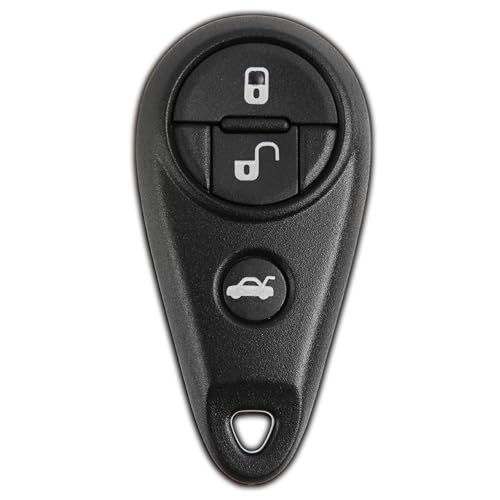
- Self-Programming Capability: This key fob replacement is designed for easy, self-programming, making it a convenient DIY solution. You won't need professional assistance to set it up-just follow the simple instructions provided. In just a few easy steps, you can program the fob to your vehicle, restoring full functionality without costly visits to the dealership. It's a quick, cost-effective way to replace a lost or damaged key fob while maintaining convenience and security
- Premium Replacement Quality: This car fob is designed to match the specifications of the factory remote. Unlike generic alternatives, this premium replacement ensures a seamless integration with your car's security system, maintaining the same high-quality performance while offering an affordable and convenient option for replacing a lost or damaged remote (PN: 88036SC030)
- Three-Button Functionality: This Keyless Option replacement remote features convenient 3-button options, providing a range of functions for added security and ease of use with your vehicle's keyless entry system
- Complete Package Included: This product comes as a complete key fob with electronics and a battery already installed, ready for programming and immediate use upon delivery
- Vehicle Compatibility: This car remote can only be programmed for specific Makes and Models including 1999-2011 Subaru Impreza, Legacy, WRX, and Outback vehicles. Please verify compatibility with your vehicle before purchase
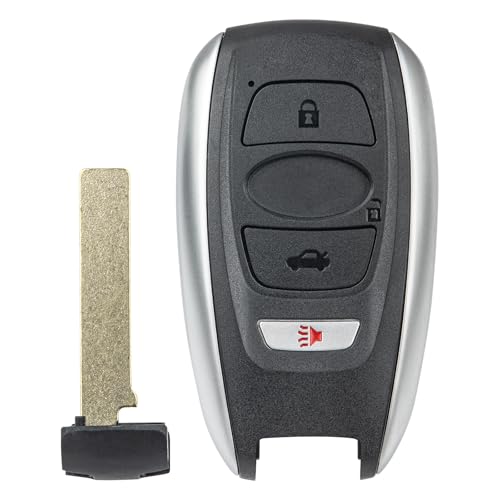
- 【Replacement】For FCC ID:HYQ14AHK; P/N:88835FL032, 88835FL031, 88835FL030, 88835-FL03C, 88835-FL03B, 88835-FL03A; Frequency:434 MHz; Please Make Sure That Your Original Remote Has the Same Buttons on it
- 【Compatibility】Compatible with 2019-2024 Subaru Ascent/ 19-23 Crosstrek Forester/ 17-23 Impreza/ 18-21 Legacy/ 18-23 Outback/ 22-24 BRZ/ 19-21 WRX STI. Please Check Our Product Description and Vehicle Fitment Tool for Full Compatible Vehicles List
- 【Programming Methord】Self-Programming is Not Available, it's necessary to be cut and programmed by a qualified dealer or locksmith.【NOTE】This Key Fob Only Supports Vehicles Equipped with Push to Start / Stop Button on The Dashboard and Proxy Keyless Entry System. It Doesn’t Support Regular Key/Keyed Ignition Vehicles.
- 【OEM-Quality】Made of Premium Plastic Materials, Shockproof, Every Single Keyless Entry Remote Start Control Car Key Fob is Fully Pre-tested by Professional Locksmith Tools before Shipping. 100% New Brand Remote Control Car Key Fob, The Function is the Same as the Factory Original Car Key Fob.
- 【Package Include】1x Keyless Entry Remote Start Control Key Fob with Electronics and Battery Pre-Installed.【WARRANTY】Buy with Confidence, 24-Months Warranty and Lifetime Support. If You Find They Don't Work or Any Problems, Just Feel Free to Contact us Anytime, We Will Arrange Free Refund or Return for You

- Only Key Fob Shell: This is just a key shell case replacement with no electronics, transponder chip, or battery inside.
- Fitment: An empty key fob cover shell replacement compatibility with 2014-2022 Subaru BRZ, 2015-2022 Legacy & Crosstrek, 2015-2023 Outback & Impreza, 2016-2018 Forester, 2016-2023 Subaru WRX & STI, 2019-2022 Ascent Fits for FCC ID: HYQ14AHK.
- Installation: Our remote key fob shell case is easy to install. Just open your original key fob control and then put the internals like a circuit board in this new key case shell. (Does not require reprogramming). The New Blank key needs to be cut by a hardware store or locksmith.
- Materials: Mixed metal and plastic composition, durable replacement key shell case. It is a good replacement key fob case for broken or worn remotes.
- Remote Key Shell Appearance: Please check the button position and appearance of your car remote fob key is the same as our key case shell before you buy.

- Complete Replacement Solution: This pack includes 2 KeylessOption key fob replacements designed specifically for 2010-2014 Subaru Forester, Impreza, WRX, and STI models, providing a cost-effective alternative to dealership replacements while maintaining full functionality
- Self-Programming Capability: Features easy self-programming functionality that allows you to program the remote yourself without requiring expensive dealership visits or professional locksmith services, saving both time and money on installation
- 4-Button Functionality: Equipped with four convenient buttons that provide complete keyless entry control, allowing you to lock, unlock, open the trunk, and activate the panic alarm directly from your remote for enhanced vehicle security and accessibility
- OEM Compatibility: Designed to replace FCC ID CWTWB1U819 remotes, ensuring seamless compatibility with your Subaru's existing keyless entry system and maintaining the same reliable performance as your original factory remote
- Dual Pack Value: Comes as a set of two key fobs, providing you with a convenient backup remote or allowing you to share vehicle access with family members while ensuring you always have a spare available in case of loss or damage
SEOCONTENT-START
Bulletin Number: 15-242-19R; Date: 02/28/23 Page 1 of 4 Continued… INTRODUCTION: This Service Information bulletin has been developed for use as a quick reference tool to aid in diagnosing operational concerns of the Gen 2 Telematics system’s remote access features. It is STRONGLY suggested both Technicians and Service Advisors read through this material carefully and in its entirety as the intent of this tool is to help Service Department staff enhance Customer Satisfaction, save valuable time and in some cases, reduce unnecessary component replacements. SERVICE PROCEDURE / INFORMATION: VERY IMPORTANT: Any Technician or other retailer personnel who, despite service documentation and training to the contrary, performs a DCM swap on a subscribed vehicle should NEVER release that vehicle back to the customer until after confirming the proper operation of the Telematics system. If the issue is first discovered only after the vehicle has been released to the customer, then the retailer MUST contact the customer immediately to inform the customer the ACN/AACN feature may not be functioning properly, and that the vehicle must be returned for inspection as soon as possible. REMINDER: Customer satisfaction and retention starts with performing quality repairs. IMPORTANT NOTE: Before performing any diagnosis, ALWAYS confirm an active subscription and the level of that subscription includes the features in question. WARRANTY / CLAIM INFORMATION: For vehicles within the Basic New Car Limited Warranty period or covered by an active Subaru Added Security Gold plan, refer to the Labor Time Guide on Subarunet for the proper claim coding information. NUMBER: 15-242-19R DATE: 05/21/19 REVISED: 02/28/23 SERVICE INFORMATION BULLETIN ATTENTION: GENERAL MANAGER q PARTS MANAGER q CLAIMS PERSONNEL q SERVICE MANAGER q IMPORTANT – All Service Personnel Should Read and Initial in the boxes provided, right. ©2019 Subaru of America, Inc. All rights reserved. APPLICABILITY: All 2019-23MY Vehicles with Gen 2 Telematics SUBJECT: Telematics System Diagnostic Quick-Reference Guide CAUTION: VEHICLE SERVICING PERFORMED BY UNTRAINED PERSONS COULD RESULT IN SERIOUS INJURY TO THOSE PERSONS OR TO OTHERS. Subaru Service Bulletins are intended for use by professional technicians ONLY. They are written to inform those technicians of conditions that may occur in some vehicles, or to provide information that could assist in the proper servicing of the vehicle. Properly trained technicians have the equipment, tools, safety instructions, and know-how to do the job correctly and safely. If a condition is described, DO NOT assume that this Service Bulletin applies to your vehicle, or that your vehicle will have that condition. SUBARU OF AMERICA, INC. IS ISO 14001 COMPLIANT ISO 14001 is the international standard for excellence in Environmental Management Systems. Please recycle or dispose of automotive products in a manner that is friendly to our environment and in accordance with all local, state and federal laws and regulations. Bulletin Number: 15-242-19R; Date: 02/28/23 Page 2 of 4 Continued… Remote System / Service Not Functioning Inspection Points / Areas Purpose of Inspection / Additional Details Customer states the Remote Engine Start (RES) system requests are failing. NOTE: This information applies to push-button start models only as Key Start models are not equipped with Telematics RES. Using the Subaru Select Monitor (SSM) confirm operation of LF, RF, LR, RR, R Gate Switch inputs. The RES system confirms all doors are closed and locked before starting. Intermittent door switch operation could make RES fail for not seeing the correct door position status. Using SSM, confirm operation of Hood Switch input. NOTE: Hood switch is now a component of the hood latch assembly. The RES system confirms the hood is securely latched prior to starting as a safety feature to ensure there is nobody working in the engine compartment. Intermittent hood switch operation could make RES fail for not seeing the correct hood position status. Confirm the fuel level using the fuel gauge. The RES confirms there is a sufficient amount of fuel in the vehicle prior to starting. Although this varies by vehicle, generally the low fuel light will illuminate when approximately 2.5 gallons or less remain in the tank. A low fuel level, inaccurate fuel level sensor or fuel gauge could be the root cause of RES not completing. Confirm operation of shift lever and Inhibiter Switch. Check Combination Meter, TCM and KACM (Keyless Access with Push Button Start control module) and also the pid in the BIU for the Park Switch signal (P SW). The RES will only start the engine when the vehicle is in Park. An improperly adjusted or malfunctioning Inhibiter Switch could possibly be the root cause of a RES concern. Verify operation of security system. Ask the customer if a RES was attempted immediately following an alarm system activation. A malfunctioning security system could be one source. However, after a security system activation occurs, a manual push button start is required before the RES will resume normal operation. Verify operation of all door locks and the remote keyless entry system through a visual inspection and SSM data (if necessary). The RES system locks all doors for safety before starting the vehicle. A malfunctioning door lock actuator, mechanical condition (lock / latch problem) and/ or electrical fault may be the root cause of a RES concern. Using the SSM, check for any DTCs. Is B2A16 current or in history? The DCM must be registered with the immobilizer for the RES system to work. Follow the 2019 Registration Manual for Immobilizer Other Than BRZ found on STIS to perform the DCM registration procedure. Using the SSM, check the following items in the [Data monitor] > [Telematics] Confirm the DCM is capable of receiving an Engine Start request signal. Does the PID for Remote Engine Starter Active indicate TRUE? If TRUE, and engine does not start, refer to Telematics System (Diagnostics) > Diagnostics with Phenomenon > Inspection > Telematics Remote Engine Starter / RES Air Conditioner Does Not Function. If FALSE, and it is confirmed the STARLINK subscription includes this feature, there may be a provisioning problem. Using the SSM, check the following items with [Data monitor] > [Body Control] [Data monitor] > [Keyless Access with Push Button Start] Verify the Immobilizer has not been triggered preventing a restart: Body Control – Immobilizer Set Memory = SET Keyless Access with P/B Start – Immobilizer Set Memory = SET IF SET is displayed, have customer contact call the Subaru CRS Call Center to release the lock-out. Ask customer for details about the RES concern. For example: were any RES requests successful? How many times was RES requested and for what duration? After RES start, total maximum runtime will not exceed 20 minutes. Example: 5 Minutes + 5 Minutes + 10 Minutes = 20 minutes total runtime for a total of 3 remote engine start requests. Bulletin Number: 15-242-19R; Date: 02/28/23 Page 3 of 4 Continued… Remote System / Service Not Functioning Inspection Points / Areas Purpose of Inspection / Additional Details Customer reports inability to remotely perform an Engine Stop request after trying multiple times. Ask customer detailed questions about the time the Remote Engine Start Request was made and how long after the successful RES was the Remote engine stop request made? The default configuration of these services sends an email and/or text message to confirm service activation. Use the time stamps from these if available to build a timeline. A remote engine stop can only be performed within the first 10 min of a remote engine start request. If the request was for 15 min runtime and the remote engine stop request was performed during minute 11, the customer would receive a fail message which is normal operation of this feature. Customer states only some remote system requests operate. Examples: Remote Door Locks, Remote Horn and Lights, RES, Remote Climate control (Hybrid model only). Ask for details about the concern. For example: was the vehicle parked in a garage? Was the key away from the vehicle and all the dash lamps not illuminated? Were any abnormal warning chimes heard? Most of the remote services require the ignition to be in the “OFF” position to operate. Some customers who park in garages or driveways get in the habit of leaving the keys in the car and sometimes forget to verify the position of the ignition switch. Ask for details about the concern. For example: was the vehicle in park and stationary at the time of the request? Almost all remote services require the vehicle not be moving when the request is made. The vehicle confirms first it is in Park. Next, it confirms there is no vehicle speed detected before it will issue a remote services request. Using the SSM, check the following items in the [Data monitor] > [Telematics] Verify the DCM is receiving a Door Lock request. Does the PID for Remote Door Lock Active indicate TRUE? If TRUE and Door Locks are not active, refer to STIS for Security and Locks Inspection procedures. Using the SSM, check the following items in the [Data monitor] > [Telematics] Verify the DCM is receiving a Horn and Lights request. Does the PID for Remote Horn & Lights Active indicate TRUE? If TRUE and Horn & Lights are not active, refer to STIS for Security and Locks Inspection procedures. Customer states Hybrid Charge Now requests are failing. Use SSM to verify Hybrid battery state of charge. Ask detailed questions about color and status of LED at the charging inlet. Ask detailed questions about color and status of Power Indicator, Charging Indicator and any Error warning lamps on the dash. Check operation of charging inlet. Hybrid batteries only charge when the state of charge is less than 70%. There are charging indicator lamps at the charging inlet and inside the cockpit to indicate many different circumstances which could affect charging. Refer to the Hybrid Owner’s Manual for specific information on charging, charging port operation and operation of charging indicators. A faulty charge cable, charging inlet or charging inlet lock assembly can all prevent normal charging. Customer states no remote service requests were working previously but now, all are working to manufacturer specifications. Make sure to ask detailed questions about the circumstances leading up to the remote services request. For example: When was the last time the vehicle was driven? How long has the vehicle been sitting in airport long-term parking? It is required for there to be a key on ignition drive cycle every 14 days in order to keep modules from going in to hibernation mode and to ensure continuous operation. Infrequently used vehicles or those left for extended periods may enter hibernation mode and require a drive cycle to return remote service requests back to normal. Customer states Remote service requests operate intermittently at some locations. Ask detailed questions about these locations. Was the location underground, under a metal or solar awning, or inside a concrete structure? Do requests always fail at this location? Are there any unique geographic attributes to the area? For example: on top of a mountain, at the base of a valley, or are there any large broadcast antennae nearby? Certain structures or geographic attributes can affect the way cellular signals travel through the air, sometimes weakening or totally blocking the signal. Verifying an area is within good AT&T cellular coverage is a good start. Knowing if there may be other conditions impacting the coverage will help identify potential impacts. Bulletin Number: 15-242-19R; Date: 02/28/23 Page 4 of 4 Remote System / Service Not Functioning Inspection Points / Areas Purpose of Inspection / Additional Details Customer states intermittent operation of Vehicle Scheduler, Vehicle Locator and Vehicle Security System notifications. Ask detailed questions about locations where the concern was noted. Was the location underground, under a metal or solar awning, or inside a concrete structure? Do requests always fail at this location? Are there any unique geographic attributes to the area, for example: at the base of a valley, or while at street level parking in a city where large buildings obstruct clear view of the sky? These remote services require the use of GPS. In order for GPS to register and work properly, a clear view of the sky is required. Being in the shadow of large building or mountains can impact signal performance. Parking within certain structures could also impair these functions. Using the SSM, check the following items: [Data monitor] > [Telematics] Verify the DCM is receiving Appointment Scheduler request. Does the PID for Service Appointment Scheduler Active indicate TRUE? Confirm Scheduler was being operated within an ATT 4G LTE coverage area since this feature only functions using 4G LTE. Using the Subaru Select Monitor, check the following items: [Data monitor] > [Telematics] Verify the DCM is receiving a Vehicle Locator request. Does the PID for Vehicle Locator Active indicate TRUE? Make sure the vehicle has clear view of sky and actual vehicle location is within 328 feet of the displayed location. With the vehicle Head Unit (H/U) in Service Diagnostic Mode: 1. Turn ignition switch to ACC 2. Press Tune/Scroll six times while pressing “HOME” button 3. On Service Menu, Click “Function Check” 4. Select Navigation System Check If vehicle is equipped with Navigation, you can use the Service Diagnostic Mode to verify GPS operation. GPS related check: Status of the GPS signal reception can be checked. When there is faulty reception status, position detection or date indication, re-check the reception status at a location with a clear view of the sky and no obstacles around that will interrupt the signal reception. When normal condition is still not obtained, the GPS antenna may be faulty. • GPS/Reception number: Normal when it is indicated in blue. • GPS/Status: Normal when OK is indicated. • GPS/Measurement ratio 3D: • GPS/Measurement ratio 2D: • GPS/Date: Normal when current time is indicated. When current date/time is not indicated, click the Date Setting button to set the current date on the displayed date setting screen. • GPS/Position: Normal when longitude and latitude of the current position are indicated. IMPORTANT REMINDERS: • SOA strongly discourages the printing and/or local storage of service information as previously released information and electronic publications may be updated at any time. • Always check for any open recalls or campaigns anytime a vehicle is in for servicing. • Always refer to STIS for the latest service information before performing any repairs.
**************************************************************************************************************
SEOCONTENT-END
This product presentation was made with AAWP plugin.