NHTSA ID Number: 10174535
Manufacturer Communication Number: Subaru Tech Tips
Summary
Subaru’s QMR of the month winner.
9 Affected Products
Vehicles
| MAKE | MODEL | YEAR |
|---|---|---|
| SUBARU | ASCENT | 2020 |
| SUBARU | BRZ | 2020 |
| SUBARU | CROSSTREK | 2020 |
| SUBARU | FORESTER | 2020 |
| SUBARU | IMPREZA | 2020 |
| SUBARU | LEGACY | 2020 |
| SUBARU | OUTBACK | 2020 |
| SUBARU | WRX | 2020 |
| SUBARU | WRX STI | 2020 |
Articles Contained in this Issue
CODE ARTICLE……………………………………………………….PAGE
(00) STIS New Releases…………………………10-11
(01) QMR of the Month……………………………..1-2
(01) Disinfecting Vehicles………………………….2-3
(01) CPO Procedure for Turbocharged Subaru
Vehicles……………………………………………3-4
Tech Tips Greatest Tips
(01) Authorization Requests (AR) for Paint and
Glass over $500.00…………………………….4-5
(03) Squeak/Chirp Sound from High-Torque
CVT When Shifting from P/N to D………….. 5
(05) C2921 and Intermittent TPMS DTC
Diagnosis………………………………………….6-8
(15) Review of and Additional DTC B2A15
Telematics Information………………………8-9
(15) Updated Infotainment “Conditions”
Information……………………………………….. 10
SEOCONTENT-START
Subaru Service and Technical Support Line Newsletter
01 QMR of the Month
We are pleased to announce this month’s Winner of QMR of the Month:
Leo Gilmore from
Ruge’s Subaru in Rhinebeck, NY
February’s winning QMR described the diagnosis and repair of a 2020
Impreza Sport which displayed a “Keyless Access System Disabled”
warning message in the combination meter during a pre-delivery
inspection. A Select Monitor check for DTCs revealed a B2282 for
Vehicle Speed Signal Correlation. Although the keyless access fob
functions (lock/unlock, etc.) operated normally, the live data for vehicle
speed always displayed the status as “Stopped” instead of “Driving”
regardless of the vehicle speed during his road test. The vehicle’s
speedometer operated normally and there were no other DTCs stored.
Leo then identified and isolated the vehicle speed signal wire from
the VDC control module to the Keyless Access control module. He
proceeded to check the signal using the SSM’s oscilloscope function
after confirming his continuity checks were all OK. The wire was
relatively easy to access so, he checked the same signal on a knowngood
vehicle to use for comparison. The problem car displayed a
square-wave signal ranging from 0 to approximately .2 volts while the
known-good vehicle voltage ranged from 0 to over 12 volts. Leo then
proceeded to check the remaining I/O signals at the VDC connector
with no other problems or connection issues found. After replacing the
VDC control module, he scoped the signal wire again and confirmed
the signal pattern and voltage range had returned to normal. The DTC
was cleared and normal Keyless Access system operation restored.
Leo’s report included detailed results of all his testing along with photos
of the wiring diagram and oscilloscope screen shots.
In appreciation for going the extra mile and sharing his experience with
us, Leo will be receiving the following from his Field Service Engineer.
$500.00 Snap-On gift card
©2020 Subaru of America, Inc. All rights reserved.
SUBARU TECHLINE HOLIDAYS
& HOURS OF OPERATION
Memorial Day: (Closed)
Monday, May 25, 2020
Independence Day: (Closed)
Friday, July 3, 2020
Labor Day: (Closed)
Monday, September 7, 2020
Mon. – Thurs. 8:30AM – 7:30PM EST
Friday 10:30AM – 5:00PM EST
Saturday 9:00AM – 3:00PM EST
Continued on the next page
home
Articles Contained
in this Issue
The Subaru TechTIPS newsletter is intended for use by professional Technicians ONLY. Articles are
written to inform those Technicians of conditions that may occur in some vehicles, or to provide
information that could assist in the proper servicing of the vehicle. Properly trained Technicians
have the equipment, tools, safety instructions, and know-how to do the job correctly and safely.
If a condition is described, DO NOT assume that your vehicle has or will have that condition.
Impreza, Legacy, Justy, Loyale, Outback, Forester, Subaru SVX, WRX, WRX STI, Baja, Tribeca,
BRZ, XV Crosstrek, Ascent, Crosstrek Hybrid and “Quality Driven” are Registered Trademarks.
ISO 14001 is the international standard for excellence
in Environmental Management Systems.
Please recycle or dispose of automotive
products in a manner that is friendly to our
environment and in accordance with all local,
state and federal laws and regulations.
CAUTION: VEHICLE SERVICING PERFORMED BY UNTRAINED PERSONS
COULD RESULT IN SERIOUS INJURY TO THOSE PERSONS OR TO OTHERS.
SUBARU OF AMERICA, INC. IS
ISO 14001 COMPLIANT
Click on a title below to jump to the article.
Click the date located in the footer to return to page 1.
CODE ARTICLE……………………………………………………….PAGE
(00) STIS New Releases…………………………10-11
(01) QMR of the Month……………………………..1-2
(01) Disinfecting Vehicles………………………….2-3
(01) CPO Procedure for Turbocharged Subaru
Vehicles……………………………………………3-4
Tech Tips Greatest Tips
(01) Authorization Requests (AR) for Paint and
Glass over $500.00…………………………….4-5
(03) Squeak/Chirp Sound from High-Torque
CVT When Shifting from P/N to D………….. 5
(05) C2921 and Intermittent TPMS DTC
Diagnosis………………………………………….6-8
(15) Review of and Additional DTC B2A15
Telematics Information………………………8-9
(15) Updated Infotainment “Conditions”
Information……………………………………….. 10
April 2020
April 2020 TechTIPS Page 1 of 12
01 QMR of the Month (continued)
We would also like to further acknowledge Leo for his continued support of the QMR of the Month program.
Since 2016, Leo has won QMR of the Month at the Regional level, twice and at the National level, four times!
In addition, since 2016, Leo has submitted 120 QMRs and represented Subaru Distributors Corporation
Inc. at the 2019 Subaru National Technician Competition. We sincerely appreciate his ongoing commitment
to improving product quality for all our customers. His dedication helps ensure all Subaru Technicians and
customers benefit from useful service information which leads to faster and more accurate repairs. Leo’s
actions are truly representative of the Subaru Love Promise.
The other Regional winners selected from QMRs submitted during February 2020 were:
• David Jodat from Subaru City of Milwaukee in Milwaukee, WI
• Fernando Maldonado from Premier Subaru of Fremont in Fremont, CA
• Garrett Fuchs from Baierl Subaru in Pittsburgh, PA
• Daniel Evans from North Reading Subaru in North Reading, MA
Any Subaru Technician can participate in the QMR of the Month program. See the February 2013 and
January 2016 issues of Tech TIPS for full details. You just might see your name and photo in a future issue
of Tech TIPS!
01 Disinfecting Vehicles
During these challenging times, we know our retailers consider the personal safety of their employees and
customers to be of the utmost importance. We understand many retailers have enhanced cleaning procedures
at their stores, including procedures for cleaning, sanitizing, and disinfecting vehicle interiors.
DISCLAIMER: Subaru of America has not evaluated any product for its ability to disinfect
the novel coronavirus, and we make no representations regarding the effectiveness of any
product. For information on products and procedures recommended for this purpose,
please refer to information from the United States Centers for Disease Control and Prevention
and the United States Environmental Protection Agency, available at www.CDC.gov and
www.epa.gov/pesticide-registration/list-n-disinfectants-use-against-sars-cov-2.
Service department practices should be enhanced to ensure customer and employee safety. Safety
enhancements may include:
• Sanitizing customer areas every hour.
• Waiting area floor markings with 6’ lines to promote social distancing.
• Continue to greet the customers in a professional and friendly manner but refrain from any physical
contact.
• Inform the customer of any sanitation measures taken before their vehicle is released to them.
• Personal protective equipment (gloves, etc.) should be used by Service Advisors.
• Providing the customer with a new pen for their sole use to prevent cross-contamination.
Subaru vehicles are built using many different materials that require many different types of care. Once a
disinfectant has been chosen, do not spray or apply the product directly to any electrical switches or display
screen surfaces. Instead, apply the product to a clean soft cloth. Make sure to not apply so much that the product
is dripping off the cloth when squeezed. Applying too much cleaner may result in the product penetrating the
surface and damaging the vehicle’s electrical system components.
Continued on the next page
April 2020 TechTIPS Page 2 of 12
01 Disinfecting Vehicles (continued)
Always try any cleaner / sanitizer on an inconspicuous small area (or better yet a similar scrap part) before
using more broadly in a customer vehicle to ensure it will not damage, discolor, or fade the surfaces being
cleaned.
Never apply cleaner / sanitizer while in direct sun or when the surface is warm or hot as drying speed will
be affected and could result in water marks or similar discoloration.
Avoid use of highly concentrated alcohol solutions on infotainment touch screens and other clear plastics
as it may cause hazing or fading to occur.
It is VERY important to remember when cleaning leather or other supple surfaces, a conditioner MUST be
applied IMMEDIATELY after wiping away any disinfectant, to restore moisture.
Vehicle sanitation should focus on areas frequently touched:
• Interior and exterior door handles
• Steering wheel
• Arm rests
• Shift lever/paddle shifters
• Turn signal, wiper stalks
• Radio and climate control buttons/knobs
• Window switches
• Center console
• Door locks and switches
• Rearview mirror and side mirror controls
• Sun visors
• Seat(s)
• Key(s)/fob(s)
Below is a link to a very informative video from Hagerty.com on this subject. Subaru of America has not
verified—and does not endorse—any claims made in this video with respect to disinfecting the novel
coronavirus. However, its recommendations for avoiding damage to vehicle surfaces provide helpful
guidance.
https://www.hagerty.com/articles-videos/articles/2020/03/24/how-to-disinfect-car-without-destroyinginterior?
utm_source=SFMC&utm_medium=email&utm_content=20_March_27_Newsletter_NewDD
01 CPO PROCEDURE FOR TURBOCHARGED SUBARU VEHICLES
Due to the high number of phone calls
presented to the Techline, we felt it
necessary to remind retailers of the
correct CPO procedures for Turbocharged
Subaru vehicles. Checking the CID/CVN
over the phone for CPO purposes is NOT
the correct procedure. The information
below was published in the September
2015 TechTIPS Newsletter:
Continued on the next page
April 2020 TechTIPS Page 3 of 12
01 CPO PROCEDURE FOR TURBOCHARGED SUBARU VEHICLES (continued)
Please ensure all criteria are met before sending in a CPO CID/CVN Certification request to avoid delays.
Once the vehicle has passed this part of the inspection process, you should proceed with the rest of the
decision-making process on certifying the vehicle.
As the CPO 152-point inspection form indicates, if a vehicle has ANY performance modifications, it cannot
be enrolled as a Subaru Certified Pre-Owned vehicle. If there are any other non-performance related
modifications, the vehicle must be returned to stock, with all stock/OEM parts installed before it can be
enrolled as Certified. Non-compliance to these requirements may result in chargeback to the retailer for
replacements after it is sold as a Subaru CPO unit.
This series features TechTIPS articles frequently referred to by Techline. This month’s feature is from
September 2018.
01 AUTHORIZATION REQUESTS (AR) FOR PAINT AND GLASS OVER $500.00
On a daily basis, Techline receives Authorization Requests (AR) through Subarunet for paint and
glass repairs exceeding $500.00. These ARs are reviewed to determine if the condition reported
will be covered under Warranty. Many of the ARs submitted describe damage caused by outside
influence which is not a defect and therefore, not a matter for warranty. Prior to submitting your next
AR, please review the Subaru Claims Policy and Procedures Manual (Sections 8.4.25 and 8.4.31) to
familiarize yourself with valid repairs criteria related to Paint and Glass.
Common reasons ARs are rejected:
• Impact causing damage to the windshield or other glass, stone chips, wiper slap
(To avoid damage caused by wiper slap, it is recommended the wiper arm(s) be lowered
to the glass without letting go until the rubber of the wiper blade touches the glass.)
• Paint Chips caused by outside influence
• Clear coat lifting/blistering and/or color coat damage caused by outside influence like:
fluids, tree sap, bird droppings, solvents or impact.
To improve the process, a close inspection of the glass crack or paint condition is required to identify
any source of outside influence. If you determine a condition is not warrantable, review your findings
with the customer at the time of the inspection. Submitting an AR when it is known it will be rejected
is counterproductive for everyone involved.
If it is determined an AR is required, provide only quality pictures that clearly show the condition
being reported. All retailers are required to have a 5 mega pixel (minimum) camera that provides high
quality photos.
Continued on the next page
April 2020 TechTIPS Page 4 of 12
01 AUTHORIZATION REQUESTS (AR) FOR PAINT AND GLASS OVER $500.00 (continued)
• Windshield cracks must have overlapping photos showing the entire length of the
crack when applicable
• Vehicle should be clean
• Avoid glare from overhead lighting, bright sunlight and reflections.
It is important to review all of the pictures being submitted and ensure they are quality photos clearly
showing the condition being reported. If unable to see the condition on the photo, we will not see it
either resulting in requests for additional photos.
Following these recommendations will save time and improve the Authorization Request process for
everyone.
03 Squeak/Chirp Sound from High-Torque CVT When Shifting from P/N to D
The High-Torque CVT equipped in the 2019+MY Ascent, 2015+MY Legacy/Outback 3.6R and XT, 2014-
2018MY Forester XT, and 2015MY+ WRX (CVT equipped), may emit a brief squeak or chirp sound
when shifting the transmission from park or neutral to drive. This sound is caused by the operation
of the forward clutch, just before the clutch fully engages. The sound is caused by the clutch plate
friction materials sliding against each other. These plates are designed to accept this type of contact.
The sound does not affect the performance or reliability of the transmission and is characteristic of its
operation so, no attempt should be made to try to repair it. It is important to ensure there are no DTCs
stored as current or in history, there are no drivability concerns present and, the sound only occurs
while the vehicle is stopped and under the conditions described above.
April 2020 TechTIPS Page 5 of 12
Continued on the next page
05 C2921 and Intermittent TPMS DTC Diagnosis
Techline has received several calls regarding tire pressure DTCs, intermittent flashing of the TPMS
lamp, and/or the center information display (in the combination meter) not displaying tire pressures.
Technicians may find DTC C2921 set as history or current in the TPMS control module.
Situation 1: This code is originally set when TPMS ID is not registered correctly.
Situation 2: It is also set when one or more of the sensor status parameters do not change.
This means a communication error between TPMS CM and TPMS sensor(s) has occurred. If the TPMS
CM cannot communicate, it assumes there is a sensor registration error. In some cases, the TPMS CM
sets DTC C2121-C2124, for each TPMS malfunction, and DTC C2921 is set afterwards. Unfortunately,
those DTCs move to “history” on the next key cycle, but C2921 remains as “current”. If the TPMS memory
is cleared, only C2921 is left in the TPMS CM. The TPMS CM is constantly trying to communicate with
the sensors and needs to see the status change on each sensor within a specified time. Diagnosis
should begin with a recorded data monitor file of the TPMS live data while driving at varying speeds and
making several turns. When reviewing the data, look for one or more of the tire pressure sensor status
parameters performing differently than the others. These parameters use a BIT code to record several
conditions in each sensor.
First, let’s break down how to read the BIT data associated with the sensors.
The BIT code is an 8-digit number, read left to right, with corresponding digits 7 to 0. The chart below
can be found on STIS, and if here for reference.
The last BIT code sequence (2-0) will need to be read in binary. This will create the number associated
with the condition.
This is as follows: 000 = 0; 001 = 1; 010 = 2; 011 = 3; 100 = 4; 101 = 5; 110 = 6; 111 = 7
April 2020 TechTIPS Page 6 of 12
Continued on the next page
05 C2921 and Intermittent TPMS DTC Diagnosis (continued)
Below is a SSM4 graph of normal operating sensors for reference:
Take note, the sensors are reading the same status and are uniform.
Below is an example of a faulty TPMS sensor:
In the picture above, you can see one of the sensors does not communicate properly and drops status.
The other sensors change status as designed and eventually the faulty sensor comes online. This would
be a case of intermittent transmission. This will aid in diagnosis to isolate the potential faulty sensor.
April 2020 TechTIPS Page 7 of 12
05 C2921 and Intermittent TPMS DTC Diagnosis (continued)
Above is another example of a faulty sensor.
A transmitter code may be set if the individual tire pressure sensor malfunctions multiple times in
correspondence with TPMS CM logic. This should be considered when determining which of the sensors
may be malfunctioning.
Once a sensor is isolated, the wheel and tire should be swapped with a known good assembly for
testing. Do not neglect to register the sensors before performing another test drive. The BIT/live data
should then be monitored again for any fluctuations.
NOTE: Technician preliminary checks should include inspection of customer accessories that may
cause interference with the system and proper diagnosis. These accessories may include but are not
limited to: USB converter to 12V power port, USB cables, mylar blankets and metallic sun shades.
15 Review of and Additional DTC B2A15 Telematics Information
NOTE: The first 4 paragraphs (in italics) of this article were previously released in the May 2019 issue
of TIPS. The new information begins with the 5th paragraph.
There have been a significant number of inquiries regarding DTC B2A15 and telematics system
operation. Customers usually report a concern about the red telematics LED being illuminated, either
currently or in the past. In a case where the red LED is presently not displayed, the customer may
also have an email stating STARLINK has detected their services may not be operating correctly and
recommending they return to the retailer to have the system diagnosed. Once at the retailer, if the LED
is green, the system is usually operating within manufacturer specification BUT, there may be a DTC
B2A15 in history.
Continued on the next page
April 2020 TechTIPS Page 8 of 12
Continued on the next page
15 Review of and Additional DTC B2A15 Telematics Information (continued)
The first step to any B2A15 concern investigation is to ask the customer if they are using or have
used any third-party device like an insurance company’s driver monitoring or OBD-II port-connected
device. There are more and more products hitting the market every day meant to plug into the OBD II
connector to monitor and collect data from the vehicle.
If an OBD-II port-connected device is in use, following a detailed customer interview, secure customer
permission to remove the device and confirm operation of all subscribed remote telematics services
as well as operation of both the “i” and SOS buttons. If all services are currently performing within
manufacturers specifications, clear the DTC and inform the customer to consult their STARLINK®
service agreement terms and conditions. Below is the section copied from the Agreement applicable
to this situation.
“Subaru cannot guarantee the performance of any devices not supplied by Subaru of America, Inc,
or its affiliates. Additionally, third-party devices (such as some driver monitoring or third-party OBD-II
port devices), may interfere with the proper function of certain vehicle features, including the Subaru
STARLINK system. Customers may, at their discretion, use those devices but, if they create interference
with the vehicle or the STARLINK® system’s operation, the system may not operate properly and, the
warranty may not offer relief for the conditions that result from such usage.”
NOTE: Anytime there is a current DTC B2A15, the message in the STARLINK notification and/or shown
on the head unit (H/U) display may indicate the safety and security services may not be available. This
STARLINK notification is a generic message to account for several possible DTC conditions which
may impair the function of the vehicle’s Telematics system. In the case of B2A15 caused by an OBDII
device as described above, safety and security features will continue to function as expected along
with STARLINK notification messages for informational purposes. There is language in the STARLINK
notification which may appear on the H/U display as well as in STARLINK communications subscribed
to by the customer stating safety and security services may not be available. RED LED and STARLINK
notifications will occur if there is an OBDII device installed at engine start-up, and B2A15 is set as a
current code. This message is generic to account for all possible DTC conditions which may impair the
function of the vehicle’s Telematics system.
In the case of B2A15 caused by an OBDII device, safety and security features will continue to
function as expected. STARLINK notification messages will also continue for informational
purposes.
For customers concerned about the frequency of these communications which are being caused
exclusively by the their OBDII device, they can modify the frequency STARLINK provides notification by
visiting their MySubaru account.
As another option, DTC B2A15 can be avoided in most cases by disconnecting the OBD device following
each engine shutdown and reconnected only after the engine has been started and running for at least
5 seconds.
April 2020 TechTIPS Page 9 of 12
15 Updated Infotainment “Conditions” Information
Denso Gen 4 CP1 Audio Exchange Unit Process
There is currently a high volume of exchange orders for Denso CP1 CID components.
CCU CID Base CID MID & High
In order to mitigate the risk of backorder situation, always insure proper diagnosis is completed each and
every time prior to proceeding with CID or CCU exchanges. The results of diagnostics performed must
be documented on the Repair Order and in the rare case of an actual CID failure, using the supplied
questionnaires attached to QMRs.
In the vast majority of cases, even when the operation of the CID touch screen appears impacted (stuck,
frozen or not responding), this is actually a result of a CCU software or hardware failure rather than actual
CID failure. CCU is either unable to receive the input properly or unable to provide the needed output
to display but, the touch screen is still functioning as designed. Moving the affected CID to a correctly
operating vehicle is a quick way to confirm the CID is or is not related to the condition.
Keep this information in mind when repairing infotainment related concerns.
00 STIS new releases
ITEM CODE ITEM TYPE TITLE
CREATED
DATE
SOA567H011 Accessory Installation Guide Thule 2” Hitch Adapter 17-Apr-20
SOA567B060 Accessory Installation Guide Thule Bike Carrier – Hitch Pla… 17-Apr-20
07-162-19R Technical Service Bulletin Automatic Door Lock / Unlock F… 17-Apr-20
12-287-20 Technical Service Bulletin Manual Rear Gate, Gate Stays- … 16-Apr-20
WUJ-95R Subaru Product/Campaign Bulletin Exhaust Pipe Front (EPF) Bello… 16-Apr-20
WQT-55 Subaru Product/Campaign Bulletin Occupant Detection System (ODS… 16-Apr-20
All revised publications are highlighted in yellow. Continued on the next page
April 2020 TechTIPS Page 10 of 12
ITEM CODE ITEM TYPE TITLE
CREATED
DATE
WRC-20R Subaru Product/Campaign Bulletin Rear Seat Belt Webbing Locking 14-Apr-20
15-257-19 Technical Service Bulletin STARLINK Service Leads, DTC B2… 10-Apr-20
15-219-18R Technical Service Bulletin Error Code 202 and / or 204 Ge… 8-Apr-20
12-286-20 Technical Service Bulletin Front Door Weatherstrip- Desig… 6-Apr-20
07-162-19R Technical Service Bulletin Automatic Door Lock / Unlock F… 3-Apr-20
WUM-98R Subaru Product/Campaign Bulletin Occupant Detection Wiring Harn… 3-Apr-20
16-128-20 Technical Service Bulletin DTC P0842 / Transmission Harne… 2-Apr-20
WRA-20R Subaru Product/Campaign Bulletin Rear Seat Belt Webbing Locking 1-Apr-20
07-175-20 Technical Service Bulletin DMS Settings- SSM4 Procedure f… 31-Mar-20
09-71-20 Technical Service Bulletin Rattle / Buzz -Type Sound from… 31-Mar-20
15-240-19R Technical Service Bulletin New Harman Audio Amplifiers 31-Mar-20
15-262-20 Technical Service Bulletin DTC B224C- Radio Antenna Fault… 26-Mar-20
WUK-96R Subaru Product/Campaign Bulletin DIT Exhaust Pipe Front (EPF) N… 26-Mar-20
07-174-20 Technical Service Bulletin DTC B2350- Rear Cross Traffic … 26-Mar-20
12-258-20 Technical Service Bulletin Rattling Sound from Sunroof De… 25-Mar-20
WUJ-95R Subaru Product/Campaign Bulletin Exhaust Pipe Front (EPF) Bello… 24-Mar-20
16-127-20 Technical Service Bulletin AT Select Lever Guide Plate- D… 24-Mar-20
12-284-20 Technical Service Bulletin Interior Door Handles- Chrome … 24-Mar-20
12-283-20 Technical Service Bulletin Hood Stay Support / Prop Rod- … 24-Mar-20
H451SFL300 Accessory Installation Guide PORT INSTALLTION: 2020MY Impr… 23-Mar-20
H501SSG203 Accessory Installation Guide PORT INSTALLATION: 2020MY Lega… 23-Mar-20
12-282-20 Technical Service Bulletin Instrument Panel and Center Ve… 20-Mar-20
07-173-20 Technical Service Bulletin Rear Hatch / Trunk Release- Un… 20-Mar-20
07-172-20 Technical Service Bulletin Headlight Anti-Fog Enhancement… 20-Mar-20
15-249-19R Technical Service Bulletin 2020 Audio/Navigation & Power … 19-Mar-20
14-24-20 Technical Service Bulletin Hub Remover / Special Tool – J… 19-Mar-20
SUTTIPSLOC Other/Miscellaneous TechTIPS Article Locator Index… 18-Mar-20
J501SXC150 Accessory Installation Guide 21MY Ascent 2nd Row Rear Seatb… 17-Mar-20
J501SXC130 Accessory Installation Guide 21MY Ascent 2nd Row Rear Seatb… 17-Mar-20
07-155-19R Technical Service Bulletin Power Rear Gate (PRG) Control … 16-Mar-20
All revised publications are highlighted in yellow.
00 STIS new releases (continued)
April 2020 TechTIPS Page 11 of 12
Continued on the next page
*** Now you can e-mail your TechTIPS input and suggestions to: tech@subaru.com ***
SUBARU TECHLINE Monday – Thursday 8:30 am to 7:30 pm
Hours of Operation Friday 10:30 am to 5 pm and Saturday 9 am to 3 pm
This is your chance to offer suggestions for use in future issues of TechTIPS! Make sure
that if you e-mail us, you place in the subject line of your e-mail “For TechTIPS Newsletter”.
Thank you!
Model:
Year:
VIN:
Description of situation encountered:
Your suggestion for repair procedure, product improvements, etc.:
Please attach separate sheets, if necessary. You may also want to include Service Manual diagrams
or references, or your own drawings to assist in describing your suggestion. All information
submitted becomes the property of Subaru of America, Inc. Permission is granted to Subaru of
America, Inc. to print your name and suggestions in TechTIPS and other Subaru of America, Inc.
publications. Mail items to: PO Box 9103; Camden, NJ 08101-9877.
Your Name:
Signature:
Dealer’s Name:
City:
Date:
Dealer Code:
April 2020 TechTIPS Page 12 of 12
SEOCONTENT-END
TIPS0420

- [Easy to Use—Work Out of the Box] + [FOXWELL 2026 New Version] FOXWELL NT604 Elite scan tool is the 2026 new version from FOXWELL, designed for car owners who want to figure out the cause of issues before fixing car problems by scanning common systems like ABS, SRS, engine, and transmission. The NT604 Elite obd2 scanner diagnostic tool comes with the latest software—no need to waste time downloading software first. Plug the scanner into the OBDII port with OBDII cable to start the diagnosis.
- [Affordable] + [Reliable Car Health Monitor] Will you be confused what happens when the warning light of ABS/SRS/transmission/check engine flashes? Instead of taking your cars to dealership, this FOXWELL scanner will help you do a thorough scanning and detection for your cars and pinpoint the root cause. Note:The device is a diagnostic tool, not a repair tool. To turn off a warning light, you must first physically repair the issue causing it. Only then can the scanner be used to clear the corresponding fault code.
- [5 in 1 Car Diagnostic Scanner] Compared with obd scanners (50-100), NT604 Elite code scanner not only includes their OBDII diagnosis but also serves as ABS/SRS scanner, transmission and check engine code reader. When it’s an odb2 scanner, you can use it to check if your car is ready for annual test through I/M readiness menu. In addition, live data stream, built-in DTC library, data play back and print, all these features are a big plus for it. Note: doesn't support maintenance functions like reset or relearn. For the SRS system, NT604 Elite can read and clear common fault codes not caused by a crash, but crash/collision data cannot be cleared.
- [Fantastic AUTOVIN] + [No extra software fee] Through the AUTOVIN menu, this NT604 Elite car scanner allows you to get your V-IN and vehicle info rapidly, no need to take time to find your V-IN and input one by one. What's more, the NT604 Elite ABS SRS scanner supports 60+ car brands from worldwide (America/Asia/Europe). You don’t need to pay extra software fee. AUTOVIN may not work on some older vehicles or certain vehicle brands. If AUTOVIN fails, please input the vin code manually or go to the Diagnostic Menu to select your vehicle model.
- [Solid protective case KO plastic carrying bag] + [Lifetime update] Almost all same price-level car scanner diagnostic tool only offers plastic bag to hold the scanner.However, NT604 Elite automotive scanner is equipped with solid protective case, preventing your obd2 scanner from damage. Then you don’t need to pay extra money to buy a solid toolbox.
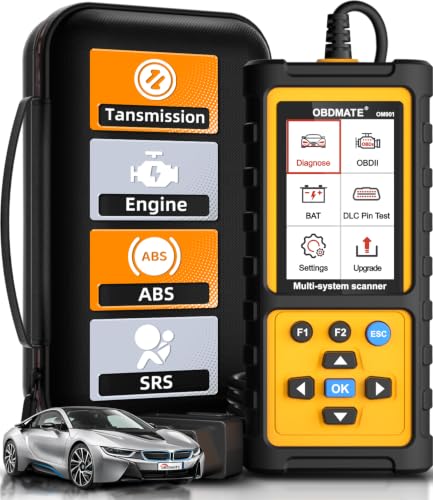
- 【Reset ABS/SRS/Transmission/Engine Lights】 More than an check engine code reader, OBDMATE OM901 obd2 scanner performs comprehensive diagnostics for the 4 most-used systems (ABS/SRS/Engine/Transmission). It quickly clears fault codes, turns off warning lights, read data stream and auto VIN.
- 【3.5" Handheld Scanner with 4 System Diagnose】 3.5" Super large TFT screen equipped displays an intuitive menu and clear readings of various sensors from ABS, SRS, ECM and TCM systems. It arrived with a silicone protective case and hard-shell carrying case, ensuring long-lived durability and drop resistance. The car diagnostic tool is plug-to-play designed, plug it and get diagnosis started without any batteries or updates required.
- 【One-Click I/M Readines&Full OBD2 Functions】 Press F1 to get an intuitive corloured form about whether various emissions-related systems on the vehicle are operating properly. Help you get smog-check ready quickly. OM901 car scanner supports all essential OBD2 functions you need: read & clear codes, view freeze frame, read I/M readiness, retrieve VIN, live data stream (with graphing display), O2 sensor test, onboard monitoring mode, and EVAP leak test.
- 【Battery Voltage Check&DLC Pin Test】 It allows you to monitor battery health by testing current battery voltage. Plus, this obd2 diagnostic tool features DLC 16-PIN test to check current voltage of every pin.
- 【Automotive Scanner Diagnostic Kit】 The package comes with 1 car scanner, 1 USB-type c cable, 1 hard storage bag and 1 user manual(en). Free to update without any hidden fees. 5 languanges available in setting including English, French, Italian, German and Espanish. Valuable and Portable, making it a great tool kit for car owners, DIY enthusiasts, and professional mechanics.

- [All System Diagnostics, Professional-Level Scanner] - BLCKTEC 460T is the ultimate OBD2 diagnostic tool for home mechanics and professionals. It supports all 10 OBD2 modes, reads and clears Engine/Transmission/ABS/SRS codes, performs All-System Diagnostics, offers workshop reset tools, and provides real-time live data. It helps you pinpoint issues, assess your car's condition, and prepare for SMOG checks with ease. NOTE: Function availability depends on your vehicle. Before you buy, be sure to use the Compatibility Checker on BLCKTEC website or contact our customer support to verify that the features you need are supported for your vehicle’s specific year, make, and model.
- [12+ Most Popular Reset Functions] - BLCKTEC 460T OBD2 scanner offers 12+ dealer-level service functions, including Oil Maintenance Reset, ABS Bleeding, EPB Reset, SAS(Steering Angle Sensor) Recalibration, DPF(Diesel Particulate Filter) Reset, Throttle Body Relearn, Battery Reset/Initialization, TPMS Relearn, Transmission Reset, Fluid Change Reset, Maintenance Reset and more, enabling you to perform workshop services like a pro. NOTE: Function availability depends on your vehicle. Be sure to use the Compatibility Checker on BLCKTEC website to verify that the features you need are supported for your vehicle.
- [Real-Time OBD2 and OEM Live Data, Freeze Frame Data] - BLCKTEC 460T helps diagnose vehicle issues when warning lights like Check Engine Light or ABS/SRS Light appear. It offers detailed DTC info, ECU Freeze Frame Data, and real-time OBD2 and advanced OEM live data, including Engine, Transmission, ABS, SRS, and more, making it easy to diagnose and resolve vehicle problems. You can view, graph, record, replay, and overlay up to four live data streams in a single graph for better analysis.
- [AutoVIN, AutoReLink, AutoScan, 3X Faster] - Equipped with AutoVIN technology, 460T automatically retrieves the VIN to save you time. Its AutoScan and AutoReLink features scan all of the vehicle's ECUs and detect any fault codes immediately after you plug the scanner into the vehicle's OBD2 port - no button presses required. Additionally, it regathers DTC and I/M readiness information every 30 seconds, simplifying monitor tests. 460T's advanced technology makes it 3X faster than other products.
- [Get RepairSolutions2, the #1 Auto Repair App for Free] - When paired with RepairSolutions2(RS2) App, 460T becomes even more powerful. RS2's Verified Fix Database built by master technicians, provides the parts needed for the repair. Additionally, RS2 gives you access to OEM warranty info, maintenance schedules, TSB, and dealership recall info, making car care easier than ever. RS2 is free with no subscription fees and it stores your car scan reports in the cloud, allowing you to access, share, or print them anytime and anywhere.
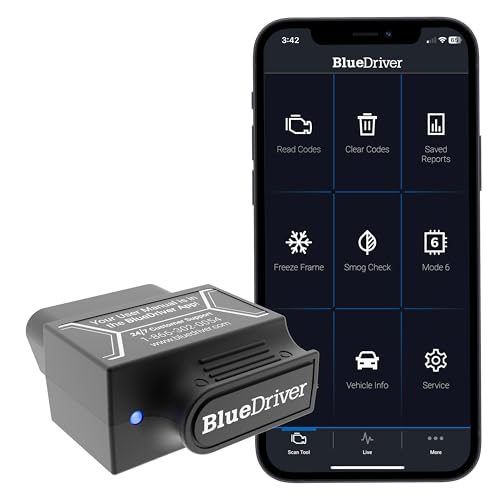
- [Diagnose Like a Pro] BlueDriver Pro is a professional OBD2 scanner and diagnostic tool that helps you scan, understand, and clear vehicle trouble codes with confidence. Turn your phone into a powerful car diagnostic scanner—no guesswork, no unnecessary repairs.
- [Read and Clear More Codes Than Ever] Read and clear more codes than basic car code readers. Access enhanced diagnostics for Check Engine, ABS, SRS, Airbag, TPMS, Transmission.
- [Verified Fixes and Real-Time Data] Get unlimited, technician-verified repair reports matched to your VIN, with definitions, causes, and confirmed fixes. Monitor live vehicle data as you drive, view freeze frames, check smog readiness, and analyze Mode 6 test results.
- [Wireless & Bluetooth Enabled] - Say goodbye to wires. BlueDriver connects with Bluetooth via your phone/tablet to a sensor that plugs into your car's OBDII port. Get all of the capabilities of an expensive code reader & scan tool without any annoying wires.
- [Broad Make & Model Coverage] Strong support for GM, Ford, Stellantis (RAM, Jeep, Chrysler), Toyota, Honda, Nissan, Mazda, Subaru, Hyundai, Mercedes-Benz, BMW, and VW.

- OBD2 SCANNER FOR ALL SYSTEMS – The INNOVA SD35 is a tablet-based OBD2 scanner designed for advanced diagnostics. Read and clear check engine light, ABS, SRS, and TPMS codes, plus test your car battery and alternator to prevent unexpected failures. Vehicle coverage may vary. Please use Innova’s Coverage Checker to verify compatibility.
- ALL-SYSTEM DIAGNOSTICS & LIVE DATA – Unlike basic code readers, this OBD2 scanner for all vehicles scans engine, transmission, ABS, SRS, and more. Get real-time live data, including RPM, fuel trims, temperature readings, and oxygen sensor performance.
- OBD2 TABLET WITH USER-FRIENDLY INTERFACE – This automotive scan tool features a high-resolution display, making vehicle diagnostics faster and easier.
- ADVANCED TPMS, OIL RESET & SERVICE FUNCTIONS – Perform TPMS sensor checks, oil light reset, and other service resets with ease This professional diagnostic tool provides comprehensive vehicle maintenance capabilities in one device.
- WIDE VEHICLE COVERAGE (1996 & NEWER CARS & TRUCKS) – This OBD2 scanner Bluetooth tablet is compatible with Toyota, Ford, Honda, Chevrolet, Nissan, Dodge, and more. However, feature coverage may vary. Please use Innova's Coverage Checker to verify coverage.
This product presentation was made with AAWP plugin.