
NHTSA ID Number: 10232233
Manufacturer Communication Number: 15-195-16R
Summary
This Service Information bulletin provides IMPORTANT information regarding diagnosis and replacement (when applicable) of the STARLINK Telematics Data Communication Module (DCM) along with a new claim submission requirement.
NUMBER: 15-195-16R
DATE: 04/28/20
REVISED: 02/27/23
| APPLICABILITY: | All Models with STARLINK Telematics System |
| SUBJECT: | Servicing and Claim Submission Requirements for STARLINK Diagnosis and Repair Involving the Data Communication Module (DCM) |
INTRODUCTION
This Service Information bulletin provides IMPORTANT information regarding diagnosis and replacement (when applicable) of the STARLINK Telematics Data Communication Module (DCM) along with a new claim submission requirement. Use the table below to determine Telematics system / generation applicability.
| Carline | MY 2016 | MY 2017 | MY 2018 | MY 2019 | MY 2020 | MY 2021 | MY 2022 | MY 2023 |
| Ascent | n/a | n/a | n/a | Gen 2 | Gen 2 | Gen 2 | Gen 2 | Gen 3 |
| Crosstrek | Gen 1 | Gen 1 | Gen 1 | Gen 2 | Gen 2 | Gen 2 | Gen 2 | Gen 2 |
| Crosstrek Hybrid | n/a | n/a | n/a | Gen 2 | Gen 2 | Gen 2 | Gen 2 | Gen 2 |
| Forester | Gen 1 | Gen 1 | Gen 1 | Gen 2 | Gen 2 | Gen 2 | Gen 2 | Gen 2 |
| Impreza | Gen 1 | Gen 1 | Gen 1 | Gen 2 | Gen 2 | Gen 2 | Gen 2 | Gen 2 |
| Legacy | Gen 1 | Gen 1 | Gen 1 | Gen 1 | Gen 2 | Gen 2 | Gen 2 | Gen 3 |
| Outback | Gen 1 | Gen 1 | Gen 1 | Gen 1 | Gen 2 | Gen 2 | Gen 2 | Gen 3 |
WRX | n/a | Gen 1 | Gen 1 | Gen 1 | Gen 1 | Gen 1 | Gen 2 | Gen 2 |
| BRZ | n/a | n/a | n/a | n/a | n/a | n/a | Gen 2 | Gen 2 |
The key takeaway items from this bulletin are:
1. DCMs must NEVER be swapped as part of any diagnosis. DCMs continue to be inadvertently swapped during a head unit swap. The DCM is located right below the head unit and should never be included in any head unit diagnosis / swap activity.
Similarly, whenever any ECM swap is performed for diagnostic purposes THE DCM MUST BE DISCONNECTED FIRST to prevent VIN overwrite during the ECM testing.
2. If the vehicle has an “active” STARLINK Telematics subscription, as confirmed by Subarunet inquiry, STARLINK functions MUST be confirmed as operational prior to returning the vehicle to the customer.
a. Successful connection MUST be made using BOTH the “i” and “SOS”
b. Remote services (e.g. Remote Engine Start) if subscribed to, must be tested by performing a remote service request using the MySubaru Mobile App or the Customer Web Portal.
3. Techline contact may be required in some cases. Conditions may occur which cannot be resolved in the field solely by parts replacement and must coincide with additional vendor activity.
4. NOTE: A new replacement DCM does not come with a BUB installed. If the BUB requires replacement due to failure (B2A07) or the repair date is 5 years past the date stamp, (see image for decoding the BUB date stamp) the BUB must be ordered separately. There is also a related data collection requirement for anytime a DCM is replaced as outlined later in this bulletin.
5. All claims for DCM replacement MUST include the Serial Number of the NEW DCM in the Miscellaneous Detail Field of the claim entry.
SERVICE PROCEDURE / INFORMATION:
1) All retailers must discontinue the practice of swapping STARLINK Telematics DCMs between vehicles regardless if the swap is for diagnosis only or a repair.
NOTE: This requirement also potentially affects swapping of Audio or Audio/Navigation systems between vehicles as the DCM is part of the audio unit stack (mounted on the same brackets).
If an audio or audio/navigation system must be swapped between vehicles for diagnosis, BOTH DCMs MUST be kept with their original vehicles. AT NO TIME is the DCM to be powered up in a vehicle other than the one it was placed in during manufacturing. This (swapping) may cause a situation where the DCM becomes lost to the STARLINK network which may result in a loss of Telematics services for that vehicle.
VERY IMPORTANT: Any Technician or other retailer personnel who, despite service documentation and training to the contrary, performs a DCM swap on a subscribed vehicle should NEVER release that vehicle back to the customer until after confirming the proper operation of the Telematics system. If the issue is first discovered only after the vehicle has been released to the customer, then the retailer MUST contact the customer immediately to inform the customer the ACN/AACN feature may not be functioning properly, and that the vehicle must be returned for inspection as soon as possible.
Charges related to repairs as a result of DCM swaps are NOT eligible for warranty coverages and are the retailer’s responsibility.
2) IMPORTANT: After replacing a DCM, the new module must be ComChecked. Follow instructions in the applicable Service Manual for performing the ComChecked. If the STARLINK services are actively subscribed, the DCM must be activated (a.k.a. “provisioned”) by the STARLINK network. In the vast majority of cases, this procedure will complete within a few minutes to half an hour if placed in area with good cellular signal following successful com check. In rare cases, it may take up to 4 If for any reason the DCM has not completed provisioning after 25 hours, immediately contact Techline for assistance. Before calling Techline, please send an email to: tech@subaru.com. In the e-mail subject line, enter: Delayed Provisioning, the last 8 of the VIN and the Techline case number (if previously supplied). The body of the message must inclure:
a. The new DCM Serial Number
b. The new DCM IMEI Number
c. At least 10 seconds of Telematics data (all PIDS) from the new DCM after it was successfully ComChecked.
CRITICAL: The car must NOT be released back to the customer as “repaired” until it has completed provisioning AND STARLINK function has been confirmed by:
a. Perform an SOS and “i” button push making contact with operator on each and confirming vehicle VIN and location.
b. Remote service requests need to be made through the MySubaru Mobile APP or, the MySubaru customer Web Portal with help of the customer (or after a retailer service team member has been granted access to the customer account).
To confirm provisioning is complete:
- After switching the ignition ON, a GREEN status indicator LED located between the “SOS” and “i” buttons will be on solid.
- The new active STARLINK Telematics subscription is verified on Subarunet.
- The function of BOTH the “i” (Enhanced Roadside Assistance) and “SOS” (STARLINK Emergency) buttons have been confirmed as being fully operational indicating the unit is able to communicate with BOTH STARLINK support operators who can verify both the VIN and location of the vehicle.
- The operation of remote services equivalent to the customer’s subscription plan has been confirmed through use of the MySubaru Mobile App or the Customer Web Portal.
3) Telematics-equipped vehicles do not need the DCM backup Battery (BUB) replaced as part of repairs requiring DCM replacement. DCM BUB replacement occurs when a DTC indicates the BUB needs replacement, the customer requests maintenance replacement, or is directed by SOA quality assurance activity. NOTE: A new replacement DCM does not come with a BUB installed. The BUB must be ordered separately.
4) IMPORTANT: The following data must be collected with any DCM replacement (these are all normally part of the Telematics System Basic Diagnostic Procedure).
i. A completed Check List for Interview from the appropriate Service Manual
ii. The Current DTC(s), the past/memorized DTCs in all related units (with freeze frame data), saved electronically
iii. Current streaming data of the DCM for at least 10 seconds. If possible, collect the data while the complaint is occurring
iv. A description of the troubleshooting steps taken by the retailer Technician and the results found
v. The DCM’s Serial Number and IMEI number must be noted on the Repair Order prior to
5) Effective Immediately, all claims for DCM replacement MUST include the 10-digit DCM Serial Number of the installed (new) DCM. This number is found on the DCM label shown here and MUST be entered in the Miscellaneous Detail field of the claim entry.
IMPORTANT NOTES:
- The only effective way to confirm repair of a Telematics concern is to verify operation of remote services through execution by using the MySubaru Mobile App or MySubaru customer web portal. Using the SOS button or i-Button successfully should in no way be considered a full or functional test of remote services. There are many conditions which can occur and still allow the SOS and/or “i” button to function and reach a Starlink operator although, some or all of the remote services may not function. Remote service operational status can only be confirmed by execution of a remote service request through either the MySubaru APP or the customer web portal.
- Always reference the most up-to-date TSBs, TechTIPS and STIS information whenever diagnosing, replacing components, performing CommCheck, or any other operational checks of the Telematics system. If necessary, FSEs and the Techline are available for additional support.
1 Affected Product
Vehicle
1 Associated Document
Manufacturer Communications
NUMBER: 15-195-16R
DATE: 04/28/20
REVISED: 02/27/23
MC-10232233-0001.pdf 398.544KB
NHTSA ID Number: 10201806
Manufacturer Communication Number: 15-195-16R
Summary
This bulletin provides important information regarding diagnosis and replacement (when applicable) of the STARLINK Telematics Data Communication Module (DCM) along with a new claim submission requirement.
1 Associated Document
Manufacturer Communications
NUMBER: 15-195-16R
DATE: 04/28/20
REVISED: 09/22/21
MC-10201806-0001.pdf 445.724KB
NHTSA ID Number: 10186389
Manufacturer Communication Number: 15-195-16R
Summary
This bulletin provides important information regarding diagnosis and replacement of the STARLINK Telematics Data Communication Module (DCM). This update is applicable to all models equipped with a STARLINK Telematics System.
1 Associated Document
Manufacturer Communications
NUMBER: 15-195-16R
DATE: 04/28/20
REVISED: 01/14/21
MC-10186389-0001.pdf 445.878KB
NHTSA ID Number: 10177819
Manufacturer Communication Number: 15-195-16R
Summary
This Service Information bulletin provides IMPORTANT information regarding diagnosis and replacement (when applicable) of the STARLINK Telematics Data Communication Module (DMC).
1 Associated Document
Manufacturer Communications
NUMBER: 15-195-16R
DATE: 04/28/20
REVISED: 07/14/20
MC-10177819-0001.pdf 443.435KB
NHTSA ID Number: 10174537
Manufacturer Communication Number: 15-195-16R
Summary
This service information bulletin provides important information regarding diagnosis and replacement (when applicable) of the STARLINK Telematics Data Communication Module (DCM). All models with STARLINK Telematics System.
1 Associated Document
Manufacturer Communications
NUMBER: 15-195-16R
DATE: 04/28/20
REVISED: 04/30/20
MC-10174537-0001.pdf 416.928KB

- This Android touch screen radio is designed to seamlessly fit and function for Subaru Outback Legacy models from 2015 to 2022.The installation is Plug & Play,making it easy to upgrade your car's entertainment system.For 2015-2017 models equipped with Harmon Sound System, search for ASIN B0CTJRJVMQ get an additional harness to maintain audio.For 2018-2022 models,search for ASIN B0DBDJHH85
- Upgrade to wireless CarPlay & wireless Android Auto! Perfect for older radios,this system lets you enjoy wireless music & screen mirroring instantly. No more permanent wires—set up & go! A smart investment for seamless, modern driving
- Experience top performance with this Android stereo: 8-core CPU,2GB RAM, 32GB ROM for lightning-fast response. Enjoy crystal-clear visuals on a 9-inch 1280x720 IPS touchscreen & immersive sound with built-in DSP
- Stay connected everywhere! This stereo supports 4G LTE—insert a SIM card or use Wi-Fi for internet access. Bluetooth 5.0 ensures premium sound for calls & music. Perfect for on-the-go connectivity
- Simple installation,full control! Retain original wheel functions—switch songs,channels, & adjust volume safely without hands leaving the wheel.Drive smarter & safer with this convenient upgrade

- 8 Core 64GB Android Radio:Our Android car radio is equipped with the latest version of Android and an 8-core CPU processor, delivering exceptional performance and a perfect user experience. With 4G RAM and 64G ROM, our radio ensures smooth operation and provides ample storage for downloading popular apps like YouTube. It is designed to be compatible with Subaru Forester Impreza WRX 2008-2012 models. If you’re unsure whether it’s a good fit for your vehicle, please ask us first
- Wireless and Wired Carplay Android Auto:The Subaru Forester Impreza WRX car stereo offers seamless connectivity with your smartphone’s apps and features like WhatsApp, Google Maps, and Telegram, whether through Bluetooth or a USB data cable. It also supports voice control through Siri or Google Assistant, allowing you to keep your hands free while operating the stereo
- GPS Navigation and WiFi and Split Screen:With WiFi or hotspot connectivity, you can browse the internet, watch videos, and download apps on the 9 inch Subaru Forester Impreza WRX car radio. It also supports online and offline maps, providing real-time road conditions to help you avoid traffic jams. The split-screen feature enables you to simultaneously enjoy GPS navigation and watch videos on the 9 -inch screen with a resolution of 1280x720
- 32EQ DSP/BLUETOOTH 5.0/ FM/RDS:The car stereo comes pre-installed with DSP tuning software, allowing you to adjust the frequency, audio effects, and 32 EQ equalization settings, resulting in crystal-clear sound. Bluetooth 5.0 ensures a faster transmission speed and enables hands-free calling, phonebook downloads, and music streaming. The FM/RDS radio with 30 preset stations allows you to stay updated with new broadcasts, real-time traffic information, weather forecasts, and more
- Multi Function:The Android car stereo supports mirror link functionality, allowing you to mirror your smartphone’s content onto the large screen. It also supports steering wheel controls, provides 59 UI themes to suit your preferences, and allows you to move frequently used software to the home screen for easy access. As a gift, the car stereo comes with an external microphone and an AHD rearview camera with night vision and a 170 degree viewing angle

- Matters Need Attention: This upgraded radio dash kit is for subaru outback legacy 2010 2011 2012 2013 2014. The stereo comes with an in-dash head unit, wiring harness cables and frame panel. Cable does NOT support the original car with power amplifier (Purchase If Needed). Compatible with the original car 𝐖𝐈𝐓𝐇𝐎𝐔𝐓 a screen, if your original car has a screen, you need to purchase a separate Canbus decoder box and a new power cable. In addition, it SUPPORTS the factory reversing camera
- Newest 2+64G Android 13 Car Radio: HD capacitive touch screen radio for subaru legacy outback with 1024 x 600 screen resolution, giving you an excellent visual playback experience when watching videos or navigating. Support multiple EQ options and 28 desktop themes, allows you to enjoy a superior music listening experience and switch your favorite user interface style
- Car Stereo with IOS Carplay & Android Auto: for subaru legacy outback infotainment with touchscreen and built-in wireless/wired Apple CarPlay and wireless/wired Android Auto for superior voice-assisted control and easier access to your phone features, including music, navigation, calls, notification, messages and much more (Some Samsung Phones are Restricted)
- GPS Navigation & WiFi: for subaru legacy outback radio dash kit with bluetooth contains a built-in GPS module, navigation software such as Waze and free offline maps can be used. With a WiFi/hotspot connection, the online map works perfectly, and you can also download apps from the Play Store such as YouTube, Tiktok, etc., which can enrich your car life
- Android/IOS Mirror Link: You can connect this touch screen car stereo through WiFi hotspot or original USB cable of your phone to synchronize the phone screen and for subaru legacy outback stereo head unit radio screen. This is very convenient when you use your phone's navigation function. Android supports bidirectional control, iPhone supports unidirectional control (Some Samsung Phones are Restricted)

- Replaces the original part number: Compatible with Subaru Legacy Outback 8-inch touchscreen radio screen. The TsuperU uses upgraded materials, offering superior sensitivity, high definition, high temperature resistance, and is non-bubbling and non-whitening. With this part, you won't need to go to the dealer for a replacement, as they often recommend replacing the entire radio, which could cost thousands of dollars, but is completely unnecessary. Please watch the replacement video on YT's
- EASY PROBLEM SOLVED: If your display touch screen is cracked, delaminating, bubbles, White, fogging, air holes, unresponsive, has garbled, phantom, ghosted, ghosting, dead pixels, unresponsive, or looks bad, simply replace the TsuperU 8-inch screen navigation touchscreen and it will return to its original functionality without the need for a trip to the dealership for costly repairs. One replacement is all it takes to fix the problem
- COMPATIBLE WITH SUBARU MODELS: Navigation screen fits Subaru Outback 2.5i Limited Premium Sport Touring Premier 3.6R Limited Premier Touring radio digitizer screen 2019 2018. please check the OEM number and size carefully before purchasing, There are two versions of MAP & PHONE, compare with your original parts to make sure that this touch screen fits your car. The digitizer screen for the 8-inch touchscreen radio works with both GPS-equipped radios and non-GPS radios
- EASY TO INSTALL: The product comes with adhesive, you only need to tear off the protective film to use it, easy to install. for Subaru radio screen is an exact fit for the original vehicle. For display only 86471-AL65A 86471-AL65B 86471-AL66A 86471-AL68A 86431-AL66A 86431-AL62A 86431-AL65A 86471 AL65A 86471 AL65B 86471 AL66A 86471 AL68A 86431 AL66A 86431 AL62A 86431 AL65A 86471AL65A 86471AL65B 86471AL66A 86471AL68A 86431AL66A 864734-AL66A, 86471AL76A, 86471-AL76A 864734AL66A, 864734 AL66A
- TOUCH RESPONSIVE: Touch screen meets OEM navigation system, high light transmission, high visibility, responsive, high touch accuracy. touch screen monitor is made of new upgraded material with high resolution, high clarity, more stable performance, faster response time, and has been rigorously tested to ensure a long service life, touch screen replacement
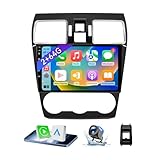
- 【Vehicle Compatibility】 The car stereo is compatible with Subaru Forester WRX Impreza 2015 2016 2017 2018(With Silver Air Vent). Please check the car console and the year before buying. If you are not clear, please provide the following details: 1. Your car's model and year, 2. A picture of your car console
- 【 Android 13 Car Radio】The head unit runs on Android 13 as its main operating system, turning your car radio into a large tablet. Featuring 2GB + 64GB of storage, it ensures smooth performance for navigation, music, and more. The 9-inch touch screen with 1280x720 resolution provides a sharp and clear display. With the Play Store preinstalled, you can install many apps after connecting to Wi-Fi,
- 【Wireless CarPlay & Android Auto】Carplay App (preinstalled) is used to enable CarPlay connectivity. Wireless CarPlay and Android Auto work seamlessly, allowing for hands-free calls, navigation, music, and app use without cables. Simply connect to your smartphone via Bluetooth/Wi-Fi/USB to access the GPS navigation system, make phone calls, enjoy music while focusing on the road through the car's CarPlay screen, having a more convenient and safer driving experience
- 【GPS Navigation & WIFI &Bluetooth】Built-in GPS module supports both offline and online navigation. When connected to WiFi, you can get real - time traffic information. You can answer/make hands-free Bluetooth phone calls, listen to Bluetooth music without distractions
- 【Bluetooth & FM/RDS Radio】This car radio replacement features built-in Bluetooth, enabling hands-free calls, phone book syncing, and wireless music streaming for a convenient and safe driving experience. The FM/RDS radio offers stable reception and allows you to preset your favorite stations, keeping you informed with real-time news, sports updates, and weather forecasts while you're on the road
Last update on 2026-06-12 / Affiliate links / Images from Amazon Product Advertising API
SEOCONTENT-START
Bulletin Number: 15-195-16R; Revised 02/27/23 Page 1 of 4 INTRODUCTION This Service Information bulletin provides IMPORTANT information regarding diagnosis and replacement (when applicable) of the STARLINK Telematics Data Communication Module (DCM) along with a new claim submission requirement. Use the table below to determine Telematics system / generation applicability. The key takeaway items from this bulletin are: 1. DCMs must NEVER be swapped as part of any diagnosis. DCMs continue to be inadvertently swapped during a head unit swap. The DCM is located right below the head unit and should never be included in any head unit diagnosis / swap activity. Similarly, whenever any ECM swap is performed for diagnostic purposes THE DCM MUST BE DISCONNECTED FIRST to prevent VIN overwrite during the ECM testing. 2. If the vehicle has an “active” STARLINK Telematics subscription, as confirmed by Subarunet inquiry, STARLINK functions MUST be confirmed as operational prior to returning the vehicle to the customer. a. Successful connection MUST be made using BOTH the “i” and “SOS” buttons. b. Remote services (e.g. Remote Engine Start) if subscribed to, must be tested by performing a remote service request using the MySubaru Mobile App or the Customer Web Portal. NUMBER: 15-195-16R DATE: 04/28/20 REVISED: 02/27/23 APPLICABILITY: All Models with STARLINK Telematics System SUBJECT: Servicing and Claim Submission Requirements for STARLINK Diagnosis and Repair Involving the Data Communication Module (DCM) CAUTION: VEHICLE SERVICING PERFORMED BY UNTRAINED PERSONS COULD RESULT IN SERIOUS INJURY TO THOSE PERSONS OR TO OTHERS. Subaru Service Bulletins are intended for use by professional technicians ONLY. They are written to inform those technicians of conditions that may occur in some vehicles, or to provide information that could assist in the proper servicing of the vehicle. Properly trained technicians have the equipment, tools, safety instructions, and know-how to do the job correctly and safely. If a condition is described, DO NOT assume that this Service Bulletin applies to your vehicle, or that your vehicle will have that condition. SUBARU OF AMERICA, INC. IS ISO 14001 COMPLIANT ISO 14001 is the international standard for excellence in Environmental Management Systems. Please recycle or dispose of automotive products in a manner that is friendly to our environment and in accordance with all local, state and federal laws and regulations. Continued… SERVICE INFORMATION ATTENTION: GENERAL MANAGER q PARTS MANAGER q CLAIMS PERSONNEL q SERVICE MANAGER q IMPORTANT – All Service Personnel Should Read and Initial in the boxes provided, right. ©2016 Subaru of America, Inc. All rights reserved. Bulletin Number: 15-195-16R; Revised 02/27/23 Page 2 of 4 3. Techline contact may be required in some cases. Conditions may occur which cannot be resolved in the field solely by parts replacement and must coincide with additional vendor activity. 4. NOTE: A new replacement DCM does not come with a BUB installed. If the BUB requires replacement due to failure (B2A07) or the repair date is 5 years past the date stamp, (see image for decoding the BUB date stamp) the BUB must be ordered separately. There is also a related data collection requirement for anytime a DCM is replaced as outlined later in this bulletin. 5. All claims for DCM replacement MUST include the Serial Number of the NEW DCM in the Miscellaneous Detail Field of the claim entry. SERVICE PROCEDURE / INFORMATION: 1) All retailers must discontinue the practice of swapping STARLINK Telematics DCMs between vehicles regardless if the swap is for diagnosis only or a repair. NOTE: This requirement also potentially affects swapping of Audio or Audio/Navigation systems between vehicles as the DCM is part of the audio unit stack (mounted on the same brackets). If an audio or audio/navigation system must be swapped between vehicles for diagnosis, BOTH DCMs MUST be kept with their original vehicles. AT NO TIME is the DCM to be powered up in a vehicle other than the one it was placed in during manufacturing. This (swapping) may cause a situation where the DCM becomes lost to the STARLINK network which may result in a loss of Telematics services for that vehicle. IMPORTANT NOTE: If the Technician is instructed by his FSE or Techline to swap the ECM during the course of a diagnosis, it is a precondition of the ECM swap that the DCM in both vehicles be physically disconnected from the vehicle before and during the entire time the donor ECM is in the other vehicle. Not disconnecting the DCM prior to an ECM swap will result in the same situation (DCM becomes lost to the STARLINK network) as the ECM is the Master control unit in the vehicle. Restoration of Telematics services may require DCM replacement. VERY IMPORTANT: Any Technician or other retailer personnel who, despite service documentation and training to the contrary, performs a DCM swap on a subscribed vehicle should NEVER release that vehicle back to the customer until after confirming the proper operation of the Telematics system. If the issue is first discovered only after the vehicle has been released to the customer, then the retailer MUST contact the customer immediately to inform the customer the ACN/AACN feature may not be functioning properly, and that the vehicle must be returned for inspection as soon as possible. Charges related to repairs as a result of DCM swaps are NOT eligible for warranty coverages and are the retailer’s responsibility. Continued… Bulletin Number: 15-195-16R; Revised 02/27/23 Page 3 of 4 2) IMPORTANT: After replacing a DCM, the new module must be ComChecked. Follow instructions in the applicable Service Manual for performing the ComChecked. If the STARLINK services are actively subscribed, the DCM must be activated (a.k.a. “provisioned”) by the STARLINK network. In the vast majority of cases, this procedure will complete within a few minutes to half an hour if placed in area with good cellular signal following successful com check. In rare cases, it may take up to 4 hours. If for any reason the DCM has not completed provisioning after 25 hours, immediately contact Techline for assistance. Before calling Techline, please send an email to: tech@subaru.com. In the e-mail subject line, enter: Delayed Provisioning, the last 8 of the VIN and the Techline case number (if previously supplied). The body of the message must inclure: a. The new DCM Serial Number b. The new DCM IMEI Number c. At least 10 seconds of Telematics data (all PIDS) from the new DCM after it was successfully ComChecked. CRITICAL: The car must NOT be released back to the customer as “repaired” until it has completed provisioning AND STARLINK function has been confirmed by: a. Perform an SOS and “i” button push making contact with operator on each and confirming vehicle VIN and location. b. Remote service requests need to be made through the MySubaru Mobile APP or, the My- Subaru customer Web Portal with help of the customer (or after a retailer service team member has been granted access to the customer account). To confirm provisioning is complete: • After switching the ignition ON, a GREEN status indicator LED located between the “SOS” and “i” buttons will be on solid. • The new active STARLINK Telematics subscription is verified on Subarunet. • The function of BOTH the “i” (Enhanced Roadside Assistance) and “SOS” (STARLINK Emergency) buttons have been confirmed as being fully operational indicating the unit is able to communicate with BOTH STARLINK support operators who can verify both the VIN and location of the vehicle. • The operation of remote services equivalent to the customer’s subscription plan has been confirmed through use of the MySubaru Mobile App or the Customer Web Portal. 3) Telematics-equipped vehicles do not need the DCM backup Battery (BUB) replaced as part of repairs requiring DCM replacement. DCM BUB replacement occurs when a DTC indicates the BUB needs replacement, the customer requests maintenance replacement, or is directed by SOA quality assurance activity. NOTE: A new replacement DCM does not come with a BUB installed. The BUB must be ordered separately. Continued… Bulletin Number: 15-195-16R; Revised 02/27/23 Page 4 of 4 4) IMPORTANT: The following data must be collected with any DCM replacement (these are all normally part of the Telematics System Basic Diagnostic Procedure). i. A completed Check List for Interview from the appropriate Service Manual ii. The Current DTC(s), the past/memorized DTCs in all related units (with freeze frame data), saved electronically iii. Current streaming data of the DCM for at least 10 seconds. If possible, collect the data while the complaint is occurring iv. A description of the troubleshooting steps taken by the retailer Technician and the results found v. The DCM’s Serial Number and IMEI number must be noted on the Repair Order prior to installation. 5) Effective Immediately, all claims for DCM replacement MUST include the 10-digit DCM Serial Number of the installed (new) DCM. This number is found on the DCM label shown here and MUST be entered in the Miscellaneous Detail field of the claim entry. IMPORTANT NOTES: • The only effective way to confirm repair of a Telematics concern is to verify operation of remote services through execution by using the MySubaru Mobile App or MySubaru customer web portal. Using the SOS button or i-Button successfully should in no way be considered a full or functional test of remote services. There are many conditions which can occur and still allow the SOS and/or “i” button to function and reach a Starlink operator although, some or all of the remote services may not function. Remote service operational status can only be confirmed by execution of a remote service request through either the MySubaru APP or the customer web portal. • Always reference the most up-to-date TSBs, TechTIPS and STIS information whenever diagnosing, replacing components, performing CommCheck, or any other operational checks of the Telematics system. If necessary, FSEs and the Techline are available for additional support. IMPORTANT REMINDERS: • SOA strongly discourages the printing and/or local storage of service information as previously released information and electronic publications may be updated at any time. • Always check for any open recalls or campaigns anytime a vehicle is in for servicing. • Always refer to STIS for the latest service information before performing any repairs.
**************************************************************************************************************
SEOCONTENT-END
This product presentation was made with AAWP plugin.