
NHTSA ID Number: 10216968
Manufacturer Communication Number: TechTips
Summary
TechShare QMR of the Month.
Articles Contained in this Issue
Click on a title below to jump to the article.
Click the date located in the footer to return to page 1.
CODE ARTICLE………………………………………………………….PAGE
(00) STIS New Releases…………………………..10-11
(01) QMR of the Month………………………………..1-2
(01) QMR of the Month Award
Presentations………………………………………… 2
(01) Replacement of components on the CAN .
network and Central Gateway Control .
module LAN registration…………………………. 3
(15) Charging Cables and Touch Screen
Concerns…………………………………………….3-4
(15) CP1 Navigation shows the wrong
location………………………………………………5-6
(15) Harman 3.1 Base & Base+ Only, Ghost .
Image or Double Image………………………….. 6
(15) Harman Unit, bubble screen condition……… 7
(15) Importance of Inspecting for Aftermarket .
Devices. Check the USB port & LEDs………8-9
1 Affected Product
Vehicle
1 Associated Document
Manufacturer Communications
TIPS0522 – 2022 May TechTIPS Newsletter
MC-10216968-0001.pdf 5515.554KB

- [Easy to Use—Work Out of the Box] + [FOXWELL 2026 New Version] FOXWELL NT604 Elite scan tool is the 2026 new version from FOXWELL, designed for car owners who want to figure out the cause of issues before fixing car problems by scanning common systems like ABS, SRS, engine, and transmission. The NT604 Elite obd2 scanner diagnostic tool comes with the latest software—no need to waste time downloading software first. Plug the scanner into the OBDII port with OBDII cable to start the diagnosis.
- [Affordable] + [Reliable Car Health Monitor] Will you be confused what happens when the warning light of ABS/SRS/transmission/check engine flashes? Instead of taking your cars to dealership, this FOXWELL scanner will help you do a thorough scanning and detection for your cars and pinpoint the root cause. Note:The device is a diagnostic tool, not a repair tool. To turn off a warning light, you must first physically repair the issue causing it. Only then can the scanner be used to clear the corresponding fault code.
- [5 in 1 Car Diagnostic Scanner] Compared with obd scanners (50-100), NT604 Elite code scanner not only includes their OBDII diagnosis but also serves as ABS/SRS scanner, transmission and check engine code reader. When it’s an odb2 scanner, you can use it to check if your car is ready for annual test through I/M readiness menu. In addition, live data stream, built-in DTC library, data play back and print, all these features are a big plus for it. Note: doesn't support maintenance functions like reset or relearn. For the SRS system, NT604 Elite can read and clear common fault codes not caused by a crash, but crash/collision data cannot be cleared.
- [Fantastic AUTOVIN] + [No extra software fee] Through the AUTOVIN menu, this NT604 Elite car scanner allows you to get your V-IN and vehicle info rapidly, no need to take time to find your V-IN and input one by one. What's more, the NT604 Elite ABS SRS scanner supports 60+ car brands from worldwide (America/Asia/Europe). You don’t need to pay extra software fee. AUTOVIN may not work on some older vehicles or certain vehicle brands. If AUTOVIN fails, please input the vin code manually or go to the Diagnostic Menu to select your vehicle model.
- [Solid protective case KO plastic carrying bag] + [Lifetime update] Almost all same price-level car scanner diagnostic tool only offers plastic bag to hold the scanner.However, NT604 Elite automotive scanner is equipped with solid protective case, preventing your obd2 scanner from damage. Then you don’t need to pay extra money to buy a solid toolbox.
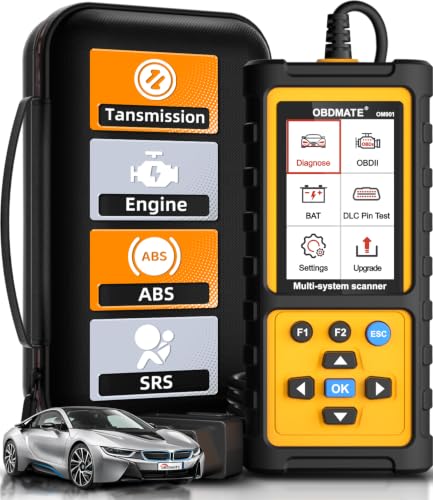
- 【Reset ABS/SRS/Transmission/Engine Lights】 More than an check engine code reader, OBDMATE OM901 obd2 scanner performs comprehensive diagnostics for the 4 most-used systems (ABS/SRS/Engine/Transmission). It quickly clears fault codes, turns off warning lights, read data stream and auto VIN.
- 【3.5" Handheld Scanner with 4 System Diagnose】 3.5" Super large TFT screen equipped displays an intuitive menu and clear readings of various sensors from ABS, SRS, ECM and TCM
 systems. It arrived with a silicone protective case and hard-shell carrying case, ensuring long-lived durability and drop resistance. The car diagnostic tool is plug-to-play designed, plug it and get diagnosis started without any batteries or updates required.
 - 【One-Click I/M Readines&Full OBD2 Functions】 Press F1 to get an intuitive corloured form about whether various emissions-related systems on the vehicle are operating properly. Help you get smog-check ready quickly. OM901 car scanner supports all essential OBD2 functions you need: read & clear codes, view freeze frame, read I/M readiness, retrieve VIN, live data stream (with graphing display), O2 sensor test, onboard monitoring mode, and EVAP leak test.
- 【Battery Voltage Check&DLC Pin Test】 It allows you to monitor battery health by testing current battery voltage. Plus, this obd2 diagnostic tool features DLC 16-PIN test to check current voltage of every pin.
- 【Automotive Scanner Diagnostic Kit】 The package comes with 1 car scanner, 1 USB-type c cable, 1 hard storage bag and 1 user manual(en). Free to update without any hidden fees. 5 languanges available in setting including English, French, Italian, German and Espanish. Valuable and Portable, making it a great tool kit for car owners, DIY enthusiasts, and professional mechanics.

- [All System Diagnostics, Professional-Level Scanner] - BLCKTEC 460T is the ultimate OBD2 diagnostic tool for home mechanics and professionals. It supports all 10 OBD2 modes, reads and clears Engine/Transmission/ABS/SRS codes, performs All-System Diagnostics, offers workshop reset tools, and provides real-time live data. It helps you pinpoint issues, assess your car's condition, and prepare for SMOG checks with ease. NOTE: Function availability depends on your vehicle. Before you buy, be sure to use the Compatibility Checker on BLCKTEC website or contact our customer support to verify that the features you need are supported for your vehicle’s specific year, make, and model.
- [12+ Most Popular Reset Functions] - BLCKTEC 460T OBD2 scanner offers 12+ dealer-level service functions, including Oil Maintenance Reset, ABS Bleeding, EPB Reset, SAS(Steering Angle Sensor) Recalibration, DPF(Diesel Particulate Filter) Reset, Throttle Body Relearn, Battery Reset/Initialization, TPMS Relearn, Transmission Reset, Fluid Change Reset, Maintenance Reset and more, enabling you to perform workshop services like a pro. NOTE: Function availability depends on your vehicle. Be sure to use the Compatibility Checker on BLCKTEC website to verify that the features you need are supported for your vehicle.
- [Real-Time OBD2 and OEM Live Data, Freeze Frame Data] - BLCKTEC 460T helps diagnose vehicle issues when warning lights like Check Engine Light or ABS/SRS Light appear. It offers detailed DTC info, ECU Freeze Frame Data, and real-time OBD2 and advanced OEM live data, including Engine, Transmission, ABS, SRS, and more, making it easy to diagnose and resolve vehicle problems. You can view, graph, record, replay, and overlay up to four live data streams in a single graph for better analysis.
- [AutoVIN, AutoReLink, AutoScan, 3X Faster] - Equipped with AutoVIN technology, 460T automatically retrieves the VIN to save you time. Its AutoScan and AutoReLink features scan all of the vehicle's ECUs and detect any fault codes immediately after you plug the scanner into the vehicle's OBD2 port - no button presses required. Additionally, it regathers DTC and I/M readiness information every 30 seconds, simplifying monitor tests. 460T's advanced technology makes it 3X faster than other products.
- [Get RepairSolutions2, the #1 Auto Repair App for Free] - When paired with RepairSolutions2(RS2) App, 460T becomes even more powerful. RS2's Verified Fix Database built by master technicians, provides the parts needed for the repair. Additionally, RS2 gives you access to OEM warranty info, maintenance schedules, TSB, and dealership recall info, making car care easier than ever. RS2 is free with no subscription fees and it stores your car scan reports in the cloud, allowing you to access, share, or print them anytime and anywhere.
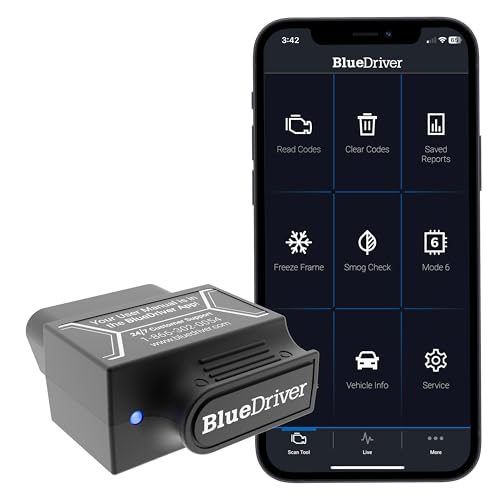
- [Diagnose Like a Pro] BlueDriver Pro is a professional OBD2 scanner and diagnostic tool that helps you scan, understand, and clear vehicle trouble codes with confidence. Turn your phone into a powerful car diagnostic scanner—no guesswork, no unnecessary repairs.
- [Read and Clear More Codes Than Ever] Read and clear more codes than basic car code readers. Access enhanced diagnostics for Check Engine, ABS, SRS, Airbag, TPMS, Transmission.
- [Verified Fixes and Real-Time Data] Get unlimited, technician-verified repair reports matched to your VIN, with definitions, causes, and confirmed fixes. Monitor live vehicle data as you drive, view freeze frames, check smog readiness, and analyze Mode 6 test results.
- [Wireless & Bluetooth Enabled] - Say goodbye to wires. BlueDriver connects with Bluetooth via your phone/tablet to a sensor that plugs into your car's OBDII port. Get all of the capabilities of an expensive code reader & scan tool without any annoying wires.
- [Broad Make & Model Coverage] Strong support for GM, Ford, Stellantis (RAM, Jeep, Chrysler), Toyota, Honda, Nissan, Mazda, Subaru, Hyundai, Mercedes-Benz, BMW, and VW.

- OBD2 SCANNER FOR ALL SYSTEMS – The INNOVA SD35 is a tablet-based OBD2 scanner designed for advanced diagnostics. Read and clear check engine light, ABS, SRS, and TPMS codes, plus test your car battery and alternator to prevent unexpected failures. Vehicle coverage may vary. Please use Innova’s Coverage Checker to verify compatibility.
- ALL-SYSTEM DIAGNOSTICS & LIVE DATA – Unlike basic code readers, this OBD2 scanner for all vehicles scans engine, transmission, ABS, SRS, and more. Get real-time live data, including RPM, fuel trims, temperature readings, and oxygen sensor performance.
- OBD2 TABLET WITH USER-FRIENDLY INTERFACE – This automotive scan tool features a high-resolution display, making vehicle diagnostics faster and easier.
- ADVANCED TPMS, OIL RESET & SERVICE FUNCTIONS – Perform TPMS sensor checks, oil light reset, and other service resets with ease This professional diagnostic tool provides comprehensive vehicle maintenance capabilities in one device.
- WIDE VEHICLE COVERAGE (1996 & NEWER CARS & TRUCKS) – This OBD2 scanner Bluetooth tablet is compatible with Toyota, Ford, Honda, Chevrolet, Nissan, Dodge, and more. However, feature coverage may vary. Please use Innova's Coverage Checker to verify coverage.
SEOCONTENT-START
May 2022 TechTIPS Page 1 of 12 Subaru Service and Technical Support Line Newsletter ©2022 Subaru of America, Inc. All rights reserved. 01 TechShare QMR of the Month We are pleased to announce this month’s TechShare QMR of the Month Winner: John Cote from Bill Kolb Jr. Subaru in Orangeburg, NY John created a high quality QMR using TechShare reporting on key fob not communicating with vehicle. His report included diagnostic steps, high-quality photos, videos and SSM Data. Please refer to the following link to review the TechShare QMR in detail. https://subarutechshare.com/qmrs/TS-192945 In appreciation for going the extra mile and sharing his experience with us, John will be receiving the following from his Field Service Engineer: S UBARU TECHLINE HOLIDAYS $500.00 Snap-On gift card & HOURS OF OPERATION Mon. – Thurs. 8:30AM – 7:30PM EST Friday 10:30AM – 5:00PM EST Saturday 9:00AM – 3:00PM EST Articles Contained in this Issue Click on a title below to jump to the article. Click the date located in the footer to return to page 1. CODE ARTICLE………………………………………………………….PAGE (00) STIS New Releases…………………………..10-11 (01) QMR of the Month………………………………..1-2 (01) QMR of the Month Award Presentations………………………………………… 2 (01) Replacement of components on the CAN . network and Central Gateway Control . module LAN registration…………………………. 3 (15) Charging Cables and Touch Screen Concerns…………………………………………….3-4 (15) CP1 Navigation shows the wrong location………………………………………………5-6 (15) Harman 3.1 Base & Base+ Only, Ghost . Image or Double Image………………………….. 6 (15) Harman Unit, bubble screen condition……… 7 (15) Importance of Inspecting for Aftermarket . Devices. Check the USB port & LEDs………8-9 The Subaru TechTIPS newsletter is intended for use by professional Technicians ONLY. Articles are written to inform those Technicians of conditions that may occur in some vehicles, or to provide information that could assist in the proper servicing of the vehicle. Properly trained Technicians have the equipment, tools, safety instructions, and know-how to do the job correctly and safely. If a condition is described, DO NOT assume that your vehicle has or will have that condition. Impreza, Legacy, Justy, Loyale, Outback, Forester, Subaru SVX, WRX, WRX STI, Baja, Tribeca, BRZ, XV Crosstrek, Ascent, Crosstrek Hybrid and “Quality Driven” are Registered Trademarks. ISO 14001 is the international standard for excellence in Environmental Management Systems. Please recycle or dispose of automotive products in a manner that is friendly to our environment and in accordance with all local, state and federal laws and regulations. CAUTION: VEHICLE SERVICING PERFORMED BY UNTRAINED PERSONS COULD RESULT IN SERIOUS INJURY TO THOSE PERSONS OR TO OTHERS. SUBARU OF AMERICA, INC. IS ISO 14001 COMPLIANT Continued on the next page May 2022 Continued on the next page May 2022 TechTIPS Page 2 of 12 01 QMR of the Month (CONTINUED) The other regional winners selected from TechShare QMRs submitted during March 2022 were: • David Nichols from Morrie’s Minnetonka Subaru in Minnetonka, MN • John Venegas from Sierra Subaru of Monrovia in Monrovia, CA • Trevor Wales from Burlington Subaru in Burlington, VT • Luke Wasson from VCMA’s Colonial Subaru in South Chesterfield, VA Any Subaru Technician can participate in the TechShare QMR of the Month program. See the February 2013 and January 2016 issues of TechTIPS for full details. You just might see your name and photo in a future issue of TechTIPS! 01 QMR of the Month Award Presentations As part of our “enhanced” QMR of the Month recognition program, we will include a photo (whenever available) of the recipient’s award presentation in TIPS. The winner selected from QMR of the Month submissions received during March 2022 was John Cote, Shop Foreman and Master Technician at Bill Kolb Jr. Subaru, Orangeburg NY. John is shown above (center) after being presented with his $500.00 Snap-On Gift Card and NOCO Boost GB40. To his right is Bill Kolb Jr. Subaru’s Fixed Operations Director Joe Minns. To his left is Subaru Distributors Corporation Field Service Engineer, Jim Colamarino. Congratulations and THANK YOU to our March 2022 QMR of the Month Award recipient! Continued on the next page May 2022 TechTIPS Page 3 of 12 Replacement of components on the CAN network and Central Gateway Control module LAN registration 01 Techline recommends that if any component on the CAN network attached to the Central Gateway Control Module (CGW) is replaced, that the CGW be re-registered so it can properly identify and function with other modules. An example Techline has identified is if the DCM is replaced for a fault code, the remote services associated with the Gen 2 Telematics system may operate erratically or be inoperative. The DCM provides the command to the network through the CGW, and in turn, the CGW distributes the command. If the CGW is not registered to the new device, the command may not be completed. This situation could happen with any device on the network, including but not limited to the Cockpit Control Unit (CCU), Cockpit Information Display (CID), Body Integrated Unit (BIU), Engine Control Module (ECM, Air Conditioning Control Module, or Keyless Access Control Module (KACM). These devices receive and provide commands to and from the CGW. It is best practice to perform this action before the repairs are finalized and the vehicle system in question is retested for proper operation. The re-register command can be found in the CGW Work Support using the SSM. Proper battery charge should be checked before issuing this command. If a component is swapped for another vehicle for testing, a Recovery option is also in work support which will have you re-register the system again. 15 Charging Cables and Touch Screen Concerns Please be aware that charging cables should not be routed in front of any touch device such as the Denso F10, Harman Headunits, and CP1 Cockpit Display. Routing the cables across the touch screen can cause erratic operation of the screen. This is referred to as ‘ghost touch’. This is caused by an electrical pulse through the wire being interpreted as an input by the screen. This unwanted input can cause intermittent screen concerns and even unit crashing. This concern can be traced back to the first Denso F10 Units. Continued on the next page May 2022 TechTIPS Page 4 of 12 15 Charging Cables and Touch Screen Concerns (CONTINUED) If faced with an intermittent screen operation concern, it is important during the customer interview process to ask where the customers phone/device is kept or mounted. Pay close attention to the windshield/dashboard area for suction cup mounting marks, magnetic mounts or weighted phone mounts. An example of an external device is typically, but not limited to; a third-party GPS, a cell phone mount, or wireless charger. These components are useful hints as too how the vehicle is being used. Pictured to the right, is an example from Techline of a customer with a wireless charger mounted to the pocket above the Headunit. The Customer concern was intermittent no response from the touch screen and screen distortion. Not only is the charging cord across the screen but the electromagnetic effect of the wireless charger. In some vehicle this may affect speaker performance. Pictured to the left, is an example of a phone mount and charging set up that could affect the screen responsiveness and behavior. Projection apps can be affected by this concern as well. Finally, with the addition of CP1 to the Subaru lineup, there is a much larger screen where multiple inputs can be made. Shown to the right is an example of how a charging cord could affect the screen. This is especially noticeable in radio mode or a screen with several selections such as SXM or Navigation. This could cause a no response situation or screen distortion until the key is cycled and the cord is removed. Continued on the next page May 2022 TechTIPS Page 5 of 12 15 CP1 Navigation shows the wrong location Retailers may receive vehicles with a customer complaint of the navigation showing the wrong location. This condition may show the vehicle a few miles off from the current location, the wrong town, the wrong state, or out in open water. The following instructions will clear the condition and explain how to reset the vehicle properly. Failure to follow these steps will not resynchronize the unit and may lead to unnecessary part replacement. Below are two examples of common wrong locations seen. Note: This condition and following process are only relevant if the clock is set to Auto mode and the correct time zone for the area is selected. If the clock is set to manual or the time is incorrect, please review basic GPS antenna integrity inspections. Note: The default GPS location for CP1 is Manhattan, New York. The arrow icon could be gray, which indicates the vehicles’ location is not found by the Navigation satellites (shown above). Navigation Resyncing procedure. 1. Verify the condition. 2. Install the newest logic as per TSB 15-261-20R; refer to the TSB for the latest version. 3. Document the customers’ settings, radio stations, favorites, and saved locations. 4. Perform a 10-minute capacitive discharge. It is recommended that no short cuts be taken at this time. Failure to meet the allotted capacitive discharge time may not erase the memory and the Technician will find the same condition present when setting the vehicle back up. Continued on the next page May 2022 TechTIPS Page 6 of 12 15 CP1 Navigation shows the wrong location (CONTINUED) 5. Set up the customers’ settings, radio stations, favorites, and saved locations. 6. Road test the vehicle in as straight of a line as possible for 10 minutes or ten miles, whichever resets the GPS arrow icon from gray to blue. Be mindful of the road test route selected. Note: When the arrow icon changes, the vehicle’s location will change immediately to where the vehicle presently is. Note: If the map display does not show the street names, refer to TSB 15-259-20R; Condition 1b. 15 Harman 3.1 Base & Base+ Only, Ghost Image or Double Image If a customer is concerned with a Ghost Image or Double Image on a Base+ or Base Harman unit, this condition requires no repair at this time. The vender has determined that this condition is non detrimental to the operation of the Headunit and will clear with time as the unit is used. The exchange process is NOT recommended for this concern. Refer to the images below for an example of the condition. Continued on the next page May 2022 TechTIPS Page 7 of 12 15 Harman Unit, bubble screen condition Recently, there have been an increase in reports of Harman Headunits exhibiting screen bubbling to TechShare and Techline. The root cause of this concern is liquid entering the airgap between the screen and inner Headunit components through the CD player port. Liquid enters down into the air gap of the screen and will cause permanent damage. This may originate from spray bottle splash or liquid cloth wipes coming in contact with the area. The only repair for this concern is the Headunit exchange program. In the Starlink owner’s manual, reference page 7 for cleaning recommendations. No liquid should be put on the display. This means spray disinfectants, liquid cleaners (wipes included), or food products. If the screen is dirty, it should be cleaned with a soft, dry cloth. If a chemical cleaner is needed, see the recommendations listed in the manual. If you suspect the unit has been damaged by liquid, some Technicians report being able to use their flashlight on an angle to see the liquid behind the clear plastic when the Headunit is off. If liquid can be seen, a Headunit exchange will be needed. Continued on the next page May 2022 TechTIPS Page 8 of 12 15 Importance of Inspecting for Aftermarket Devices. Check the USB port & LEDs Techline has seen an increase in concerns that are in direct relation to aftermarket components. These concerns can range from Telematics RES operation to Infotainment concerns and even as wide as drivability concerns. It is extremely important to ask the following questions when assessing the vehicle and during the customer interview. • Is anything installed in the vehicle that was not originally equipped at the time of PDI? • Did the customer take any belongings with them when they dropped the vehicle off? • How does the customer operate the vehicle daily? • Does the concern happen when an aftermarket device is in use? • Are any devices plugged into the USB/AUX port? What are Aftermarket Devices? Techline typically asks: Are there any aftermarket components installed on the vehicle? (Excluding SOA installed accessories). This is a broad question but when asked, take note on ANYTHING that did not come with the vehicle at the time of PDI. Does the customer have a dash camera and additional cables? Does the customer have a power inverter in the car for a mobile computer? If so, how are they being supplied power? Are there any other devices being used in the USB port? Thoroughly inspecting the vehicle during the multiple point inspection will help answer these questions. If you have any questions about whether or not a device is aftermarket, contact the Techline. Have you ever been asked if anything was plugged into the car? Techline may ask if you interviewed the customer or found any devices plugged into the vehicle. This question includes the USB data port, USB charger port, front accessory port, or Hardwired into the vehicle. This could be an Insurance Tracker, Cellular accessory battery charger, Phone cords, Dash Cameras, or aftermarket lighting. Any of these devices could draw or provide power that may affect vehicle operation. Example 1: The customer states they have a concern of the Infotainment system having erratic screen operation. When the Technician performed his inspection and diagnosis of the vehicle, they found no aftermarket devices and unable to duplicate the concern. After an interview was performed, it was found that the customer was mounting their phone above the Head unit and charging it. At the time of drop off however, the customer took their phone setup (phone, mount & cord) with them. If the Technician had known, they could have attempted to mimic the customers setup in an effort to duplicate and advised the customer against this. Example 2: A classic example some Technicians may have heard when talking with Techline, is the case of a 15MY WRX with a fuel rail pressure DTC. When the Technician contacted Techline, they had already completed the DTC Trouble Tree, which led to replacement of the fuel pressure sensor. After replacement, the code returned and was current. Further inspection with the SSM4 found that the actual rail pressure reading was approximately 40% lower than the target rail pressure. The tech completed the Trouble Tree a second time, again it was pointing to a failed pressure sensor. The tech thoroughly inspected connections for the circuit. All were found to be fully seated with no signs of Continued on the next page May 2022 TechTIPS Page 9 of 12 Importance of Inspecting for Aftermarket Devices. Check the USB port & LEDs (CONTINUED) 15 tampering. The Technician inspected the battery health, battery terminals, and ECM grounds. Again, all came back with the correct specified results. Not finding any issues, the Technician was asked if there were any aftermarket parts or electrical devices in the vehicle. The Technician mentioned that the vehicle was equipped with aftermarket LED license plate bulbs. The Technician proceeded to remove the LEDs and found the code had moved to history. This was new as previously the code was only current. The Technician went back to check the actual and target fuel pressure PIDs and found that they were now in agreement with one another. With OEM bulbs installed, the code remained in history and did not re-set. Example 3: A recent report was shared with Techline in reference to a customer concern of the Telematics Remote Engine Start request not being completed. It was later found the customer was using the USB port to charge a battery. When the customer left this in the vehicle there was an abnormal voltage reading at start up. The charge from the batter connected to the USB power supply back feed into the power supply circuit. The Telematics RES saw this abnormal voltage and would not operate as designed. Techline has provided multiple references over the years of aftermarket components that could affect vehicle systems and performance. Listed below are a few key Tech TIP articles for reference. February 2022 – GEOTAB November 2021 – Aftermarket Accessories April 2020 – OBD port devices March 2019 – LED disclaimer March 2019 – Electrical Diagnostics June 2017 – LED reference Continued on the next page May 2022 TechTIPS Page 10 of 12 00 STIS New Releases ITEM CODE ITEM TYPE TITLE CREATED DATE V6710BE – card Service Manual 2023 Solterra Emergency Respon… 30-Jun-22 V6710BE Service Manual 2023 Solterra Emergency Respon… 30-Jun-22 15-246-19R Technical Service Bulletin New Immobilizer Registration P… 30-Jun-22 13-105-22 Technical Service Bulletin 2023 MY Paint Coding Informati… 29-Jun-22 09-88-22 Technical Service Bulletin P0890 TCM Power Relay Sense Ci… 29-Jun-22 DCA-8000 Other/Miscellaneous DCA-8000 Diagnostic Battery Ch… 29-Jun-22 DSS-5000 Other/Miscellaneous DSS-5000 User Guide 29-Jun-22 07-206-22R Technical Service Bulletin Auto Headlamp Leveling System … 28-Jun-22 WRA-20R Subaru Product/Campaign Bulletin Rear Seat Belt Webbing Locking 28-Jun-22 07-208-22 Technical Service Bulletin Metallic Rattle Sound While Op… 27-Jun-22 J121SAN500 Accessory Installation Guide PORT INSTALLATION: 2023MY Outb… 27-Jun-22 J121SAN100 Accessory Installation Guide PORT INSTALLATION: 2023MY Outb… 27-Jun-22 PT91242231 Accessory Installation Guide PORT INSTALLATION: 2023MY Solt… 27-Jun-22 PS93642230 Accessory Installation Guide PORT INSTALLATION: 2023MY Solt… 27-Jun-22 PT97442231 Accessory Installation Guide PORT INSTALLATION: 2023MY Solt… 27-Jun-22 15-236-18R Technical Service Bulletin Reprogramming File Availabilit… 27-Jun-22 18-224-22 Technical Service Bulletin Diagnostics Procedure Addition… 27-Jun-22 E5610VC110 Accessory Installation Guide 2022MY WRX Rear Under Diffuser 27-Jun-22 18-225-22 Technical Service Bulletin Diagnostics Procedure Addition… 27-Jun-22 15-211-17R Technical Service Bulletin Reprogramming File Availabilit… 27-Jun-22 L101SXC005 Accessory Installation Guide PORT INSTALLATION: 2022MY Asce… 27-Jun-22 MSA5M2311A Owner Manual 2023MY Legacy/Outback Subaru S… 22-Jun-22 MSA5M2303A Owner Manual 2023MY Legacy Owner’s Manual 22-Jun-22 MSA5M2304A Owner Manual 2023MY Outback Owner’s Manual 22-Jun-22 MSA5M2314A Owner Manual 2023MY Legacy/Outback Eyesight… 22-Jun-22 01-184-22 Technical Service Bulletin Pre-Delivery Inspection (PDI) … 14-Jun-22 SPN0004850 Accessory Installation Guide 2019MY Legacy/ Outback – REMOT… 14-Jun-22 J1310VC624 Accessory Installation Guide 2022MY WRX Shift Boot WRX RED… 14-Jun-22 09-89-22R Technical Service Bulletin P0890 TCM Power Relay Sense Ci… 14-Jun-22 16-136-22R Technical Service Bulletin Vibration & Possible Judder Co… 14-Jun-22 12-239-22 Technical Service Bulletin Non-Power Rear Gate Stay / Des… 14-Jun-22 09-90-22R Technical Service Bulletin P0890 TCM Power Relay Sense Ci… 14-Jun-22 07-206-22 Technical Service Bulletin Auto Headlamp Leveling System … 12-Jun-22 TIPS0422 TechTIPS NewsLetter 2022 April TechTIPS Newsletter 10-Jun-22 TSG 900MHz PS Troubleshooting Guide Remote Engine Start Systems Tr… 8-Jun-22 All revised publications are highlighted in yellow. Continued on the next page May 2022 TechTIPS Page 11 of 12 ITEM CODE ITEM TYPE TITLE CREATED DATE MSA5M2301W Warranty Booklet 2023 Warranty and Maintenance … 8-Jun-22 E7710VC501 Accessory Installation Guide 2022MY WRX Exhaust Finisher 8-Jun-22 E5610VC010 Accessory Installation Guide 2022MY WRX Rear Side Under Spo… 2-Jun-22 L101SSJ005 Accessory Installation Guide PORT INSTALLATION: 2019-2022MY… 25-May-22 07-162-19R Technical Service Bulletin Automatic Door Lock / Unlock F… 23-May-22 12-288-20R Technical Service Bulletin Power Front Seat Cushion Frame… 23-May-22 J101SVC100 Accessory Installation Guide 2022MY WRX – Mud Flaps 19-May-22 16-112-18R Technical Service Bulletin Ignition Key Sticking / Design… 19-May-22 MSA5M2312A Owner Manual 2023MY Impreza Eyesight Owner’… 18-May-22 MSA5B2301A Owner Manual 2023MY Impreza Getting Started… 18-May-22 MSA5M2309A Owner Manual 2023MY Impreza Subaru STARLINK… 18-May-22 MSA5M2301A Owner Manual 2023MY Impreza Owner’s Manual 18-May-22 12-203-16R Technical Service Bulletin Squeaking Sound from Front Sea… 18-May-22 J131SVC001 Accessory Installation Guide 2017-22MY Impreza (all trims) … 18-May-22 MSA5M2318A Owner Manual 2022MY Crosstrek Eyesight Owne… 17-May-22 MSA5B2307A Owner Manual 2023MY Crosstrek Getting Start… 17-May-22 15-236-18R Technical Service Bulletin Reprogramming File Availabilit… 17-May-22 MSA5M2327A Owner Manual 2023MY Crosstrek Hybrid Eyesig… 17-May-22 MSA5B2308A Owner Manual 2023MY Crosstrek Hybrid Gettin… 17-May-22 MSA5M2325A Owner Manual 2023MY Crosstrek Hybrid Subaru… 17-May-22 MSA5M2308A Owner Manual 2023MY Crosstrek Hybrid Owner’… 17-May-22 WRG-21R Subaru Product/Campaign Bulletin Fuel Pump Impeller Failure 17-May-22 15-296-22 Technical Service Bulletin Denso CP1 MID & HIGH (11.6” Di… 13-May-22 15-273-20R Technical Service Bulletin Denso CP1 BASE (Dual 7” Displa… 13-May-22 15-295-22 Technical Service Bulletin Denso CP1 BASE (Dual 7” Displa… 12-May-22 18-219-22 Technical Service Bulletin Service Manual Correction / D… 12-May-22 01-167-08R Technical Service Bulletin Recommended Materials (All Veh… 11-May-22 MSA5M2319A Owner Manual 2023MY Crosstrek Subaru STARLI… 10-May-22 MSA5M2307A Owner Manual 2023MY Crosstrek Owner’s Manua… 10-May-22 Service Diagnostics 2023MY Impreza / Crosstrek Se… 10-May-22 MSA5M2301M Warranty Booklet 2023 Solterra Warranty and Mai… 9-May-22 18-218-22 Technical Service Bulletin Service Manual Correction / DT… 9-May-22 4-28-22 Technical Service Bulletin Squeaking Sound Occurs When Tu… 3-May-22 00 STIS New Releases All revised publications are highlighted in yellow. Continued on the next page May 2022 TechTIPS Page 12 of 12 *** Now you can e-mail your TechTIPS input and suggestions to: tech@subaru.com *** SUBARU TECHLINE Monday – Thursday 8:30 am to 7:30 pm Hours of Operation Friday 10:30 am to 5 pm and Saturday 9 am to 3 pm This is your chance to offer suggestions for use in future issues of TechTIPS! Make sure that if you e-mail us, you place in the subject line of your e-mail “For TechTIPS Newsletter”. Thank you! Model: Year: VIN: Description of situation encountered: Your suggestion for repair procedure, product improvements, etc.: Please attach separate sheets, if necessary. You may also want to include Service Manual diagrams or references, or your own drawings to assist in describing your suggestion. All information submitted becomes the property of Subaru of America, Inc. Permission is granted to Subaru of America, Inc. to print your name and suggestions in TechTIPS and other Subaru of America, Inc. publications. Mail items to: PO Box 9103; Camden, NJ 08101-9877. Your Name: Signature: Dealer’s Name: City: Date: Dealer Code:
**************************************************************************************************************
SEOCONTENT-END
This product presentation was made with AAWP plugin.