
Accessory Installation Guide
| 2022MY WRX CD PLAYER INSTALLATION | H0010VC770 |
CD PLAYER INSTALLATION INSTRUCTION
TOOLS USED
Philips screwdriver, Flathead screwdriver, Clip remover, Trim removal tool, Nose pliers, Nipper, Cutter knife, Plastic tape, Curing tape
PRECAUTIONS
- Please refer to the precautions below before you begin work, in order to install the product safely and accurately
Please also refer to the vehicle Service manual. - This manual shows typical installation procedures on LHD vehicle. Installation will be mirror image for RHD vehicles.
ATTENTION
- Please disconnect the battery cable while conducting wiring operations. Failure to do so may result in electrical shock or injury.
- Please confirm that the electrical components of the vehicle operate normally. Also, please make an note of data in the memory of the electrical components such as the radio. This will help avoid problems that may arise when performing the repair check after the installation.
- When tightening bolts or screws, use the proper tools and the proper size, and comply for the specified torque specified for the part. Failure to securely tighten the bolt and nut may cause them to loosen and fall off, causing
damage. - When removing the connector from the vehicle, remember to remove the lock that holds the main body of the connector, instead of pulling the lead line. This protects against a lead wire cuts, etc.
- Please be sure to properly connect the connector and terminal. This helps to avoid a poor connection.
- When wiring the harness(wiring), clamp the wires together along with the wiring harness of the vehicle. This protects the harness from becoming entangled or causing strange sounds.
- When connecting or disconnecting parts or installing or removing the finisher, etc, be careful not to let the harness be hooked or pulled from the back. This protects against a cut wire or shorts.
- Be careful not to forcefully pull the wiring harness of the vehicle. This helps prevent the connector from being disconnected, and the wires from being cut or damaged.
- After installing the wiring, perform an operations check on the newly installed parts before reassembling. This helps prevent mis-wiring.
WARNING
To prevent any accident during work, make sure to disconnect the negative (-) terminal of the battery according to the latest service manual.
REMOVING THE VEHICLE COMPONENTS
NOTE
Affix curing tape to the shaded parts ( ) in the figure to protect the vehicle.
6MT
(1) Rotate the shift knob in the direction of the arrow to remove it.
(2) Remove the shift lever boot ASSY. (Clips: 8 points)
(3) Remove the parking brake boot. (Clips: 5 points, Tab: 1 point)
(4) Remove the cover front ASSY. (Clips: 12 points)
(5) Remove the two cap consoles.
(6) Remove the two bolts.
(7) Remove the screw, disconnect each connector, and remove the console box ASSY. (Clips: 3 points)
(8) Remove the screw, and then remove the cover center side RH. (Clips: 2 points)
(1) Turn over the rubber of the center tray, insert the screwdriver into the position in the figure, and while inserting it to the depth, lower the shift lever.
(2) Lower the shift lever boot, and pull out the pin to remove the shift knob.
(3) Remove the center tray.
Caution during reinstallation
- If the plastic panel is detached from the rubber during removal of the center tray, firmly fit the hooks of the rubber into the recess sections of the plastic panel, and perform reinstallation.
(4) Disconnect the one connector, and then remove the cover front ASSY. (Clips: 18 points)
(5) Remove the two points of the cap console.
(6) Remove the two bolts and two screws, and while disconnecting the three connectors, remove the console box ASSY. (Tabs: 2 points)
(7) Remove the screw, and then remove the cover center side RH. (Clips: 2 points)
EXCHANGING TO THE CONSOLE BOX ASSY POCKET (FOR DECK)
6MT
(1) Remove the existing harness. (Clips: 7 points)
NOTE
For section A in the figure, use nose pliers to hold the clips and remove them.
Removal of the clip at section A
(2) Remove the console box rear and set it to the floating state. (Clips: 6 points)
(3) Release the clips (2 points) of the existing harness, and then remove the console box rear.
(4) Remove the three screws, and then remove the lid ASSY.
(5) Remove the two screws, and then remove the console box RH in the order of 1 and 2. (Clips: 4 points)
* Remove the console box LH in the same way.
(6) Remove the socket from the existing pocket, and attach it to the pocket (for deck).
(7) Use the four truss screws (M5x6) to attach the bracket RH and bracket LH to the CD PLAYER.
(8) Install the CD PLAYER while passing the CD PLAYER cable through the hole in the pocket (for deck).
(9) Use the four screws (M5x16) to fix the CD PLAYER to the pocket (for deck).
(10) Fix the clip of the CD PLAYER cable into the existing holes in the pocket (for deck).
(11) Fix the two CD PLAYER cable connectors into the existing holes in the pocket (for deck).
(12) Fix the clip of the CD PLAYER cable into the existing holes in the pocket (for deck).
(13) Install the panel deck to the pocket (for deck).
(14) Use the two screws (M5x16) to fix the deck.
(15) Assemble the console box ASSY using the reverse procedure to removal.
(16) Turn over the console box ASSY, peel off the vinyl tape from the existing harness, and then remove the L-shaped stay with clip.
(17) Aligning with the end of the sponge of existing harness, attach the two urethane sheets and fold them back.
(18) Use a cable tie to fix the indicated position of the existing harness to the pocket (for deck).
(1) Remove the existing harness. (Clips: 8 points)
NOTE
Use nose pliers to pinch the six clips on the existing harness and release them. Release the two clips shown by the arrows in the figure from the exterior of the console box ASSY.
(2) Remove the console box rear. (Clips: 6 points)
(3) Remove the four screws, and then remove the lid ASSY.
(4) Remove the two screws, and then remove the console box RH in the order of 1 and 2. (Clips: 5 points)
* Remove the console box LH in the same way.
(5) Remove the socket from the existing pocket, and attach it to the pocket (for deck).
NOTE
The existing pocket is not reused. Hand it to the customer.
(6) Attach the four spring nuts to the pocket (for deck).
(7) Use the four truss screws (M5x6) to attach the bracket RH and bracket LH to the CD PLAYER.
(8) Install the CD PLAYER while passing the CD PLAYER cable through the hole in the pocket (for deck).
(9) Use the four screws (M5x16) to fix the CD PLAYER to the pocket (for deck).
(10) Fix the two CD PLAYER cable connectors into the existing holes in the pocket (for deck).
(11) Fix the CD PLAYER cable into the existing holes in the pocket (for deck) using a cable tie.
(12) Fix the CD PLAYER cable into the existing holes in the pocket (for deck) using a cable tie.
(13) Install six plastic clips to the panel deck.
(14) Install the panel deck to the pocket (for deck).
(15) Assemble the console box ASSY using the reverse procedure to removal.
WIRING OF RELAY HARNESS
6MT
(1) Connect the connector with the black connection side of the relay harness to the vehicle-side pre-wire connector.
NOTE
To prevent damage to the vehicle-side connector, make sure not to connect the gray-surface connector of the relay harness.
(2) Wire the relay harness along the vehicle harness, and fix it with a cable tie.
(3) Peel off the vinyl tape and take out the white 5P connector of the existing harness.
(4) Connect the white 5P connector of the existing harness to the white 5P connector of the CD PLAYER installed in the console box ASSY.
(5) Reinstall the console box ASSY in the vehicle using the reverse procedure to removal.
(6) Connect the relay harness to the gray 4P connector of the CD PLAYER.
NOTE
To prevent damage to the vehicle-side connector, make sure not to connect the black-surface connector of the relay harness.
(7) Fix the harnesses with cable ties as shown in the figure.
(8) After reinstalling the vehicle components, attach the mat in the console box ASSY.
(1) Connect the connector with the black connection side of the relay harness to the vehicle-side pre-wire connector.
NOTE
To prevent damage to the vehicle-side connector, make sure not to connect the gray-surface connector of the relay harness.
(2) Wire the relay harness along the vehicle harness, and fix it with a cable tie.
(3) Reinstall the console box ASSY in the vehicle using the reverse procedure to removal.
(4) Connect the connectors of the relay harness and vehicle-side pre-wire to the CD PLAYER cable connectors.
NOTE
To prevent damage to the vehicle-side connector, make sure not to connect the black-surface connector of the relay harness.
(5) After reinstalling the vehicle components, attach the mat in the console box ASSY.
Operation Check
(1) Referring to the wiring diagram, connect all wires.
(2) Connect the battery, and turn on the engine switch.
(3) Insert a CD medium into the deck, and check for EJECT/Loading/Playback output.
H0010VC770
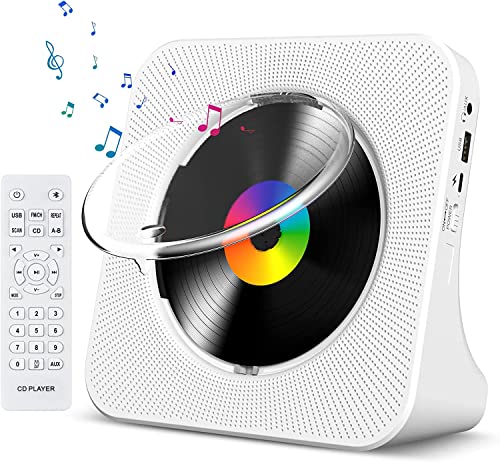
- Multi-functional CD Player: 1.Desktop CD Player, 2.Bluetooth 5.0 HiFi Speaker, 3. FM Radio, 4.TF card Music Player, 5.USB Flash Drive Player, 6. 3.5mm Audio Player. Support CD,CD-R,CD-RW,MP3,WMA.
- Dual Mode Bluetooth CD Player: It's a Bluetooth transmitter and receiver. Built-in dual Hi-Fi Bluetooth speakers, which can be connected with Bluetooth-enabled devices such as mobile phone or tablet. It will work as a wired speaker. As Bluetooth transmitter, it can be connect with your Bluetooth earphone or speaker.
- Desktop Design & Designed with a clear display screen: Desktop design with update also can as a Bluetooth transmitter, one plays all multiple functions of remote control. Easy to stand on the desk without Assembly or other support. Built-in LCD display shows track number, play time, and mode – always keep your music in view.
- Wired Speaker: Connect the CD player to other external wired devices such as mobile, tablet or laptop via 3.5mm male-to-male audio cable, it will work as a wired speaker. (Notice: Remote control does not included batteries)
- Great Gift: This Gueray CD Player is a perfect gifts for everyone. It supports remote control within 5 meters, A-B repeat, suitable for language learning, prenatal education / antenatal training, early education, FM radio broadcast.

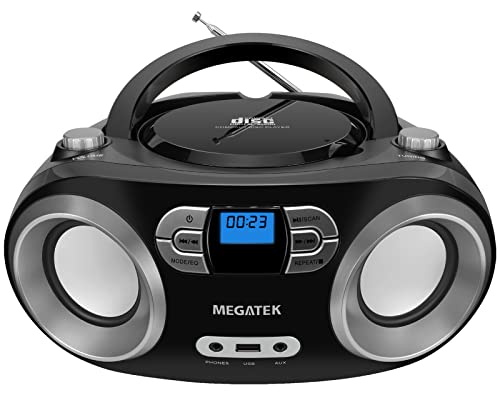
- Simple & Stylish – Large buttons, top dials, and backlit LCD for easy use. Portable, compact design fits any space—perfect for home, shop, or on-the-go music.
- Crisp Stereo Sound – Dual 3" front-firing speakers deliver clear, balanced stereo sound, with 5 EQ modes for customized audio effects.
- Top-Loading CD Player – Plays CDs, CD-R/RWs, CD-G, audiobooks, and MP3/WMA discs, with shuffle, repeat, and resume functions for flexible playback.
- FM Radio – Digital FM tuner with 30 station presets for news, talk, and music programming. Note: AM not supported.
- Bluetooth Wireless – Enjoy wireless playback from your smartphone, tablet, or laptop. Note: No transmitter function.

- Multi-functional CD Player: 1.Desktop CD Player, 2.Bluetooth 5.0 HiFi Speaker, 3. FM Radio, 4.TF card Music Player, 5.USB Flash Drive Player, 6. 3.5mm Audio Player. Support CD,CD-R,CD-RW,MP3,WMA.
- Dual Mode Bluetooth CD Player: It's a Bluetooth transmitter and receiver. Built-in dual Hi-Fi Bluetooth speakers, which can be connected with Bluetooth-enabled devices such as mobile phone or tablet. It will work as a wired speaker. As Bluetooth transmitter, it can be connect with your Bluetooth earphone or speaker.
- Desktop Design & Designed with a clear display screen: Desktop design with update also can as a Bluetooth transmitter, one plays all multiple functions of remote control. Easy to stand on the desk without Assembly or other support. Built-in LCD display shows track number, play time, and mode – always keep your music in view.
- Wired Speaker: Connect the CD player to other external wired devices such as mobile, tablet or laptop via 3.5mm male-to-male audio cable, it will work as a wired speaker. (Notice: Remote control does not included batteries)
- Great Gift: This Gueray CD Player is a perfect gifts for everyone. It supports remote control within 5 meters, A-B repeat, suitable for language learning, prenatal education / antenatal training, early education, FM radio broadcast.

- Multi-Function CD Players for Home: Support CD/ CD Bluetooth transmitter/ USB/ Bluetooth/ FM radio mode, with remote controls,3.5mm,AUX,S/PDIF Prot
- Speakers-Bass Boost: Sound quality is enhanced by a fully sealed wooden cabinet, and the remote control allows for one-touch bass boosting and bass lowering to increase treble settings
- Bluetooth Input and Output: It supports receiving external Bluetooth devices in CD mode to listen to your favorite CD music, or you can use the wooden small CD player as a Bluetooth speaker
- Top-Loading CD Player: The appearance is a scaled-down version of a record player, but it is a multifunctional all-in-one CD music player. Compact design, portable. It is corded powered device
- Easy to use: top opens to hold CDs, toggle switch, voice mode alert, rotary volume button, easy to understand buttons. Make it easy to use for the elderly and children
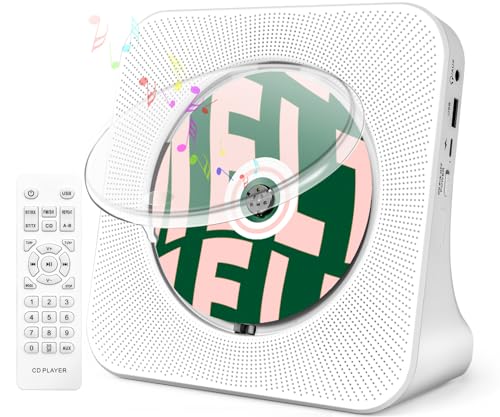
- 【8-in-1 Multifunctional CD Player】 ROADOM desktop cd player features up to 8 functions including CD, Bluetooth transmitting, Bluetooth receiving, FM Radio, U disk, AUX, Timer and Repeat. This compact disc player is widely compatible with five cd formats including CD, CD-R, CD-RW, MP3 and WMA — a complete home audio solution for any music collection.
- 【Bluetooth Transmitting & Receiving】Featured with built-in Bluetooth receiver, ROADOM kpop cd player can easily connect to devices armed with Bluetooth function like your phones, computers, pads, etc., acting as a small Bluetooth speaker. But if you want to enjoy cds via your Bluetooth earphones or Bluetooth speakers, please don't worry, this small cd player can also make it. Thanks to its Bluetooth transmitter, this portable bluetooth cd player can easily pair with your Bluetooth earphones or speakers — true wireless freedom with bluetooth cd player portable convenience.
- 【Crystal Clear Stereo Surround Sound】Thanks to its Hi-Fi technology, this hifi cd player delivers crystal clear stereo surround sound with the lowest distortion even at maximum volume. Whether for party, studio, massage, yoga, home schooling, or as a cd player for bedroom listening, this cd player with clear sound fits any setting. It also features a built-in full band FM Radio (76.0-108.0MHZ) — making it a versatile cd player and radio that doubles as a cd player home audio system.
- 【AUX and USB Functions】Featuring a USB port, this audio cd player reads and plays MP3/WMA files from U-Disk — the USB port can even charge your phone or pad. Connect to devices like computers or phones via the 3.5 mm AUX cable, using it as a wired speaker. With its AUX output, this easy to use cd player also sends audio to external headphones or speakers, and comes with a cd player with remote for effortless control from across the room.
- 【Widely Used & Ideal Gift】 With this mini cd player, you can study new language, listen to audio books, enjoy bedtime stories, and more. Place it in the living room, bedroom, bathroom, dining room, kitchen or wherever you prefer. ROADOM cute cd player with vintage cd player charm and retro style is a perfect choice for music lovers, kpop fans, yoga fans and dancing girls — an ideal gift for cd player for kids, cd player for seniors, parents and friends. Also perfect as a cd player for classroom learning or a cd player for travel companion.
SEOCONTENT-START
1 2 3 4 CD PLAYER INSTALLATION INSTRUCTION COMPONENTS 6MT ●CD PLAYER 6MT H0010VC760 ●FITTING KIT 6MT H0010VC710 No. Name Qty 1 CD PLAYER 1 2 Relay harness 1 3 Cable tie 10 4 Urethane sheet 2 Applicable model Genuine component number H0010VC780 204-0444-00 WRX(6MT) 2022MY~ WRX(CVT) 2022MY~ H0010VC770 △ 0 5 6 7 8 9 0 ! No. Name Qty 5 Panel deck 1 6 Pocket (for deck) 1 7 Mat 1 8 Truss screws (M5x6) 4 9 Screws (M5x16) 6 0 Bracket RH 1 ! Bracket LH 1 PF3982AD, PF3982AE -1- G.t> SUBARU I I Qo -2- 1 2 3 TOOLS USED Philips screwdriver, Flathead screwdriver, Clip remover, Trim removal tool, Nose pliers, Nipper, Cutter knife, Plastic tape, Curing tape COMPONENTS CVT ●CD PLAYER CVT H0010VC750 ●FITTING KIT CVT H0010VC700 No. Name Qty 1 CD PLAYER 1 2 Relay harness 1 3 Cable tie 10 No. Name Qty 4 Panel deck 1 5 Pocket (for deck) 1 6 Mat 1 7 Truss screws (M5x6) 4 8 Screws (M5x16) 4 9 Plastic clips 6 0 Spring nuts 4 ! Bracket RH 1 @ Bracket LH 1 4 5 6 7 8 9 0 ! @ -3- PRECAUTIONS • Please refer to the precautions below before you begin work, in order to install the product safely and accurately Please also refer to the vehicle Service manual. • This manual shows typical installation procedures on LHD vehicle. Installation will be mirror image for RHD vehicles. ATTENTION • Please disconnect the battery cable while conducting wiring operations. Failure to do so may result in electrical shock or injury. • . Also, please make an note of data in the memory of the electrical components such as the radio. This will help avoid problems that may arise when performing the repair check after the installation. • When tightening bolts or screws, use the proper tools and the proper size, and comply for Failure to securely tighten the bolt and nut may cause them to loosen and fall off, causing damage. • When removing the connector from the vehicle, remember to remove the lock that holds the main body of the connector, instead of pulling the lead line. This protects against a lead wire cuts, etc. • Please be sure to properly connect the connector and terminal. This helps to avoid a poor connection. • When wiring the harness(wiring), clamp the wires together along with the wiring harness of the vehicle. This protects the harness from becoming entangled or causing strange sounds. • , etc, be careful not to let the harness be hooked or pulled from the back. This protects against a cut wire or shorts. • Be careful not to forcefully pull the wiring harness of the vehicle. This helps prevent the connector from being disconnected, and the wires from being cut or damaged. • After installing the wiring, perform an operations check on the newly installed parts before reassembling. This helps prevent mis-wiring. Please confirm that the electrical components of the vehicle operate normally the specified torque specified for the part. When connecting or disconnecting parts or installing or removing the finisher Vehicle-side pre-wire(Power system) Vehicle-side pre-wire(Video system) Relay harness CD PLAYER CD PLAYER Vehicle-side pre-wire(Power system) Relay harness Vehicle-side pre-wire(Video system) INSTALLATION OVERVIEW To prevent any accident during work, make sure to disconnect the negative (-) terminal of the battery according to the latest service manual. WARNING WRX WRX 6MT CVT -4- I r: \ ~ — ~’=/2 ~ 711 ~ ~ \ (/// / ~ ~ J Shift lever boot ASSY Clips Shift knob 6MT REMOVING THE VEHICLE COMPONENTS (1) Rotate the shift knob in the direction of the arrow to remove it. (2) Remove the shift lever boot ASSY. (Clips: 8 points) Affix curing tape to the shaded parts ( ) in the figure to protect the vehicle. NOTE -5- WRX C_-______~ ) u ~ 7\ ~ ~~~,_~ / ~ c:::i c:::i =s=—- ~ Bolt Console box ASSY Bolt Cap console Cap console Moving forward Cover front ASSY Connector position Clips Parking brake boot Clips Tab 6MT (3) Remove the parking brake boot. (Clips: 5 points, Tab: 1 point) (4) Remove the cover front ASSY. (Clips: 12 points) (5) Remove the two cap consoles. (6) Remove the two bolts. -6- WRX “\’,\v\, ~”-rn ~ /~ ~~ /i ..——-; \, / Clips Screw Cover center side RH Screw Console box ASSY Connector position Clips 6MT (7) Remove the screw, disconnect each connector, and remove the console box ASSY. (Clips: 3 points) (8) Remove the screw, and then remove the cover center side RH. (Clips: 2 points) -7- WRX …..__________I t I —– / Rubber of the center tray Screwdriver Shift lever -8- CVT (1) Turn over the rubber of the center tray, insert the screwdriver into the position in the figure, and while inserting it to the depth, lower the shift lever. (2) Lower the shift lever boot, and pull out the pin to remove the shift knob. (3) Remove the center tray. Affix curing tape to the shaded parts ( ) in the figure to protect the vehicle. NOTE Center tray Pin Shift knob Shift lever boot WRX ) -9- CVT Plastic panel Rubber of the Center tray Hooks of the rubber Insert into this position. Hooks of the rubber Shift down the hook Caution during reinstallation ● If the plastic panel is detached from the rubber during removal of the center tray, firmly fit the hooks of the rubber into the recess sections of the plastic panel, and perform reinstallation. Clips Cover front ASSY Connector position (4) Disconnect the one connector, and then remove the cover front ASSY. (Clips: 18 points) WRX – ‘- =-c ,,,.——-\ – I ~1L/ l. — ,.? -~I “= -“-‘1 .:::::::;:::::(:’ – ~ ~ Cover center side RH Screw Clips -10- CVT Cap console Tabs Screws Console box ASSY Bolt Cap console Bolt Connectors (5) Remove the two points of the cap console. (6) Remove the two bolts and two screws, and while disconnecting the three connectors, remove the console box ASSY. (Tabs: 2 points) (7) Remove the screw, and then remove the cover center side RH. (Clips: 2 points) WRX ” ” ‘\. ______,- ” l – –~~ ~~~u~=” 1/~ ~-=.~ -~ / ~c~–=- Clip Nose pliers Existing harness Console box Rear Console box Rear Console box ASSY Console box ASSY Clips Clips Clips Existing harness A A Console box ASSY -11- EXCHANGING TO THE CONSOLE BOX ASSY POCKET (FOR DECK) (1) Remove the existing harness. (Clips: 7 points) (2) Remove the console box rear and set it to the floating state. (Clips: 6 points) (3) Release the clips (2 points) of the existing harness, and then remove the console box rear. 6MT For section A in the figure, use nose pliers to hold the clips and remove them. NOTE Removal of the clip at section A WRX ~lr:7°T~i-“,’ –,7-~ •r—- –,= Screw Screw Console box RH Clips Console box LH Screw Screw 1 2 Screws Lid ASSY Console box ASSY (4) Remove the three screws, and then remove the lid ASSY. (5) Remove the two screws, and then remove the console box RH in the order of 1 and 2. (Clips: 4 points) * Remove the console box LH in the same way. -12- 6MT WRX Existing pocket Pocket(for deck) Socket Socket Remove (6) Remove the socket from the existing pocket, and attach it to the pocket (for deck). -13- 6MT CD PLAYER Bracket LH Bracket RH Truss screws (M5x6) Truss screws (M5x6) (7) Use the four truss screws (M5x6) to attach the bracket RH and bracket LH to the CD PLAYER. WRX Pocket(for deck) CD PLAYER Pocket(for deck) CD PLAYER -14- 6MT (8) Install the CD PLAYER while passing the CD PLAYER cable through the hole in the pocket (for deck). (9) Use the four screws (M5x16) to fix the CD PLAYER to the pocket (for deck). WRX 1~~1 –~– Screws(M5x 16) Screws(M5x16) Screws( ) Panel deck Pocket(for deck) Front side Pocket(for deck) Fix the clip (Gray 4P connector) Fix the clip (White 5P connector) Fix the clip Existing hole Existing hole Front side Pocket(for deck) Fix the clip Existing hole CD PLAYER cable CD PLAYER (10) Fix the clip of the CD PLAYER cable into the existing holes in the pocket (for deck). (11) Fix the two CD PLAYER cable connectors into the existing holes in the pocket (for deck). (12) Fix the clip of the CD PLAYER cable into the existing holes in the pocket (for deck). (13) Install the panel deck to the pocket (for deck). (14) Use the two screws (M5x16) to fix the deck. -15- 6MT WRX M5x16 Console box ASSY Vinyl tape Stay with clip Vinyl tape Existing harness CD PLAYER Console box ASSY -16- 6MT (15) Assemble the console box ASSY using the reverse procedure to removal. (16) Turn over the console box ASSY, peel off the vinyl tape from the existing harness, and then remove the L-shaped stay with clip. WRX Existing harness 40mm Cable tie Pocket(for deck) Urethane sheet (attach one sheet) Urethane sheet (align the length and cut) Fold back Align Align Existing harness -17- 6MT (17) Aligning with the end of the sponge of existing harness, attach the two urethane sheets and fold them back. (18) Use a cable tie to fix the indicated position of the existing harness to the pocket (for deck). WRX / 1 II 11 -18- Nose pliers Clip Existing harness How to release the clip Remove the clip at this position from the exterior. Console box ASSY Clips Remove the clip at this position Existing harness from the exterior. (1) Remove the existing harness. (Clips: 8 points) Use nose pliers to pinch the six clips on the existing harness and release them. Release the two clips shown by the arrows in the figure from the exterior of the console box ASSY. NOTE CVT Console box ASSY Console box rear Clips (2) Remove the console box rear. (Clips: 6 points) WRX …. =-=:-=== I v~ ~~ —— Pocket(for deck) Remove the socket Socket Existing pocket Console box ASSY Lid ASSY Screws -19- CVT Console box LH Console box RH Clips Screw Screw 1 2 Screw Screw (3) Remove the four screws, and then remove the lid ASSY. (4) Remove the two screws, and then remove the console box RH in the order of 1 and 2. (Clips: 5 points) * Remove the console box LH in the same way. (5) Remove the socket from the existing pocket, and attach it to the pocket (for deck). The existing pocket is not reused. Hand it to the customer. NOTE WRX 1==~1—-;—_717_ Spring nuts Spring nuts Front side Pocket (for deck) -20- CVT CD PLAYER Bracket LH Bracket RH Truss scews (M5x6) Truss scews (M5x6) (6) Attach the four spring nuts to the pocket (for deck). (7) Use the four truss screws (M5x6) to attach the bracket RH and bracket LH to the CD PLAYER. CD PLAYER Pocket (for deck) Pass the cable through the hole. (8) Install the CD PLAYER while passing the CD PLAYER cable through the hole in the pocket (for deck). WRX -21- Pocket(for deck) Fix the clip CD PLAYER cable Existing hole Front side Pocket(for deck) Fix the connector with clips Existing hole Existing hole CD PLAYER cable Front side CD PLAYER Scews (M5x16) Scews (M5x16) Pocket (for deck) (9) Use the four screws (M5x16) to fix the CD PLAYER to the pocket (for deck). (10) Fix the two CD PLAYER cable connectors into the existing holes in the pocket (for deck). (11) Fix the CD PLAYER cable into the existing holes in the pocket (for deck) using a cable tie. (12) Fix the CD PLAYER cable into the existing holes in the pocket (for deck) using a cable tie. CVT WRX Console box ASSY CD PLAYER Pocket (for deck) Panel deck Clips Plastic clips Plastic clips Panel deck (13) Install six plastic clips to the panel deck. (14) Install the panel deck to the pocket (for deck). (15) Assemble the console box ASSY using the reverse procedure to removal. -22- CVT WRX .,-, ,-, – I I I I ~-.~,·~,—·,✓ – ~ ,_., ‘\ –i- r, ,- Connect the connector with the black side Relay harness(4pole) Vehicle-side pre-wire connector(4pole) Relay harness Cable tie WIRING OF RELAY HARNESS (1) Connect the connector with the black connection side of the relay harness to the vehicle-side pre-wire connector. (2) Wire the relay harness along the vehicle harness, and fix it with a cable tie. -23- 6MT To prevent damage to the vehicle-side connector, make sure not to connect the gray-surface connector of the relay harness. NOTE WRX Connector of the CD PLAYER (White 5P connector) Console box ASSY Connector of the existing harness (White 5P connector) Connector of the existing harness (White 5P connector) Peel off the vinyl tape -24- (3) Peel off the vinyl tape and take out the white 5P connector of the existing harness. 6MT (4) Connect the white 5P connector of the existing harness to the white 5P connector of the CD PLAYER installed in the console box ASSY. (5) Reinstall the console box ASSY in the vehicle using the reverse procedure to removal. WRX ——– Connector of the existing harness (White 5P connector) Cable tie Relay harness Existing harness -25- 6MT Relay harness Gray 4P connector of the CD PLAYER (6) Connect the relay harness to the gray 4P connector of the CD PLAYER. (7) Fix the harnesses with cable ties as shown in the figure. To prevent damage to the vehicle-side connector, make sure not to connect the black-surface connector of the relay harness. NOTE Connect the connector with the gray side WRX -26- 6MT CD PLAYER Mat (8) After reinstalling the vehicle components, attach the mat in the console box ASSY. WRX I I —— -27- CVT (1) Connect the connector with the black connection side of the relay harness to the vehicle-side pre-wire connector. To prevent damage to the vehicle-side connector, make sure not to connect the gray-surface connector of the relay harness. NOTE Vehicle-side pre-wire connector(4pole) Connect the connector with the black side Relay harness(4pole) Cable tie Relay harness Cable tie Fix to the vehicle-side pre-wire (2) Wire the relay harness along the vehicle harness, and fix it with a cable tie. (3) Reinstall the console box ASSY in the vehicle using the reverse procedure to removal. WRX 8~ r===–1 ~ 7\ / ~ N OJ \ i —z4′!’-s:i I 1/ /11 ‘ \’i)~.i’ ~ ffl ~ —- CD PLAYER Mat Vehicle-side pre-wire (White 5P) Relay harness CD PLAYER cable connector (Gray 4P) CD PLAYER cable connector (White 5P) (4) Connect the connectors of the relay harness and vehicle-side pre-wire to the CD PLAYER cable connectors. (5) After reinstalling the vehicle components, attach the mat in the console box ASSY. -28- CVT Connect the connector with the gray side To prevent damage to the vehicle-side connector, make sure not to connect the black-surface connector of the relay harness. NOTE WRX CD PLAYER Connector (White 5P) Connector (Gray 4P) Relay harness Vehicle-side pre-wire (power system) Vehicle-side pre-wire (video system) WIRING DIAGRAM Operation Check (1) Referring to the wiring diagram, connect all wires. (2) Connect the battery, and turn on the engine switch. (3) Insert a CD medium into the deck, and check for EJECT/Loading/Playback output. -29- Vihicle-side Must be gray connection surface Must be black connection surface WRX 0 o ( ) n 0 o n REVISION HISTORY Content Date Newly established 10 / 2021 △ △ △ 0 △ △ -30-
**************************************************************************************************************
SEOCONTENT-END
This product presentation was made with AAWP plugin.