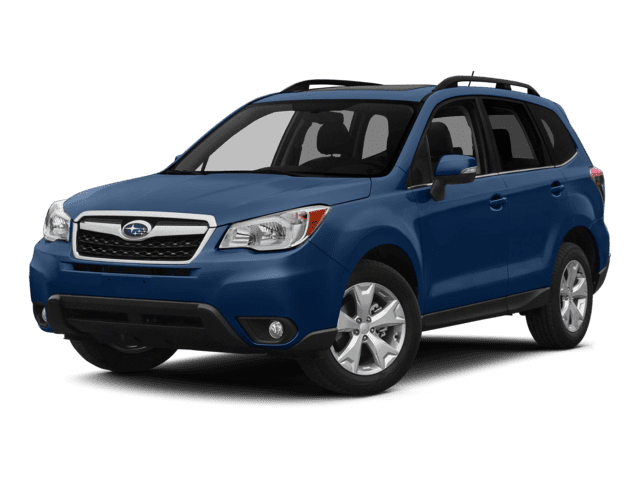
NHTSA ID Number: 10233139
Manufacturer Communication Number: TechTIPS
Summary
Tip issues
ARTICLES CONTAINED IN THIS ISSUE
CODE ARTICLE………………….. PAGE
(01) Rear Bumper Underguard…. 1
(01) Auto Dimming Side Mirror with Approach Lighting……. 2
(01) Trailer Hitch………………… 7
(01) Remote Engine Start Key Start…………………… 9
(01) Remote Engine Start Push Button………………. 12
(01) 110 Power Outlet…………. 13
(01) Auto Dimming Home Link Mirror …………………….. 18
(01) Bumper Cover Installation Tips……………24
(01) Sports Grille……………….25
1 Affected Product
Vehicle
| MAKE | MODEL | YEAR |
SUBARU | FORESTER | 2014 |
1 Associated Document
Manufacturer Communications
SUTTIPS0413 – 2014 Forester Accessory TechTIPS Newsletter
MC-10233139-9999.pdf 5660.312KB

- [Easy to Use—Work Out of the Box] + [FOXWELL 2026 New Version] FOXWELL NT604 Elite scan tool is the 2026 new version from FOXWELL, designed for car owners who want to figure out the cause of issues before fixing car problems by scanning common systems like ABS, SRS, engine, and transmission. The NT604 Elite obd2 scanner diagnostic tool comes with the latest software—no need to waste time downloading software first. Plug the scanner into the OBDII port with OBDII cable to start the diagnosis.
- [Affordable] + [Reliable Car Health Monitor] Will you be confused what happens when the warning light of ABS/SRS/transmission/check engine flashes? Instead of taking your cars to dealership, this FOXWELL scanner will help you do a thorough scanning and detection for your cars and pinpoint the root cause. Note:The device is a diagnostic tool, not a repair tool. To turn off a warning light, you must first physically repair the issue causing it. Only then can the scanner be used to clear the corresponding fault code.
- [5 in 1 Car Diagnostic Scanner] Compared with obd scanners (50-100), NT604 Elite code scanner not only includes their OBDII diagnosis but also serves as ABS/SRS scanner, transmission and check engine code reader. When it’s an odb2 scanner, you can use it to check if your car is ready for annual test through I/M readiness menu. In addition, live data stream, built-in DTC library, data play back and print, all these features are a big plus for it. Note: doesn't support maintenance functions like reset or relearn. For the SRS system, NT604 Elite can read and clear common fault codes not caused by a crash, but crash/collision data cannot be cleared.
- [Fantastic AUTOVIN] + [No extra software fee] Through the AUTOVIN menu, this NT604 Elite car scanner allows you to get your V-IN and vehicle info rapidly, no need to take time to find your V-IN and input one by one. What's more, the NT604 Elite ABS SRS scanner supports 60+ car brands from worldwide (America/Asia/Europe). You don’t need to pay extra software fee. AUTOVIN may not work on some older vehicles or certain vehicle brands. If AUTOVIN fails, please input the vin code manually or go to the Diagnostic Menu to select your vehicle model.
- [Solid protective case KO plastic carrying bag] + [Lifetime update] Almost all same price-level car scanner diagnostic tool only offers plastic bag to hold the scanner.However, NT604 Elite automotive scanner is equipped with solid protective case, preventing your obd2 scanner from damage. Then you don’t need to pay extra money to buy a solid toolbox.
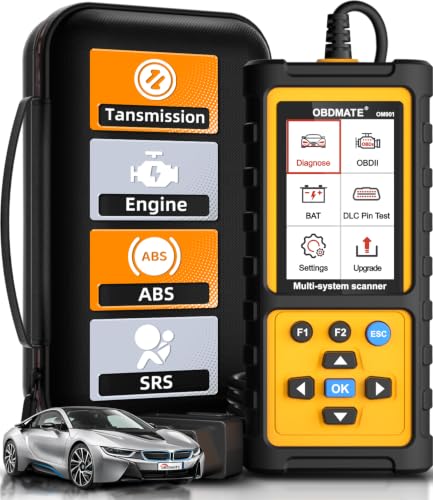
- 【Reset ABS/SRS/Transmission/Engine Lights】 More than an check engine code reader, OBDMATE OM901 obd2 scanner performs comprehensive diagnostics for the 4 most-used systems (ABS/SRS/Engine/Transmission). It quickly clears fault codes, turns off warning lights, read data stream and auto VIN.
- 【3.5" Handheld Scanner with 4 System Diagnose】 3.5" Super large TFT screen equipped displays an intuitive menu and clear readings of various sensors from ABS, SRS, ECM and TCM systems. It arrived with a silicone protective case and hard-shell carrying case, ensuring long-lived durability and drop resistance. The car diagnostic tool is plug-to-play designed, plug it and get diagnosis started without any batteries or updates required.
- 【One-Click I/M Readines&Full OBD2 Functions】 Press F1 to get an intuitive corloured form about whether various emissions-related systems on the vehicle are operating properly. Help you get smog-check ready quickly. OM901 car scanner supports all essential OBD2 functions you need: read & clear codes, view freeze frame, read I/M readiness, retrieve VIN, live data stream (with graphing display), O2 sensor test, onboard monitoring mode, and EVAP leak test.
- 【Battery Voltage Check&DLC Pin Test】 It allows you to monitor battery health by testing current battery voltage. Plus, this obd2 diagnostic tool features DLC 16-PIN test to check current voltage of every pin.
- 【Automotive Scanner Diagnostic Kit】 The package comes with 1 car scanner, 1 USB-type c cable, 1 hard storage bag and 1 user manual(en). Free to update without any hidden fees. 5 languanges available in setting including English, French, Italian, German and Espanish. Valuable and Portable, making it a great tool kit for car owners, DIY enthusiasts, and professional mechanics.

- [All System Diagnostics, Professional-Level Scanner] - BLCKTEC 460T is the ultimate OBD2 diagnostic tool for home mechanics and professionals. It supports all 10 OBD2 modes, reads and clears Engine/Transmission/ABS/SRS codes, performs All-System Diagnostics, offers workshop reset tools, and provides real-time live data. It helps you pinpoint issues, assess your car's condition, and prepare for SMOG checks with ease. NOTE: Function availability depends on your vehicle. Before you buy, be sure to use the Compatibility Checker on BLCKTEC website or contact our customer support to verify that the features you need are supported for your vehicle’s specific year, make, and model.
- [12+ Most Popular Reset Functions] - BLCKTEC 460T OBD2 scanner offers 12+ dealer-level service functions, including Oil Maintenance Reset, ABS Bleeding, EPB Reset, SAS(Steering Angle Sensor) Recalibration, DPF(Diesel Particulate Filter) Reset, Throttle Body Relearn, Battery Reset/Initialization, TPMS Relearn, Transmission Reset, Fluid Change Reset, Maintenance Reset and more, enabling you to perform workshop services like a pro. NOTE: Function availability depends on your vehicle. Be sure to use the Compatibility Checker on BLCKTEC website to verify that the features you need are supported for your vehicle.
- [Real-Time OBD2 and OEM Live Data, Freeze Frame Data] - BLCKTEC 460T helps diagnose vehicle issues when warning lights like Check Engine Light or ABS/SRS Light appear. It offers detailed DTC info, ECU Freeze Frame Data, and real-time OBD2 and advanced OEM live data, including Engine, Transmission, ABS, SRS, and more, making it easy to diagnose and resolve vehicle problems. You can view, graph, record, replay, and overlay up to four live data streams in a single graph for better analysis.
- [AutoVIN, AutoReLink, AutoScan, 3X Faster] - Equipped with AutoVIN technology, 460T automatically retrieves the VIN to save you time. Its AutoScan and AutoReLink features scan all of the vehicle's ECUs and detect any fault codes immediately after you plug the scanner into the vehicle's OBD2 port - no button presses required. Additionally, it regathers DTC and I/M readiness information every 30 seconds, simplifying monitor tests. 460T's advanced technology makes it 3X faster than other products.
- [Get RepairSolutions2, the #1 Auto Repair App for Free] - When paired with RepairSolutions2(RS2) App, 460T becomes even more powerful. RS2's Verified Fix Database built by master technicians, provides the parts needed for the repair. Additionally, RS2 gives you access to OEM warranty info, maintenance schedules, TSB, and dealership recall info, making car care easier than ever. RS2 is free with no subscription fees and it stores your car scan reports in the cloud, allowing you to access, share, or print them anytime and anywhere.
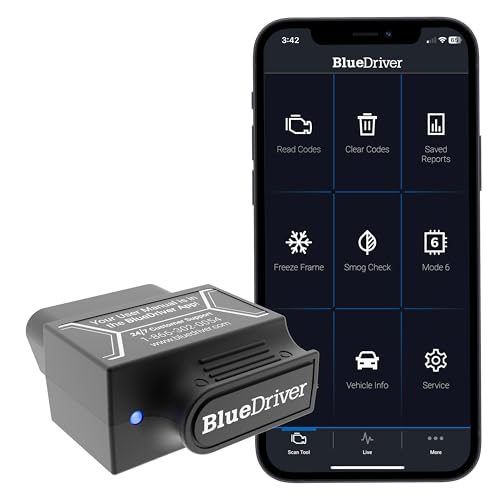
- [Diagnose Like a Pro] BlueDriver Pro is a professional OBD2 scanner and diagnostic tool that helps you scan, understand, and clear vehicle trouble codes with confidence. Turn your phone into a powerful car diagnostic scanner—no guesswork, no unnecessary repairs.
- [Read and Clear More Codes Than Ever] Read and clear more codes than basic car code readers. Access enhanced diagnostics for Check Engine, ABS, SRS, Airbag, TPMS, Transmission.
- [Verified Fixes and Real-Time Data] Get unlimited, technician-verified repair reports matched to your VIN, with definitions, causes, and confirmed fixes. Monitor live vehicle data as you drive, view freeze frames, check smog readiness, and analyze Mode 6 test results.
- [Wireless & Bluetooth Enabled] - Say goodbye to wires. BlueDriver connects with Bluetooth via your phone/tablet to a sensor that plugs into your car's OBDII port. Get all of the capabilities of an expensive code reader & scan tool without any annoying wires.
- [Broad Make & Model Coverage] Strong support for GM, Ford, Stellantis (RAM, Jeep, Chrysler), Toyota, Honda, Nissan, Mazda, Subaru, Hyundai, Mercedes-Benz, BMW, and VW.

- OBD2 SCANNER FOR ALL SYSTEMS – The INNOVA SD35 is a tablet-based OBD2 scanner designed for advanced diagnostics. Read and clear check engine light, ABS, SRS, and TPMS codes, plus test your car battery and alternator to prevent unexpected failures. Vehicle coverage may vary. Please use Innova’s Coverage Checker to verify compatibility.
- ALL-SYSTEM DIAGNOSTICS & LIVE DATA – Unlike basic code readers, this OBD2 scanner for all vehicles scans engine, transmission, ABS, SRS, and more. Get real-time live data, including RPM, fuel trims, temperature readings, and oxygen sensor performance.
- OBD2 TABLET WITH USER-FRIENDLY INTERFACE – This automotive scan tool features a high-resolution display, making vehicle diagnostics faster and easier.
- ADVANCED TPMS, OIL RESET & SERVICE FUNCTIONS – Perform TPMS sensor checks, oil light reset, and other service resets with ease This professional diagnostic tool provides comprehensive vehicle maintenance capabilities in one device.
- WIDE VEHICLE COVERAGE (1996 & NEWER CARS & TRUCKS) – This OBD2 scanner Bluetooth tablet is compatible with Toyota, Ford, Honda, Chevrolet, Nissan, Dodge, and more. However, feature coverage may vary. Please use Innova's Coverage Checker to verify coverage.
SEOCONTENT-START
2014 Forester TechTIPS Page 1 Technical Support Line Newsletter 2014 Forester Tips Issue HELPING TO ACHIEVE THE PREMIUM SERVICE EXPERIENCE REAR BUMPER UNDERGUARD ARTICLES CONTAINED IN THIS ISSUE CODE ARTICLE………………….. PAGE (01) Rear Bumper Underguard…. 1 (01) Auto Dimming Side Mirror with Approach Lighting……. 2 (01) Trailer Hitch………………… 7 (01) Remote Engine Start Key Start…………………… 9 (01) Remote Engine Start Push Button………………. 12 (01) 110 Power Outlet…………. 13 (01) Auto Dimming Home Link Mirror …………………….. 18 (01) Bumper Cover Installation Tips……………24 (01) Sports Grille……………….25 01 The Subaru TechTIPS newsletter is intended for use by professional technicians ONLY. Articles are written to inform those technicians of conditions that may occur in some vehicles, or to provide information that could assist in the proper servicing of the vehicle. Properly trained technicians have the equipment, tools, safety instructions, and know-how to do the job correctly and safely. If a condition is described, DO NOT assume that your vehicle has or will have that condition. Impreza, Legacy, Justy, Loyale, Outback, Forester, Subaru SVX, WRX, WRX STI, L.L. Bean, Baja, Tribeca, BRZ, XV Crosstrek and “Quality Driven” are Registered Trademarks. The international standard for excellence in Environmental Management Systems. Please recycle or dispose of automotive products in a manner that is friendly to our environment and in accordance with all local, state and federal laws and regulations. CAUTION: VEHICLE SERVICING PERFORMED BY UNTRAINED PERSONS COULD RESULT IN SERIOUS INJURY TO THOSE PERSONS OR TO OTHERS. SUBARU OF AMERICA, INC. IS “ISO 14001 COMPLIANT” 5/16” Roll under to remove all gaps and drill under holes. 3/8” 1/4” 1/4” 3/8” Dealer Template 1 2 3 4 5 20 in-lbs Push Clips This edition contains highlights and tips for installation of various ‘14 Forester accessories. Please always refer to the installation instructions found on the Subaru Technical Information Site 2014 Forester TechTIPS Page 2 AUTO DIMMING SIDE MIRROR WITH APPROACH LIGHTING 01 Release Mirror Assemble Springs Assemble Springs Pre-arranged Connector Continued… Apply Grease 1 2 3 4 2014 Forester TechTIPS Page 3 AUTO DIMMING SIDE MIRROR WITH APPROACH LIGHTING (CONTINUED) 01 Unclip side harness Connect lower harness Route lower harness through under side clip. Continued… 5 6 7 7 Route side harness under side clip, on top of lower harness. 2014 Forester TechTIPS Page 4 AUTO DIMMING SIDE MIRROR WITH APPROACH LIGHTING (CONTINUED) 01 Twist lower harness and side harness together. Continued… 9 10 Twist wires two times to take up excess slack. Connect side harness. Secure connector in holder. At this point its ok if lower harness comes out of side clip. It will be held by side harness 11 12 2014 Forester TechTIPS Page 5 Press Down to Snap & Lock Hook Mirror Connect Terminals Hook clips to mirror plate. AUTO DIMMING SIDE MIRROR WITH APPROACH LIGHTING (CONTINUED) 01 Continued… 13 14 15 16 2014 Forester TechTIPS Page 6 Harness not visible. Harness stays back though mirror’s entire range of motion. AUTO DIMMING SIDE MIRROR WITH APPROACH LIGHTING (CONTINUED) 01 17 18 2014 Forester TechTIPS Page 7 TRAILER HITCH 01 Continued… R10 center pointR10 centrent le point01.97in 050mm 102 mm4.02 in5mm0.2in5mm0.2inExisting lineLigne existanteAlign with lower edge of bumperAligner avec le bord inférieur du pare-chocsPlace in the inside of the rear bumperPlacez à l’intérieur du pare-chocs arrièreCentre line of bumperLigne Centre du pare-chocs2-R10 Fascia Cutting Template Cut-out Trim Orientation Mount Locations Remove Heatshield/Drill Hole as specified Mount Bracket and Spacer washer Mount Bracket and Spacer washer 2X for Turbo Models 2014 Forester TechTIPS Page 8 TRAILER HITCH (CONTINUED) 01 Pre-arranged Connector Harness Routing (Foam and Tape Locations) Mounting Module 2014 Forester TechTIPS Page 9 REMOTE ENGINE START KEY START: ANTENNA MOUNTING FOR NON-EYESIGHT UNITS 01 Wrap the long piece of foam tape (supplied in the kit) along the length of the wire harness, starting 76mm (3”) to the left of the connector. 76mm (3”) The antenna is still mounted 1” to the left on the center line on the windshield. Once the foam has been wrapped along the entire length of the harness you may then tuck the harness behind the headliner working towards the LF A pillar. Continued… 1 2 3 2014 Forester TechTIPS Page 10 REMOTE ENGINE START KEY START: ANTENNA MOUNTING FOR EYESIGHT UNITS 01 Continued… The top left corner of the antenna pod should be 20mm (3/4”) from the right corner of the A-pillar trim panel in a straight line and 10mm (3/8”) down from the headliner to the upper right corner of the antenna pod. The antenna should be level left to right. 1 2 3 Sunvisor 10mm 20mm 2014 Forester TechTIPS Page 11 REMOTE ENGINE START KEY START 01 Run the wire harness down the A-pillar and zip-tie in the 6 locations circled in red. Once the 6 locations have been zip-tied then wrap each zip-tie with the supplied foam tape to eliminate the potential for rattles. Continued… 2014 Forester TechTIPS Page 12 REMOTE ENGINE START PUSH BUTTON 01 Working back from the glove box area there are 2 tie-off locations behind the dash assembly before the center panel opening. At the center panel opening (where the RES harness is routed underneath the ducts and behind the two metal brackets) zip-tie the RES harness as shown in the lower left hand image. 2014 Forester TechTIPS Page 13 110V POWER OUTLET 01 Continued… Template and cut orientation is rotated from previous 110V Power Outlet installs. The opening flap is now facing the LF seat. Mount the inverter so that the connector is facing towards the LF seat. 1 2 3 4 2014 Forester TechTIPS Page 14 110V POWER OUTLET (CONTINUED) 01 Removal of center console for wire harness routing. With both hands grip the side console wings and pull towards you to remove. Ensure that both yellow retention clips are retained for reinstallation. Then remove the shift lever console plate. With the console plate removed the 2 screws for the center console can now be accessed. Continued… 5 6 7 8 2014 Forester TechTIPS Page 15 110V POWER OUTLET (CONTINUED) 01 Tilt the center console back in order to begin harness routing. Route the wire harness underneath the carpet directly across from the e-brake assembly. Fish the harness underneath the RF seat, out from underneath the carpet flap and plug into the inverter. Continued… 9 10 11 12 2014 Forester TechTIPS Page 16 110V POWER OUTLET (CONTINUED) 01 Continued… Apply aluminum tape to the wire harness exiting the inverter. 12 Inverter 2014 Forester TechTIPS Page 17 110V POWER OUTLET (CONTINUED) 01 Four tie-off locations circled in red for securing the wire harness underneath the center console. 13 2014 Forester TechTIPS Page 18 AUTO DIMMING HOME LINK MIRROR INCLUDING VEHICLES W/EYE SIGHT INSTALLATION 01 Carefully Pry off the Cover Apply protective tape to the eye sight camera openings. DO NOT TOUCH THE LENSES EyeSight Equipped Continued… Auto Dimming Home Link Mirror 1 2 3 4 2014 Forester TechTIPS Page 19 AUTO DIMMING HOME LINK MIRROR INCLUDING VEHICLES W/EYE SIGHT INSTALLATION (CONTINUED) 01 Using a 8mm socket remove the Eye Sight cover retaining bolts (2) Carefully support the headliner here when pulling down on the cover. EyeSight Equipped Continued… Carefully pull down on the cover from the headliner to remove the cover from the headliner. Support the front of the cover when removing. 5 6 7 8 2014 Forester TechTIPS Page 20 AUTO DIMMING HOME LINK MIRROR INCLUDING VEHICLES W/EYE SIGHT INSTALLATION (CONTINUED) 01 DO NOT TOUCH THE LENSES Locate the windshield upper shade center mark to align the mirror harness and cover EyeSight Equipped Continued… DO NOT TOUCH THE LENSES Remove the original mirror 9 10 11 12 2014 Forester TechTIPS Page 21 Locate the OE wiring harness to connect the A/D / H/L mirror. Note: the connector is taped to the EyeSight wiring harness using “black” tape. The “black” electrical tape will not break away like the “blue” tape and must be carefully cut to allow the connector harness to extend closer to the opening. AUTO DIMMING HOME LINK MIRROR INCLUDING VEHICLES W/EYE SIGHT INSTALLATION (CONTINUED) 01 EyeSight Equipped Continued… 13 14 15 2014 Forester TechTIPS Page 22 Remove the sunshade holder using a small screwdriver in the locations shown AUTO DIMMING HOME LINK MIRROR INCLUDING VEHICLES W/EYE SIGHT INSTALLATION (CONTINUED) 01 Supplemental Instructions to allow for easier access to pre-arranged connector. Remove the sunshade (2) Phillips screws Mirror connector Continued… 1 2 3 2014 Forester TechTIPS Page 23 Remove this clip to allow the headliner to hang down to access the connector without damaging the headliner AUTO DIMMING HOME LINK MIRROR INCLUDING VEHICLES W/EYE SIGHT INSTALLATION* (CONTINUED) 01 Supplemental Instructions to allow for easier access to pre-arranged connector. Carefully access the connector without damaging the headliner 4 5 2014 Forester TechTIPS Page 24 Pull the tape covers using the following steps 3 5 6 BUMPER COVER INSTALLATION TIPS 01 1 Temperature range 60 -110 degrees F. 2 4 Clean bumper surface with 70% -90% Alcohol using a clean towel. Remove tape cover #1 and ensure the edge (lip) fits the bumper contour all the way across, edge to edge. Align Center gate striker 1 2 3 4 After all tape covers are removed apply 15lbs. of pressure for 10 seconds to entire bumper cover. 2014 Forester TechTIPS Page 25 SPORT GRILLE 01 Kit Contents (8) Washers Continued… 2014 Forester TechTIPS Page 26 SPORT GRILLE (CONTINUED) 01 Lower Grille Section Removal Remove these clips to release the lower grille assembly (red) and remove the dust covers (green). Save to re-use when installing the new sport grille. Be careful when removing the end clips that have a rubber cover. The clip top will need to pop-up to allow the clip to be released without breakage. Continued… 1 2014 Forester TechTIPS Page 27 SPORT GRILLE (CONTINUED) 01 Lower Grille Section Removal Carefully pull the grille free of the retaining claws after removing the screws without scratching the bumper skin painted surfaces. #1 Stubby Phillips Screwdriver Continued… 2 4 Claws Front Grill Lower Front Bumper (back side) 2014 Forester TechTIPS Page 28 SPORT GRILLE (CONTINUED) 01 Upper Grille Section Removal Do not allow any of the nuts to drop into the engine compartment. Remove (8) Acorn Nuts Continued… 1 Hood Front Grill Center Open 2014 Forester TechTIPS Page 29 SPORT GRILLE (CONTINUED) 01 Upper Grille Section Removal Recommend closing the hood to apply the required force to remove the upper grille section held in place by (1) center clip. Carefully pry “up” in the center area under the Subaru Emblem on the upper grille section to unseat the center clip. Continued… 2 Clip 2014 Forester TechTIPS Page 30 Upper Grille Trim Removal It is easier to remove the upper grille trim with the hood closed to all for a better grip and minimize the possibility of damaging the hood. Remove the (2) 8mm screws and carefully remove the upper grille trim. Note: Ensure protective tape is used on the hood to prevent scratching. Continued… SPORT GRILLE (CONTINUED) 01 1 Protective Tape 9 Clips 2014 Forester TechTIPS Page 31 SPORT GRILLE (CONTINUED) 01 New Upper Grille Trim Installation Transfer the (2) end slide bolts(studs) and sealing washers to the new upper grille trim section. Continued… 1 2014 Forester TechTIPS Page 32 New Upper Grille Section Installation Transfer the (2) slide bolts(studs) and sealing washers to the new upper grille section. Continued… SPORT GRILLE (CONTINUED) 01 1 2014 Forester TechTIPS Page 33 New Upper Grille Section Installation Continued… SPORT GRILLE (CONTINUED) 01 Torque all (8) Acorn Nuts to 40 in.lbs. 2 2014 Forester TechTIPS Page 34 New Lower Grille Section Installation SPORT GRILLE (CONTINUED) 01 Continued… Carefully insert the new lower section grille claws into the bumper slots. Check to ensure fully locked in place. Do not scratch the painted bumper surface. 1 2014 Forester TechTIPS Page 35 New Lower Grille Section Installation SPORT GRILLE (CONTINUED) 01 Reinstall the air deflector (4) clips and the upper grille (4) clips including the (4) dust covers. Air Deflector Panel 2
SEOCONTENT-END
This product presentation was made with AAWP plugin.